


Netflix has revolutionized modern entertainment, providing a massive catalog of world-class movies and series. Yet, many subscribers find themselves frustrated by the platform's strict download restrictions on PC and Mac. To help you bypass these limitations and build a permanent offline library, we have tested and reviewed the best Netflix downloaders currently on the market. But which tool takes the #1 spot for speed and quality? Let's dive into our top recommendations.
See also: How to Download Netflix Movies on Laptop


Part 1. How to Choose the Best Netflix Video Downloader
Before choosing a Netflix downloader, it's important to understand the key criteria that separate high-quality software from unstable or low-performance options. Here are some key points to keep in mind:
1. Compatibility with Your Device. Ensure that the Netflix video downloader works on both Windows and Mac if you use multiple platforms. Some tools are optimized for one system, while others offer cross-platform support.
2. Video Quality. The best Netflix video downloader should support HD (720p), Full HD (1080p), or even 4K video downloads, depending on the resolution you prefer. The higher the quality, the better your viewing experience will be when watching Netflix on projector and other bigger screen.
3. Ease of Use. A clean, intuitive user interface makes the downloading process simpler and faster. Look for a Netflix video downloader that is easy to operate and offers smooth interaction when you click on it. A built-in Netflix browser is necessary, especially for beginners.
4. Batch Download & Speed. The best Netflix video downloader should allow batch downloads and maintain stable speed without crashing, especially when downloading multiple episodes or movies. Tools that support hardware acceleration usually perform better.
5. Price & Free Trial. Consider the pricing model of the best Netflix Downloader and the features it offers. Many Netflix download tools offer free trials but limit either video length or download quantity. Evaluate whether the paid version offers good value.
6. Supported Output Format. It's important to check if the downloader supports the formats that work best for your needs. Typically, the best Netflix Downloader should support converting Netflix videos to MP4 or MKV formats, as they are widely compatible with most devices, including smartphones, tablets, and computers.
7. Subtitle & Audio Track Options If you watch international content, subtitle flexibility is critical. Look for tools that support Internal subtitles, External subtitle files (SRT), Multiple audio tracks, and Multilingual subtitle selection. This feature is particularly important for global users.
MP4 is generally preferred for playback on phones, tablets, USB drives, and media players, while the MKV format supports multiple subtitles and audio tracks preservation.
Other factors, including customer support responsiveness, software update frequency, and more, are also worth considering based on your personal requirements. Now that you understand how to choose the best Netflix video downloader, let's take a closer look at the top 9 best Netflix downloaders in 2026 and see how they compare in real-world performance.
Part 2. Top 9 Best Netflix Video Downloader Options Overview
#1. AudFree Netflix Video Downloader
AudFree Netflix Video Downloader stands out as one of the most popular choices among Netflix enthusiasts. It supports both Windows and Mac systems and provides high-quality downloads at an ultra-fast speed. You can download ad-free Netflix movies and TV shows in up to 1080p with ease. Besides, it allows you to save Netflix content in MP4 or MKV formats on your computer.
With the H.264 and AV1 video encoding technology supported, you'll start an efficient conversion work with better performance on compression. Most importantly, the AV1 encoding doesn't require high bandwidth and processors. This way, you can even use it on older operating systems like Windows 7.
Besides, you can flexibly configure audio tracks and subtitles output when converting videos. This way, you can freely select Stereo AAC or 5.1 Surround Dolby Atmos audio and embedded or external SRT subtitles with multiple languages.
Additionally, it has a clear and easy-to-use interface with a built-in Netflix web browser. You can enjoy your shows with it, but also download them offline. Even though so powerful, it only takes up less than 120MB of storage space on your devices.
To sum up, the AudFree Netflix Downloader performs well on most aspects, including the operating system compatibility, video formats, high resolution, tiny size, etc. It covers most features supported by other Netflix Video Downloaders, but only costs $49.95 per year, which is the most competitive price. Definitely worth trying!
| Features | AudFree Netflix Downloader |
|---|---|
| Prices and Plans | $39.95/month; $49.95/year; $89.95/lifetime |
| Supported OS | Windows 7/8/10/11; Mac OS X 10.13 or later |
| Free Trial | Download the first 3 minutes for each title |
| Ratings | ⭐⭐⭐⭐⭐ |
How to Use AudFree Netflix Video Downloader
Before downloading Netflix videos on computer, please click the Try It Free button below to install the Netflix downloader first.
- Step 1. Install the Best Netflix Video Downloader and Log into Your Netflix Accounts

- Once installed it to your computer. Then, launch AudFree Netflix Video Downloader from your desktop or start menu, and you'll see the built-in Netflix web browser instantly. Simply click the Sign In button and use your Netflix credentials to access the content you want to download.
- Step 2. Select Video Quality, Format, and Other Output Preferences

- Before starting the download, you can customize the output settings. Click on the "Menu" icon (located in the top-right corner) and select "Preferences." Here, you can choose the desired video quality (high/medium/low), select the output format (MP4 or MKV), and adjust other settings like audio and subtitle language.
See also: How to Get Netflix Subtitles
- Step 3. Choose Netflix Content to Download

- Use the built-in search feature to find the Netflix TV shows or movies you want to download. You can search by title, actor, genre, or other keywords. Or, you can copy and paste the Netflix video URLs into the top web address bar at this AudFree tool.
- Step 4. Batch Conversion of Netflix Movies or Videos

- Once you find your desired content, click on the Download Arrow at the bottom right. The video will open in a new window where you can choose the specific episodes or movies you want to download. You can also adjust output settings for a single title here. After all is set, simply hit the "Download" button. AudFree Netflix Downloader will begin the process of downloading the selected Netflix content to your computer.
Pros and Cons of AudFree Netflix Downloader
Offers 1080p FHD, ad-free downloads with 5.1 Surround Dolby audio;
A permanent access to non-expiring MP4/MKV files for any device;
Ultra-fast batch downloading on PC and Mac;
Use H.264 and AV1 for efficient video encoding;
Multi-language support for embedded or external SRTs;
25+ audio languages including Audio Description (AD);
Regular software updates and responsive customer service;
A lightweight and efficient tool with a minimal installation footprint;
Professional features at a highly competitive price
Only support downloading 3-minute Netflix videos for a free trial
#2. StreamFab Netflix Downloader
StreamFab Netflix Video Downloader is a powerful contender known for its comprehensive all-in-one interface, which serves as a hub for various streaming platforms, such as Netflix, Disney+, etc. By selecting the Netflix icon from the home screen, you can utilize the built-in browser to find and download content without ever leaving the application.
StreamFab Netflix Downloader stands out by supporting 1080p Full HD downloads with advanced H.264 or H.265 (HEVC) encoding. It is one of the few tools that attempts to preserve high-dynamic-range metadata, including HDR10 and Dolby Vision, where available. Like AudFree Netflix Video Downloader, it exports videos to MP4 and MKV formats while keeping multilingual audio and subtitles intact.
However, it limits even for the premium users. To protect user accounts from being flagged by Netflix, StreamFab Netflix converter enforces a strict download quota: a maximum of 100 videos per day and 700 videos per week, which means you can only download Netflix videos on Mac or Windows with a number cap.
In addition, while it is a top-tier choice for video quality, the interface can feel slightly crowded due to the many other service modules included in the software.
See also: How to Bypass Netflix Download Limit

| Features | StreamFab Netflix Downloader |
|---|---|
| Prices and Plans | $54.99/month; $99.99/lifetime |
| Supported OS | Windows 10/11; MacOS 11.0 or newer |
| Free Trial | Offer 3 full video downloads from streaming services (Netflix, Disney, or others) |
| Ratings | ⭐⭐⭐⭐ |
Pros and Cons of StreamFab Netflix Downloader
1080p Full HD with HDR10 and Dolby Vision support;
Exports to high-compatibility MP4 and MKV;
Choice of embedded (soft-code) or external SRT files.;
Options for Stereo AAC 2.0 or 5.1 Surround Atmos;
Supports H.265 (HEVC) for high quality at smaller file sizes
Not compatible with older Windows versions (7/8);
Monthly subscription is higher than average market rates;
Strict limit of 100 downloads per day to ensure account safety;
Resource-intensive all-in-one interface
#3. MovPilot Netflix Video Downloader
MovPilot Netflix Video Downloader is another excellent specialized tool, especially for users who prioritize speed and flexible subtitle options. It supports downloads in up to 1080p high definition and offers useful features such as batch downloading, subtitle retention, and high-speed performance. In addition, MovPilot Netflix converter allows users to save Netflix videos in MP4 or MKV format for broader device compatibility.
With its fast download speed, MovPilot performs particularly well when downloading Netflix videos in bulk, delivering efficiency comparable to AudFree. Moreover, unlike StreamFab Netflix Downloader, it does not impose a strict download limit. Its standout advantage lies in its versatile subtitle handling options, making it especially popular among international film enthusiasts.

| Features | MovPilot Netflix Downloader |
|---|---|
| Prices and Plans | $49.95/month; $79.95/year |
| Supported OS | Windows 7/8/8.1/10/11; MacOS 10.15 and above |
| Free Trial | Download the first 6 minutes of any title for free |
| Ratings | ⭐⭐⭐⭐ |
Pros and Cons of MovPilot Netflix Video Downloader
Up to 1080p Netflix downloads;
Reach up to 5x faster download speeds;
Video encode in H.264 and H.265;
Soft-coded, Embedded, and Hard-coded (burned-in) subtitles supported;
Preserves 5.1 Surround Sound (Atmos) and all original metadata
Lower value for money compared to similar high-end downloaders;
The UI is functional but lacks the premium "hub" feel of more expensive competitors
#4. CleverGet Netflix Downloader
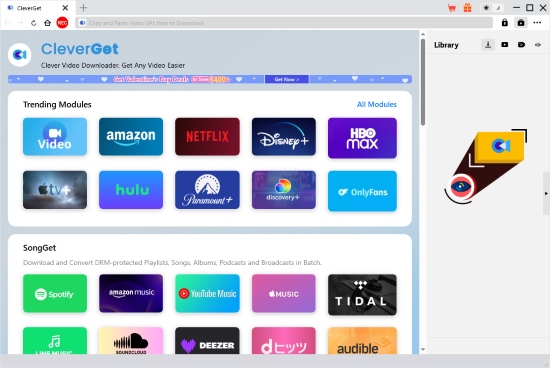
CleverGet Netflix Downloader is also one of the best Netflix video downloaders available, designed as a sophisticated all-in-one media solution for users who want a flexible way to save Netflix content in MP4 or MKV format. Users can purchase the Netflix-only module, or opt for broader support that includes multiple streaming services such as Netflix, Disney+, Amazon Prime Video, and more.
Please be aware that while the software supports multiple platforms, each streaming service requires an individual module fee. These costs can accumulate significantly if you plan to unlock every supported service.
One of CleverGet's biggest advantages is its built-in browser technology, which streamlines the entire search-to-download process. Unlike many other Netflix video downloaders, CleverGet is optimized to handle high-bitrate content (with support claimed up to 8K) while preserving essential metadata, making digital library management much easier.
| Features | CleverGet Netflix Downloader |
|---|---|
| Prices and Plans | $59.95/year; $99.95/lifetime |
| Supported OS | Windows 7/8/8.1/10/11; macOS 11/12/13/14/15/26 |
| Free Trial | Download only the first 3 minutes of three movies or episodes |
| Ratings | ⭐⭐⭐⭐ |
Pros and Cons of CleverGet Netflix Downloader
Minimal compression for a crisp, high-quality viewing experience (8K);
Automatically saves titles, cast, and tags - optimized for Plex/Kodi;
Supports multiple simultaneous tasks with reliable queue management;
Browse and download Netflix content directly within the application
Rather resource-heavy than lightweight alternatives (integrated browser engine);
Comparable slow download speed;
Limited to downloading only the first 3 minutes of 3 videos;
Relatively slow startup and operation;
Demands modern hardware for a smooth experience;
The user interface is functional but unfocused, with too many elements competing for the user's attention
#5. Pazu Netflix Video Downloader
Pazu Netflix Video Downloader is a top-tier choice for users seeking a stable, standalone solution that bypasses the need for the official Netflix app. Known for its high compatibility with legacy systems and its robust download quality, Pazu focuses on efficiency and high-fidelity output. It is particularly valued by users who need to transfer content to devices like Roku, Plex, or external drives without worrying about Netflix's digital expiration rules.
See also: How to Watch Netflix Videos on Roku
Pazu Netflix converter enables downloads in up to 1080p Full HD resolution while preserving Dolby Atmos 5.1 surround sound when available. It also provides flexible subtitle options, allowing users to select multiple languages in soft subtitles, hardcoded subtitles, or external SRT files. Once downloaded, videos can be freely played offline on a wide range of devices.

| Features | Pazu Netflix Downloader |
|---|---|
| Prices and Plans | $59.95/year; $89.90/lifetime |
| Supported OS | Windows 7/8/10/11; macOS 10.11 or later |
| Free Trial | First 3 minutes per each video |
| Ratings | ⭐⭐⭐⭐ |
Pros and Cons of Pazu Netflix Video Downloader
Up to 1080p HD Downloads;
Fast Download Speed (Up to 8×);
Supports both H.264 and H.265 (HEVC) codecs for better compression and quality balance;
Support MP4 and MKV as output format;
Allows users to choose between Stereo AAC or 5.1 Dolby Atmos surround sound
The trial version only support downloading first 3 minutes from Netflix;
Lifetime pricing is competitive, but yearly pricing is higher than some similar alternatives
#6. TunePat Netflix Video Downloader
TunePat Netflix Video Downloader is a well-established solution in the video downloading market, recognized for its strong stability and straightforward, no-frills performance. It is designed for users who want to build a permanent, DRM-free Netflix library, especially in response to recent restrictions such as the 'Netflix Household' location limitations.
By converting Netflix streams into local MP4 or MKV files, TunePat Netflix Downloader ensures that downloaded videos remain playable on any device without expiration limits.
TunePat Netflix converter also supports downloading Netflix movies and TV shows in up to 1080p Full HD quality, with H.264 or H.265 (HEVC) encoding for efficient compression and high-quality output. It also supports batch downloading, flexible subtitle customization, and preserves audio bitrate up to 768 kbps, including 5.1 surround sound when available.
One of its standout advantages is its fast download speed - up to 10× acceleration. In most cases, a standard movie can be downloaded in approximately 4-5 minutes. Once saved as DRM-free files, your Netflix videos can be played freely across multiple devices without being affected by Netflix Household restrictions.
See also: How to Bypass Netflix Household

| Features | TunePat Netflix Downloader |
|---|---|
| Prices and Plans | $79.90/lifetime |
| Supported OS | Windows 7/8/8.1/10/11; macOS 10.15 or later |
| Free Trial | First 5 minutes per each video |
| Ratings | ⭐⭐⭐⭐ |
Pros and Cons of TunePat Netflix Video Downloader
Up to 1080p Full HD Netflix downloads;
Up to 10x download speed;
Video encode in H.264 and H.265;
Support MP4 and MKV as output format;
Batch downloading support
Keep 5.1 Surround Atmos and all video metadata
No monthly or annual subscription options available;
Only the first 5 minutes of each video can be downloaded during the trial period;
Maximum resolution is limited to 1080p
#7. Kigo Netflix Video Downloader
Kigo Netflix Video Downloader features a clean interface similar to AudFree and includes a built-in Netflix browser, allowing users to search and download content directly within the software.
In addition to the standalone Netflix downloader, Kigo also offers Kigo Movie One, an all-in-one version that supports more than 20 streaming platforms, including Netflix, Paramount+, Disney+, Amazon Prime Video, and more. Users can choose between the dedicated Netflix version for simplicity or the all-in-one solution for broader platform support.
The Kigo Netflix Downloader supports downloading Netflix videos in up to 1080p HD quality, with claimed support for higher resolutions depending on the content. It preserves Dolby Atmos 5.1 surround sound and offers three subtitle types: soft subtitles, hardcoded subtitles, and external subtitle files. Users can download videos in MP4 or MKV format, making it easy to create permanent backups on USB drives, external hard disks, or media servers.
One notable advantage is the software size - both the standalone and all-in-one versions are lightweight, typically under 50 MB. However, users should be careful to download the correct version, as the two products are hosted on distinct pages with nearly identical URLs, which can easily lead to version confusion. Additionally, the all-in-one version has a more complex workflow, and video link analysis may take longer, especially under slower internet connections.

| Features | Kigo Netflix Video Downloader/Kigo Movie One |
|---|---|
| Prices and Plans | $79.90/lifetime (Netflix version); $149.90/lifetime (Movie One) |
| Supported OS | Windows 7/8/8.1/10/11; macOS 10.15 or later |
| Free Trial | Downloads the first 5 minutes of each video |
| Ratings | ⭐⭐⭐⭐ |
Pros and Cons of Kigo Netflix Video Downloader
Up to 1080p HD downloads;
Up to 10x download speed;
Video encode in H.264 and H.265;
Offer MP4 and MKV output formats;
With 5.1 Dolby Atmos & metadata preservation;
Small file size (under 50 MB) and streamlined installation
Only the first 5 minutes of each video can be downloaded;
No monthly or annual subscription plans available;
The standalone and all-in-one versions may cause confusion during download selection;
Parsing and analyzing video links may take longer with unstable internet
#8. FreeGrabApp Netflix Downloader
FreeGrabApp Netflix Downloader positions itself as a budget-friendly option for downloading Netflix videos. Although it offers a free trial, the trial version limits downloads to 240p resolution, which is too low for a comfortable viewing experience. To download full-length Netflix movies in higher quality, users must upgrade to the paid version, priced at $59.99 per year. At this price point, it competes directly with other Netflix video downloader tools that provide more advanced features and better overall performance.
Unlike most top Netflix downloaders that include a built-in browser, FreeGrabApp Netflix converter operates via a URL copy-and-paste method. Users must manually copy the Netflix video link and paste it into the software for analysis and downloading. While the interface is clean and minimalistic, the workflow is less intuitive and may feel outdated compared to browser-integrated tools.
The software supports downloads in up to 1080p resolution and allows users to save videos in MP4 or MKV format. It also preserves embedded subtitles or external SRT files, along with 5.1 surround sound audio and basic metadata.
However, recent user feedback indicates occasional instability and compatibility issues, which may affect overall reliability.

| Features | FreeGrabApp Netflix Video Downloader |
|---|---|
| Prices and Plans | $59.99/year |
| Supported OS | Windows 7/8/10/11; macOS 10.15 or newer |
| Free Trial | Limits downloads at 240p resolution |
| Ratings | ⭐⭐⭐ |
Pros and Cons of FreeGrabApp Netflix Video Downloader
Supports Full HD Netflix downloads;
Offers flexible format compatibility, M4K and MKV;
Preserves embedded subtitles or exports external SRT files;
Maintains surround audio and essential video information
Can only download 240p resolution during a free trial;
No built-in Netflix browser, making the process less convenient;
Some users report that the software may not work consistently after Netflix updates;
Annual pricing is similar to more advanced alternatives with broader features
#9. FlixGrab+ Netflix Downloader
FlixGrab+ Netflix Downloader is another lightweight Netflix video downloader that focuses on affordability. Similar to FreeGrabApp, it does not include a built-in Netflix browser and relies entirely on copying and pasting video URLs.
One of its biggest advantages is pricing. FlixGrab+ offers plans at $9.99 for 3 months or $19.99 per year, making it one of the most budget-friendly options available.
The software supports downloading Netflix videos in resolutions ranging from 240p up to 1080p, allowing users to choose lower-quality files to save storage space. It also supports TTML subtitles, multiple language options, and 5.1 surround sound audio. However, output is limited to MP4 format only, which reduces flexibility compared to tools offering MKV support.
Additionally, FlixGrab+ converter is available for Windows only, with no macOS version.

| Features | FlixGrab+ Netflix Downloader |
|---|---|
| Prices and Plans | $9.99/3-month; $19.99/year |
| Supported OS | Windows 7/8/8.1/10/11 only |
| Free Trial | Limited trial duration 3-day free trial with full feature |
| Ratings | ⭐⭐⭐ |
Despite the 3-day trial, the login workflow is counterintuitive, requiring a URL to be pasted before signing in. Recent tests indicate potential stability issues with account authentication, which may hinder the trial experience.
Pros and Cons of FlixGrab+ Netflix Downloader
One of the lowest-cost Netflix downloaders on the market;
Supports downloads from 240p to 1080p;
Preserves immersive audio where available;
Takes up very little system memory compared to browser-based downloaders (not including Kigo)
No macOS support;
Lacks MKV format flexibility;
No built-in Netflix browser for direct navigation;
Does not support the high-speed or batch conversion
Part 3. Comparison of the 9 Best Netflix Video Downloader
To help you make a quicker and clearer decision, the comparison table below summarizes the pricing, system compatibility, output formats, video quality, download speed, audio/subtitle support, and overall ratings of the nine best Netflix video downloaders discussed above.
After reviewing each tool in detail, you may still wonder which one truly fits your needs. Some tools focus on speed, others prioritize audio quality or subtitle flexibility, while a few emphasize affordability.
| Software | Price Plans | Interface Type | Supported OS | Output Format | Download Speed | Max Video Quality | Audio & Subtitle Support | Ratings |
|---|---|---|---|---|---|---|---|---|
| AudFree Netflix Downloader | $39.95/month; $49.95/year; $89.95/lifetime | Clean Netflix-focused built-in browser | Windows 7-11; macOS 10.13+ | MP4 / MKV | Ultra-fast | Up to 1080p | AAC 2.0 / 5.1 Dolby Atmos; Embedded & External SRT; 25+ audio languages | ⭐⭐⭐⭐⭐ |
| StreamFab Netflix Downloader | $54.99/month; $99.99/lifetime | All-in-one hub with built-in browser | Windows 10/11; macOS 11+ | MP4 / MKV | N/A (Quota-limited) | Up to 1080p (HDR10/Dolby Vision supported) | EAC3 5.1 / Atmos; Embedded & External subtitles | ⭐⭐⭐⭐ |
| MovPilot Netflix Downloader | $49.95/month; $79.95/year | Built-in browser | Windows 7-11; macOS 10.15+ | MP4 / MKV | Up to 5× | Up to 1080p | 5.1 Atmos; Soft, Embedded & Hardcoded subtitles | ⭐⭐⭐⭐ |
| CleverGet Netflix Downloader | $59.95/year; $99.95/lifetime | All-in-one built-in browser | Windows 7-11; macOS 11+ | MP4 / MKV | Moderate | Up to 1080p (High-bitrate; 8K claimed) | Stereo / 5.1; Embedded & External subtitles; Metadata optimized | ⭐⭐⭐⭐ |
| Pazu Netflix Downloader | $59.95/year; $89.90/lifetime | Netflix-focused interface | Windows 7-11; macOS 10.11+ | MP4 / MKV | Up to 8× | Up to 1080p | Stereo AAC / 5.1 Atmos; Soft, Hardcoded & External SRT | ⭐⭐⭐⭐ |
| TunePat Netflix Downloader | $79.90/lifetime | Netflix-only built-in browser | Windows 7-11; macOS 10.15+ | MP4 / MKV | Up to 10× | Up to 1080p | 5.1 Atmos; Flexible subtitle options; Metadata preserved | ⭐⭐⭐⭐ |
| Kigo Netflix Downloader | $79.90/lifetime | Built-in browser | Windows 7-11; macOS 10.15+ | MP4 / MKV | Up to 10× | Up to 1080p | 5.1 Atmos; Embedded / SRT / VTT subtitles | ⭐⭐⭐⭐ |
| FreeGrabApp Netflix Downloader | $59.99/year | URL copy-paste (No browser) | Windows 7-11; macOS 10.15+ | MP4 / MKV | N/A | Up to 1080p (Trial: 240p) | 5.1 Atmos; Embedded & SRT subtitles | ⭐⭐⭐ |
| FlixGrab+ Netflix Downloader | $9.99/3 months; $19.99/year | URL copy-paste (No browser) | Windows 7/8/8.1/10/11 only | MP4 only | Basic | Up to 1080p | 5.1 Atmos; TTML subtitles | ⭐⭐⭐ |
Part 4. FAQs About Netflix Video Downloaders
Can I download Netflix videos in 4K or 8K via a Netflix Downloader?
In most cases, 1080p is the highest resolution supported by mainstream Netflix video downloaders. While some tools advertise 4K or even 8K capabilities, actual downloadable resolution is typically limited to Full HD (1080p) due to Netflix's DRM protection and streaming restrictions. A few advanced Netflix downloader software options may preserve HDR metadata such as HDR10 or Dolby Vision, but true 4K downloads are not consistently supported. For stable offline playback across laptops, TVs, and mobile devices, 1080p remains the most reliable and widely compatible choice.
Do these Netflix downloaders on laptop preserve subtitles and multiple audio tracks?
Yes, most professional Netflix converters for Windows and Mac support preserving subtitles and multiple audio tracks. Users can typically choose between internal subtitles (embedded in the video), external subtitle files (such as SRT), or hardcoded subtitles. Many tools also allow you to select different language audio tracks before downloading. However, subtitle flexibility may vary depending on the software, so it's important to check feature details before purchasing.
Are there any Netflix video downloader apps for iPhone or other mobile devices?
Currently, there are no reliable Netflix video downloader apps available directly on iPhone, iPad, or Android devices due to system restrictions and app store policies. Most Netflix downloader tools are designed for Windows or Mac computers. After downloading Netflix videos on a laptop, users can then transfer the MP4 files to their mobile devices for offline playback. For iOS users especially, downloading through a computer remains the safest and most stable method.
Is there any free Netflix downloader available?
Some Netflix download tools offer free trials, but fully free Netflix video downloader software with unlimited functionality is rare. Free versions usually limit video length, resolution (often capped at 240p or 480p), or the number of downloads. If you only need to test the software, a free trial may be sufficient. However, for full-length HD downloads with subtitle preservation and batch support, upgrading to a paid version is typically required.
Can I use an online Netflix video downloader instead of installing software?
No. There is currently no reliable online Netflix video downloader that works directly in a web browser. Netflix content is protected by advanced DRM encryption (Widevine), which prevents browser-based tools or web services from accessing and decrypting video streams. Unlike simple video-sharing websites, Netflix requires secure authentication and encrypted playback that online downloaders cannot bypass.
If you want to download Netflix videos permanently, you must use a dedicated desktop program such as AudFree Netflix Downloader, which operates through a secure built-in browser and handles DRM properly.
Part 5. In Conclusion
After testing and comparing these nine Netflix video downloaders in 2026, it's clear that each tool targets a slightly different type of user.
All-in-one solutions like StreamFab Netflix Downloader and CleverGet Netflix Downloader focus on broader streaming platform support and advanced codec options, but they can feel resource-heavy and are often more expensive.
Budget-friendly options such as FlixGrab+ Netflix Downloader and FreeGrabApp Netflix Downloader offer lower pricing, yet sacrifice convenience (no built-in browser), stability, or format flexibility.
Tools like MovPilot Netflix Video Downloader, Pazu Netflix Video Downloader, TunePat Netflix Video Downloader, and Kigo Netflix Video Downloader provide solid 1080p performance with good subtitle and audio retention, but pricing models, UI design, or feature limitations may vary depending on your expectations.
If we evaluate overall balance - including speed, video quality, subtitle flexibility, codec efficiency, system compatibility, and price - AudFree Netflix Video Downloader clearly stands out as the most well-rounded solution. It delivers stable 1080p downloads with H.264 and AV1 encoding, preserves 5.1 Dolby Atmos audio and multilingual subtitles, supports both MP4 and MKV formats, and runs smoothly even on older Windows systems. The lightweight installation, clean built-in Netflix browser, ultra-fast batch downloading, and competitive annual pricing further strengthen its value proposition.
In short, while many Netflix downloaders can get the job done, AudFree offers the best combination of performance, flexibility, and cost-effectiveness for users who want to build a permanent, high-quality offline Netflix library without unnecessary complexity.

Staff Editor


