


YouTube and YouTube Music have become the world's most popular destinations for music discovery, curated playlists, podcasts, live sets, and audio-visual storytelling. While streaming online is convenient, many users regularly search for ways to download complete playlists for offline playback, DJ sets, road trips, or personal archiving - and that's where dedicated playlist downloaders come in.
In this guide, we explore the 8 best YouTube and YouTube Music playlist downloaders of 2026, including lossless desktop tools, reliable online solutions, and free options that work for both audio and video. For each, you'll find real operational steps, pros/cons, and key use-case recommendations. Let's dive in!

Part 1. Best YouTube Playlist Downloaders [Lossless]
In this section, we cover the most powerful desktop downloaders capable of saving YouTube or YouTube Music playlists in high-quality (including lossless audio). These tools are ideal for power users who want offline libraries, batch downloads, custom output formats, and more.
1. AudFree Streaming Music Downloader
Rating: ★★★★☆ (4.3/5)
AudFree Streaming Music Downloader is one of the most complete and reliable tools for downloading playlists from YouTube Music. It captures audio at full fidelity and supports batch downloading of large playlists, up to 30x faster speed.
AudFree Streaming Music Downloader

- Download YouTube Music to Computers in lossless formats (FLAC, WAV, MP3, M4A, and more)
- Maintain original playlist metadata (titles, artists, album, artwork)
- Work with YouTube Music, Apple Music, and many other streaming services (10+)
- Ad-free output with original audio quality
- Fully compatible with Windows & Mac
How to Download Youtube Music Playlist via AudFree Streaming Music Downloader
- Step 1. Set Output Format of YouTube Music

- Launch the AudFree Streaming Music Downloader for YouTube on your computer. Click the menu icon > Preferences > Conversion, then choose a common audio format as the output format, FLAC or MP3. Here, you can also customize bitrate, sample rate, and audio channels. Under the Output tab, select your preferred destination folder and enable ID3 tag retention for your YouTube files.
See also: How to Convert YouTube to MP3
- Step 2. Add YouTube Music for Conversion
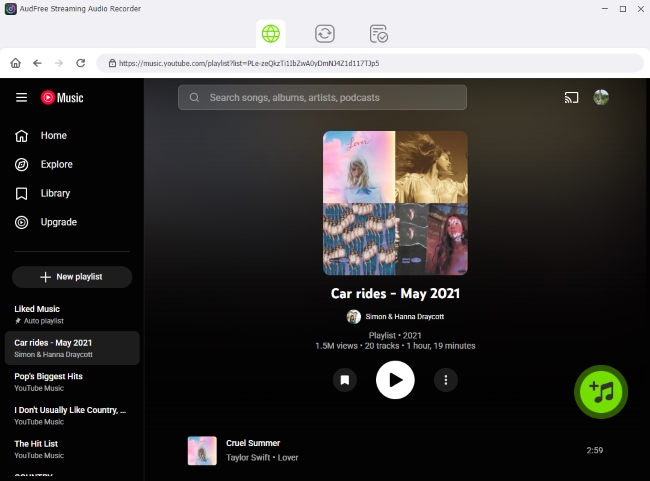
- After saving the Preferences above, click the YouTube Music icon on the home interface and sign in to your Google account in the built-in web player. Navigate to YouTube songs, playlists, or albums, then tap the green '+' button to add them to the conversion list. There is no limit on the number of YouTube songs you can add.
- Step 3. Start Downloading a YouTube Playlist

- Go to the Converting tab and click Convert. The program will process the YouTube playlist conversion. Once completed, all of your YouTube Music local files will be available in the Converted section or be accessed in the output folder you selected, which is ready for these files to be transferred to your phone, MP3 player, USB drive, or other devices.
View also: How to Download YouTube Music to USB Drive
Pros and Cons of AudFree Streaming Music Downloader
High quality and lossless output;
Full playlist capture with metadata;
Advanced audio output customization;
Ultra-fast download speed to get YouTube Music playlist;
Works with YouTube Music and multiple streaming services
Requires installation and setup;
Not available for YouTube video playlist download;
Need a paid license to get full YouTube playlist conversion
2. AudFree Audio Capture
Rating: ★★★★☆ (4.0/5)
AudFree Audio Capture, another powerful recorder from AudFree, also focuses on lossless audio extraction from YouTube, YouTube Music, and any web or app player. It's lighter than a full recorder but still powerful for playlist grabbing. With ID tags retention and edition, it also has a built-in audio editor for trimming and reformatting. It supports over 16 audio formats and can convert audio to any common format suitable for any player. However, it doesn't support exporting YouTube playlists to MP4.
AudFree Audio Capture

- Capture YouTube to FLAC or WAV in lossless quality
- Provide over 16 output formats, including WAV, MP3, M4A, OGG, WMA, AAC, FLAC, AC3, AIFF, M4B, AU, APE, MKA, AMR, M4R, MP2, and more
- Offer a fuction to split tracks manually and intelligently
- Built-in audio editor for trimming and reformatting
How to Record YouTube Playlist Using AudFree Audio Capture
- Step 1. Install and Activate AudFree Audio Capture

- Download, install the AudFree Audio Capture to your computer, and run it. Then, click Select/Add an App > '+' to add Google Chrome.
- Step 2. Choose YouTube or YouTube Music Output Format

- Before YouTube playlist conversion, you need to set output formats for the playlist. Click the Format at the bottom and hit Audio to choose your needed audio formats, like MP3 or FLAC. Next to each option, you can see a Edit icon (Gear-like icon). Click it and you can set other parameters. In the end, please click Create and apply to save your settings for YouTube playlist.
See also: How to Convert YouTube to WAV
- Step 3. Download YouTube or YouTube Music Playlist

- First, click Start to launch the Google Chrome instance you previously added. Navigate to either the YouTube or YouTube Music website. On YouTube, search for a keyword like 'Top Hits 2026/[Year]' or '[Artist] Playlist' and begin playback. On YouTube Music, simply play your desired playlist. AudFree Audio Capture will automatically begin downloading the tracks once playback starts. When you are finished, click Stop to end the recording process.
- Step 4. Edit YouTube Music captured audio

- Once the conversion is complete, your tracks will appear within the AudFree interface. Click the Trim icon to edit your audio or split tracks to remove silent sections. To customize the metadata, select Edit Tags to modify the original ID3 information. Finally, click Save to export the YouTube playlist files to your computer's local storage.
Pros and Cons of AudFree Audio Capture
Support lossless output;
Give a full playlist capture with metadata;
Work with both video and audio sources;
Advanced audio output customization;
Edit or trim audio files as liked
Requires installation and setup;
Recording process can take as long as playlist length (real time);
Not ideal for video/MP4 downloads
Part 2. 4 Best YouTube Playlist Downloader Online
Not everyone wants software - sometimes a browser-based YouTube playlist downloader is enough to grab entire playlists quickly. These online YouTube playlist downloader websites work without installation and can export playlists to MP3 or video formats. Here we list 4 free playlist downloaders for YouTube online for your needs.
Most online tools may trigger antivirus false positives due to how download scripts interact with YouTube. Furthermore, due to a lack of consistent maintenance, these websites often become unstable or shut down without prior notice.
1. YouTube Video/Audio Playlist Downloader Online - YouTube Multi Downloader
Site: https://ytmultidownloader.com/
Rating: ★★★☆☆ (3.9/5)
YouTube Multi Downloader is a popular web-based YouTube playlist downloader that supports both audio and video downloads. It is a simple, flexible solution for one-off playlist needs, offering video exports in MP4 (ranging from 144p to 1080p at 25fps) and audio exports in OPUS format.
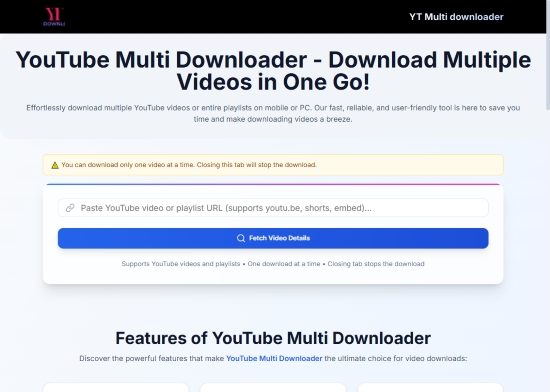
Step 1. Open your browser on a PC or mobile device and navigate to the YouTube Multi Downloader website.
Step 2. Paste your playlist link into the input box; the tool supports links from both YouTube and YouTube Music.
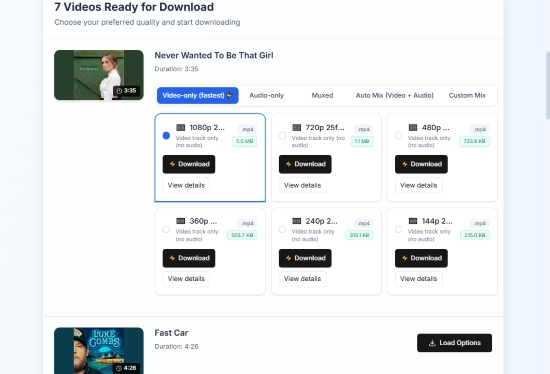
Step 3. In the search results, click Load Options for each item to begin the link analysis process.
While the tool can analyze entire playlists, you must initiate the download for each song or video individually.
Step 4. Once the analysis is complete, select your preferred quality parameters (e.g., 1080p 25fps) to start the download.
Pros and Cons of YouTube Multi Downloader
No install required;
Works smoothly on mobile and PC;
Supports YouTube Music and YouTube playlist URLs;
Less ads or pop-ups;
Offer multiple options for MP4 and OPUS
Limit batch downloading;
No MP3 offered;
Quality depends on original YouTube source;
No lossless output
2. Free YouTube Playlist Downloader Website - Loader.to
Site: https://en.loader.to/4/
Rating: ★★★☆☆ (3.7/5)
Loader.to is a powerful playlist downloader for YouTube online, which has become a favorite for many due to its robust playlist support. It handles both YouTube and YouTube Music URLs, allowing users to export content into a wide variety of formats, including MP3, AAC, FLAC, MP4, and WebM. Notably, it supports high-resolution video exports up to 1440p (2K).

Step 1. Navigate to the Loader.to website.
Step 2. Paste your YouTube or YouTube Music playlist URL into the input field.
Step 3. Select your desired format and quality (e.g., MP3 or MP4 1440p).
Step 4. Download your playlist items as individual files or as a compressed ZIP archive.

Pros and Cons of Loader.to
Supports large playlists and batch processing;
Clean, intuitive user interface and workflow;
Compatible with both YouTube and YouTube Music;
Completely free with a wide range of media formats
Frequent intrusive ads and browser redirects;
Download speeds fluctuate based on server traffic;
No true "lossless" audio (FLAC files are converted from lossy sources)
3. Free YouTube Video Playlist Downloader Online - YT1s
Site: https://yt1s.com.co/en176/
Rating: ★★★☆☆ (3.5/5)
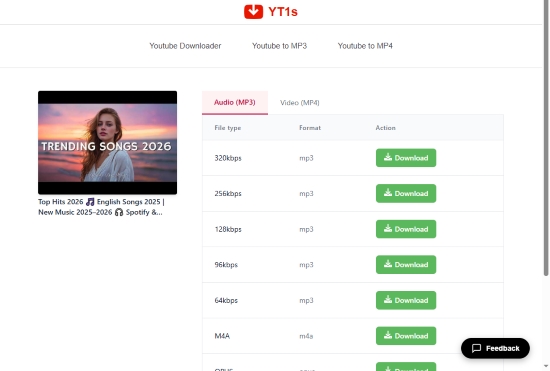
YT1s is a lightweight web YouTube playlist downloader online favored for its speed and relatively clean interface. It's free to use. Not only can it convert YouTube videos to MP3, M4A, Opus, and MP4, but it also allows users to select specific audio bitrates ranging from 64kbps to 320kbps for MP3 format. Video quality is supported up to 1080p. Note that unlike its competitors, YT1s does not currently support YouTube Music URLs.
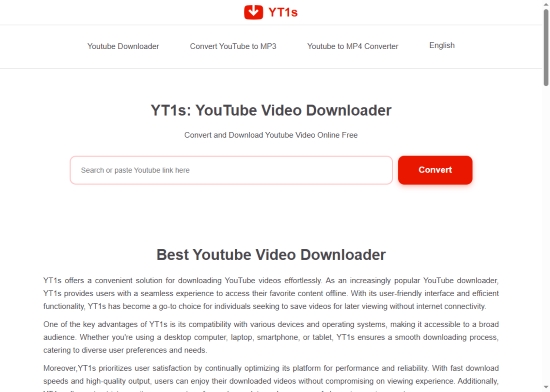
Step 1. Visit the YT1s website in your preferred browser.
Step 2. Paste the YouTube playlist URL into the search bar.
Step 3. Choose your desired output format (MP3 or MP4) and quality selection.
Step 4. Click Download to save the file to your local storage.
Pros and Cons of YT1s
Simple paste and download flow;
Fast, minimal interface with fewer redirects than average;
Supports both video and audio exports;
Completely free with no registration required
Does not support YouTube Music URLs;
Strict limits on the number of videos processed from a playlist;
Occasional pop-up advertisements
4. Free Online YouTube to MP3/MP4 Playlist Downloader - YTDown
Site: https://ytdown.to/en2/
Rating: ★★★☆☆ (3.4/5)
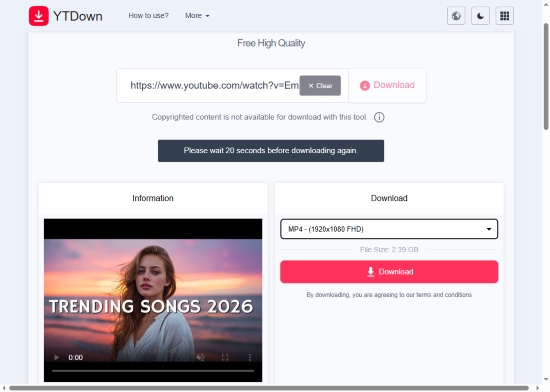
YTDown is another lightweight playlist downloader for YouTube online that focuses on playlist downloading with batch options and ease of use. It supports MP4 video exports up to 1080p and M4A audio downloads at 128kbps. While efficient for smaller lists, it enforces a 60-second cooldown interval between downloads, which may slow down the process for larger collections.
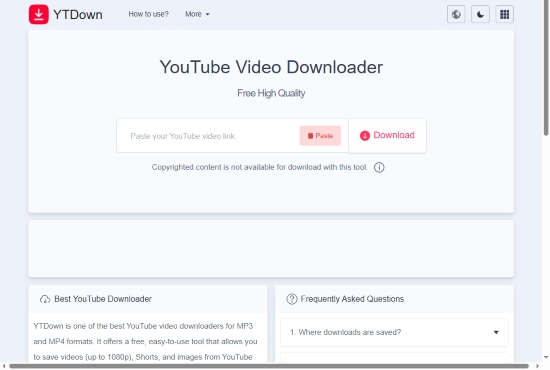
Step 1. Open the YTDown website in your browser.
Step 2. Paste your YouTube playlist link into the provided field.
Step 3. Select your preferred audio or video output format.
Step 4. Click Download once the link has been processed.
Pros and Cons of YTDown
Highly intuitive and straightforward workflow;
Provides clear choices between audio (M4A) and video (MP4) formats;
Includes basic batch processing features for playlist management;
No account or registration required to start downloading
A 60-second interval is required between downloads;
Audio is capped at 128kbps M4A;
Contains intrusive advertisements or pop-ups;
The mandatory cooldown makes downloading long playlists tedious
Part 3. Free YouTube Playlist Downloader [App & Telegram Bot]
If you want completely free options that still get the job done, here are two solid tools - one native app and one popular bot.
1. MediaHuman YouTube Playlist MP3 Downloader
Rating: ★★★☆☆ (3.8/5)
Site: https://www.mediahuman.com/youtube-video-downloader/32/
MediaHuman is a long-standing desktop application that remains a reliable choice for batch-downloading playlists. While it offers a premium tier, the free version is robust enough for most users. It supports downloading entire playlists or channels in ultra-high resolutions, including 4K and 8K, and can seamlessly extract audio tracks to save as MP3s.

Step 1. Download and install MediaHuman YouTube to MP3 Playlist Downloader (Windows/Mac/Linux).
Step 2. Copy your YouTube playlist URL and click the Paste Link button in the app.
Step 3. The app will automatically parse the link and list all available videos.
You can also customize the output format and bitrate in the settings, including video/audio quality and bitrate.
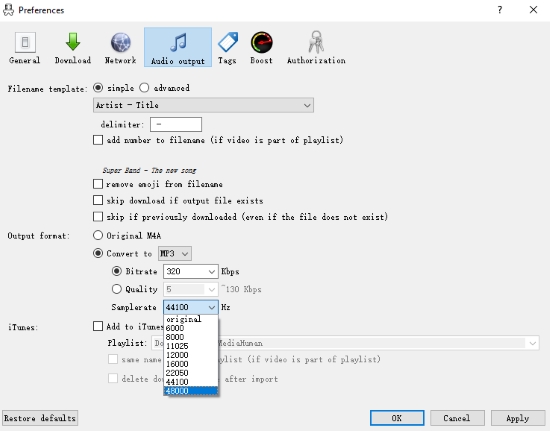
Step 4. Click the Download icon to start the process.
Pros and Cons of MediaHuman YouTube Playlist MP3 Downloader
Completely free version available for Windows/Mac/Linux;
Downloads audio and video from YouTube Music;
Supports YouTube playlists and channels;
Support ultra-high resolutions (4k & 8k);
Limited format options;
Interface feels slightly dated;
Occasional parsing errors when YouTube updates its site;
Slow download speeds for large playlists
2. Telegram Bot - YouTube Playlist Downloader Bot
Rating: ★★★☆☆ (3.2/5)
Site: https://t.me/PlaylistDownloaderNewBot
Telegram bots are an excellent alternative to YouTube playlist downloader for mobile users on iOS and Android. Several bots allow you to batch-download YouTube playlists for free across all your devices. However, these bots can be unstable and may go offline without notice due to platform restrictions. In this section, we'll highlight one popular bot: the YouTube Playlist Downloader bot.
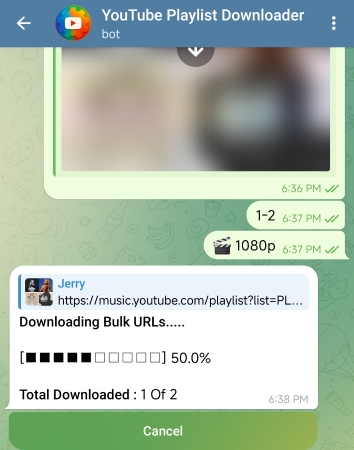
Step 1. Open the Telegram app on your iOS or Android device.
Step 2. Search for "YouTube Playlist Downloader" and start the bot.
Step 3. Send your YouTube or YouTube Music playlist link to the chat.
Step 4. Follow the on-screen prompts to choose your format (MP4/MKV) and resolution (144p to 1080p).
The bot currently supports downloading up to 2 videos at once. For larger playlists, you'll need to download them in batches (e.g., 1-2, 3-4,... 99-100). In addition, it requires a 30-minute interval between successful downloads.
Pros and Cons of YouTube Playlist Downloader Bot
Support both audio and video exports;
Works on any device with Telegram installed;
Allows for basic audio bitrate and video format customization;
Simple, chat-based interface
Limited quality options;
30-minute cooldown between successful downloads;
Reliability can vary;
May shut down without noting
Part 4. FAQs About YouTube Playlist Downloader
Are there any YouTube playlist downloaders that can handle both songs and videos?
Yes. Many tools support both audio and video downloads. Desktop tools like MediaHuman can extract MP3 and also download MP4 video files. Web services like YouTube Multi Downloader, loader.to, YT1s, and YTDown likewise allow you to choose between downloading songs or full videos from YouTube playlists. The key is choosing the output format you need before initiating the download.
Why do many web-based YouTube playlist downloaders trigger antivirus warnings?
Web-based tools often generate download scripts and server redirects that antivirus engines may flag as 'suspicious'. This doesn't automatically mean the site is harmful - many downloaders use complex backend processing to fetch YouTube media, which can be misinterpreted by security software. Always rely on reputable tools, and avoid downloading unknown executables from untrusted sources.
Are there any browser extensions available for downloading YouTube playlists?
Yes. But these browser extensions are harder to find due to platform restrictions (especially in Chrome and Firefox stores). Some third-party extensions exist on developer sites, but always be cautious: browser download extensions may violate terms of service or contain adware, so prefer tested desktop or online tools where possible.
Are the YouTube Music playlist downloaders on GitHub actually effective?
Many open-source projects on GitHub can download YouTube or YouTube Music playlists (e.g., yewtube or podsync). They can be effective and customizable if you have technical skills, but they require command-line knowledge and regular updating. For non-technical users, GUI tools like AudFree Streaming Music Downloader and AudFree Audio Cpature are more reliable, and web downloaders are often easier.
Conclusion
Downloading YouTube or YouTube Music playlists in 2026 has never been easier, whether you're after lossless audio, batch video, or simply a quick MP3 export.
✅ Best overall for quality: AudFree Streaming Audio Recorder and AudFree Audio Capture deliver the richest features with lossless support and metadata control.
✅ Best online options: YouTube Multi Downloader, loader.to, YT1s, and YTDown are quick solutions that don't require software.
✅ Best free tools: MediaHuman and Telegram bots give you playlist downloads without cost.
Choose the tool that matches your workflow, device, and quality expectations - and enjoy your playlists offline wherever you go!

Staff Editor


