


Qobuz is widely regarded as one of the best music streaming platforms for audiophiles. Unlike many mainstream services, Qobuz places a strong focus on lossless FLAC and Hi-Res audio up to 24-bit/192kHz, making it a popular choice for listeners who prioritize studio-quality sound.
However, while Qobuz supports offline listening and official music purchases, users may still encounter practical limitations. Offline downloads remain restricted to the Qobuz app, subscriptions need to stay active, and compatibility with third-party devices and DJ software can be limited. This has led many users to look for reliable Qobuz downloaders or rippers that can save Qobuz music as local files for more flexible use.
In this article, we'll explore the best Qobuz music downloaders and rippers for desktop and online use, covering their key features and more. Let's dive in!
Online Qobuz downloaders and rippers vary significantly in reliability, and many previously popular web tools have gone offline. Due to these frequent service outages and API instabilities, there is no guarantee these web tools will remain functional.


Part 1. How to Get Qobuz Downloads via Official Ways (For Paid Subscribers)
As mentioned earlier, there are several limitations to downloading Qobuz music via the official channels, including that these downloads are encrypted and non-transferable. But if you're a Qobuz subscriber, such as the Studio or Sublime plan, the easiest way to listen offline is still through Qobuz's official apps. In this section, we will guide you through the official method for downloading music from Qobuz on both mobile and desktop devices.
Method 1. Downloading Qobuz Music for Offline Playback on Mobile (Android/iOS)
Step 1. Download the Qobuz app from the Google Play Store or Apple App Store.
Step 2. Log in using your Studio or Sublime credentials.
Step 3. Browse or search for the album or playlist you wish to save.
Step 4. Tap the Download icon (downward arrow).

Step 5. Once the process is complete, your Qobuz music will be available in your library for offline listening within the Qobuz app.
These files are cached only for offline listening within the Qobuz mobile app and cannot be exported to external devices like MP3 players or car stereos.
Method 2. Getting Qobuz Downloads on the Desktop App (PC/Mac)
Step 1. Download and install the Qobuz desktop client on your computer.
Step 2. Access your account to sync your library.
Step 3. Find the album or track you want. Click the three dots (...) and select "Import". You can choose your preferred audio quality (CD or Hi-Res) in the drop-down list.

Step 4. The downloaded music is stored locally in a proprietary format and can only be accessed through the Qobuz desktop app.
Although the Qobuz web player looks and feels similar, it is primarily designed for buying permanent, DRM-free FLAC downloads. Unlike Method 1 or 2 above - which rely on a streaming subscription "rental" model - Qobuz gives you actual ownership of your music files after purchasing.
See also: How to Download Qobuz to 24-bit FLAC
While purchasing permanent, DRM-free downloads directly from Qobuz is ideal for casual buyers, building a complete high-res library can quickly become cost-prohibitive for audiophiles and working DJs. Must true music ownership always come at such a steep price?
Don't worry, there is a workaround. You can use a dedicated Qobuz downloader tool to secure high-res files without breaking the bank, which we'll cover step-by-step in the next section.
Part 2. How to Download Qobuz Music Using 4 Qobuz Music Downloaders on PC/Mac/Linux
Whether you want to preserve your Qobuz library permanently, transfer tracks to other devices, or build a lossless backup on a budget, dedicated third-party Qobuz rippers offer the most reliable and powerful solution. They usually offer higher success rates, better audio quality, and batch downloading capabilities compared to online tools, without relying on Qobuz's limitations.
Besides, some Qobuz music converters offer more flexibility and can help users extract and save music in multiple systems, including Windows, macOS, or Linux. Here are some of the best third-party Qobuz downloaders for computers:
1. AudFree Streaming Audio Recorder [Windows/Mac]
AudFree Streaming Audio Recorder is a powerful Qobuz music downloader for both PC and Mac, designed to convert and save Qobuz tracks with high fidelity. This all-in-one tool captures lossless audio streams from Qobuz as well as other major platforms like Spotify, Tidal, and YouTube Music, and converts them into popular formats such as FLAC, WAV, and MP3 for offline playback.
Unlike traditional ripping tools, AudFree preserves the original studio-quality sound while offering fast, reliable conversions. It is an ideal solution for audiophiles who want to retain Qobuz's Hi-Res audio quality while enjoying the flexibility of locally stored music files.
AudFree Streaming Audio Recorder

- Seamlessly downloads music from Qobuz and 9+ major music services
- Save entire Qobuz playlists to your local drive at up to 10X faster speeds
- Losslessly convert Qobuz tracks into FLAC, WAV, AIFF, MP3, and more
- Automatically preserves original ID3 tags and metadata
- Fully optimized for the latest versions of Windows and macOS
How to Download Music from Qobuz via AudFree Qobuz Music Downloader
Follow this detailed guide to transfer Qobuz tracks to your local folder in just a few clicks.
- Step 1. Install and Launch AudFree Qobuz Music Downloader
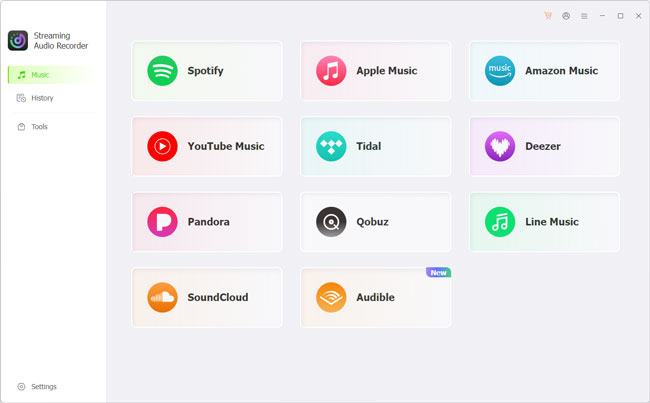
- Download the installer from the official AudFree website, or click the green button above. Once installed, launch the program on your PC or Mac. Here you can see 10 major music streaming services, including Qobuz.
- Step 2. Configure Audio Preferences
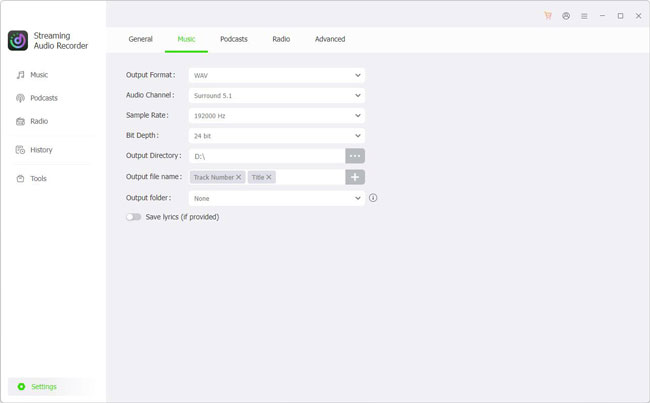
- Then click the 'Settings' > 'Music' to choose the Qobuz output format. Choose output format (e.g., FLAC or WAV) and adjust bit rate, sample rate, etc. Here, you can also choose a folder to save your transformed files and enable ID3 tag export for better music organization.
- Step 3. Add Qobuz Music to the Conversion List
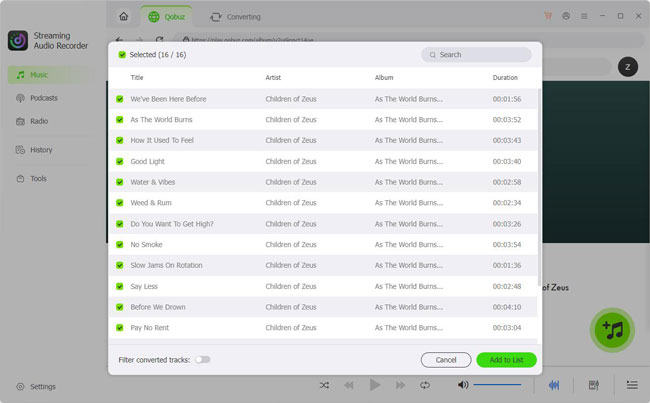
- Click 'Music' to back to the main interface and click the Qobuz icon to open the built-in web player. Sign in to your account. After that, browse for your desired tracks, playlists, or albums, and click the bottom-right Green '+' icon to add the song to the conversion list.
- Step 4. Start the Conversion Process
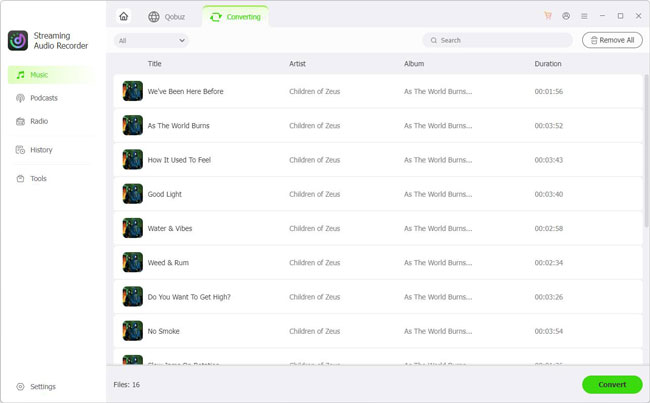
- After that, click the Converting tab to click the 'Convert' button to begin the high-speed download. Once finished, navigate to the History tab to view your files or access them directly in your local folder.
Best for: AudFree Streaming Audio Recorder (AudFree Qobuz Music Downloader) is ideal for users who want a professional Qobuz ripper with consistent performance and broad format support.
2. Streamrip [Windows/Mac/Linux]
Streamrip is a popular open-source Qobuz downloader built with Python. In addition to Qobuz, it supports downloads from platforms like Tidal, Deezer, and SoundCloud. StreamRip enables users to download music from Qobuz in lossless and Hi-Res formats, as long as they have valid credentials or tokens.

Warning: Using third-party rippers violates Qobuz's Terms of Service and may compromise your account security. Always exercise caution before proceeding with these tools.
✅ Downloads Qobuz music in FLAC and Hi-Res
✅ Open-source and customizable
✅ Fast batch downloads
✅ Supports albums and playlists download
✅ Open-source and actively maintained by the community
How to Download Qobuz Music via Streamrip
Below is a step-by-step guide on how to use Streamrip to download Qobuz albums with your preferred audio quality.
To download Qobuz music in Hi-Res quality, you will still need an active Studio or Sublime subscription.
Step 1. Install Python and Streamrip
First, make sure Python 3.10 or later is installed on your system, along with pip (Python's package manager). Once Python is ready, install or update Streamrip using the following command:
For Windows
pip3 install streamrip --upgrade
For Mac/Linux
pip3 install streamrip simple-term-menu --upgrade
Alternatively, Mac users can easily install streamrip via Homebrew using the brew command:
brew install streamrip
To ensure full functionality, especially for format conversion and metadata handling, it is strongly recommended to install FFmpeg. While Streamrip can run without FFmpeg, some features may be limited.
Step 2. Download Qobuz Albums with Streamrip
Streamrip uses quality IDs (QID) to define the audio resolution of downloaded files. When downloading music from Qobuz, you must specify the desired quality using the --quality parameter.
Qobuz Ripper Streamrip Quality IDs Explained
| Quality ID | Audio Quality | Available Sources |
|---|---|---|
| 1 | 320 kbps MP3 or AAC | Deezer, Tidal, Qobuz, SoundCloud (limited) |
| 2 | 16 bit, 44.1 kHz (CD Quality) | Deezer, Tidal, Qobuz, SoundCloud (limited) |
| 3 | 24 bit, ≤ 96 kHz | Tidal, Qobuz, SoundCloud (limited) |
| 4 | 24 bit, ≤ 192 kHz (Hi-Res) | Tidal, Qobuz |
To download a Qobuz album in maximum Hi-Res quality (QID 4, FLAC), use the following command format:
rip --quality 4 url https://www.qobuz.com/us-en/album/rumours-fleetwood-mac/0603497941032
If you want to download multiple Qobuz albums at once, simply list the album URLs consecutively in a single command:
rip --quality 4 url https://www.qobuz.com/us-en/album/back-in-black-ac-dc/0886444889841 https://www.qobuz.com/us-en/album/blue-train-john-coltrane/0060253764852
Best for: Streamrip is best suited for advanced users who want full control over their Qobuz downloads and don't mind technical configuration.
3. Qobuz-dl [Windows/Mac/Linux]
Qobuz-dl is also a lightweight, open-source command-line Qobuz ripper designed for advanced users who want to download Qobuz music in lossless and Hi-Res quality. It supports direct album and track downloads and is widely used on Linux systems, though it also works on Windows and macOS.

✅ Download full albums or individual tracks via Qobuz URLs
✅ Support for 24-bit Hi-Res FLAC audio
✅ Compatible with Linux, Mac, and Windows
✅ Secure login using your own Qobuz account credentials
✅ Open-source and maintained by the community
How to Download Qobuz Music via Qobuz-dl
As with Streamrip, you must have a paid subscription to access Qobuz music via Qobuz-dl.
Step 1. Download Qobuz-dl from GitHub
Visit the official Qobuz-dl GitHub repository and download the latest release or source files.
Step 2. Install Qobuz-dl
After extracting the files, open Command Prompt (Windows) or Terminal (macOS/Linux), navigate to the extracted folder, and run the appropriate commands below:
For Windows
pip3 install windows-curses
pip3 install --upgrade qobuz-dl
For Linux / MAC OS
pip3 install --upgrade qobuz-dl
Step 3. Log in to Your Qobuz Account
Launch Qobuz-dl and enter your Qobuz login credentials when prompted. These credentials are used only to authenticate your account and access available audio streams.
If something fails, run qobuz-dl -r to reset your config file.
Step 4. Download Qobuz Music
To download a Qobuz album or track, use a command like the example below:
qobuz-dl dl https://play.qobuz.com/album/qxjbxh1dc3xyb -q 7
Here, the -q parameter specifies the audio quality level, with higher values corresponding to better sound quality, including Hi-Res FLAC where available.
| Quality ID | Audio Quality |
|---|---|
| 5 | 320 kbps MP3 |
| 6 | 16 bit, 44.1 kHz (CD Quality) |
| 7 | 24 bit, < 96 kHz |
| 27 | 24 bit, ≤ 192 kHz (Hi-Res) |
Best for: Qobuz-dl remains a solid choice for experienced users who prefer lightweight tools and manual Qobuz control.
See also: Qobuz-dl and Its Best Alternative
4. Qobuz Downloader X-MOD [Windows/Mac]
QobuzDownloaderX-Mod is a modified version of older Qobuz ripper projects, offering a graphical interface instead of a command-line workflow.

✅ Download individual tracks, albums, or playlists
✅ GUI-based operation
✅ Supports FLAC downloads
✅ Cross-platform (Windows/macOS)
✅ Metadata and cover art included
How to Get Qobuz Downloads via Qobuz Downloader X-MOD
Step 1. Download from GitHub or trusted source, and launch it.
Step 2. Log in using your Qobuz account credentials (email and password).
Step 3. Paste Qobuz URL into the app. Choose output settings and download location.
Step 4. Click 'Download' and wait for completion.

✨ FYI: Full Guide of the QobuzDownloaderX-MOD Wiki
Best for: This tool may appeal to users who want a simple desktop Qobuz ripper but should be used cautiously due to maintenance concerns.
Part 3. Free Online Qobuz Downloaders: What Still Works?
If you prefer not to install desktop software, online Qobuz music downloaders can be convenient for occasional use. However, their availability and reliability can change quickly, and some previously popular services are no longer working.
Below is a current look at several online Qobuz ripper, including tools that are still usable and services that have become unavailable.
Be aware that using unauthorized online ripper is a breach of Qobuz's service agreements and can put your account at risk. Ensure you understand these potential consequences before use.
1. DoubleDouble - Online Qobuz Downloader
Site: https://doubledouble.top/
DoubleDouble is a browser-based Qobuz ripper that supports Qobuz along with several other music platforms, including Tidal, Deezer, SoundCloud, and Amazon Music. It is designed for users who want a simple workflow without installing dedicated desktop software.

Key Features of DoubleDouble:
• Start downloading immediately without an app or a Qobuz account
• Preserves high-fidelity audio quality directly from the browser
• Automatically packages albums and individual tracks into ZIP files for easier management
• A single interface to download from Qobuz, Tidal, Deezer, SoundCloud, and Amazon Music
• A simple "copy-and-paste" process designed for speed
How to Download Music from Qobuz Online for Free via DoubleDouble
Step 1. Navigate to doubledouble.top.
Step 2. Enter the copied Qobuz track, playlist, or album URL into the search bar.
Step 3. Click Download and wait a moment for the system to process the audio metadata.
Step 4. Click the 'Here' link to be redirected to the final download page, then hit the Download button to save your Qobuz local files locally.
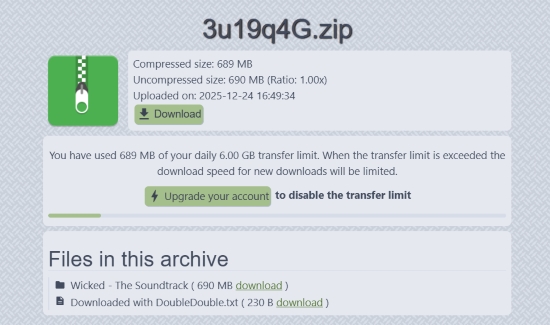
Online downloaders can become unavailable or change their supported services without notice. Check the tool's current functionality before relying on it for large downloads or music libraries.
Best for: Casual users who want a quick, browser-based Qobuz ripper without installing additional software.
2. Jumo-DL - No Longer Available
Site: https://jumo-dl.pages.dev/
Jumo-DL was a popular web-based Qobuz downloader that has since gone offline. It previously allowed users to download Qobuz tracks and albums directly without installing software or requiring account authentication, but the service is no longer available.
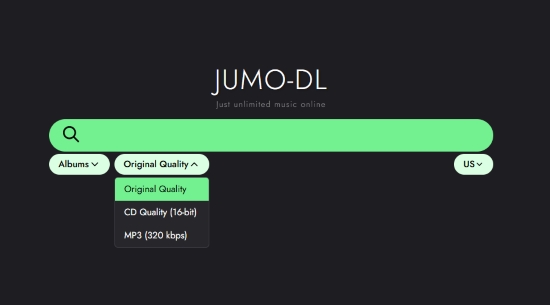
We strongly advise against relying on outdated Jumo-DL guides or unofficial mirrors. If you need a reliable alternative, consider supported desktop downloaders like AudFree Streaming Audio Recorder or Streamrip in Part 2. For quick browser-based access, DoubleDouble remains a viable web-based option when operational.
Jumo-DL Status
| Feature | Current Status |
|---|---|
| Website Availability | ❌ |
| Qobuz Downloading | ❌ |
| Installation Required | ❌ |
| Qobuz Account Required | ❌ |
| Recommended Today | ❌ |
| Alternative | See the working desktop or online options in Part 2 and Part 3 |
3. Squid.WTF - Currently Not Working for Qobuz
Site: https://squid.wtf/
Squid.WTF is another web-based service that has attracted searches from users looking for a free Qobuz downloader. The website itself may still be online accessible, but its current Qobuz downloading function does not appear to work reliably.
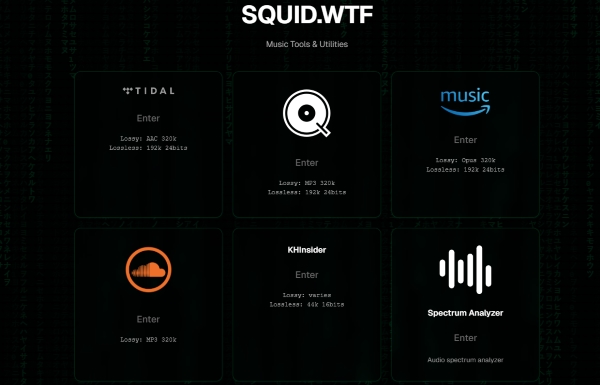
In past testing, Squid.WTF offered access to Tidal, Qobuz, Amazon Music, and SoundCloud. However, during our latest hands-on test, support for these platforms was completely stripped. For that reason, we don't recommend using it as a reliable Qobuz ripper right now.
Squid.WTF Status
| Feature | Current Status |
|---|---|
| Website Availability | ✅ |
| Qobuz Downloading | ❌ |
| Installation Required | ❌ |
| Qobuz Account Required | ❌ |
| Recommended Today | ❌ |
| Alternative | See the working desktop or online options in Part 2 and Part 3 |
Part 4. Which Qobuz Downloader Is Best for You?
With several Qobuz music downloaders or rippers available, the best option depends less on the number of features and more on your device, technical experience, audio requirements, and preferred workflow. The table below provides a quick way to narrow down the choices.
Best Qobuz Downloader Comparison
| Qobuz Downloader | Platform | Type | Current Status | Best For |
|---|---|---|---|---|
| AudFree Streaming Audio Recorder | Windows/Mac | Desktop | ✅ Working | Beginners & regular users for large library backup |
| Streamrip | Windows/Mac/Linux | Desktop / CLI | ✅ Working* | Advanced users |
| Qobuz-dl | Windows/Mac/Linux | Desktop / CLI | ⚠️ Maintenance-dependent | Command-line users |
| QobuzDownloaderX-MOD | Windows/Mac | Desktop / GUI | ⚠️ Maintenance-dependent | Users who prefer a GUI |
| DoubleDouble | Online | Web | ⚠️ Availability varies | Occasional online use |
| Jumo-DL | Online | Web | ❌ Unavailable | / |
| Squid.WTF | Online | Web | ❌ Unavailable | Qobuz download not available |
*Availability and compatibility of third-party tools can change as Qobuz updates its service.
Which One Should You Choose?
- For beginners: Choose AudFree Streaming Audio Recorder if you want a graphical interface, batch processing, multiple output formats, and a more straightforward desktop workflow.
- For advanced users: Streamrip and Qobuz-dl are better suited to users who are comfortable with command-line tools and manual configuration.
- For GUI-based downloading: QobuzDownloaderX-MOD may be more approachable than command-line tools, although its maintenance status should be checked before use.
- For quick online downloads: DoubleDouble is the most relevant option in the online section, but online tools tend to be less predictable than desktop software.
Part 5. FAQs About Qobuz Rippers & Downloaders
Is it legal to use a third-party Qobuz ripper?
Legality depends on your location and how the downloaded music is used. In many regions, downloading music for personal use may fall under fair use or private copy exceptions, while redistribution or commercial use is typically prohibited. It's always recommended to respect the rules and check local copyright laws before using a Qobuz downloader.
Can Qobuz downloaders preserve Hi-Res (24-bit/192kHz) audio quality?
Yes, some professional Qobuz downloaders, such as AudFree Streaming Audio Recorder, Streamrip, Qobuz-DL, and QobuzDownloaderX-Mod, are capable of preserving Hi-Res audio quality, including 24-bit/192kHz FLAC and WAV formats. By contrast, online Qobuz converters typically fail to deliver true Hi-Res output, often compressing or downsampling the audio, like DoubleDouble.
Can I download Qobuz music for free without a subscription?
Officially, no. Qobuz requires either an active subscription or a direct purchase to download music. While certain third-party Qobuz downloader online like DoubleDouble claim to allow downloads without a subscription, their functionality is often limited and unreliable. These tools frequently stop working whenever Qobuz updates its platform security.
Can I use a Qobuz ripper on Android or iOS?
While most professional Qobuz downloaders are built for Windows and macOS, you can still download music directly to your mobile phone using free online rippers like DoubleDouble. Otherwise, the standard method is to download the tracks to your computer first and then transfer the files to your Android or iOS device for offline playback.
Why did the download speed of some Qobuz rippers suddenly slow down or fail?
Download speeds may fluctuate or fail due to network instability, server-side issues at Qobuz, or limitations within the third-party tool itself. If these problems persist, try restarting the application or switching to an alternative tool. Note that online Qobuz rippers are particularly unstable and may become unavailable at any time without prior notice.
Conclusion
Choosing the right Qobuz downloader depends on how you plan to save and manage your music. Qobuz itself provides offline listening through its apps, while third-party downloaders and rippers offer different levels of flexibility for local playback and music management. Desktop tools such as AudFree Streaming Audio Recorder, Streamrip, Qobuz-dl, and QobuzDownloaderX-MOD are better suited to users who need more control over their audio files, while online options can be more convenient for occasional use.
However, the availability of Qobuz downloaders can change over time. Jumo-DL is no longer available, and Squid.wtf may still be accessible but currently does not provide a working Qobuz download function. Therefore, instead of relying only on a fixed list of "best" tools, check each tool's current status and choose one based on your platform, desired audio quality, ease of use, and workflow. For the most reliable experience, a maintained desktop solution is generally a better choice than a web downloader whose availability can change without notice.

Staff Editor


