


You may come across with SpotSaver Spotify Downloader when looking for a way to download Spotify music for free. However, is SpotSaver downloader safe? How does it work? You may want to learn more about it. In this guide, we will explain what SpotSaver Spotify music downloader is, how it works, what can it do, its limitations and safety, and its best alternative.

Part 1. What Is SpotSaver Spotify Downloader and How It Works?
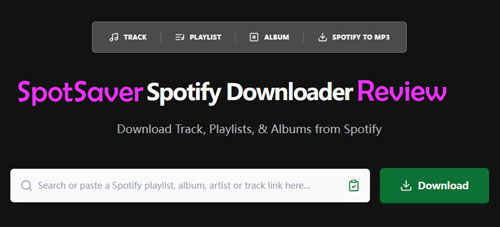
SpotSaver.net is a browser-based Spotify music downloader for downloading Spotify tracks, playlists, and albums as MP3 files. Also, it claims to keep track's metadata like title, artist, etc., and output MP3 files at up to 320 kbps. You don't need to install any software, create an account, pay for it and even don't need to log in to your Spotify account. You can use this tool on mobile phones, tablets, laptops, and desktop computers.
SpotSaver Spotify downloader is easy to use. You can just insert the Spotify music link into the blank box on its webpage. Then it will analyze the link and proceed to convert and download Spotify music files. After that, you can listen to Spotify music offline anywhere and anytime.
Part 2. How to Use SpotSaver Spotify Music Downloader to Download Spotify Music
In this part, let's proceed to learn how to use SpotSaver Spotify downloader to download tracks, playlists and albums from Spotify to MP3 audio files step by step.
How to Download a Single Spotify Track via SpotSaver Spotify Song Downloader
Step 1. Open the Spotify app or visit Spotify web player on your mobile or desktop device.
Step 2. Find the track that you want to download on Spotify. Then copy its link address.
Step 3. Visit SpotSaver.net website, then paste copied link address into the text box and hit 'Download'.
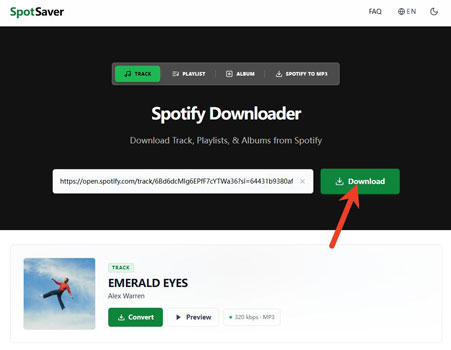
Step 4. Later, you will get the result, then hit 'Convert'.
Step 5. Later, click 'Download' to download music from Spotify to MP3 audio format.

How to Download a Spotify Album or Playlist via SpotSaver Spotify Album/Playlist Downloader
Step 1. Start the Spotify app or go to Spotify web player on your mobile device or computer.
Step 2. On the Spotify music library, find the playlist, or album that you want to download and copy its link address.
Step 3. Go to SpotSaver.net website, insert the copied playlist or album link address into the blank box and hit the 'Download' button.
Step 4. Then SpotSaver downloader will analyze the link and show you the result. You will see all the track in the album or playlist. Then hit 'Convert All' and it will convert the album or playlist at once automatically.
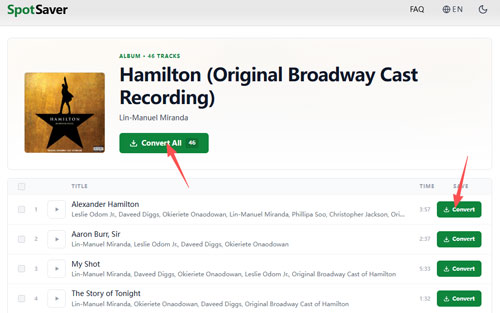
Step 5. Next, you need to click 'Download' next to each title to save Spotify album or playlist to MP3 file on your device one by one.
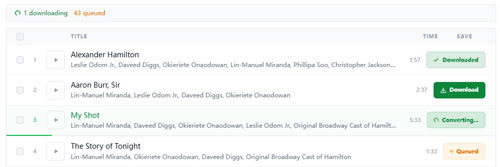
However, there are redirect ads on the SpotSaver Spotify downloader website. When you hit the Convert and Download button under the track name, it will redirect to the Opera web browser page.
Part 3. Is SpotSaver Spotify Downloader Safe?
SpotSaver.net is a free browser-based downloader and do not need to register. Also, it does not require you to enter your Spotify password to download music files. However, as a third-party website, it is not safe enough, it may contain malwares and ads while using it.
So, you should be careful while using SpotSaver Spotify music downloader to download audio content. First, you need to make sure you are visiting the official website. Also, do not provide your Spotify password in any unsure website. Besides, be cautious with unexpected redirects, pop-ups, or executable downloads. What's more, keep your web browser and security software updated and avoid installing browser extensions or applications that the downloader unexpectedly asks you to add.
Part 4. SpotSaver Spotify Music Downloader Pros and Cons
SpotSaver Spotify downloader is convenient, however, there are still some limitations. You can check the pros and cons below to know more about it.
Support to download Spotify song, album and playlist;
Support to download Spotify music to MP3 format;
Keep metadata of the music track
Can't download Spotify podcast, audiobook, and artist;
Only supports MP3 output audio format;
Need to download track in the album or playlist one by one;
Have redirect webpage during the process
Part 5. Best SpotSaver Spotify Downloader Alternative
From the above, you learn what SpotSaver Spotify music downloader can do and what it can't do. In this case, if you want to find a tool with batch download, multiple output formats and more features, you can try this alternative.
Here we will recommend AudFree Spotify Music Converter to you. This tool supports to download Spotify tracks, playlists, albums, audiobooks, podcasts, etc. to computer locally without using a Spotify Premium account. Besides, it supports multiple output audio formats, including MP3, FLAC, WAV, AIFF, M4A and M4B. Also, you can alter the bit rate, sample rate and audio channel to get a better output sound quality for Spotify music. After using this tool, you can save Spotify music as local files on your computer, then you can put them on other devices or players for use or playback offline.
Now, let's learn how to use this SpotSaver Spotify downloader alternative to convert and download music from Spotify to computer easily and quickly.
- Step 1. Install and open AudFree Spotify Music Converter

- Install and launch AudFree Spotify Music Converter on your computer. Then log in to your Spotify Free or Premium account. Next, find any audio content that you want and hit '+' > 'Add to list' to load them to AudFree tool.
- Step 2. Set Spotify Output Format

- Now, tap Menu > Preferences > Conversion to set the output format, audio channel, bit rate, and sample rate for Spotify music. After that, tap OK.
- Step 3. Download Spotify Music
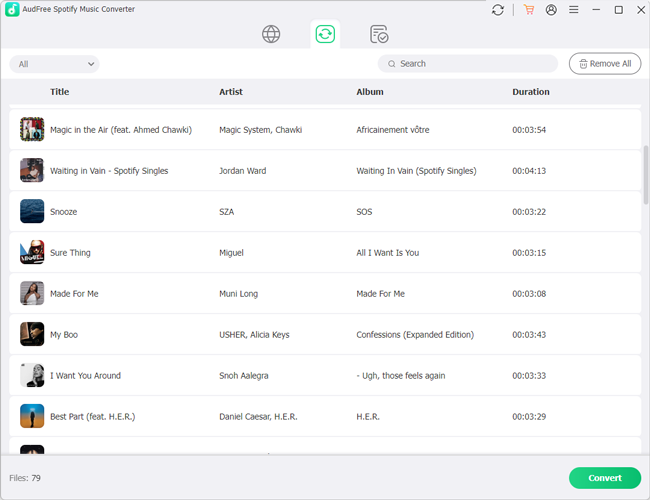
- After that, in the Converting list window, tap the Convert button to start downloading and converting music from Spotify in batches. Once done, you can find the downloaded files on your computer and you can play them offline anywhere.
Comparison: SpotSaver Spotify Downloader vs AudFree Spotify Music Converter
| Features | AudFree Spotify Music Converter | SpotSaver Spotify Downloader |
|---|---|---|
| Compatible OS | Mac/Windows | Online |
| Supported Input Format |
All Spotify audio content | Spotify single track, playlist and album |
| Supported Output Format |
MP3, AIFF, WAV, FLAC, M4A, M4B |
MP3 |
| Spotify App Required | ❌ | ❌ |
| Conversion Speed | 13X | 1X |
| Customize Output Quality | ✅ | ❌ |
| Batch Conversion | ✅ | ❌ |
| Keep ID3 Tags | ✅ | ✅ |
| Success Rate | 100% | High |
| Price | $89.95/lifetime | Free |
| Ratings | ⭐️⭐️⭐️⭐️ | ⭐️⭐️⭐️ |
Besides, to download Spotify music locally, you can use AudFree Streaming Audio Recorder. This program supports music download from Spotify, Tidal, YouTube Music, Apple Music, SoundCloud, Pandora and so on.
Part 6. Conclusion
SpotSaver Spotify Downloader is such a simple browser-based option for you to download Spotify music to MP3 files without installing any software. However, it is not safe enough and it lacks some features than professional programs.
If you specifically need more features, such as batch processing, multiple audio formats, etc., a dedicated music converter like AudFree Spotify Music Converter may be better. It supports almost all audio content from Spotify, batch downloading, multiple formats, customized settings and so on.
No matter which option you choose, keep copyright, Spotify's terms, and the security of your device and account in mind.

Editor in chief


