


Quick Answer: SpotiDown is convenient for users to download Spotify music without premium. But its multiple similarly named domains, unstable download, potential redirects and limitations make it is not ideal for everyone. If you need more stable download, more features, etc., you may use a dedicated desktop tool such as AudFree Spotify Music Converter.
If you are looking for a way to download Spotify songs for free and enjoy music offline, you may have come across SpotiDown. In this post, we will focus on SpotiDown Spotify Downloader and answer the critical questions: Is it safe? Does it download music in 320kbps high quality? Is it still working?
To know the answers, please keep reading the review, which covers our real test results, its main features, how to use it and the best reliable alternative to it.


Part 1. SpotiDown Spotify Downloader: What Is It and How Does It Work?
What is SpotiDown? SpotiDown is a free and online web-based tool that allows all users to download Spotify music online without using a Spotify Premium account. It supports to download Spotify songs, albums and playlists to MP3 locally. In this case, users can listen to Spotify music offline on other devices and players. Now, let's check out the key features of this online tool.
Main Features of SpotiDown Free Spotify Downloader
1. Download Spotify Music for Free without Ads
SpotiDown Online Spotify Downloader allows users to download playlists, songs and albums from Spotify without ads for free.
2. Easy to Use
SpotiDown Spotify Downloader has a user-friendly interface. So, it is simple to use to download music from Spotify to computer or mobile device. Users just need to copy and paste the Spotify track's URL into the page of spotidown.com, and the tool will proceed with the process.
3. Keep Metadata Automatically
This tool will automatically save song's metadata, including cover images, titles, release dates, artists, etc. In this case, it is convenient to manage your music library. But sometimes the data may be mismatched as SpotiDown gets data from YouTube.
4. Work with Multiple Platforms
SpotiDown is an online tool, so it can work with any browser on any computer and mobile device. That's to say, users can use it anywhere easily.
Part 2. SpotiDown.com vs Other SpotiDown Websites
When you search on the web, you may find that there are mulitple domains using the same or very similar SpotiDown name. In this part, you will learn more detailed about them and we will show our real test of them.
1. SpotiDown.com
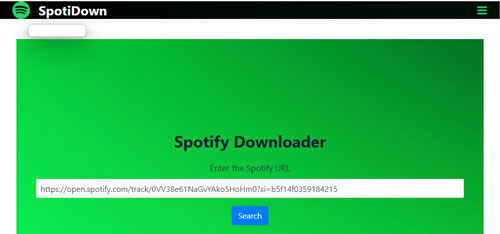
SpotiDown.com claims to download tracks, albums and playlists from Spotify with metadata such as artists, cover art, etc. Also, it supports to download playlist in ZIP file. However, now SpotiDown is not working. During our test, when pasting the Spotify song URL into the text box and click the Search button, nothing happens. It doesn't work at all. So, do not try to use this SpotiDown website to download music from Spotify.
2. SpotiDown.app
SpotiDown.app supports to download songs, albums and playlists into high quality MP3 format. Moreover, you can use it to get ZIP file of the Spotify playlist or album.
During our test, SpotiDown.app can detect and analyze the Spotify link quickly, then show the result with album artwork, song title, artist, and the download option.
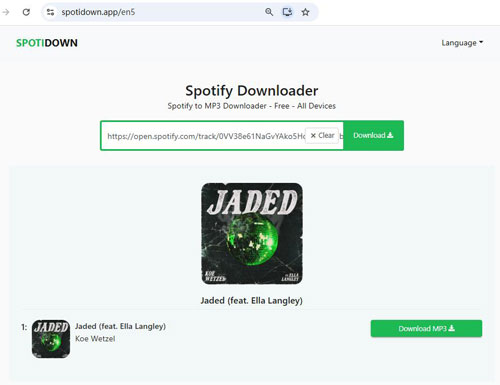
However, when click the Download MP3 button, we got the 'Please refresh the page & try again' error. After refresh the webpage, tap the Download button again, the tool start working once time.
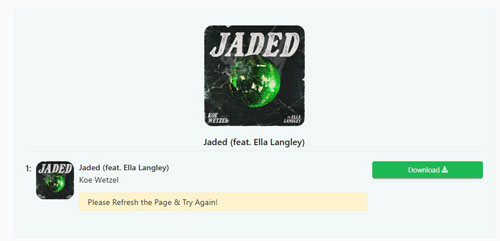
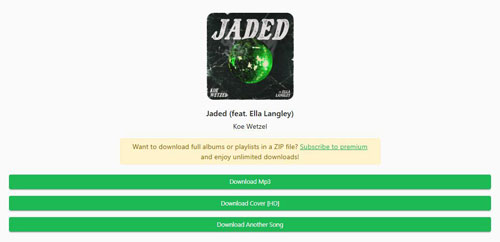
Later, SpotiDown.app will show the download options, including Download MP3, Download Cover [HD], and Download Another Song. Once tap the Download Mp3 option, it will start downloading the track in MP3 format to your computer. By the way, you will get the notice to ask you to subscribe to Premium to download full albums or playlists in a ZIP file. Or, you are only allowed to download 5 tracks from the playlist or album.
Spek Analysis of the Downloaded MP3 File Audio Quality from SpotiDown.app
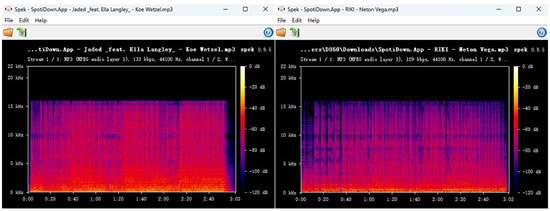
We had downloaded multiple Spotify songs and analyzed the resulting MP3 file downloaded from SpotiDown.app with Spek. In our tests, the files were identified as 129 kbps and 133 kbps MP3s at 44.1 kHz stereo, rather than a 320 kbps file. The spectrogram also showed a distinct high-frequency cutoff at approximately 16 kHz, with virtually no visible audio information above that frequency.
These indicate that the downloaded file utilized relatively low-bitrate lossy compression. SpotiDown.app claims to provide 320 kbps MP3 downloads, you can see that the advertised bitrate do not align with our test. While these are not sufficient to establish that every downloads from SpotiDown.app has the same characteristics, you should verify the actual bitrate and audio spectrum of the files you obtain rather than relying solely on the advertised audio quality.
3. SpotiDown.co
Like other SpotiDown tools, SpotiDown.co also supports to download tracks, playlists and albums from Spotify as 320 kbps MP3 for free. Besides, playlists and albums can be downloaded as ZIP file.
During our test, after putting the copied Spotify link into the text box, it asks to do a human verification.
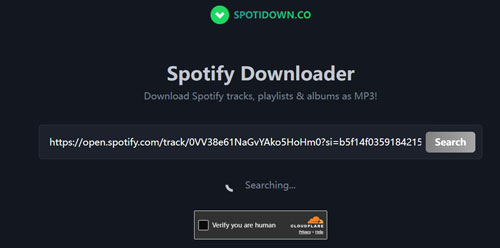
After that, it will start to analyse the track and show the result. In the result, we see the artist name, song title, and download button. However, it doesn't show the album artwork to the music.
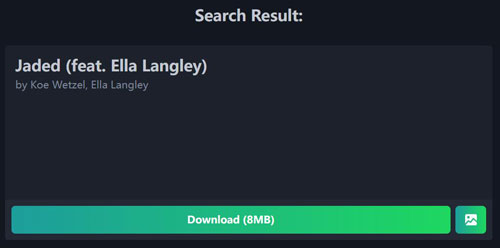
Once clicked the Download button, it started to download the track. After that, just tapped the Save button to save music file to the computer. Then a 'Support Us' pop-up shown on the page to ask you to upgrade to SpotiDown.co Premium.

4. SpotiDown.net
SpotiDown.net also allows users to download Spotify playlists, albums and songs to MP3 in high quality quickly for free.
In our test, when inserting the copied Spotify link into SpotiDown.net website's text box and click the Download button, it quickly analyzed the link and showed the result.
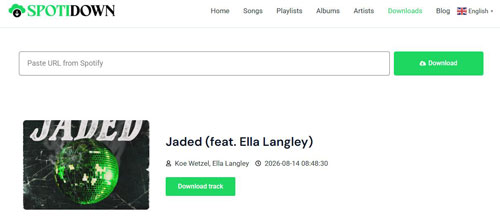
After clicking the Download track button, it took a long time to initiate the download. Later, an error popped out which says 'Failed to start YouTube conversion: Operation timed out after 60001 milliseconds with 0 bytes received'.
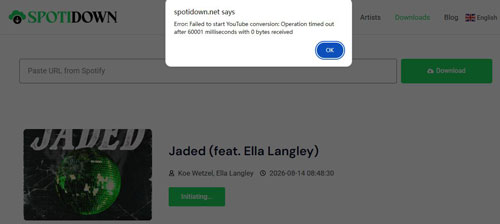
So, be aware of using SpotiDown.net as it is not stable enough to download Spotify music.
5. SpotiDown.me
SpotiDown.me claims to support to download Spotify songs, playlists, albums and artists online.
During our test, we put the Spotify music link in to the blank box and tap the Start button. Then it started detect the song.
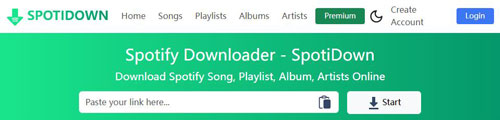
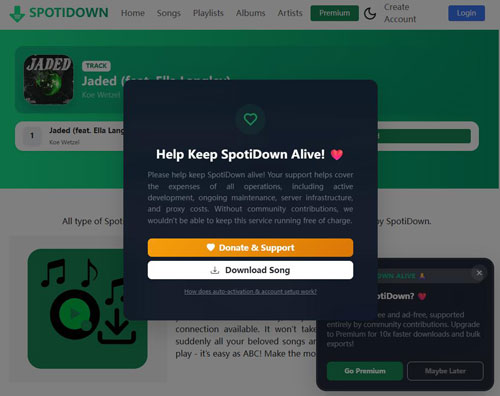
Later, we tap the Convert > Download button. There is a pop-up that requires to upgrade to SpotiDown.me premium or choose to Download song. We click the Download song option and SpotiDown.me begins downloading.
6. SpotiDown.org
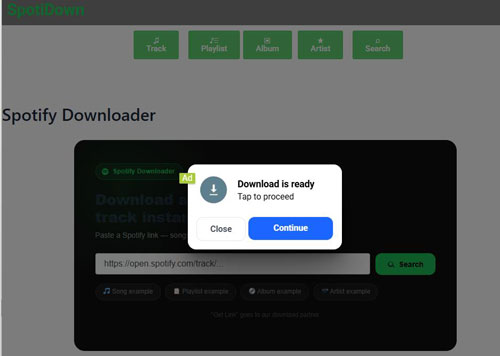
Do not visit SpotiDown.org website. We had tested it and found that there are lots of pop-up ads on the page. When clicked the pop-up at the center of the page, the ads will be triggered and redirected you to unsecure websites.
Which SpotiDown Website Should You Use?
| Feature | SpotiDown.com | SpotiDown.app | SpotiDown.co | SpotiDown.net | SpotiDown.me | SpotiDown.org |
|---|---|---|---|---|---|---|
| Claimed Output Quality | 320 kbps | 320 kbps (129 -133 kbps actually) | 320 kbps | 320 kbps | 320 kbps | 320 kbps |
| Claimed Output Formats | MP3 | MP3 | MP3 | MP3 | MP3 | MP3 |
| Playlist Download | ✅ | ✅ | ✅ | ✅ | ✅ | ✅ |
| Podcast/Artist Support | ❌ | ❌ | ❌ | ❌ | ❌ (Support artists download) | ❌ |
| Save Metadata | ✅ | ✅ | ✅ | ✅ | ✅ | ✅ |
| Language | English | Multiple | English | Multiple | English | English |
| Ads / Pop-ups | ❌ | ✅ | ✅ | ❌ | ✅ | ✅ |
| Redirects | ❌ | ✅ | ✅ | ❌ | ✅ | ✅ |
| Security Risk | Low | Medium | Medium | Low | Medium | High |
| Batch Download | ❌ | ✅ | ✅ | ✅ | ✅ | ❌ |
Part 3. How to Use SpotiDown Online Spotify Downloader
After learning the main features of SpotiDown and other SpotiDown websites, now, let's learn how to use it to download audio files from Spotify online and for free step by step. The download process of almost all the SpotiDown tools are quite the same. So, here we will take SpotiDown.app as an example.
Step 1. Open the Spotify app or Spotify Web Player on your desktop or mobile device. Then find the song, playlist or album you want to download.
Step 2. Click the "Three Dots", then find and copy the URL of the Spotify song, album or playlist.

Step 3. Enter SpotiDown Spotify Downloader online website. Then paste the copied URL into the search bar on the screen. Later, tap the "Download" button and it will fetch the track for you.
Step 4. Now, you can click the "Download MP3" button.
Step 5. At last, touch "Download MP3" to start to download Spotify audio files online for free.
Our Real Test:
We have tested the tool and used it to download a playlist with 3 songs. As a free user, it allows to download 5 tracks from the playlist. Or, it required to download the track in the playlist one by one manually. Besides, when we pasted a playlist link containing 50 songs, it failed to retrieve the playlist. Also, it can't download music in 320kbps at it claims and there are pop-up ads in the webpage.
Part 4. SpotiDown Spotify Downloader: Pros and Cons
Now, you can take a look at the advantages and limitations of the existing SpotiDown websites.
No need to install any extra software on the device;
Simple and easy to use;
No need a Spotify Premium account;
Supports Spotify songs, albums, playlists and even artists
The output audio quality is not high as 320 kbps as it claims;
Most websites can't support batch downloading playlist and album;
Contains potential ads and redirects;
Limited output audio customizations;
Won't work with large playlist
Part 5. How to Fix SpotiDown Not Working Common Errors
If you can't download songs with SpotiDown tool currently, you are not alone. Here we list some errors of it and show you how to resolve it.
Problem 1. SpotiDown Not Working/Stuck at 99% or Forever When Downloading Music
This is due to SpotiDown's server can't connect to YouTube or other sources to fetch the audio file. It is noted that YouTube now updates its code to block ripping sites.
Fix: You can try to refresh the webpage, or use the 'Incognito Mode' to access the page.
Problem 2. SpotiDown 'Something Went Wrong' or 404 Error
Fix: Make sure that you are copying the song or playlist link from Spotify, not a link of artist or podcast. Or, the website is down for maintenance and you need to wait for it.
Problem 3. SpotiDown Output 'Empty ZIP File'
Fix: Do not use the 'Download All' button if you are trying to download a playlist. Please download tracks one by one manually.
Problem 4. SpotiDown Wrong Song Downloaded
It is noted that SpotiDown searches tracks from YouTube for a match, instead of Spotify. It just search based on the song title. So, it may grab the video version, not the track version.
Fix: No specific fix to this error, but you can try other professional tools like AudFree Spotify Music Converter.
Part 6. Best Alternative to SpotiDown: AudFree Spotify Music Downloader
From above, you know that there are limitations on SpotiDown. It is not stable and outputs low audio quality. Besides, it only supports MP3 output audio format and it can't batch convert. What's more, it can't download Spotify podcasts, audiobooks and other content. Besides, you can't customize output audio parameters you want.
If you want to get a professional alternative to SpotiDown, AudFree Spotify Downloader is your choice. It is stable and reliable. It allows you to download all content from Spotify, like podcasts, playlists, audiobooks, single tracks, albums, etc. Besides, it can convert Spotify audio files to multiple audio formats, including MP3, AIFF, Lossless, FLAC, WAV and more. It also supports batch downloading Spotify music files and keeps 100% original audio quality of downloaded Spotify music content. Moreover, you are allowed to reset output audio parameters like bit rate, sample rate, etc.
AudFree Spotify Music Converter

- Download Spotify songs, albums, playlists, audiobooks, podcasts, etc.
- Convert Spotify to MP3, WAV, FLAC, M4A, AIFF and M4B
- Retain 100% original audio quality, full ID3 tags and metadata information
- Work at a fast speed, adjust Spotify output audio parameters you want
How to Use the Best SpotiDown Spotify Downloader Alternative
Step 1. Tap the "Download" button above to download, install and open AudFree Spotify Downloader on your PC or Mac. Then in the built-in Spotify web player, tap the track and click the "+" button. Next, touch the 'Add to list' button to load Spotify audio file.

Step 2. Later, click the "Menu" bar > "Preferences" > "Conversion" option. Here, you can reset Spotify music to various output audio formats like MP3, FLAC, AIFF, WAV, etc. Besides, if you want to enjoy high-quality Spotify music downloads, you can set other audio parameters like bit rate, sample rate, etc. before converting. After that, tap "OK".

Step 3. Now, click the "Convert" button to start the free download process of Spotify songs. When it's done, tap the "Converted" button to locate the downloaded Spotify songs in your computer's local folder. After that, you can listen to Spotify offline without premium.

Spek Analysis of the Downloaded MP3 File Audio Quality from AudFree Spotify Music Converter
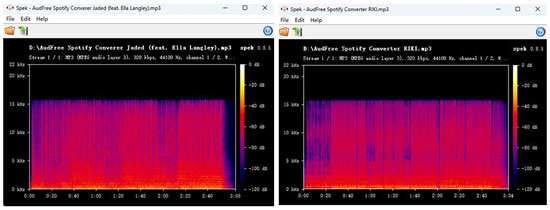
Spek analysis shows that the converted file from AudFree Spotify Music Converter is a standard 320 kbps, 44.1 kHz stereo MP3. Both samples retain rich audio information up to approximately 15 - 16 kHz, with a distinct high-frequency cutoff visible above that range.
Besides, AudFree Streaming Audio Recorder is also an alternative to SpotiDown. It can download music from Spotify in high quality with full metadata. What's more, it supports to download music from Apple Music, YouTube Music, Amazon Music, SoundCloud, Tidal, Qobuz, and so on, as well as audiobooks from Audible.
Part 7. Compare SpotiDown vs AudFree Spotify Music Converter
Above is review and best alternative to SpotiDown Spotify Downloader. They both help download music from Spotify without using a Spotify Premium account. But there are some differences between them. You can check the comparison table below to learn more.
| Features | SpotiDown | AudFree Spotify Music Downloader |
|---|---|---|
| Operating System | Online | Windows, Mac |
| Download Content | Spotify songs, playlists and albums | All Spotify content |
| Audio Source | YouTube | Spotify platform (Built-in web player) |
| Supported Output Format | MP3 | MP3, FLAC, M4A, WAV, AIFF, M4B |
| Batch Download | ❌ | ✅️ |
| Output Quality | Lossy (128kbps) | Lossless (320kbps/FLAC/WAV) |
| Download Speed | Medium | Fast |
| ID3 Tags Retained | ✅️ (Title/Artist) | ✅️ (Full ID3 tags) |
| Personalized Settings | ❌ | ✅️ |
| Conversion Success Rate/Stability | Low | High |
| Safety | Risky (Contains redirect ads) | 100% Safe (No ads, verified software) |
| Price | Free | $14.95/month |
| Ratings | ⭐️⭐️⭐️ | ⭐️⭐️⭐️⭐️⭐️ |
From the chart, you can see that AudFree Spotify Downloader is better than SpotiDown. It supports all kinds of Spotify audio content, multiple output audio formats, high conversion speed, etc. With this AudFree tool, you can download any audio content from Spotify locally for free and convert it to multiple audio formats. If you have a lot of Spotify tracks to convert, you should not miss AudFree Spotify Song Downloader. But if you just download a single track, you can choose SpotiDown. Just pick up the Spotify music downloader that meets your needs.
Part 8. FAQs about SpotiDown Downloader
Is SpotiDown Safe?
Security and privacy practices vary across different SpotiDown domains, and third-party checks have raised security concerns regarding some of them. Exercise caution when using SpotiDown, remain vigilant against page redirects or unexpected downloads, and ensure you use only specific domains that you have verified as safe.
Can SpotiDown Download Private Playlists on Spotify?
No, it can't, as it doesn't have permission to log in to your personal Spotify account to access the private content. It can only view the public content on Spotify.
Is There a SpotiDown App for iPhone or Android?
No, there is no official SpotiDown app for iOS or Android device. You can only access SpotiDown website.
Why Does the Spotify Album Art Downloaded from SpotiDown Look Blurry or Wrong?
This is because SpotiDown grabs data from YouTube and matches your track with a low-resolution cover art from a music video, instead of Spotify's server. If you want to download Spotify cover art with original quality, you can use AudFree Spotify Music Converter or other professional tools.
Is It Legal to Download Spotify Music from SpotiDown?
Technically, this violates Spotify's Terms of Service. Yet, it falls into a legal gray area in many countries if it is for personal offline use. Sharing the downloaded music files is illegal.
Part 9. Conclusion: Is SpotiDown Worth Using?
If you are looking for a fast, free, and browser-based way to download Spotify songs, SpotiDown is worth considering. However, relying on it exclusively is not recommended for reasons such as the existence of multiple websites using the "SpotiDown" name and the service's relatively low audio quality.
Therefore, if you frequently download Spotify music and require features like playlist and album support, batch processing, multiple output formats, and greater control over your music files, AudFree Spotify Music Converter is the recommended choice.

Chief Editor


