


The holiday season would not feel complete without the timeless warmth of Christmas music. Whether you prefer classic carols, modern pop hits, instrumental background music, or soulful R&B holiday tracks, Pandora remains one of the easiest platforms to enjoy personalized Christmas playlists and stations.
With its smart recommendations, curated holiday hubs, and robust cross-device support, Pandora has become an essential and indispensable partner throughout the season. After reading this guide, you will be able to play Christmas music on Pandora almost anywhere - on your phone, PC/Mac, smart TVs, and even in your car.
Let’s dive in and get your home, office, or car ready for the holidays.


Part 1. Does Pandora Offer Free Christmas Music?
The short answer is yes, Pandora offers plenty of Christmas music for free. Even if you’re using a free account, you can still access thousands of festive songs, radio-style stations, and genre-specific Christmas collections.
What Free Users Can Access
With a free Pandora account, you can:
- Listen to Christmas radio stations with ads
- Create custom Christmas stations and easily shuffle them
- Access numerous curated holiday playlists (with ad interruptions)
- Thumb up/down Christmas songs to fine-tune your recommendations
- Play Christmas music on multiple devices via internet streaming
Limitations for Free Accounts
- No offline downloads
- Limited skips per hour (About 6 skips per hour)
- With ad interruptions between song playback
- No on-demand playlist playback (radio-style listening only)
- Some curated playlists require Pandora Premium
Despite these limitations, Pandora's free tier remains one of the simplest and most effective ways to access high-quality Christmas music on Pandora without needing a paid subscription.
Part 2. How to Listen to Christmas Music on Pandora Online (Mobile & PC)
Pandora makes it simple to search, play, shuffle, and customize Christmas music across devices. Below are step-by-step instructions for both mobile and desktop users.
How to Play Christmas Music on Pandora (iPhone/Android)
Step 1. Download and Install Pandora App
Ensure the latest version of the Pandora app is installed on your mobile device (iPhone or Android), then launch the app and log in.
Step 2. Navigate to Christmas Station or Playlist
In the bottom navigation bar, tap Search. In the top search box, enter some general keywords like 'holiday' or 'Christmas' or some specific keywords like 'Black Christmas Music', 'Country Christmas', or 'Christmas Jazz' to find Christmas music on Pandora that suits you.
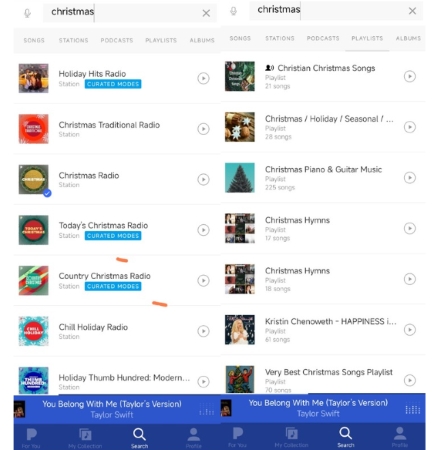
Step 3. Enjoy Christmas Music on Pandora
Tap one or more desired stations or playlists, add them to your collection, and hit Play to start streaming.
📌 Pro Tip for Pandora Station Personalization
• Refine Your Station: While a station is streaming, use the Thumb Up or Thumb Down options on songs. This action is crucial for improving Pandora's personalization and ensuring your station becomes more precisely tailored and festive.
• Create a Continuous Mix: To shuffle music across multiple holiday genres, navigate to My Collection and tap the Shuffle button (often represented by a pen or edit icon). Here, you can select several Christmas stations to mix together, providing a continuous blend of holiday variety.

How to Play Christmas Music on Pandora (Windows & Mac Web Player)
Step 1. Visit pandora.com on your computer and sign in.
Step 2. In the top search bar of Pandora, type terms like 'Christmas', 'Holiday', Xmas, 'Relaxing Christmas', Instrumental Christmas, etc., to acquire your Christmas music.
Step 3. Choose a station or playlist to start listening immediately. Or you can click + to add these Christmas contents to your library for fast access later.
Step 4. You can also shuffle Christmas music across several stations, through My Collection > Stations > Shuffle, select multiple Christmas stations for continuous play.

Bonus Tips: Subscriber-Only Benefits (Offline & Ad-free)
If you are a Pandora Plus or Premium subscriber, you gain two major advantages for enjoying Christmas music:
• Ad-Free Listening: Both subscription tiers completely remove advertisements and increase the number of skips available, providing uninterrupted holiday cheer.
• Offline Access: You can download Pandora Christmas music, including your favorite Christmas stations and curated Christmas playlists, directly to your mobile device for offline listening. This is perfect for enjoying music without an internet connection.
Part 3. How to Play Christmas Music on Pandora Offline (All Devices)
As we mentioned, Pandora’s built-in offline mode requires a subscription. But even with Premium, the Christmas songs can only stream within the Pandora app. In some cases, some users still want permanent offline Christmas playlists that can be imported to any device - PC, speakers, car players, or a smart TV. Apparently, subscriptions can't meet their need.
For users who want unrestricted offline Christmas playback, you can use AudFree Streaming Audio Recorder to download your favorite Pandora Christmas playlists to MP3, FLAC, WAV, or other formats legally for personal use.
AudFree Streaming Audio Recorder

- Convert Pandora songs to MP3, WAV, FLAC, and other formats
- Save Pandora Christmas playlists up to 65X speed
- Auto-recognize the ID3 tags and artworks of Christmas songs
- Batch downloading multiple Christmas genres from Pandora at once
- Fully compatible with Windows & Mac
How to Download Pandora Christmas Music Offline on PC with AudFree Streaming Audio Recorder
Using AudFree Streaming Audio Recorder, you can capture Christmas songs from Pandora Web Player in high quality while preserving metadata. And remember to download and install the program on your computer, both Windows and Mac are okay.
- Step 1. Customize Pandora Output Format for Christmas Offline Listening

- Run the tool, and click Menu > Preferences > Conversion to set your desired output format for Christmas music, including FLAC, M4A, WAV and more.
- Besides, you can also adjust parameters such as bitrate or sample rate as needed. At last, tap Output to specify the destination folder to store your local Pandora Christmas music, and you can enable ID3 tags for these tracks.
- Step 2. Add Christmas Music to AudFree's Conversion List

- On the main interface of AudFree, tap the Pandora icon, and sign in. Navigate to the Christmas songs or playlists you prefer to acquire, and then click the '+' button to add them to the conversion list.
- Step 3. Start Pandora Music Conversion

- Click Convert on the Converting window to start the process. Once done, you'll locate all your local Pandora Christmas tracks in the Converted section. And you can now listen to the downloaded holiday songs on:
• Windows/Mac
• Phone/iPhone
• MP3 players
• Smart TVs
• Car infotainment systems (USB or Bluetooth)
• USB speakers
• Home stereos
How to Play Pandora Christmas Music Offline on Mobile (Android & iPhone)
Since you've acquired Christmas music from Pandora using the AudFree tool, you can follow these steps below to get easy access on your Android or iPhone.
On Android:
Step 1. Connect your Android phone to the computer using a USB cable.
Step 2. Once you device is detected on the computer, copy and paste the downloaded Christmas song files directly into the desired music folder on your phone.
Step 3. After the transfer is complete, disconnect the device. You can now play this Pandora Christmas music offline using any local media player (e.g., Poweramp, VLC) on your phone.
On iPhone:
Step 1. Connect your iPhone to computer via a USB cable.
Step 2. Launch iTunes (or Finder on newer macOS versions), then click 'File' > 'Add File to Library' to import the Christmas music into your library.

Step 3. Click the small device icon in the top left corner. In the left sidebar, tap 'Music' and check the box next to 'Sync Music'.

Step 4. Choose the specific folder or playlist containing the transferred Christmas songs, and click 'Sync' or 'Apply' to transfer them to your iPhone.
Step 5. Now, you can enjoy the Christmas music offline, ad-free, and without the original Pandora restrictions via the Apple Music app or any third-party player (e.g., VLC, EverMusic, Poweramp, etc.).
How to Play Pandora Christmas Music Offline on Smart TVs
Most Smart TVs do not support direct music downloads from streaming apps like Pandora. However, once you have secured the local music files using a tool like AudFree Streaming Audio Recorder, you gain several simple offline playback options:
Method 1. USB Playback: Transfer the downloaded Christmas tracks from your computer to a USB drive. Plug the drive directly into your TV's USB port to play the Christmas music without Pandora's limitations.

Method 2. Network Streaming (DLNA/AirPlay): Stream the Christmas music wirelessly from your computer or a Network Attached Storage (NAS) device using DLNA or similar casting protocols available on your TV.
Method 3. Media Center Apps: Load the Christmas music files into a media server application (such as Plex or Kodi) installed on your TV or an external streaming box.
Method 4. Casting from Phone: Use built-in casting functions (like Chromecast or AirPlay) on your phone to cast the locally stored files to your Smart TV.
How to Listen to Pandora Christmas Music Offline in the Car
This method is ideal for holiday travel or driving through areas with poor internet service, as transferring your files directly is the most reliable strategy for ensuring uninterrupted Christmas music playback.
Method 1. USB Drive (Recommended): Convert the tracks to the universal MP3 format and transfer them to a dedicated USB drive. This remains the most stable playback solution for most car stereo systems.
Method 2. SD Card: Alternatively, transfer the files to an SD card if your vehicle supports that media format.
Method 3. Offline Bluetooth Streaming: You can also use your phone's Bluetooth to stream the locally stored, converted Christmas music files to your car's stereo system.
Part 4. FAQs About Christmas Music on Pandora
Does Google Assistant support Pandora integration for Christmas music streaming on Android?
As long as you have the Pandora app installed and are logged into your Google Assistant account, you can use voice commands to start playing music. You can give a specific command like: 'Hey Google, play the Christmas Classics Radio on Pandora.' to play Christmas music on Pandora on your Android device.
Why can’t I find Christmas stations on Pandora in November/December?
Christmas stations on Pandora are typically released in a phased rollout beginning in November. If you cannot find them, ensure your Pandora app is updated to the latest version, as regional access or staggered availability can sometimes cause delays. You may also need to actively search for popular holiday terms like 'Christmas', 'Holiday', or 'Kwanzaa' if the dedicated 'Holiday Hub' has not yet fully appeared in your interface.
How do I stop Christmas music from appearing on Pandora after the holidays?
To stop holiday music from appearing, you have several options:
1) Remove all Christmas contents from your collection by deleting the specific Christmas stations or playlists.
2) Thumb Down songs on any remaining stations to teach the Music Genome Project not to play similar tracks.
3) Clear your listening history or reset your profile (a more drastic step) if the recommendations persist, allowing Pandora to build a new profile based on non-holiday listening.
Part 5. Best Christmas Music Stations and Playlists on Pandora (Curated List)
To help you explore the widest selection of Christmas hits, here’s a curated list separated into Top Picks and Genre-Specific Pandora Christmas Playlists.
Top Christmas Stations on Pandora (Most Popular)
1. Christmas Radio (74M Listeners)
Pandora’s flagship Christmas mix featuring classics, pop hits, and timeless favorites.
2. Today's Christmas Radio (21M Listeners)
It is designed to be the definitive soundtrack for the modern holiday season, covering contemporary Christmas and holiday hits released primarily from the 1990s through the present day.
3. Christmas Traditional Radio (13M Listeners)
This station is the authoritative source of timeless classic Christmas carols and standard pieces. It focuses on nostalgia and traditional sound of the holidays, drawing heavily from the mid-20th century.
4. Holiday Hits Radio (10M Listeners)
It serves as a comprehensive, non-exclusive mix that guarantees familiarity and festivity for listeners of all ages.
5. Country Christmas Radio (10M Listeners)
This station focuses entirely on holiday music performed by country artists, blending traditional Christmas themes with the distinctive sound, instrumentation, and vocal styles of the country music genre (from Luke to Carrie to Thomas to Dolly).
Genre-Specific Christmas Radio and Playlists on Pandora
1. Black/R&B Christmas Music
Features smooth, soulful holiday tracks from iconic artists like Boyz II Men, Stevie Wonder, Whitney Houston, and Mary J. Blige.
• R&B Christmas Radio
• R&B Holiday Radio
• Holiday Soul Classics
• Black Christmas Hits
2. Country Christmas
Includes festive music from stars such as Carrie Underwood, Luke Bryan, Blake Shelton, Dolly Parton, Johnny Cash, and Rascal Flatts.
• Country Christmas Radio
• Holiday Country Hits
3. Rock Christmas
Perfect for fans of guitar-driven holiday covers, punk-rock energy, and classic rock hits.
• Rockin' Holidays Radio
• Classic Rock Christmas
4. Pop Christmas
Features contemporary festive songs and the biggest chart-topping hits trending every December.
• Today's Holiday Hits
• Pop Christmas
5. Jazz Christmas
Creates a cool, sophisticated vibe featuring legends like Ella Fitzgerald, Louis Armstrong, and Diana Krall, alongside instrumental jazz selections.
• Smooth Jazz Christmas Radio
• Christmas Jazz
• Jazz Christmas
6. Classical Christmas
Great for creating a peaceful, elegant, and timeless holiday atmosphere with traditional carols and orchestral pieces.
• Classical Holiday Radio
• Classical Christmas Holidays
• Christmas Classical
Beyond Radio and playlist above, you can also explore some Pandora's curated playlists, such as Xmas Favorites Top Holiday Songs or Xmas Hit, for even more specialized listening.
Conclusion
So far, Pandora remains one of the most convenient platforms for listening to Christmas music across mobile phones, computers, smart speakers, TVs, and car systems. With thousands of holiday stations, personalized recommendations, and curated genre playlists, it’s easy to keep your home filled with festive cheer throughout December.
If you subscribe to Pandora Plus or Premium, you can access offline listening and enjoy Christmas music without ads. And if you prefer permanent offline access across all devices - including smart TVs, speakers, and car systems - AudFree Streaming Audio Recorder offers a practical solution for downloading holiday playlists.
With the curated holiday lists above, you're ready to experience the best Christmas music from Pandora anytime, anywhere. Enjoy the season, celebrate with your loved ones, and let the music bring festive joy to every moment. Merry Christmas in advance!

Staff Editor


