


For serious music listeners, sound quality matters just as much as convenience. While many streaming platforms prioritize accessibility and large catalogs, audiophile services focus on delivering high-resolution audio that preserves the original studio recording. One of the leading platforms in this space is Qobuz, a streaming service known for offering lossless and high-resolution music up to 24-bit/192 kHz.
To make high-resolution streaming easier across different devices, Qobuz introduced Qobuz Connect, a feature designed to deliver bit-perfect playback directly to compatible streamers, DACs, and Hi-Fi systems without relying on Bluetooth or lossy casting technologies.
But how exactly does Qobuz Connect work? Which devices support it in 2026? And what should you do if Qobuz Connect is not working properly?
In this guide, we'll explain everything you need to know about Qobuz Connect, including how it works, supported devices, troubleshooting tips, and alternative ways to stream bit-perfect 24-bit audio. Let's get started!

Part 1. What's Qobuz Connect?
Launched on May 15, 2025 by Qobuz, Qobuz Connect is a streaming feature that allows users to control playback from their phone, tablet, or computer while streaming music directly to a compatible device such as a network streamer, smart speaker, or Hi-Fi DAC.
Instead of sending audio from your phone (like Bluetooth does), Qobuz Connect works differently. Ituses a Cloud-to-Hardware delivery model. The whole playback process remains bit-perfect with no additional compression!
- Your device acts as a remote controller: When you select a song on your iPhone, the Qobuz app doesn't actually play the audio. Instead, it sends a metadata instruction (a digital command) to your compatible streamer (e.g., WiiM or Bluesound).
- Once the streamer receives the instruction, it establishes a direct connection to the Qobuz high-res servers via your Wi-Fi or Ethernet. The music is streamed directly from Qobuz servers to your audio hardware.
- The streamer accesses the raw FLAC files (up to 24-bit/192kHz) directly from the cloud. The audio data goes straight from the internet to your Hi-Fi system, bypassing your phone's internal circuitry and OS audio limitations.
Similar to Tidal Connect, this architecture offers several advantages:
✅ Bit-Perfect Audio Streaming: Qobuz Connect maintains the original audio resolution, allowing playback up to 24-bit/192 kHz depending on the track and hardware capabilities.
✅ No Bluetooth Compression: Unlike Bluetooth streaming, which often compresses audio, Qobuz Connect preserves the original lossless audio quality.
✅ Seamless Device Switching: You can switch playback between devices without interrupting the music.
✅ Lower Battery Usage: Since the audio stream doesn't pass through your phone, your phone acts only as a controller, reducing battery consumption.
In short, for audiophiles who want studio-quality streaming on home Hi-Fi systems, Qobuz Connect offers a far better solution than traditional casting.
Part 2. Compatible Devices for Qobuz Connect in 2026
As of 2026, many Hi-Fi manufacturers have begun integrating Qobuz Connect into their devices through firmware updates or native streaming platforms. Developed by Qobuz, this feature allows compatible hardware to stream music directly from Qobuz servers while the phone or tablet acts only as a remote controller.
At launch, Qobuz Connect was already supported by nearly 60 Hi-Fi manufacturers, and the ecosystem has continued expanding as more brands adopt the feature. Today, the list includes well-known companies such as Arcam, Audiolab, dCS, Dynaudio, Eversolo, Focal, JBL Premium Audio, Lumin, Luxman, McIntosh, Naim Audio, HiFi Rose, Rotel, Ruark Audio, WiiM, and many others. Because compatibility is often implemented at the streaming platform level, entire product lines can gain support through firmware updates rather than requiring new hardware.
Below are the main categories of devices that currently work with Qobuz Connect.
1. Network Streamers

High-end network streamers typically provide the most stable and high-quality experience with Qobuz Connect. These devices are designed specifically for digital music streaming and often include premium DAC chips, advanced clocking systems, and stable wired Ethernet connections.
Popular brands include Bluesound, Cambridge Audio, Auralic, Lumin, FiiO and Naim. Many models from these companies support playback up to 24-bit/192 kHz, while some high-end streamers from brands like Lumin can handle even higher sample rates. Because these devices are purpose-built for audio streaming, they are often considered the ideal platform for enjoying Qobuz's Hi-Res catalog.
2. Integrated Amplifiers

Modern integrated amplifiers increasingly include built-in streaming modules, allowing them to function as both amplifier and network streamer in a single unit. Many of these systems now support Qobuz Connect through their embedded streaming platforms.
Examples include NAD streaming amplifiers, the Cambridge Evo series, Marantz and the Uniti systems from Naim. These devices combine amplification, digital-to-analog conversion, and streaming functionality, making them a convenient solution for listeners who want a simplified Hi-Fi setup without separate components.
3. Hi-Fi DACs with Network Capability

Some DAC manufacturers have also begun integrating network playback functionality. In these systems, Qobuz Connect streams music directly into the DAC's digital processing chain, allowing the device to handle the conversion to analog audio with minimal signal interference.
Brands such as Eversolo, Matrix Audio, and Auralic offer DAC-based streamers that support high-resolution playback while maintaining precise digital processing. This type of setup is popular among audiophiles who want maximum control over their digital audio chain.
4. Smart Speakers and Wireless Audio Systems
Wireless speaker ecosystems are gradually adding support for Qobuz streaming as well. Some premium wireless speakers and multi-room systems can now connect to Qobuz Connect through their native software platforms.
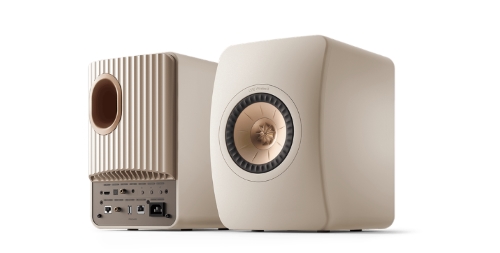
Examples include certain systems from Focal, KEF, and Ruark Audio. However, users should note that not every wireless speaker can reproduce full 24-bit audio resolution. Hardware limitations such as built-in amplifiers, wireless bandwidth, and internal DAC design may reduce the effective playback quality.
Computer-based audio setups can also take advantage of Qobuz's high-resolution catalog. When using the desktop application of Qobuz with an external USB DAC, users can achieve high-quality playback similar to dedicated streamers. While this method does not technically use Qobuz Connect, it still allows direct playback of Hi-Res files and can serve as an effective solution for desktop audiophile systems.
In gerneral, before purchasing a device specifically for Qobuz streaming, it is always recommended to check the manufacturer's latest firmware updates and compatibility documentation. Because support is often delivered through software updates, many existing devices may gain Qobuz Connect functionality over time.
Below is a comparison of several popular device ecosystems that currently support Qobuz Connect and their typical Hi-Res playback capabilities.
| Device Brand / Platform | Qobuz Connect Support | Max Hi-Res Support | Example Devices | Notes |
|---|---|---|---|---|
| WiiM | ✅ | 24-bit/192kHz | WiiM Ultra, WiiM Pro Plus | One of the earliest brands to integrate Qobuz Connect |
| Bluesound (BluOS) | ✅ | 24-bit/192kHz | Node, Powernode | Also used by NAD and PSB systems |
| Denon / Marantz (HEOS) | ✅ | 24-bit/192kHz | Denon AVR series, Marantz Model 40n | HEOS multiroom ecosystem |
| Cambridge Audio | ✅ | 24-bit/192kHz | CXN100, Evo 75/150 | StreamMagic firmware platform |
| FiiO | ✅ | 24-bit/192kHz | R7, R9, M17, SR11 R7、R9、M17、SR11 | Firmware update support, high hardware cost-effectiveness |
| Auralic | ✅ | 24-bit/192kHz | Aries G1, Altair G2 | Lightning streaming OS |
| Naim Audio | ✅ | 24-bit/192kHz | Uniti Atom HE, ND 555 | Premium audiophile streamers |
| Eversolo | ✅ | 24-bit/192kHz | DMP-A6, DMP-A8 | Popular Hi-Res network streamers |
| Lumin | ✅ | 24-bit/384 kHz | Lumin T3, U2 Mini | High-end audiophile streamers |
| HiFi Rose | ✅ | 24-bit/192kHz | RS150B, RS520 | Touchscreen streamer systems |
| Volumio | ✅ | 24-bit/192kHz | Volumio Rivo | Linux-based streaming platform |
| Focal | ✅ | 24-bit/192kHz | Diva Utopia | High-end wireless speakers |
What Should You Do if Your Device Doesn't Support Qobuz Connect?
While Qobuz Connect is compatible with an impressive range of brands, some devices - such as Sony's high-end DACs or legacy models like the Naim Mu-so Gen 1 and NDX - lack native support. For these systems, you can use a "bridge" to maintain 24-bit streaming. One effective solution is the AudFree Qobuz Music Converter, which allows you to download and save Qobuz tracks in bit-perfect 24-bit/192kHz quality. By doing so, you can play your library offline on any device without relying on Qobuz Connect (see Part 6 for a detailed guide).
Alternatively, if high-resolution audio isn't your primary concern, you can simply connect via AirPlay 2, Chromecast, or Bluetooth. These methods are universally compatible and offer a quick way to get your music playing.
Part 3. How to Use Qobuz Connect
The technology behind Qobuz Connect is similar to other streaming ecosystems that use remote playback control.
How does Qobuz Connect works? Here's a step-by-step workflow for your reference.
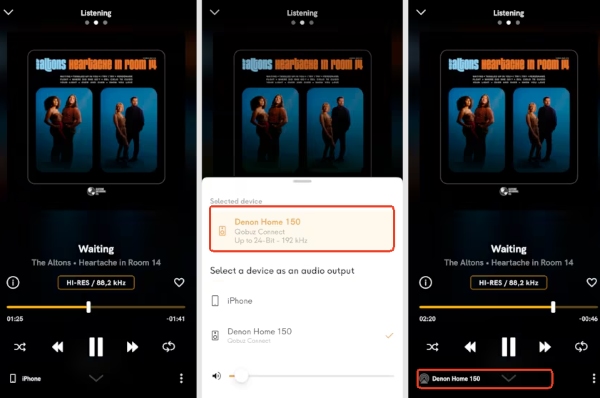
Step 1. Ensure your smartphone (or computer) and your audio streamer are connected to the same local Wi-Fi or LAN network.
Step 2. Open the official Qobuz app on your controller device and sign into your account.
Step 3. Tap the Device icon within the player interface and select your Qobuz Connect-compatible streamer or active speaker from the list.
Step 4. Once connected, the selected device streams music directly from Qobuz servers. You can control the playback via your phone.
Pros and Cons of Qobuz Connect
Direct stream from servers ensures no downsampling or resampling;
Music keeps playing if you take a call or watch TV shows;
Since the streamer does the work, your phone's battery isn't drained;
Native support for up to 24-bit/192 kHz without compression;
Eliminates signal dropouts and lossy compression
Requires a specific Qobuz Connect-compatible device;
Both the phone and streamer must remain on the same network;
Some advanced DSP or EQ settings may only be available in the hardware's native app;
While growing, it is not yet available on every legacy Hi-Fi brand;
Requires the official Qobuz app, and cannot be used via generic web browsers
Part 4. How to Fix Qobuz Connect Not Working
Sometimes Qobuz Connect may fail to detect devices or stream properly. If that happens, try the following fixes.
1. Check Your Network Connection
Most connection problems occur because devices are not on the same Wi-Fi network. To ensure proper device detection, make sure these devices below are all connected to the same Wi-Fi network:
- Your smartphone or tablet
- Your streaming device or Hi-Fi system
- Your router
If your router supports both 2.4 GHz and 5 GHz bands, ensure all devices are connected to the same band whenever possible, as some devices may not communicate correctly across different bands.
2. Restart Your Devices
A simple restart can resolve many connectivity issues by refreshing the network environment. Try restarting the following devices, including Wi-Fi router, streamer/audio device, smartphone/tablet, and the Qobuz app.
After restarting, reopen the app and check whether your device appears in the Connect device list.
3. Update the Qobuz App
Running an outdated version of the app may cause compatibility issues with newer devices or firmware.
Visit your device's app store and make sure the Qobuz app is updated to the latest version. App updates often include bug fixes, performance improvements, and expanded device compatibility.
4. Update the Firmware on Your Streamer
Many Hi-Fi manufacturers regularly release firmware updates to improve streaming stability and expand support for features like Qobuz Connect.
Open your device's official control or management app and check whether a new firmware update is available. Installing the latest firmware can often resolve device detection or playback problems.
5. Disable VPN or Network Filtering
VPN services can sometimes interfere with local network discovery, which prevents devices from appearing in the Connect menu.
If you are using a VPN, try temporarily disabling it and reconnecting to your local network. This often allows the app to properly detect compatible streaming devices.
6. Log Out and Sign Back
Occasionally, account authentication errors can prevent music from streaming properly. Logging out of your Qobuz account and signing back in can refresh your session and restore playback functionality.
In most cases, these troubleshooting steps will quickly restore Qobuz Connect functionality. If problems persist, checking the official support documentation from Qobuz or your device manufacturer can provide additional device-specific solutions. Or try the professional tool in Part 6 for a flexible solution.
Part 5. Qobuz Connect vs Tidal Connect vs Other Casting Methods
While Qobuz Connect is designed specifically for high-resolution streaming, it is not the only technology that allows remote playback on audio devices. Other popular platforms, including Tidal, Spotify, Roon, AirPlay, and Chromecast, provide similar casting or remote streaming functionality.
However, these technologies differ significantly in audio quality, device compatibility, and system architecture. Understanding these differences can help you choose the best option for your listening setup.
Below is a closer comparison of the most common streaming ecosystems.
1. Qobuz Connect vs Tidal Connect
Tidal Connect works very similarly to Qobuz Connect. Both technologies allow users to control playback from a mobile device while the audio stream is delivered directly from cloud servers to the playback device.
In terms of audio quality, both services support high-resolution streaming up to 24-bit/192kHz, making them attractive options for listeners who prioritize sound fidelity.
However, there are still several notable differences. Tidal Connect, introduced in 2020, has built a significantly broader ecosystem, with support for over 1,000 compatible devices, which gives it a strong advantage in terms of hardware integration and accessibility. Qobuz Connect, on the other hand, focuses more on delivering a pure audiophile listening experience.
From a sound signature perspective, many listeners describe Qobuz as offering a cleaner, more spacious, and highly detailed presentation, while Tidal often sounds more dynamic and punchy, which some users find more engaging for modern music genres.
Key Similarities
- Direct streaming from the service's cloud servers
- No Bluetooth compression during playback
- Mobile device acts only as a remote controller
- Stable playback without draining mobile battery
Key Differences
| Feature | Qobuz Connect | Tidal Connect |
|---|---|---|
| Max Audio Quality | 24-bit / 192 kHz FLAC | Up to 24-bit FLAC (varies by track) |
| Codec | FLAC | FLAC (previously also MQA on some tracks) |
| Target Audience | Audiophiles | Mainstream listeners + Hi-Res users |
| Music Discovery | Moderate recommendation system | Strong algorithm-based discovery |
| Device Support | 300+ supported devices | 1000+ supported devices |
Overall, Qobuz Connect prioritizes pure high-resolution audio playback, making it particularly appealing to audiophiles who value transparency and detail. Tidal Connect, meanwhile, balances high-quality streaming with a more advanced recommendation system and wider device compatibility, which can be more convenient for everyday listeners.
2. Qobuz Connect vs Spotify Connect
Spotify Connect is one of the earliest remote playback systems and is widely supported by smart speakers, TVs, and home audio devices.
However, as the world's leading music streaming service, Spotify currently prioritizes user convenience and seamless connectivity over high-fidelity audio quality.
Key Differences
| Feature | Qobuz Connect | Spotify Connect |
|---|---|---|
| Max Audio Quality | 24-bit / 192 kHz FLAC | Up to 16-bit / 44.1 kHz (320 kbps) |
| Codec | Lossless FLAC | Ogg Vorbis |
| Target Audience | Audiophiles | General listeners |
| Device Support | 300+ supported devices | 80,000+ supported devices |
While Spotify Connect offers unmatched multi-room convenience and near-universal compatibility, spanning everything from smart speakers to wearables, it cannot match the bit-perfect, lossless audio fidelity provided by Qobuz Connect.
3. Qobuz Connect vs Roon
Unlike Qobuz Connect, Roon is not simply a streaming protocol. Instead, it is a comprehensive music management ecosystem designed for serious music collectors and audiophiles.
Roon functions as a central hub that organizes and controls all of your music sources. It can integrate local music libraries, streaming services like Qobuz and Tidal, and compatible audio hardware into one unified interface.
What makes Roon unique is its powerful metadata system, advanced audio processing, and multi-room streaming capabilities. However, running Roon requires a dedicated Roon Core server, which handles the processing and distributes music to supported devices.
What Roon Can Do for Audience
- Manage large local music libraries
- Integrate multiple streaming services
- Provide advanced DSP audio processing
- Enable multi-room playback
- Deliver rich artist, album, and music discovery metadata
Key Differences
| Feature | Qobuz Connect | Roon |
|---|---|---|
| Setup Complexity | Simple | Advanced |
| Hardware Requirement | None | Requires Roon Core server |
| Library Management | Basic streaming control | Extremely powerful library system |
| Audio Quality | Bit-perfect streaming | Bit-perfect playback with optional DSP |
| Primary Purpose | Direct streaming control | Complete music ecosystem |
In short, Roon offers an incredibly powerful music management environment for users who want full control over their digital music libraries. However, it also requires additional hardware and a paid subscription, whereas Qobuz Connect provides a much simpler and more direct listening experience.
4. Qobuz Connect vs AirPlay
AirPlay is a wireless streaming technology developed by Apple and is widely used across Apple devices such as iPhones, iPads, Macs, and HomePods. While AirPlay is extremely convenient within the Apple ecosystem, its streaming method works differently from Qobuz Connect. With AirPlay, audio is transmitted from the phone or computer to the playback device, meaning the mobile device acts as the actual audio source.
Furthermore, due to protocol constraints and system-wide limitations, AirPlay typically caps audio output at 16-bit/44.1kHz (CD quality). Even when streaming high-resolution tracks from Qobuz, AirPlay often downsamples the signal or converts it to a lossy format during transmission. This prevents the listener from accessing the full 24-bit/192kHz Hi-Res masters that the Qobuz library offers.
In contrast, Qobuz Connect streams music directly from the cloud to the playback device (24-bit), with the phone serving only as a remote controller.
Key Differences
| Feature | Qobuz Connect | AirPlay |
|---|---|---|
| Audio Source | Directly from Qobuz servers | From phone or computer |
| Max Audio Quality | 24-bit / 192 kHz | Typically 16-bit / 44.1 kHz |
| Battery Usage | Low (remote control only) | Higher (device sends audio) |
| Compression | None | Possible resampling |
Because AirPlay relies on the iOS or Mac device to transmit the audio signal, the stream may sometimes be resampled or compressed before reaching the speaker, which can limit the maximum audio fidelity.
For casual listening within the Apple ecosystem, AirPlay works very well. However, Qobuz Connect is better suited for high-resolution streaming and dedicated Hi-Res playback systems.
5. Qobuz Connect vs Google Chromecast
Chromecast is another widely used streaming protocol developed by Google. It is commonly found in smart TVs, wireless speakers, and many Android-based streaming devices.
Like Qobuz Connect, Chromecast allows users to control playback from their phone while sending the audio stream to another device. However, the two technologies are designed with different ecosystems in mind.
Chromecast focuses on broad compatibility across smart devices, while Qobuz Connect is optimized for high-end audio hardware and Hi-Res streaming performance.
Key Differences
| Feature | Qobuz Connect | Chromecast |
|---|---|---|
| Audio Control | Native control inside Qobuz app | Cast protocol supported by many apps |
| Max Audio Quality | 24-bit / 192 kHz | Up to 24-bit / 96 kHz (device dependent) |
| Device Ecosystem | Hi-Fi audio equipment (300+) | Smart TVs, speakers, Android devices |
| Optimization | Audiophile-grade streaming | General smart home streaming |
Chromecast works well for everyday home streaming and smart device connectivity, especially in Android-based ecosystems. However, Qobuz Connect is specifically optimized for audiophile listening setups, offering higher-resolution streaming and tighter integration with high-end audio components.
6. Summary of Streaming Technologies
| Technology | Best For |
|---|---|
| Qobuz Connect | Best Hi-Res audiophile streaming |
| Tidal Connect | Balanced Hi-Fi streaming |
| Spotify Connect | Everyday listening convenience |
| Roon | Advanced music management |
| AirPlay | Apple ecosystem streaming |
| Chromecast | Smart home audio (Android-based ecosystems) |
If your goal is bit-perfect high-resolution playback, Qobuz Connect remains one of the most direct and efficient solutions.
Part 6. Best Workaround to Stream Qobuz 24-bit Audio Without Qobuz Connect
Although Qobuz Connect works extremely well on supported devices, there are still situations where it may not be available, including:
- Older Hi-Fi equipment
- DACs without network streaming
- Legacy streamers
- Devices that lack firmware updates
- Offline listening scenarios
In these cases, one practical solution is to download Qobuz tracks as local high-resolution files and play them directly through your own audio system.
A commonly used tool for this purpose is AudFree Streaming Audio Recorder, which allows users to download and convert streaming music into lossless local audio files.
Why Choose AudFree Streaming Audio Recorder?

- Download Qobuz to FLAC (24-bit 192kHz), WAV, MP3 (320kbps), etc.
- Convert Qobuz's entire albums or playlists at once losslessly
- Save time with 10x faster batch downloads and unlock the freedom of unrestricted offline playback
- Retain original ID3 tags for better organization
- Fully compatible with Windows & Mac
Using a downloader to create a local Hi-Res library usually involves these steps:
- Step 1. Install and Launch AudFree Streaming Audio Recorder

- After downloading the program, click the icon to launch it. Don't forget to activate the full features with a paid license.
- Step 2. Configure Output Parameters of Qobuz (24-bit)

- Click the top-right menu icon, tap 'Preferences' > 'Conversion' to choose an output format (e.g., FLAC or WAV) you prefer. Then adjust the output audio's bitrate, sample rate, etc. You can also go to the Output tab to select a folder as the destination folder and enable ID3 tag export for better music organization.
- Step 3. Add Qobuz Music to the Conversion List

- Go back to the main screen, click the icon of Qobuz, and sign in. Browse in the built-in web player, choose the tracks, playlists, or albums you wish to save, and click the bottom-right Green '+' icon to add the song to the conversion list.
- Step 4. Download Qobuz Music for Offline Playback

- Now, start the conversion process by clicking the Convert button. Once completed, export the music files to your local computer. Or you can access these tracks directly in the preset local folder.
Now, you fully own your Qobuz playlists as local audio files, allowing you to use them much more flexibly. For example, you can:
- Transfer files to a streamer
- Store them on a NAS server
- Import them into music management software
- Play them through USB DAC setups
In short, while Qobuz Connect is the most seamless method for direct Hi-Res streaming, downloading Qobuz tracks as local 24-bit audio files provides a reliable alternative for users whose devices do not support the feature. It also offers greater flexibility for building a personal Hi-Res music library that can be played on virtually any audio system.
Pros and Cons of AudFree Streaming Audio Recorder
Supports offline playback without relying on Qobuz Connect;
Works with any audio player, DAC, or streaming system;
Maintains high audio quality and metadata;
Enables permanent backup of your music library;
Flexible playback across multiple devices
Requires downloading tracks before playback;
Needs a Windows or Mac computer for conversion;
Not a real-time streaming solution like Qobuz Connect;
Additional storage space required for Hi-Res files
In Conclusion
Qobuz Connect represents a major step forward in high-resolution music streaming. By allowing compatible devices to stream directly from Qobuz servers, it ensures bit-perfect playback up to 24-bit/192 kHz while using your phone or computer simply as a remote controller.
However, if your device does not support Qobuz Connect or you want more playback flexibility, building a local Hi-Res music library can be an excellent alternative. Tools like AudFree Streaming Audio Recorder allow users to download and store high-resolution music files for playback on virtually any audio system.

Staff Editor


