


Qobuz has become one of the most trusted music platforms for audiophiles thanks to its massive catalog of 24-bit FLAC Hi-Res tracks. Whether you're building a lossless library, archiving purchased albums, or transferring music to a DAC, downloading Qobuz in genuine FLAC quality is essential for bit-perfect playback. If you are ready to take full control of your Hi-Res library, you have come to the right place.
This guide explains three reliable ways to get Qobuz 24-bit FLAC downloads - via official methods, a trustworthy third-party tool, and an open-source GitHub solution. No matter which device you use - PC, Mac, or mobile - you'll learn how to save, manage, and verify your Qobuz FLAC files correctly.

Part 1. How to Download Qobuz Tracks in FLAC 24-bit [Official Method]
The easiest and safest way to download Qobuz music to FLAC is using the Qobuz official service: Qobuz app or online website. It offers two official ways to download music:
1. Offline downloading through a subscription (temporary, locked inside the app), and
2. Permanent FLAC downloads through purchases (DRM-free files stored locally).
Below is how each method works on PC, Mac, and mobile.
Method 1. Download FLAC Offline with Qobuz Subscription (PC/Mac/Mobile)
Requirements:
• A Qobuz Studio or Sublime subscription
• A Qobuz app on Windows/Mac/iOS/Android
How to Download Qobuz Tracks to 24-bit FLAC Files on Windows/Mac:
Step 1. Install and open the Qobuz desktop app on your Windows/Mac.
Step 2. Sign in to your Qobuz subscription account.
Step 3. Navigate to the album/track you wish to download.
Step 4. Click the three dot to tap Import, and choose the download audio quality to download it to your offline library.

Step 5. The music will be cached inside the Qobuz app in its original quality (up to 24-bit).
How to Get Qobuz FLAC Downloads on Android/iOS:
Step 1. Launch the Qobuz mobile app and log in with your account credentials.
Step 2. Navigate to the album or playlist you wish to save.
Step 3. Tap the Download icon (usually a downward-pointing arrow) to add the content to your offline library.

Step 4. Wait for the download to complete. The 24-bit FLAC tracks are now accessible on your device for offline playback within the Qobuz app.
Important Note: Qobuz subscription downloads cannot be extracted as playable FLAC files. They are encrypted cache files stored in the app.
Method 2. Download Purchased Qobuz Albums in FLAC 24-bit (DRM-Free Backup)
If you require genuine, standalone FLAC files for permanent archive or playback on external devices, purchasing music directly from the Qobuz Store is the only official, DRM-free method.
How to Download Purchased Qobuz FLAC (PC/Mac)
Step 1. Open the Qobuz desktop application or visit the Qobuz web store on your computer.

Step 2. Select and purchase the desired album or single track, choosing either CD (16-bit) or Hi-Res (up to 24-bit) quality, depending on what you wish to archive.
Step 3. After the purchase is complete, navigate to the "My Purchases" section in your profile on the top navigation menu.
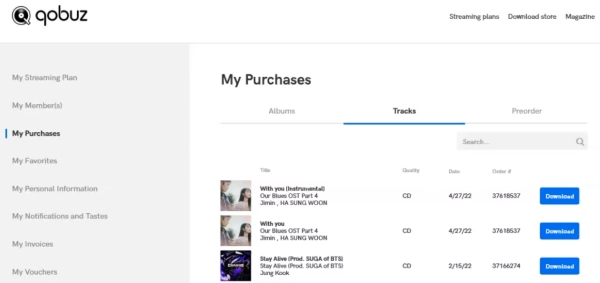
Step 4. Locate the album you just bought and click the Download button. You will typically be prompted to select your preferred download format (ZIP file or individual tracks).
Step 5. Once the download finishes, you will have your true, DRM-free Qobuz music files saved to your computer.
What quality do you get?
• DRM-free FLAC
• up to 24-bit/192 kHz (Hi-Res) or 16-bit/44.1kHz (CD)
• with full metadata and album art
Pros & Cons of Official Qobuz FLAC Downloads
✅ Pros
- 100% legal
- Original bit-perfect FLAC files
- Metadata and artwork included
- Files are DRM-free for copying, backup, and transfer
- Re-download anytime
❌ Cons
- Subscription downloads (Offline Cache) cannot be exported; only purchased files can be archived
- Only purchase each album for permanent FLAC files
Part 2. How to Get Qobuz Downloads in FLAC [Reliable Third-party Tool]
If you need to download Qobuz FLAC files for offline backup or flexible playback on any device without incurring the high cost of buying every album individually, a specialized third-party tool is a practical solution.
Among many available tools, AudFree Streaming Audio Recorder stands out for its stability and comprehensive access to major streaming services, including Qobuz, Tidal, Apple Music, and others.
AudFree Streaming Audio Recorder

- Download Qobuz to 24-bit FLAC, WAV, and more formats losslessly
- Convert Qobuz entire albums or playlists at up to 10X speed
- Preserves full ID3 tags and metadata for easy organization
- Fully compatible with both Windows & Mac operating systems
- Batch downloads multiple tracks and saves them permanently as local files
How to Use AudFree Tool to Get Qobuz FLAC Downloads (PC/Mac)
Disclaimer: This method is intended strictly for personal offline backup. Please ensure you always comply with local copyright laws and Qobuz's Terms of Service.
- Step 1. Download and Launch AudFree Streaming Audio Recorder

- Download and install the AudFree Streaming Audio Recorder. Launch the application and activate the license. You will see icons for various streaming services.
- Step 2. Adjust Qobuz Output Parameters to FLAC

- Go to the 'Menu' > 'Preferences'. In the 'Conversion' tab, change the output format to FLAC. Here, you can also adjust the quality settings, such as bit rate (320 kbps) and sample rate (192kHz or 24-bit), to match the original Qobuz Hi-Res quality.
- Navigate to the 'Output' tab to choose a dedicated local folder for your converted files, and enable ID3 tag export for better music organization.
- Step 3. Add Qobuz Music to the Conversion List

- Click the Qobuz icon on the homepage and sign in. Browse for the tracks, playlists, or albums you want to download. Click the green '+' icon (usually located in the bottom-right corner) to add them to AudFree's conversion list.
- Step 4. Start Downloadig Qobuz Music in FLAC

- Click the 'Convert' button at the bottom-right corner to begin the conversion process. Once finished, you can access the permanent, DRM-free FLAC tracks in your preset local folder.
Why choose this method?
• Universal: Works with virtually any Qobuz track, including all Hi-Res streams.
• Permanent Backup: Saves Qobuz music as local, DRM-free FLAC files forever.
• Flexibility: Allows free backup to NAS, USB drives, DAPs (Digital Audio Players), CarPlay, or Android Auto.
• Ideal for Professionals: Perfect for DJs, dedicated offline playback, or building robust private libraries.
Part 3. How to Download Qobuz Music to FLAC via Streamrip (GitHub)
For advanced users who prefer open-source tools, Streamrip is one of the most popular GitHub projects for downloading Qobuz 24-bit FLAC files.
What is Streamrip?
Streamrip is a command-line utility built in Python that interacts with music platforms (e.g., Qobuz, Tidal, Deezer and SoundCloud) to download tracks in lossless and Hi-Res formats. Due to its technical nature, it requires command-line proficiency and careful handling.
How to Use Streamrip for Qobuz FLAC Downloads(PC/Mac/Linux)
Disclaimer: Use this tool at your own risk. This method often violates Qobuz's Terms of Service and carries potential account security risks. A Qobuz Studio or Sublime subscription is required for access to the necessary streams.
Step 1. Install Python
First, ensure Python (version 3.10 or greater) and pip are installed.
pip3 install streamrip --upgrade
Install ffmpeg to ensure full functionality, though Streamrip can work without it.
Step 2. Download Albums from Qobuz
Streamrip uses quality IDs to specify the desired resolution. You must include the --quality option in your command.
| Quality ID | Audio Quality | Available Sources |
|---|---|---|
| 1 | 320 kbps MP3 or AAC | Deezer, Tidal, Qobuz, SoundCloud (rarely) |
| 2 | 16 bit, 44.1 kHz (CD) | Deezer, Tidal, Qobuz, SoundCloud (rarely) |
| 3 | 24 bit, ≤ 96 kHz | Tidal, Qobuz, SoundCloud (rarely) |
| 4 | 24 bit, ≤ 192 kHz | Tidal, Qobuz |
To download an album to FLAC from Qobuz with maximum quality (QID 4), type:
rip --quality 4 url https://www.qobuz.com/us-en/album/rumours-fleetwood-mac/0603497941032
To download multiple albums, list the URLs consecutively:
rip --quality 4 url https://www.qobuz.com/us-en/album/back-in-black-ac-dc/0886444889841 https://www.qobuz.com/us-en/album/blue-train-john-coltrane/0060253764852

✅ Pros
- 100% free and open-source
- Fast for batch downloads
- Hi-Res supported (24-bit/192 kHz)
❌ Cons
- Requires command line skills
- API changes may break compatibility
- Not beginner friendly
- With account-security risk
Streamrip is best suited for advanced users seeking automation and who fully understand the technical and security implications.
Part 4. FAQs about Qobuz FLAC Downloads
Is it legal to download Qobuz FLAC for personal offline backup?
Officially, downloading is legal only when you purchase the track or album; Qobuz then provides you with a DRM-free file. Using third-party tools to capture streaming content (for backup) typically violates Qobuz's Terms of Service, even for personal use. However, the legality of unauthorized copying under local 'fair use' or 'private copying' laws varies significantly by region. It is always illegal to redistribute copyrighted material, so please handle any Qobuz FLAC files responsibly.
Why do some albums show 'Hi-Res' but only download as 16-bit?
This discrepancy often occurs for two reasons. First, while Qobuz specializes in high-resolution audio, not every album has a master available above 16-bit/44.1kHz (CD quality). Second, when purchasing, Qobuz often allows you to select a lower-cost 16-bit version even if a 24-bit master exists. Always verify the specific quality selected (e.g., 'Studio 24-bit' vs 'CD 16-bit') immediately before purchasing.
Can I download FLAC files from Qobuz during the free trial?
During the free trial, you can use the Qobuz app to download music for offline listening. However, these files are DRM-protected and encrypted; they cannot be transferred or played outside the Qobuz app as permanent, true FLAC backups. To get genuine, DRM-free FLAC files that you can own and store, you need to purchase them separately through the Qobuz Store, even during your free trial.
Alternatively, you can effectively use your free trial with AudFree Streaming Audio Recorder to obtain your real Qobuz FLAC files, which is more cost-effective and practical.
In Summary
Qobuz is a top-tier platform for downloading 24-bit Hi-Res FLAC files, but the right method depends on what you need:
| Method | Output Format | Permanent Files? | Ease of Use | Cost | Account Safety | Best For |
|---|---|---|---|---|---|---|
| Official Subscription Offline | Encrypted cache | ❌ | Easiest | Studio: $12.99/month Sublime: $15/month | 100% Safe | Mobile offline listening |
| Official Purchases | Lossless (Up to 24-bit) | ✅ | Easiest | High (About $15+ per album) | 100% Safe | Audiophiles, collectors |
| AudFree Streaming Audio Recorder | Lossless (Up to 24-bit) | ✅ | Easy (GUI) | Medium (Software Cost) | Safe | Private backups, PC/Mac users |
| Streamrip (GitHub) | Lossless (Up to 24-bit) | ✅ | Difficult (Command Line) | Free | Moderate Risk | Advanced user, automation |
If your goal is permanent, high-quality FLAC downloads for PC/Mac or mobile playback from Qobuz, the best options are:
• Purchase albums directly from Qobuz, or
• Use a reliable third-party tool like AudFree Streaming Audio Recorder for personal backup.

Staff Editor


