


Quick Answer: AudiFab Spotify Music Converter is a nice choice to download Spotify music as local audio files. It offers multiple output formats like MP3, AAC, FLAC, WAV, ALAC, and AIFF, personalized audio settings, and so on. However, it may not be suitable for all users. So, you can compare it with its alternatives such as AudFree Spotify Music Converter, etc. before purchasing.
If you are looking for a tool to help listen to Spotify music offline locally on your device, you may find the AudiFab Spotify Converter. But is it worth paying for? What can it do? In this AudiFab Spotify Music Converter review, we will explain all the things about it to you.

Part 1. What Is AudiFab Spotify Music Converter
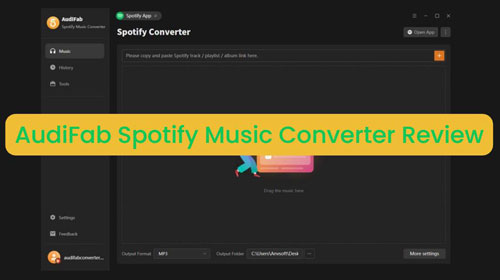
AudiFab Spotify Music Downloader is designed for Spotify Premium and Free users to convert Spotify songs, playlists, albums, music videos, video podcasts, etc. into local audio and video files for offline playback anywhere. There are two modes for you to input Spotify content. Spotify App mode allows you to access Spotify content through the Spotify desktop application. Spotify Web Player mode lets you sign in to the built-in web player without installing the Spotify desktop app.
With it, you can batch convert Spotify music to MP3, FLAC, AIFF, WAV, ALAC, and AAC audio formats. Also, you can convert music videos and podcast videos to MP4 video format. For the output audio quality, it supports up to 320 kbps and 192 kHz. In addition, it will keep full metadata of the audio track, including track number, title, artist, artwork, year and so on.
| Feature | AudiFab Spotify Music Converter Overview |
|---|---|
| Compatible OS | macOS 11 - 26 (Tahoe)); Windows 8, Windows 10, Windows 11 |
| Supported Input Format |
All Spotify audio and video content |
| Supported Output Audio Format |
MP3, AIFF, WAV, FLAC, AAC (.m4a), ALAC (.m4a) |
| Supported Output Video Format | MP4 |
| Batch Conversion | ✅ |
| Metadata | Keep full ID3 tags and lyrics |
| Download Mode | Spotify app, Spotify web player |
| Claimed Conversion Speed | Up to 40X (Web player mode) |
| Price | $44.95/year; $89.9/lifetime |
| Free Trial | ✅ (First 1 minute of each track) |
| Additional Tools | Tag editor, AA/AAX converter, CD burner, etc. |
Part 2. AudiFab Spotify Music Converter Price and Free Trial
AudiFab Spotify Converter offers 2 pricing plans, including yearly and lifetime licence for Windows, and Mac. Now, you can take a quick look at its plans below.
| Plan | Regular Price | Current Promotional Price | Device | Money Back Guarantee |
|---|---|---|---|---|
| 1 Year License | $59.95/year | $44.95 | A Mac/Windows computer | 5 days |
| Lifetime License | $129.90/lifetime | $89.9 | A Mac/Windows computer | 30 days |
Before purchasing, AudiFab Spotify Music Downloader provides the free trial version. You can download and install it for free on your computer to test the performance. However, you are limited to convert only the first 1 minute of each track.
Part 3. How to Use AudiFab Spotify Music Converter on Windows/Mac
In this part, we will guide you to use AudiFab Spotify Music Downloader for Windows and Mac step by step.
Step 1. Download and install the AudiFab Spotify Music Converter on your Windows or Mac computer from its official website. Do not download any cracked version of AudiFab from third-party websites, they are unsafe.
Step 2. Open the AudiFab Spotify Converter, choose the mode to download music from the Spotify App or Spotify Web Player on the top menu bar. After that, log in to your Spotify Free or Premium account.
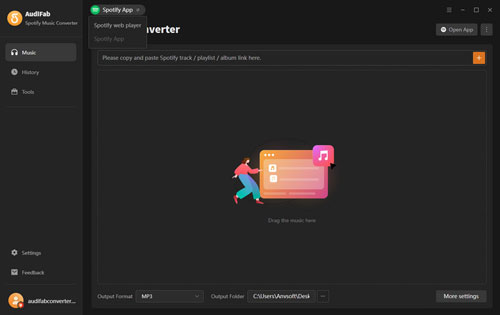
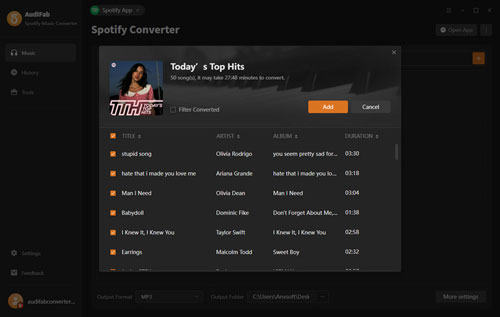
Step 3. Find the Spotify music or video content that you want to download from the Spotify app, then click the 'add' option in the new window. If you are in the Web Player mode, open the playlist or album and tap the big '+' button to load the music.
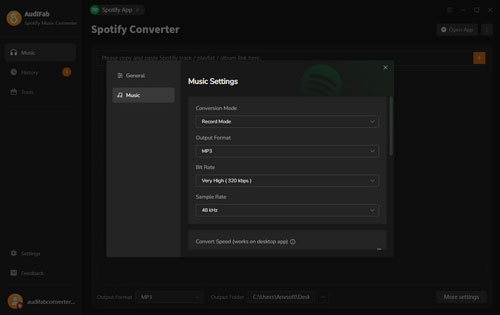
Step 4. After that, click the Settings option in bottom-left corner of AudiFab. Then you can alter the conversion mode, output format, bit rate, etc.
Step 5. Once set, click the Convert button to start to download music from Spotify on your computer.
Step 6. Once converted, go to the History section at the left-side panel to find the local Spotify music and video files on your computer.
Part 4. AudiFab Spotify Music Converter: User Feedback and Real Experience
Is AudiFab Spotify Music Downloader good? Now, let's see what are other people say about it on Trustpilot.
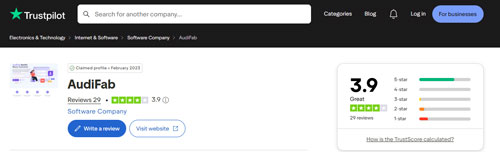
The current Trustpilot data shows AudiFab with a 3.9 rating from 29 reviews. The number of reviews is quite lower than other competitors. And there are 69% of reviews rated five stars and 17% rated one star.
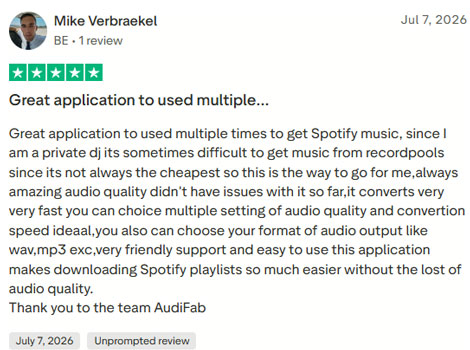
Most users gave positive reviews to AudiFab Spotify Converter. They said the tool has an easy-to-use interface, outputs high-quality audio files, works fast, etc. Besides, AudiFab offers a timely customer support.
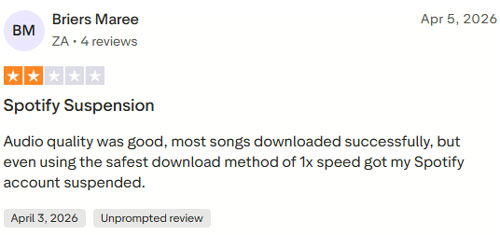
However, there are some negative reviews on AudiFab. Most people feedbacked that they met the Spotify account suspension issue.
Part 5. Pros and Cons of AudiFab Spotify Music Converter
Now, you can check the pros and cons of AudiFab Spotify Converter to see if it is worth trying.
Convert and download Spotify tracks to MP3, FLAC, ALAC, AAC, WAV and AIFF;
Convert Spotify music videos and podcast videos to MP4 video format;
Support downloading Spotify songs, albums, playlists, radios, podcasts, and audiobooks;
Support batch downloading Spotify audio content at up to 40X speed;
Support downloading from both the Spotify app and Spotify web player
Only convert first 1 minute of each track with the free trial;
The conversion speed is limited to 1 - 10 via the Spotify app mode;
No monthly license;
Do not support M4B output audio format;
No mobile or online version;
Part 6. Best AudiFab Spotify Music Converter Alternative
If you want to find a more simplifier alternative to AudiFab Spotify Downloader, we would like to recommend AudFree Spotify Music Converter.
AudFree Spotify Converter focuses on converting and downloading Spotify songs, podcasts, albums, playlists and audiobooks into MP3 and other plain formats. It can work at a fast speed, keep complete ID3 tags and retain original audio quality.
Besides, there is no extra tools inside the tool. In this case, it will run smoothly. Most importantly, it offers a Spotify music library backup and restore feature. You can back up your Spotify library in advance before converting music. And then you can log in to your another account and restore the library. To do that, you don't need to worry about losing your favorite Spotify music if Spotify suspends your account while downloading music.

By the way, AudFree Spotify Music Downloader costs less than AudiFab. Its lifetime license costs only $89.95, while AudiFab costs $129.90. Besides, there is a monthly license, which meets different users' needs.
AudFree Spotify Converter vs AudiFab Spotify Converter Comparison
| Feature | AudiFab Spotify Music Converter | AudFree Spotify Music Converter |
|---|---|---|
| Price | $59.95/year; $129.9/lifetime |
$19.95/month; $44.95/year; $89.95/lifetime |
| Available Users | Spotify Free/Premium | Spotify Free/Premium |
| Supported OS | Windows/Mac | Windows/Mac |
| Supported Spotify Content | Spotify audio and video content | Spotify audio content |
| Output Quality | Bit Rate up to 320kbps |
Bit Rate up to 320kbps Bit Depth up to 24 bit |
| Output Format | MP3, AIFF, FLAC, WAV, ALAC, AAC | MP3, FLAC, M4A, AIFF, WAV, M4B |
| Conversion Speed | 1X App Convert Mode on App 40X on Windows and Web Player Mode on Mac |
Up to 13X |
| Free Trial | First 1 minute of each track | First 30 seconds of each track |
Besides, you can use AudFree Streaming Audio Recorder to download music from Spotify, Apple Music, YouTube Music, Amazon Music, SoundCloud, Deezer, Qobuz, Audible and other music services. Also, you can use it to download any podcasts and any radio online for free.
Part 7. In Conclusion
If you need a feature-rich Spotify music converter and downloader, desire multiple output format options, or like the extra audio tools, then AudiFab Spotify Music Downloader is your great choice.
If you prefer a lightweight software, favor specific output formats, or want to get a monthly license, you might try AudFree Spotify Music Converter.

Chief Editor


