


Quick Answer: NoteBurner Spotify Music Converter is a desktop software and Android app that can convert Spotify tracks, playlists, podcasts, albums to MP3, AAC(.m4a), ALAC, FLAC, etc. for offline playback locally. Also, it supports to convert Spotify music videos and podcasts videos to MP4 format. Besides, it offers the web/app download mode and extra tools like ID3 tag editor and CD burner. Due to these, it consumes higher CPU. If you want a lightweight tool, AudFree Spotify Music Converter would be your choice.
When looking for a tool to download Spotify music, you may find that NoteBurner Spotify Music Converter listed in the top of the search result. You may want to know what can it do, what users report, its price, safety and legacy, is it worth it and so on. Now, read this full NoteBurner Spotify Music Converter Review to learn more.

Part 1. What Is NoteBurner Spotify Music Converter
NoteBurner Spotify Music Downloader and Converter is designed to convert Spotify audio and video content into local audio and video files for offline playback without using the Spotify app. There are two download modes for you to choose from: via Spotify app or via Spotify web player. With it, you can convert Spotify audio files to MP3, FLAC, AIFF, WAV, ALAC, and AAC audio formats, and convert music videos and podcast videos to MP4 video format from Spotify app or the built-in Spotify web player.
Also, it will keep full metadata of the audio content, including title, artist, artwork, year and so on. What's more, you can edit ID3 tags, burn audio to CD, or export music files to iTunes/Music app within NoteBurner Spotify Converter.
This tool can work on Windows 11/10/8.1/8, macOS 11 to macOS 26 and Android 8 to Android 15. Besides, it supports up to 48 languages, which is suitable for different languages users around the world.
| Feature | NoteBurner Spotify Music Converter |
|---|---|
| Compatible OS | Mac/Windows/Android |
| Supported Input Format |
All Spotify audio and video content |
| Supported Output Audio Format |
MP3, AIFF, WAV, FLAC, AAC (.m4a), ALAC (.m4a) |
| Supported Output Video Format | MP4 |
| Batch Conversion | ✅ |
| Metadata | Keep full ID3 tags and lyrics |
| Download Mode | Spotify app, Spotify web player |
| Claimed Conversion Speed | Up to 40X (Web player mode) |
| Price | $44.95/year; $89.9/lifetime |
| Free Trial | First 1 minute of each track |
| Additional Tools | Tag editor, format converter, AA/AAX converter, CD burner, etc. |
Part 2. NoteBurner Spotify Music Converter Price and Free Trial
Price is also an important factor to consider when choosing a tool. NoteBurner Spotify Music Converter offers 2 pricing plans, including yearly and lifetime licence for Windows, and Mac, Android license is included in the respective licenses. Now, you can check the table below to learn more.
| Plan | Price |
|---|---|
| 1 Year License | $59.95 for a Mac/Win computer (Android full version included); 5 days money back guarantee |
| Lifetime License | $129.9 for a Mac/Win computer (Android full version included); 30 days money back guarantee |
Also, NoteBurner offers an all-in-one music converter that supports over 17 streaming platforms, and it costs $259.9/lifetime.
Besides purchasing, NoteBurner Spotify Music Downloader provides the free trial version for any user to test the performance of it. However, with the free trial of NoteBurner Spotify Converter, you are limited to convert only the first 1 minute of each track.
Part 3. How to Use NoteBurner Spotify Music Converter on Windows/Mac/Android
Now, you may want to give it a try on your computer or Android device. Here we will show you the detailed steps and real test of using NoteBurner Spotify Music Converter for Mac, Windows and Android.
How to Use NoteBurner Spotify Music Downloader on Windows/Mac
We tested the tool on Windows 11 PC and show you the steps and real result.
Step 1. Download, install and launch the NoteBurner Spotify Music Converter on the Windows or Mac computer.
Step 2. Choose the Spotify App or Spotify Web Player mode at the left-side on the top menu bar. Then log in to your Spotify Free or Premium account. If you choose the Spotify App mode, you must have the Spotify app installed on your device. It will start the Spotify app automatically.
Step 3. Find any audio content that you want to download, then click the 'add' option next to the title of the track to add it to NoteBurner tool. Or, if you choose a playlist or album, you can tap the 'add' option under the playlist or album title to proceed. Also, you can directly click the big + icon at the right side to load all the tracks in one click.
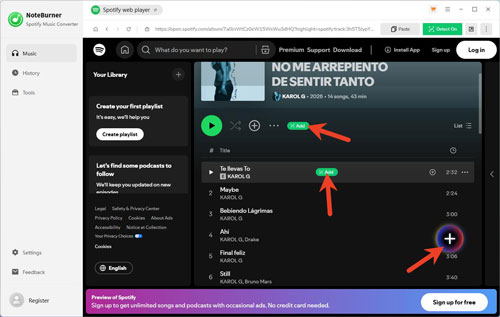
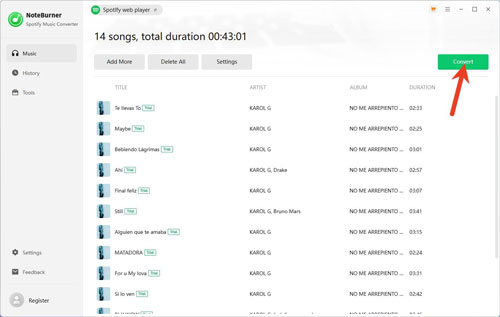
Step 4. Once imported, click the Settings option in the new window to customize the output format, bit rate, etc. for Spotify music. Also, you can choose the conversion mode, output path, etc. before converting.
Step 5. After setting, click the Convert button to start to download and convert music from Spotify on your computer.
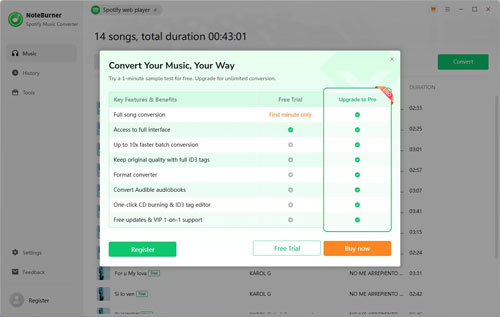
If you have't purchased and registered NoteBurner, you will get a pop-up window. You can choose from Register, Free Trial or Buy now based on your needs.
Step 6. Once converted, go to the History section to find the local Spotify music files on your computer.
Our real test result: We had tested an album with 14 tracks at about 43 minutes totally, and each track is about 3 minites 30 seconds. And it took about 4 minutes to convert all the tracks.
How to Use NoteBurner Spotify Music Converter on Android
For Android users, NoteBurner offers an Android APK for users to download Spotify music on the Android device. Now, you can follow the steps below to learn how to use NoteBurner Spotify Music Converter for Android.
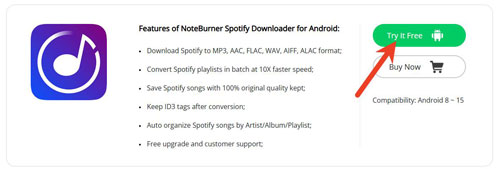
Step 1. On the NoteBurner Spotify Music Downloader for Android webpage, click the Try It Free button to get the APK file on your computer.
Step 2. On your Android device, go to Settings, and then enable the 'Install from Unknown Sources' option to allow installing APK file.
Step 3. Once installed NoteBurner Spotify Music Converter for Android on your device, open it and sign in to your Spotify account.
Step 4. Locate the audio content that you want to download, and tap the '+' icon at the right side. Next, choose the track and click Download.
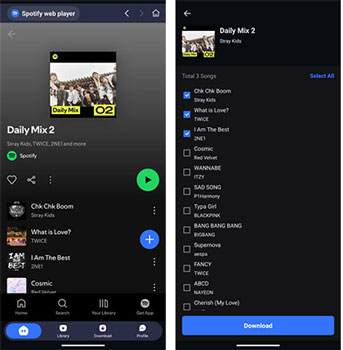
Step 5. Go to the Settings section in the NoteBurner Android app to choose the output format as MP3. Then click Confirm.
Step 6. At last, the tool will start to download Spotify music to Android automatically.
Part 4. NoteBurner Spotify Music Converter: User Feedback and Real Experience
So, what are other people say about NoteBurner Spotify Music Downloader? The current Trustpilot data shows NoteBurner with a 4.4 rating from 359 reviews. And there are 65% of reviews rated five stars and 22% rated one star.
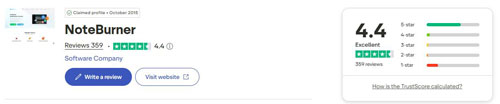
Most users said that they had a great experience with NoteBurner Spotify Converter. This tool has a clean interface, which is easy to download, convert and even organize the audio tracks. What's more, some users also got quick customer support when they need help.
However, there are some users reported that they had a bad experience with NoteBurner Spotify Playlist Downloader. They met issues when starting the program, during the conversion process, etc. Besides, some users complained that their Spotify account was suspended after using NoteBurner.
Part 5. Pros and Cons of NoteBurner Spotify Music Converter
Now, let's conclude the advantages and disadvantages for NoteBurner Spotify Converter. You can check the details below.
Convert Spotify music to MP3, FLAC, ALAC, AAC, WAV and AIFF;
Convert Spotify MVs and podcast videos to MP4;
Work on Windows, Mac and Android;
Support downloading Spotify songs, albums, playlists, radios, podcasts, and audiobooks;
Support batch downloading Spotify playlists, albums, etc. at up to 40X speed;
Built-in tag editor and other tools;
Support downloading from both the Spotify app and Spotify web player
Convert first 1 minute of each track with the free trial;
The conversion speed is limited to 1 - 10 via the Spotify app mode;
Lacks M4B output audio format
Part 6. Is NoteBurner Spotify Music Converter Safe, Legal and Worth It?
Is NoteBurner Spotify Converter safe, legal and worth it? Here in this part, we will explain to you in detail.
For safety, it is safe to download and install NoteBurner Spotify Downloader from the official NoteBurner website. Do not download NoteBurner Spotify Music Converter crack version from third-party websites or platform.
For legacy, Spotify's terms and guidelines place restrictions on the copying, redistribution, transfer, and other uses of Spotify content. The Spotify service is generally intended for personal, non-commercial use and is governed by its agreements and applicable laws. So, using NoteBurner Spotify Converter does not automatically grant you permission to redistribute converted Spotify tracks. If you use this tool, ensure that your usage complies with applicable copyright laws and the relevant terms of service. Do not assume that converted Spotify music files can be publicly uploaded, sold, distributed to others, or used for commercial purposes.
So, is NoteBurner Spotify Song Downloader worth it? It depends on your needs.
It is suitable if you want additional audio tool, use Spotify on Android device, want ALAC/AAC audio format and so on.
You need an alternative if you want a lightweight tool, don't need more extra tools, etc.
Part 7. Best NoteBurner Spotify Music Converter Alternative
For users who want an alternative to NoteBurner Spotify Music Downloader, we would like to recommend AudFree Spotify Music Converter.
AudFree Spotify Converter is designed to convert Spotify songs, podcasts, albums, playlists and audiobooks into MP3 and other plain formats for personal use. With it, you can get high-quality Spotify music files when converting at a fast speed. Besides, it will keep complete ID3 tags of each track for better management.
Besides, there is no extra tools inside the tool, making it runs smoothly. What's more, there is a Spotify music library backup and restore feature within this AudFree tool. You can back up your Spotify music in advance before converting music and them restore the library to your another account. To do that, you don't need to worry about that Spotify suspends your account.

Most importantly, the price of AudFree Spotify Music Downloader is much cheaper than NoteBurner's. Its lifetime license costs only $89.95, which NoteBurner costs $129.90. And it offers a monthly license, which is convenient for different users.
Now, you can take an overview of AudFree Spotify Converter and NoteBurner Spotify Converter on the comparison form below.
| Feature | NoteBurner Spotify Music Converter | AudFree Spotify Music Converter |
|---|---|---|
| Price | $59.95/year; $129.9/lifetime |
$19.95/month; $44.95/year; $89.95/lifetime |
| Available Users | Spotify Free/Premium | Spotify Free/Premium |
| Supported OS | Windows/Mac/Android | Windows/Mac |
| Supported Spotify Content | Spotify audio and video content | Spotify audio content |
| Output Quality | Bit Rate up to 320kbps |
Bit Rate up to 320kbps Bit Depth up to 24 bit |
| Output Format | MP3, AIFF, FLAC, WAV, ALAC, AAC | MP3, FLAC, M4A, AIFF, WAV, M4B |
| Conversion Speed | 1X App Convert Mode on App 40X on Windows and Web Player Mode on Mac |
Up to 13X |
| Free Trial | First 1 minute of each track | First 30 seconds of each track |
Besides, you can use AudFree Streaming Audio Recorder to download Spotify audio files, which costs $159.95/lifetime. And it supports Apple Music, YouTube Music, Amazon Music, SoundCloud, Deezer, Qobuz, Audible and other music services.
Part 8. Conclusion: Is NoteBurner Spotify Converter Worth It?
In a word, NoteBurner Spotify Music Converter is an excellent software, but whether it is worth purchasing depends on your specific needs.
If you need a feature-rich Spotify converter, frequently handle large playlists, desire multiple output format options, or appreciate the included extra audio tools, then NoteBurner Spotify Music Downloader is a great choice.
If you prefer a good value of money, lightweight software, or favor specific output formats, you might try AudFree Spotify Music Converter.
No matter which Spotify downloader you choose, before purchasing, be sure to test the current version using the free trial.

Chief Editor


