


"Can ChatGPT make Spotify playlists?" Yes. Now, ChatGPT features native Spotify integration. You can discover music, create bespoke playlists and explore specific podcasts within the chat interface directly. In this guide, we will show you how to connect Spotify to ChatGPT to find and create AI playlists step by step. Also, you will learn its limitations and how to save your AI-generated playlists permanently.

Part 1. How to Connect ChatGPT to Spotify Officially
Now, the Spotify ChatGPT integration is available in English across 145 countries for all ChatGPT Free, Plus and Pro users. You can use this feature on web, iOS and Android mobile devices. Note that you can't connect ChatGPT in the Spotify app directly. You need to connect them within the ChatGPT chat. Please follow the steps below to start the connection.
Step 1. Open the ChatGPT app or visit ChatGPT.com on your device and start a new chat. (Note: It is recommended using GPT-4 or the latest model.)
Step 2. Type a specific command that requires music access, like 'create a workout playlist on Spotify', 'play classical music on Spotify', etc. and send the prompt.
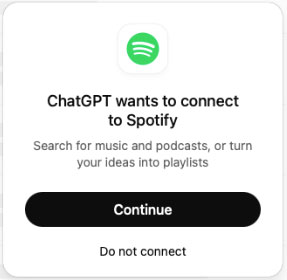
Step 3. Later, you will see the 'Connect Spotify' window display in the response within the chat interface if it is your first time using it.
Step 4. Click the Continue button and log in to your Spotify account to connect Spotify to ChatGPT. You will need to authorize OpenAI to 'view your Spotify account data' and 'manage your library'.
Step 5. After that, you will be redirected back to the chat. Now, you can use ChatGPT like your personal DJ and start using prompts like 'make a playlist of 80s hip hop, 2 hours long', etc. to discover music.

Later, ChatGPT will generate a list of tracks with cover art and durations for you. Then you can tap the 'Add to Library' icon next to the track to save this AI-generated playlist to your Spotify music library. Or, you can click the track in the list to open it in the Spotify platform.
Part 2. Limitations & Troubleshooting of Spotify with ChatGPT
Though ChatGPT Spotify integration is powerful and convenient, there are some limitations. Also, you will encounter some errors while using them.
Common Limitations of Spotify ChatGPT Integration:
1. No 'In-Chat' Audio Streaming
ChatGPT can't play audio directly from its own chat interface, as it is not a speaker. If you ask it to stream a Spotify song, it will require you to open the Spotify app to proceed.
2. No Music Playback Control
You can't pause, skip or control playback features like volume in ChatGPT with Spotify.
3. Limited Hardware Control
You can't use ChatGPT to control specific settings, like 'turn down the volume on my Sonos', etc.
Troubleshooting: Spotify ChatGPT Common Issues
1. Spotify ChatGPT Can't Save Playlist
Please go to ChatGPT's Settings > Apps & Connections, then choose Spotify and tap Disconnect to disconnect Spotify from ChatGPT. After that, reconnect it to refresh the token. Besides, make sure that you are not using a restrictive VPN. Spotify's API is region-sensitive and the mismatched IP address will block playlist creation.
2. ChatGPT Spotify Not Working/Not Connecting
First, make sure that you are in an eligible country to access this feature and both apps are updated to the latest versions. If yes, try to log out of your ChatGPT account, close the ChatGPT platform and then log back in.
Part 3. How to Keep Spotify ChatGPT AI Playlists Forever
Once you added the ChatGPT Spotify playlist in your library, you can stream them directly within the Spotify app. But you don't own the music tracks truly. If you cancel your Spotify Premium plan, you lose offline listening and are forced to shuffle.
To keep ChatGPT Spotify playlists forever as local audio files for playback anywhere, you'll get help from AudFree Spotify Music Converter. It can download playlists, songs, albums, etc. from Spotify locally, even without using the Spotify Premium account. Also, it can convert Spotify to MP3, FLAC, WAV, AIFF, M4A, and M4B so that you can play Spotify music on other devices or players without an Internet connection.
What's more, it can keep Spotify music in Lossless, 320kbps and original audio quality while working at fast conversion speed.
How to Download Spotify ChatGPT Playlists for Offline Playback
- Step 1. Add Spotify music and playlist to AudFree Spotify Music Converter

- Download and install AudFree Spotify Music Converter on your computer. Then log in to your Spotify account within AudFree's main interface. Next, find the added ChatGPT playlist in your library and open it. Later, tap the big + icon at the left and press 'Add to list' to load the playlist into AudFree's Converting list window.
- Step 2. Adjust Spotify output format

- After that, click the top-right menu bar, choose the 'Preferences' > 'Convert' option, then you can customize output format and other audio parameters for your Spotify ChatGPT playlists. You can set Spotify to MP3, FLAC, WAV, AIFF, M4A, Lossless, or M4B and adjust the output bit rate, sample rate, etc.
- Step 3. Convert and download ChatGPT Spotify playlists

- At last, press the 'Convert' button in the Converting interface to launch the downloading process. Later, you can locate all local Spotify playlists by clicking the 'Converted' > 'folder' icon.
Part 4. FAQs about Spotify with ChatGPT
Can I Use Spotify with ChatGPT with a Spotify Free Plan?
Yes, all Spotify Free and Premium users can create and save ChatGPT AI playlist to their Spotify music library.
Does OpenAI Use My Spotify Listening Data to Train Its Models?
No, Spotify won't share your private listening history or audio/video content with OpenAI for model training.
Is There Any Alternative to Spotify ChatGPT?
Yes. There are many third-party tools that can integrate with Spotify, such as PlaylistAI, etc.
What Are the Differences between Spotify AI DJ and Spotify ChatGPT?
Spotify AI DJ will recommend music based on your listening history, while ChatGPT Spotify will create custom playlists based on your specific prompts, which is perfect for when you want to control what you want to play.

Chief Editor


