


If you want to save YouTube Music tracks as regular audio files, NoteBurner YouTube Music Converter is one of the desktop tools designed specifically for this purpose. It works with the YouTube Music web player and supports songs, playlists, albums, podcasts, and music videos, with options for common formats such as MP3, AAC, FLAC, WAV, AIFF, and ALAC.
But is NoteBurner actually worth using in 2026? In this review, we will look at its main features, conversion process, strengths and limitations, and how it compares with several alternatives. We also cover some questions you might have later in the article.

Part 1. What Is NoteBurner YouTube Music Converter?
NoteBurner YouTube Music Converter is a desktop program for Windows and Mac that is designed to convert YouTube Music content into MP3, AAC, and some other popular local audio formats. Instead of relying on a separate URL-based downloader, it includes a YouTube Music web player inside the program, where you can sign in to your YouTube Music account and select the content you want to process.
It supports both free and Premium YouTube Music accounts according to NoteBurner's documentation. You can select individual songs or add playlists and albums in batches, then choose the output format, bitrate, sample rate, file output folder before starting the conversion.
Many users praise this as a go-to YouTube audio downloader. But is it actually worth your money? In this review, we'll thoroughly test its features to help you decide if it's worth the investment.
NoteBurner also comes with a few extra tools, including a Format Converter, Tag Editor, and AAX Converter (some of which require a paid license). In this review, however, we'll focus specifically on testing its core YouTube Music conversion features.
Part 2. NoteBurner YouTube Music Converter Features
NoteBurner mainly focuses on four things: fast batch conversion, multiple output formats, metadata preservation, and a built-in YouTube Music player. We tested these core features to see how they perform in actual use.
1. YouTube Music Songs, Playlists, and Albums
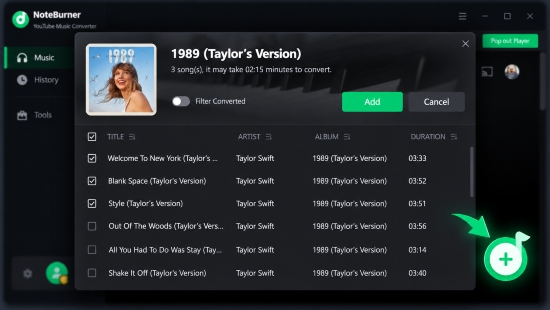
NoteBurner supports downloading songs, playlists, albums, and music videos, with full batch-processing capabilities. Its built-in YouTube Music player lets you browse and select content directly instead of manually pasting URLs.
Our test: Adding individual songs and playlists was straightforward, and batch selection worked as expected. This is one of the more convenient parts of the workflow, especially for larger playlists.
Rating: 10/10
2. Multiple Output Formats
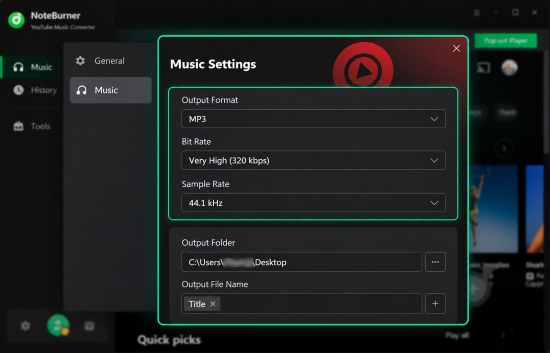
NoteBurner YouTube Music Converter supports several audio formats, including MP3, AAC, WAV, FLAC, AIFF, and ALAC. You can also adjust settings such as bitrate and sample rate, customize file names, and choose where the converted files are saved.
See also: How to Download YouTube to FLAC
The software also implys that it offers options related to video content, but our testing did not confirm a complete YouTube video-to-MP4 conversion workflow as implied by some of its promotional materials. For this reason, we would not treat video conversion as a fully verified feature based on our test.
Our test: The main audio output formats were available and worked as expected. The audio conversion options provide enough flexibility for common uses such as local playback, USB storage, and music library organization. However, the video conversion functionality did not perform as clearly as the audio workflow.
See also: How to Download YouTube Music to USB
Rating: 7/10
3. Conversion Speed and Audio Quality
NoteBurner advertises conversion speeds of up to 10× and states that it can preserve the original audio quality. In practice, however, actual conversion speed depends on factors such as your computer, network conditions, the number of tracks being processed, and the selected output format.
Our Test:
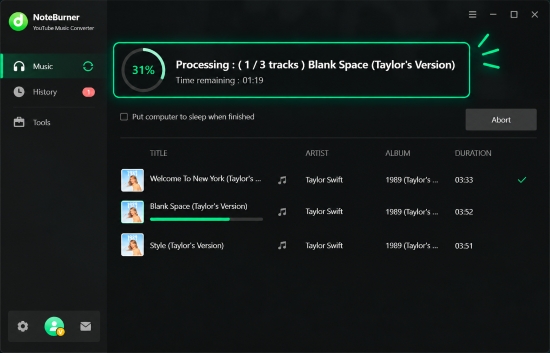
• Speed: Batch processing was noticeably faster than real-time playback. In our tests, speeds averaged around 5× to 7× - falling slightly short of the advertised 10× limit, though still impressively fast. While the app displays an estimated time remaining, it isn't always fully accurate, as actual speeds fluctuate based on your system performance, network stability, and chosen output format
• Audio Quality: Output quality was solid, but keep in mind that selecting 320 kbps in the settings will not magically upgrade lower-quality source audio. Your final file quality is still limited by YouTube Music's original stream bitrates.
Rating: 8/10
4. ID3 Tags and Artwork
NoteBurner YouTube Music Converter claims to retain metadata such as the title, artist, album, artwork, and year, while also providing an ID3 Tags Editor for further changes.
Our test: Basic metadata was retained correctly for the tracks we tested, which saved us from manually organizing every file afterward. This is particularly useful when converting complete albums or playlists.
Rating: 10/10
5. Built-in YouTube Music Web Player
Rather than requiring a separate YouTube Music application, NoteBurner YouTube Music Converter integrates a built-in web player directly into the interface, allowing you to browse, search, and select music without switching apps.
Our test: Overall, the integrated player offers a smooth, seamless workflow - especially when searching for tracks or adding full playlists. The interface has clearly benefited from recent updates, feeling more responsive and refined than previous versions. However, the navigation logic can be confusing, particularly for beginners:
- Vanishing Player Interface: Once you add songs to the conversion queue, the web player disappears, making it unintuitive to step back and continue browsing.
- Awkward Navigation: Attempting to return to the previous screen often launches a separate, standalone window rather than keeping you in the same view.
- Semi-Embedded Design: Because of this detached behavior, the player feels more "semi-embedded" than truly integrated. Additionally, if the web page experiences loading or playback issues, it directly impacts your ability to select and convert tracks.
You might notice that the web player allows you to browse and add tracks to the conversion list without logging in. However, in our tests, conversions consistently failed without an active account session. You must be signed into YouTube Music within the embedded player for downloads to process successfully.
Rating: 7.5/10
Overall Test Result
Our testing found that NoteBurner YouTube Music Converter's strongest assets are its robust playlist handling, reliable batch conversion, flexible output formats, and excellent metadata preservation. The built-in YouTube Music player also streamlines the workflow by keeping content discovery and conversion under one roof.
However, it isn't without its limitations. The semi-embedded web player can feel surprisingly unintuitive - once tracks are queued, the player interface hides itself, making back-navigation confusing for newcomers and often spawning redundant standalone windows. Furthermore, actual conversion speeds cap out around 5×-7× rather than the advertised 10×, and the displayed time estimates remain somewhat inaccurate. Finally, output quality is strictly bound by YouTube Music's native stream bitrates, meaning selecting 320 kbps won't magically upscale lower-tier source audio.
Overall, NoteBurner provides a relatively straightforward desktop workflow for users who want to organize multiple YouTube Music tracks as local audio files, although some advertised features - particularly video conversion - may require closer verification depending on the version and workflow being used.
Overall Rating: 8/10
Part 3. How to Use NoteBurner YouTube Music Converter
NoteBurner YouTube Music Downloader keeps the basic workflow relatively straightforward. The following steps cover the main process.
Step 1. Launch NoteBurner YouTube Music Converter on your PC or Mac. Click the 'Settings' (Gear icon) in the bottom-left or top-right corner. Here, select your preferred Output Format (e.g., MP3), Bit Rate (e.g., 320kbps), Sample Rate, Output Folder, and file organization preference.
Step 2. Use the built-in YouTube Music web browser window to log in to your Google account. Open any playlist, album, or track you wish to download. Click the green floating "Add to List" (+) icon at the bottom right. NoteBurner YouTube Music Converter will scan and list all available tracks in a pop-up window. Check the boxes next to the songs you want.
Step 3. After adding the tracks, review the conversion list and click 'Convert' button to start downloading. NoteBurner will process the selected YouTube Music content according to your chosen settings.
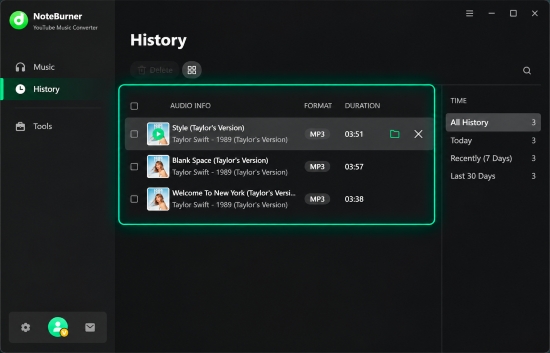
Step 4. Once the conversion completes, switch to the 'History' tab inside the program. Click the Folder icon next to any song to instantly open its location on your computer's local drive.
Part 4. Pros and Cons of NoteBurner YouTube Music Converter
After looking at its main functions and workflow, NoteBurner has some clear advantages, but it also has limitations worth considering.
Delivers reliable 5× to 7× conversion speeds with flexible output format options (MP3, AAC, WAV, FLAC, AIFF, ALAC);
Playlists and albums can be added together instead of processing every track individually;
Bitrate, sample rate, and output location can be customized;
Eliminates the hassle of copying and pasting URLs, allowing you to browse and queue tracks directly inside the integrated web player;
Preserves track info, album art, and ID3 tags accurately, saving manual organization effort;
Works smoothly for both free and paid YouTube Music accounts
Real-world speeds hover around 5× to 7×, and the displayed time-remaining estimate is often inaccurate;
Selecting 320 kbps will not upscale original stream bitrates, as output fidelity remains capped by YouTube Music's native quality;
Promotional claims regarding video downloads could not be fully confirmed during hands-on testing;
You have to sign in to a YouTube Music account to download songs;
Converts only the first minute of each track in the trial version and strictly supports YouTube Music (excluding Spotify, Apple Music, or Tidal);
The semi-embedded layout can be confusing - adding songs hides the player, navigating back often spawns redundant windows, and occasional glitches prevent pages from opening properly for no clear reason;
Tools such as CD burning, local format conversion, and audiobook conversion are useful extras, but they are not essential if your only goal is converting YouTube Music
See also: How to Burn YouTube Music to CD
Part 5. Top Alternatives to NoteBurner YouTube Music Converter
While NoteBurner YouTube Music Downloader handles basic YouTube Music downloads well, its clunky navigation, occasional player glitches, and single-platform lock-in mean it isn't ideal for everyone. Depending on whether you prioritize seamless multi-platform support, complete manual control, or free quick extractions, several alternative software solutions stand out.
Alternative 1. AudFree YouTube Music Converter
Best for: Users looking for a smooth, dedicated YouTube Music desktop converter with a seamless web player experience.
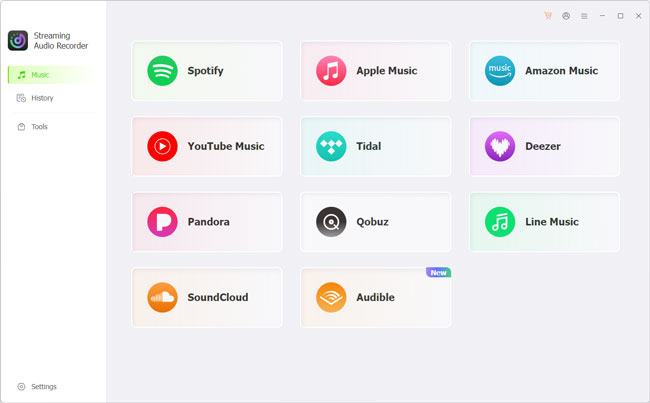
AudFree YouTube Music Converter is the closest alternative to NoteBurner in this list because it follows a similar desktop-based workflow. And both support batch converting YouTube Music into local audio formats like MP3, FLAC, and WAV.
Where AudFree truly stands out is in its user experience. Unlike NoteBurner's clunky, semi-embedded navigation and occasional glitches, AudFree features a truly integrated web player. This provides a far smoother workflow without vanishing interfaces or confusing pop-up windows when queuing tracks.
Another key difference is the scope of each product. NoteBurner YouTube Music Converter is designed specifically for YouTube Music, while AudFree offers broader compatibility with more than 10 major streaming services, including Spotify, Apple Music, and YouTube Music. This makes AudFree a more versatile option if you regularly use multiple streaming platforms.
In addition, if you prefer a clean and stable interface without distracting ads, combined with an intuitive built-in player, AudFree may provide a more streamlined overall experience.
Why Consider AudFree YouTube Music Downloader?

- 100% secure without data tracking or unnecessary data collection
- Download complete playlists and albums at high speed while preserving the original audio quality
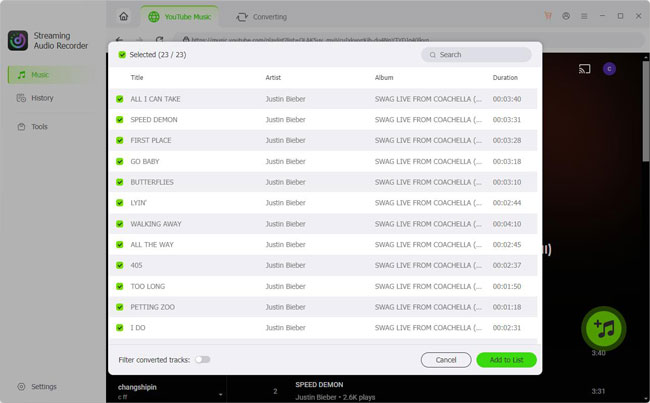
- Browse and search for YouTube Music content directly within the app without confusing back-navigation
- Save entire playlists and albums in batches at speeds of up to 30× faster
- Convert YouTube Music to WAV, FLAC, MP3, and other popular audio formats
- Automatically retain ID3 tags such as song titles, artists, album artwork, and release dates
- 24/7 access to dedicated support to help troubleshoot issues and maintain stable performance
However, AudFree is not without limitations. Its free trial is mainly intended for testing the software, allowing you to download only the first 30 seconds of each track. To save full songs, playlists, or albums, you'll need to upgrade to the full version. You also need to sign in to your YouTube Music account before downloading content. These restrictions are worth considering when deciding whether AudFree fits your needs.
Alternative 2. Audacity
Best for: Users who want a free audio recorder and editor.
Audacity is a very different type of tool. It is a free, open-source audio recording and editing application for Windows, macOS, and Linux rather than a dedicated YouTube Music converter. It can record audio, edit tracks, apply effects, and export audio in formats including MP3, M4A, AIFF, FLAC, and WAV.

This makes Audacity useful when your priority is free audio recording or editing, rather than automatically processing YouTube Music playlists. Its current version also provides a modern clip-based editing workflow and a broad range of editing and recording tools.
The main trade-off is convenience. A dedicated converter such as NoteBurner YouTube Music Converter is built around selecting online music and processing it in batches, whereas Audacity requires a recording workflow and may involve more manual work (more cumbersome). It also does not provide the same YouTube Music-specific library management features.
No hidden fees, trial timers, or feature paywalls;
Allows users to cut, trim, apply equalization, eliminate noise, and adjust pitch before exporting;
Records any sound played through your computer speakers regardless of the app or browser
You must play the full duration of a track to capture it (no multi-speed acceleration);
ID3 tags and song tracks must be split and edited manually
Alternative 3. YT1S
Best for: Casual users who want a quick browser-based download.
If you only need to convert one or two YouTube Music tracks occasionally and do not want to install software, web-based tools like YT1S or similar online YouTube-to-MP3 sites offer a quick shortcut. Such online YouTube downloaders take a simpler approach: open the website, provide the required YouTube content, select an available output option, and process it in the browser.
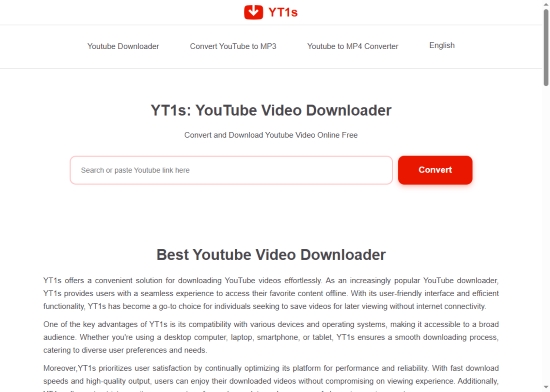
The main advantage is convenience. You do not need to install desktop software. However, browser-based tools generally provide less control than dedicated desktop converters. Batch processing, metadata management, output customization, and long-term library organization may be more limited, and users should also pay attention to advertising, redirects, privacy practices, and the specific terms of the service.
Free to use;
Runs directly inside Chrome, Safari, or Edge on both desktop and mobile devices;
Quick one-click extraction without mandatory software registration
Online sites are littered with pop-up ads, redirect banners, and potential malware risks;
Sound quality is heavily compressed (often limited to 128kbps or 192kbps);
Lacks automated batch processing for full albums or playlists
Part 6. NoteBurner YouTube Music Downloader vs Alternatives: Full Comparison
To make the differences easier to understand, the table below provides a side-by-side comparison of NoteBurner YouTube Music Converter and its main alternatives, highlighting their key features and differences.
| Feature | NoteBurner YouTube Music Converter | AudFree YouTube Music Converter | Audacity | YT1S |
|---|---|---|---|---|
| Platform Type | Desktop software | Desktop software | Desktop software | Web-based |
| Primary Platform | YouTube Music | YouTube Music, Spotify, Apple Music & more (Over 10) | Any system audio playback | Public YouTube / YouTube Music links |
| Conversion Method | Semi-Embedded Web Player | Embedded Web Player | Real-time WASAPI / Core Audio Recording | Web-based link extraction |
| Conversion Speed | 5-7× batch processing | 30x batch processing | Real-time (1×) | Dependent on web server load |
| Max Audio Quality | Up to 320 kbps | Up to 320 kbps / Lossless | Uncompressed raw audio | Compressed (often 128-192 kbps) |
| Ad-Free Output | ✅ | ✅ | ✅ | ❌ |
| ID3 Tag Auto-Save | ✅ | ✅ | ❌ | ❌ |
| Output Format | MP3, AAC, FLAC, WAV, ALAC, AIFF | MP3, FLAC, WAV, AIFF, M4A, M4B | MP3, AAC, FLAC, WAV, OGG, etc. | MP3 |
| Pricing | ~$44.95/yr or $89.90 Lifetime | ~$29.95/mon, $69.95/yr, or $159.95 Lifetime | Free | Free |
Is NoteBurner YouTube Music Converter Worth It?
Yes, but only if your listening habit revolves exclusively around YouTube Music.
NoteBurner delivers a clean, intuitive, and fast batch-conversion workflow for downloading songs with full artwork and metadata. However, if you also stream from Spotify or Apple Music, or want to record live streams and audio from YouTube videos, AudFree provides a much higher long-term value thanks to its multi-platform capture architecture.
Part 7. FAQs About NoteBurner YouTube Music Converter
Is NoteBurner YouTube Music Converter Free?
No, NoteBurner YouTube Music Converter offers a free trial, but it is not a fully free converter. The trial version converts only the first one minute of each song and has other usage restrictions. A paid license is required for unrestricted conversion.
How Much Does NoteBurner YouTube Music Converter Cost?
The official store currently lists the 1-year plan at $44.95 and the lifetime plan at $89.90, before applicable taxes. The one-year license renews automatically, while the lifetime option is a one-time purchase. Prices and promotions can change, so the official purchase page should be checked before buying.
Is NoteBurner YouTube Music Converter Safe?
Yes, but the safest approach is to download NoteBurner from its official website, not an unofficial software repository. NoteBurner states that its installers are digitally signed and free from bundled software, ads, and malware. This is the company's own statement, so users should still follow normal software-safety practices, such as downloading from the official source and keeping their operating system and security software updated.
Is NoteBurner YouTube Music Converter Legal?
The software is an audio-processing tool, but the legality of downloading or converting specific YouTube Music content depends on factors such as copyright law, applicable terms of service, and how you use the resulting files. Using converters to bypass DRM for personal offline listening (fair use) is generally tolerated in many jurisdictions, provided you do not distribute, sell, or broadcast the downloaded music files publicly, whether with NoteBurner or AudFree.
Conclusion
NoteBurner YouTube Music Converter is a feature-rich desktop solution for users who want a more structured way to convert YouTube Music content into local audio files. Its batch processing, multiple output formats, customizable quality settings, and metadata support make the workflow more convenient for maintaining a personal music library.
However, it is a paid tool with a limited trial, and not every user needs a dedicated converter. AudFree provides another desktop-oriented approach with broader compatibility, Audacity is better suited to free recording and audio editing, while online tools such as YT1S focus on quick browser-based use. The right option ultimately depends on whether you prioritize batch conversion and library management, free recording and editing, or simple occasional downloads.

Staff Editor


