


Quick Answer: SpotiLab Spotify Downloader is a web-based tool that allows you to download Spotify tracks, albums, playlists and even podcasts to MP3, FLAC and WAV without installing software or logging into your Spotify account. However, if you want more output formats and batch downloading, you may need a dedicated desktop tool like AudFree Spotify Music Converter.
When you are looking for a way to download Spotify music as MP3 files, you may notice that there is an online tool named SpotiLab on the web. You may wonder how does it work, is it free, what format can it output, is it safe, and more. In this SpotiLab Spotify Downloader review, we will explain all these to you. Besides, we will recommend an alternative to it.
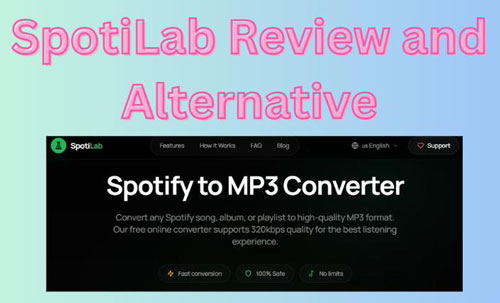

Part 1. What Is SpotiLab Spotify Downloader
Unlike traditional Spotify music downloader, SpotiLab is an online tool, you don't need to install an application on your device to use it. And you even don't need to sign in to your Spotify account to download music. You just need to visit the SpotiLab official website on your mobile or desktop device, paste the Spotify link address, choose an output format and start downloading.
With SpotiLab, you can download Spotify individual songs, albums, playlists and podcast episodes in MP3 at up to 320kbps, FLAC and WAV. Besides, it will keep the track metadata such as the song title, artist, cover artwork, release year, etc.
Part 2. Is SpotiLab Spotify Downloader Free?
SpotiLab is free to use. It offers a free plan to casual users. Users can download Spotify music at MP3 320kbps. Also, they can get FLAC downloads, but limits to 20 tracks per day. Besides, users are allowed to download 50 tracks per playlist.
However, if you want to break the limits in the free plan, you can get SpotiLab's Supporter plan. It costs $5 a month. With this plan, you can download unlimited FLAC downloads and unlimited tracks per playlist.
So, if you just want casual downloads, it is enough to use SpotiLab's free plan. But if you have a large playlist, you can consider using its Supporter plan.
Part 3. Is SpotiLab Spotify Downloader Safe and Legal?
As an online Spotify music downloader, you may care about SpotiLab's safety and legality. Here you can learn more about it.
Is SpotiLab Safe to Use?
SpotiLab claims that it doesn't require Spotify login credentials, doesn't require registration, and doesn't store personal information. It is quite safe to not offer your Spotify account info to a third-party downloader.
However, you still need to be cautious. When using an online tool, please avoid entering account passwords, clicking unrelated pop-ups and redirects, and installing unexpected browser extensions.
Is SpotiLab Legal to Use?
According to Spotify's Terms of Use, it doesn't allow users to copy, record, rip, redistribute, or transfer content unless specifically permitted. So, keep in mind that use the downloaded Spotify music from SpotiLab for personal and educational use onlly, do not use them in commercial.
Part 4. How to Use SpotiLab Spotify Music Downloader Online
To use SpotiLab to download Spotify music is very easy. Now, you can follow the steps below to start.
Step 1. Go to the Spotify app or visit Spotify web player website, then find the song, playlist or album that you want to download.
Step 2. Once located the content, right-click on it and select "Share" from the drop-down menu. Then tap "Copy Link to Track", "Copy Link to Album", or "Copy link to playlist" tab to copy the Spotify music URL.

Step 3. After copying the link address, open your web browser and go to the SpotiLab website.
For a single track:
Step 4. On the screen, paste the link of the track you want to download from Spotify, then click the "Download" button.
Step 5. SpotiLab will analyze the link and show the result to you. Then you can choose the available output format based on your plan and tap 'Download' to download Spotify music online.
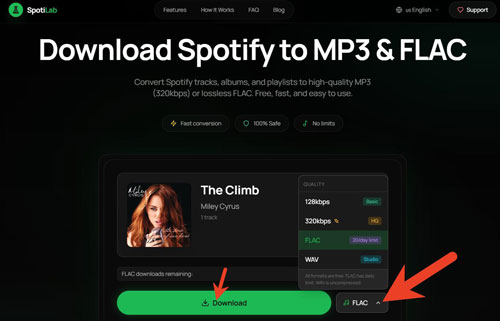
For a playlist or album:
On the screen, insert the link of the album or playlist you want to download from Spotify, then click the "Download" button. Later, SpotiLab will start downloading the playlist or album in ZIP automatically.
Part 5. Real-Tests of SpotiLab Spotify Music Downloader
We have tested SpotiLab Spotify music downloader's performance above. Now, let's know the real fact of this online tool to see if it worth using.
1. Do Not Support Podcast Download
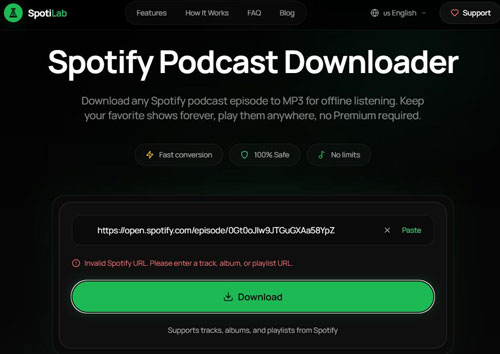
SpotiLab states that it supports downloading Spotify podcasts. However, when we visited the SpotiLab Spotify Podcast Downloader, and put the Spotify podcast and episode link into the text box, it showed 'Invalid Spotify URL. Please enter a track, album, or playlist URL'.
2. Download a Blank ZIP File
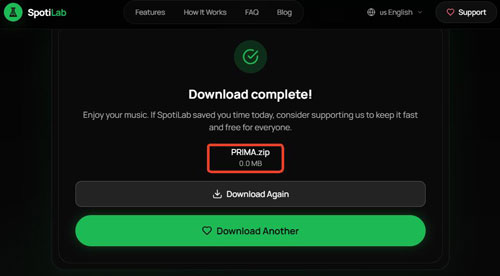
When we tested a playlist or an album downloading, SpotiLab downloaded nothing, just give a ZIP file with no files. It
3. Sometimes Failed to Analyze Link Address and Download Audio Files
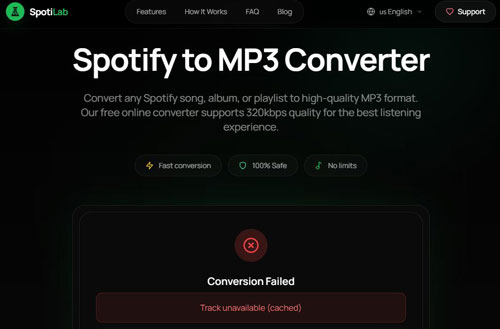
During our test, sometimes SpotiLab can't analyze the audio content link from Spotify and download the audio content successfully. It will show that the track is cached file (unavailable track) or the backend API is not enabled and can't be converted.
Part 6. Pros and Cons of SpotiLab Spotify Music Downloader
After learning what is SpotiLab, how to use it, etc., now, you can quickly check the pros and cons of it to see if it suits your needs.
No need to install a software on your device;
No need a Spotify account;
Support tracks, albums, and playlists;
Support MP3, FLAC and WAV output format;
Keep metadata of song;
Easy to use
Can't support podcasts download as it claimed;
Have restriction to Free plan;
Can't support batch download;
Failed to download audio content due to API, etc.;
Lack other output audio formats, such as AIFF, M4A, M4B, etc.
Part 7. Best SpotiLab Alternative - AudFree Spotify Downloader
SpotiLab is convenient for casual listeners to download Spotify music. However, if you want to download a large music library, want more output formats, want batch process and so on, AudFree Spotify Downloader is your ideal choice.
AudFree Spotify Music Converter

- Download songs, playlists, albums, podcasts, audiobooks, etc. from Spotify
- Download Spotify podcasts to MP3, FLAC, AIFF, WAV, M4A and M4B
- Preserve original audio quality, original ID3 tags and metadata information
- Work at 13X faster speed, adjust output audio parameters
- Support back up Spotify music library to another account

Compare SpotiLab vs AudFree Spotify Music Converter
| Feature | SpotiLab | AudFree Spotify Music Converter |
|---|---|---|
| Operating System | Online | Windows, Mac |
| Download Content | Spotify song, playlist and album | All Spotify content |
| Batch Download | ❌ | ✅️ |
| Output Format | MP3, FLAC, WAV | MP3, FLAC, M4A, WAV, AIFF, M4B |
| Download Speed | 1X | 13X |
| Output Quality | 128kbps, 320kbps | Lossless / 320kbps (True Stereo) |
| Keep ID3 Tags | ✅ | ✅️ (Excellent) |
| Customize Output Parameters | ❌ | ✅️ |
| Success Rate | 83% | 98% |
| Ad-Free | ❌ | ✅️ |
| Security | Medium | 100% safe (No ads or malware) |
| Best For | Casual listeners who want quick downloads | Users who have a large library and want batch conversion as well as more features |
Besides, AudFree Streaming Audio Recorder is also an alternative to SpotiLab Spotify music downloader. It can download any audio content from Spotify, Apple Music, YouTube Music, SoundCloud, Tidal, Qobuz, etc. with original quality. What's more, it supports to download online podcasts and online radio for free.
Part 8. Final Verdict: Is SpotiLab Worth Using?
In a word, if you want a simple download, it is worth trying to use SpotiLab Spotify downloader online to download Spotify music. However, there are some limitations of the online tool. You can't get more output formats, batch downloading, etc.
So, if you have a large music library and want super-fast speed downloads, using AudFree Spotify Music Converter is your better choice. It supports batch downloading and converting large playlists and albums at once. Besides, it can output multiple audio formats such as AIFF, FLAC, MP3, M4A, WAV, and M4B. Also, it will output original sound quality of the Spotify music tracks, which allows you to have a better listening experience on your device.

Chief Editor


