Looking for a Spotify music converter? When you search for it on the web, you've likely come across SpotiCatch.
SpotiCatch is an online tool for you to convert Spotify songs, playlists and albums to MP3 audio files. However, is it worth using? Is it safe? Or, is there any better alternative to it?
This comprehensive SpotiCatch review will answer all these questions by examining its features, limitations, safety, legality and best alternative. Just keep on reading.

Part 1. What Is SpotiCatch?
What Is SpotiCatch and How Does It Work
SpotiCatch is an online Spotify music downloader for users to download and convert Spotify files into local audio files for offline playback. You don't need to install desktop applications or log in with your Spotify account to begin downloading. You just need to copy a link to a Spotify song, playlist or album, paste it into the SpotiCatch website and start the conversion simply.
SpotiCatch Review at a Glance
| Category | Installation | Free Version | Premium Version | Output Format | Playlist Download | Keep Metadata | Download Speed | Lyrics | Spotify Login Required |
|---|---|---|---|---|---|---|---|---|---|
| Details | ❌ | ✅ | SpotiCatch Plus | MP3 128kbps (for free version) | ✅ 100 tracks (for free version) | ✅ Basic (for free version) | Standard (for free version) | ❌ | ❌ |
Key Features of SpotiCatch Spotify Downloader
✅ Download Spotify Song, Album, and Playlist for Free
SpotiCatch allows users to download song, album and playlist from Spotify without using a Spotify Premium or Spotify Free account.
✅ Browser-based Downloading
SpotiCatch works entirely online. There is no software installation. You can directly access it online from Windows, Mac, Linux, Chromebook, tablets and mobile phones.
✅ Support MP3 and FLAC Output
SpotiCatch Free version allows you to download Spotify songs to MP3 at 128kbps, while SpotiCatch supports up to 320kbps MP3 and FLAC output.
✅ Keep Metadata
SpotiCatch supports to save ID3 tags such as song title, artist, album and more of the Spotify track.
Part 2. SpotiCatch Free vs SpotiCatch Plus
SpotiCatch offers a free service as well as a premium version called SpotiCatch Plus. Although both versions share the same browser-based interface, the premium version provides additional features designed specifically for users who frequently download music.
With a SpotiCatch Plus version, you can download Spotify to FLAC, not only MP3. Besides, it supports batch playlist downloads, faster conversion speed, and full metadata preservation.
Compare SpotiCatch Free vs SpotiCatch Plus
| Feature | SpotiCatch Free | SpotiCatch Plus |
|---|---|---|
| MP3 Download | ✅ (128kbps) | ✅ (320kbps) |
| FLAC Output | ❌ | ✅ |
| Batch Playlist Download | Limited | ✅ (Unlimited) |
| Metadata Preservation | ✅ (Basic) | ✅ (Full) |
| Lyrics | ❌ | ❌ |
| Download Speed | Standard | Faster |
| Ad-free Experience | ❌ | ✅ |
| Playlist Splitting | ❌ | ✅ |
If you only download a few songs sometimes, the SpotiCatch Free version is suitable for you.
If you have a large music library and want better listening quality, you can choose the SpotiCatch Plus version.
During our research, we did not find publicly available detailed pricing information for SpotiCatch Plus subscriptions or lifetime licenses. Currently, you are required to pay $5 per month for an upgrade via Ko-fi.
Part 3. Is SpotiCatch Safe and Legal?
Before using an online tool like SpotiCatch, the most important thing is its safety and legality.
Is SpotiCatch Safe?
In some cases, SpotiCatch is safe. It doesn't require a Spotify account credential. And you don't need to sign up for SpotiCatch to use it.
However, as SpotiCatch is a relatively new tool, independent assessments regarding its long-term reliability, security measures, or overall reputation are currently limited. Besides, while no widespread reports of malware were found during our review, you should remain cautious when downloading files from third-party sites and ensure you are using the official SpotiCatch domain.
For safety, there are a few points to keep in mind. Please download music only from the SpotiCatch official website and avoid using unofficial mirror sites. Also, keep your antivirus software up to date and be wary of websites that request unnecessary permissions or personal information.
Is SpotiCatch Legal?
In fact, Spotify's Terms of Service generally prohibit the unauthorized downloading of music outside of the official application. Although SpotiCatch is designed to help users save Spotify content as standalone audio files, such downloading activity may violate Spotify's terms.
What's more, copyright laws vary by country. Downloading copyrighted music without authorization may be restricted by local regulations or deemed illegal, particularly if the files are shared, redistributed, or used for commercial purposes.
So, it is important to be aware of Spotify's terms and the copyright laws applicable in your jurisdiction before using SpotiCatch.
Part 4. How to Use SpotiCatch to Download Spotify Music
If SpotiCatch is OK for you, you can follow the steps here to use it to download music from Spotify online.
Step 1. Open the Spotify app or Spotify Web Player, find the music you want to download, then copy its link address. Just tap the three-dot icon > Share > Copy link to song, Copy link to album, or Copy link to playlist.
Step 2. Visit the official SpotiCatch website via the browser you like.
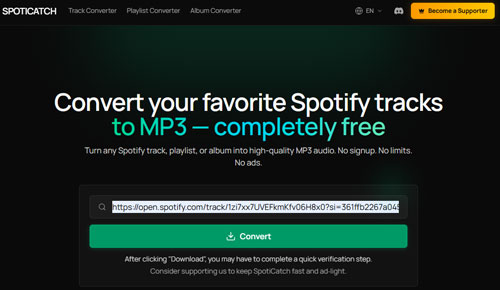
Step 3. On the main screen, paste the copied Spotify music link into the text box, then click the 'Convert' button. You may be asked to complete the verification.
Step 4. Later, choose the output format like MP3, and then click the 'Download' button to download Spotify music as local files on your computer or mobile device.
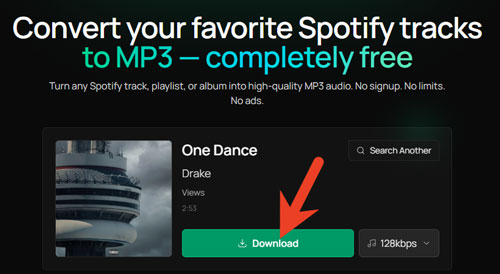
After that, you can listen to Spotify music offline without using the Spotify app and the Spotify account.
Part 5. Pros and Cons of SpotiCatch
Like other Spotify downloaders, SpotiCatch has both advantages and disadantages. Here in this part, you can take a glance at its pros and cons.
Don't need to install any software on your device, convenient for users on shared computers, Chromebooks or devices that can't install apps;
Easy to use for every user;
Works on almost any device with a browser;
No need to sign in with a Spotify account;
Keep metadata of Spotify music;
Supports MP3 and FLAC (Plus version) formats
Sometimes it is unstable due to server maintenance, changes to Spotify's platform, temporary service outages, etc.;
Less output customization, such as sample rate, file naming, bitrate, etc.;
Pricing lacks transparency;
Don't support Spotify audiobooks and podcasts downloads
Part 6. How to Fix SpotiCatch Not Working
If SpotiCatch does not function as expected, the issue may not necessarily lie with the website itself. Browser settings, network connectivity, temporary server outages, or changes made by Spotify can all affect the operation of online download tools. Below are some common issues and their corresponding solutions.
Issue 1. SpotiCatch Can't Recognize Spotify Links
Fix: Make sure you have copied the complete Spotify link to a song, playlist or album from the official Spotify app or web player. It is noted that SpotiCatch can't analyze links to podcasts or audiobooks. Besides, avoid using shortened or modified URLs. Later, refresh the page and try again.
Issue 2. Playlist Download Fails
Fix: Try a smaller Spotify playlist first if you want to convert a large playlists. Also, waiting for server traffic to decrease.
Issue 3. FLAC Option Is Missing
Fix: The FLAC output requires the SpotiCatch Plus account. First, you need to confirm whether you are using the premium version. Or, check if the FLAC feature is currently available and review the official website for any recent updates.
Part 7. Best SpotiCatch Alternative
While SpotiCatch is easy to use to download Spotify music, it lacks some functions such as more output formats, customization, and so on. Besides, as an online tool, it is not stable occasionally. So, many users are looking for a stable, professional and high-quality alternative to SpotiCatch.
In this part, we would like to recommend AudFree Spotify Music Downloader as the SpotiCatch alternative. It is a professional Spotify downloader and converter, allowing all Spotify users to download any content from Spotify, including single tracks, audiobooks, podcasts, albums, playlists, etc.
Besides, it supports to convert Spotify to MP3, M4A, M4B, FLAC, WAV and AIFF. What's more, it will keep the original audio quality and full ID3 tags of Spotify tracks, such as title, artist, album, etc. In addition, you can customize output sample rate, bit rate, audio channel, file name and more as needed.
Now, follow the simple steps below to use AudFree Spotify Converter to download music.
Step 1. Click the "Try It Free" button above to download and install this AudFree tool on your Windows or Mac computer. After that, open it and log in to your Spotify account in the built-in web player. Later, select the Spotify content you want to download, tap the big + button, and tap 'Add to list' to load Spotify files.

Step 2. Hit the "Menu" icon in the top-right corner on the program's interface and select "Preferences" from the list. Under the "Conversion" section, pick up the output audio format, customize bit rate and sample rate for desired output audio quality.

Step 3. Once set, click the "Convert" button from the Converting window to start converting Spotify music. Later, you will get the converted Spotify music files for playback offline on any device and player.

AudFree Streaming Audio Recorder can be also used as an alternative to SpotiCatch. It supports to download any music from Spotify for offline listening. What's more, if you use YouTube Music, Amazon Music, Tidal, Apple Music, SoundCloud, Pandora, Qobuz and other music services, it is suitable for you to download music.
Part 8. Conclusion
SpotiCatch offers a convenient way for users to download audio files from Spotify for offline playback. However, there are limtations of it. For casual users, using SpotiCatch is practical. But for users who want powerful functions and have a large music library, using a desktop tool like AudFree Spotify Music Converter will give you a more reliable and advanced experience.

Chief Editor