


When you search for ways to download Spotify music for offline listening on Google, you will find lots of online and desktop tools in the results. Among them, now Spotisaver is one of the popular ones. Today, we will explore everything you need to know about Spotisaver. We will discuss its safety, usage, pros & cons, alternatives and more in this review. Let's dive in.

Part 1. What Is Spotisaver
Spotisaver (https://spotisaver.net/en/) is a web-based Spotify to MP3 downloader. It can work across all platforms, including Windows, macOS, and mobile devices. Unlike professional software, it doesn't require an installation on your device. You simply copy and paste a Spotify link into its webpage, whether it's a single track, an album, or a full playlist, and it will generate a download link for you to download the music content. Also, it supports to download full album or playlist into ZIP. And it will retain metadata such as cover art, etc. of the track.
Spotisaver claims to offer high-quality 320kbps audio. However, it does not "rip" files directly from Spotify's encrypted servers. Instead, it uses a matching algorithm to find the tracks on "free sources" (often YouTube) and converts those to MP3. This means the audio quality is only as good as the source it finds.
Part 2. Is Spotisaver Safe to Use?
As an online free tool, many users worry about the safety. In fact, it is not safe enough to use Spotisaver. Security scanners like ScamAdviser and Gridinsoft have flagged Spotisaver with exceptionally low trust scores, sometimes as low as 1/100. Now, let's learn more about the risks of Spotisaver.
1. Aggressive Redirects: Free online tools often profit through "malicious advertising". Clicking the download button may redirect you to suspicious dating sites or pop up a "system update" warning, which is actually a phishing attempt.
2. Malware Potential: While the MP3 files themselves are usually safe, the website environment can be a breeding ground for browser hijackers.
3. Domain Shifting: Like many copyright-skirting tools, Spotisaver frequently changes its domain (e.g., from .net to .online). This is often a red flag for services that are regularly blacklisted by Internet Service Providers (ISPs) or Google.
While using Spotisaver, do so with a robust ad-blocker and a reliable antivirus active. Never provide personal information or download ".exe" files from the site. If you want to find a secure tool, you can skip to Part 6 to learn more.
Part 3. How to Use Spotisaver Spotify Downloader
If you still want to try Spotisaver to download music from Spotify, then you can follow the steps below and start.
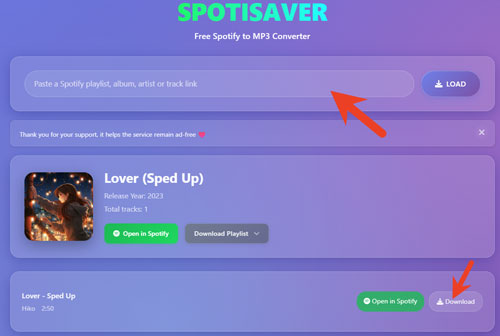
Step 1. Open Spotify platform on your computer or mobile device. Then find and copy the song or playlist link you want to download.
Step 2. Visit Spotisaver official website and put the copied Spotify track URL into the text box on its homepage. Next, tap the LOAD button next to the box.
Step 3. Later, you can tap the Download button to start to download Spotify tracks online.
Part 4. Pros and Cons of Spotisaver
In this part, let's conclude the advantages and disadvantages of Spotisaver Spotify music downloader.
100% free to use;
No need to install software on your device;
Work on mobile and desktop devices;
Keep basic ID3 tags
Output low audio quality;
Only output MP3 audio format;
Can't download podcasts, shows and artists;
Has a limit on the number of tracks that can be downloaded;
Contain pop-up ads;
Low trust rating;
Fail to download a large playlist sometimes;
Not stable, often crashes
Part 5. Why Is Spotisaver Not Working?
When using Spotisaver, users may encounter errors like 'Resource not found', 'Empty ZIP file', 'Link parsing errors', 'Expired tokens', etc. Now, you can check the reasons why Spotisaver not working.
1. Copyright Removal: Spotify regularly updates its API and encryption technology to block third-party online tools. When Spotisaver's matching script fails, it can take developers several days to update the website.
2. ISP Blocking: Many Internet Service Providers (ISPs) blacklist "piracy-related" domains. If the Spotisaver website won't load, you can try to use a VPN to access it.
3. Server Overload: Since Spotisaver a free service, the servers often struggle with high traffic, leading to slow processing or failed downloads for large playlists.
4. Browser Cache Issues: Sometimes, outdated website data in the browser can prevent the conversion script from running correctly.
Part 6. Alternatives to Spotisaver Spotify Music Downloader
If you want a safer and stable tool to download Spotify songs, here are some Spotisaver alternatives to you.
1. AudFree Spotify Music Converter (For the 'Safety' Users)
AudFree Spotify Music Converter is the best alternative to Spotisaver due to its stability, security, superior conversion technology and lossless quality output.
AudFree Spotify Music Downloader

- Batch download Spotify songs, playlists, albums, podcasts, etc. without Premium
- Convert Spotify music to MP3, FLAC, WAV, etc.
- Keep 100% original sound quality and ID3 tags of Spotify music
- Adjust output channel, sample rate, bit rate, etc. as you like
- Step 1. Add Spotify music to AudFree Spotify Music Converter

- Download and install AudFree Spotify Music Converter on your computer. Launch it, search for any tracks, playlists, or albums in Spotify web player and then add the content to the tool.
- Step 2. Set output format and parameters

- When Spotify tracks are loaded, tap Menu on the top right and choose "Preferences" from its drop-down list. On the new window, hit "Conversion". Here, set output format, channel, sample rate, bit rate, etc. Once done, tap "OK" to save the settings.
- Step 3. Convert and download Spotify music

- Now, click the "Convert" button to batch convert and download music from Spotify to computer in original quality. Once converted, press the "Converted" option to locate the downloaded Spotify files on your computer locally.
Support multiple output audio formats;
Support download podcasts from Spotify to MP3;
Support customize bit rate and sample rate;
Safe and stable;
Keep full ID3 tags and original sound quality
Works on computers only;
Need to pay for full track conversion
To download songs from Spotify with lossless quality, you can also try AudFree Streaming Audio Recorder. It is also a professional and powerful tool for Spotify users. What's more, it not only can download Spotify music but also Apple Music, YouTube Music, SoundCloud, Qobuz, and more.
2. Online/Free Alternatives to Spotisaver (For the 'Free' Users)
If you just want to download a single track and still don't want to install software on your device, you can check out these online and free tools.
SpotiDown: It is a streamlined web tool that is often faster than Spotisaver for single tracks. It has a slightly better reputation for reliability but still carries the typical risks of redirects and pop-up ads found on free conversion sites.
Spot-DL (Command Line): For those comfortable with a terminal, Spot-DL is a powerful and open-source Python script. It is completely free, has no ads, and is much safer than web tools because you run the code locally. It searches YouTube Music for the best match and embeds high-resolution cover art automatically.
View also: Best Online Spotify Music Downloader
Part 7. Compare Spotisaver and Its Alternatives
Here let's compare Spotisaver vs its alternatives in detail to help you choose the right tool to download from Spotify.
| Features | Spotisaver | AudFree Spotify Music Converter | SpotiDown | Spot-DL |
|---|---|---|---|---|
| Type | Web tool | Desktop tool | Web tool | Open Source |
| Best For | Casual and one-off downloads | Audiophiles & Safety | Quick mobile downloads | Ad-free, power users |
| Safety Level | Low | High | Moderate | High |
| Max Quality | ~128-192kbps | 320kbps / Lossless | ~128kbps | ~128-192kbps |
| Output Audio Format | MP3 | MP3, FLAC, AIFF, M4A, M4B, WAV, Lossless | MP3 | MP3 |
| Batch Download | Limited | ✅️ | ❌ | ❌ |
| Stability | ❌ | ✅️ | ❌ | ❌ |
Part 8. Conclusion
Spotisaver is a convenient and easy-to-use tool for casual music listeners who don't care about the risk and audio quality. For the best experience, consider a dedicated desktop converter like AudFree Spotify Music Converter to protect your data and output the high-fidelity sound from Spotify.

Chief Editor


