


As year-end music recaps have become a cultural trend, fans all over the world look forward to reviewing their listening habits through features like Spotify Wrapped and Apple Music Replay. SoundCloud users are no exception. Every December, countless searches appear online asking whether 'SoundCloud Wrapped' or 'SoundCloud Playback' exists, and how to access it. While SoundCloud has introduced a limited form of year-in-review for select creators and fans, the experience is still different from other platforms.
If you're wondering how to get your SoundCloud Wrapped 2025, why some users can't see it, and how to save or export your recap playlists, this comprehensive guide will walk you through everything step by step.

Part 1. Does SoundCloud Have a Wrapped Feature?
The short answer is: SoundCloud does not currently offer a universal Wrapped-style recap for all listeners, but it has launched features that resemble a 'year-in-review', primarily known as SoundCloud Playback.
Here's the current situation of SoundCloud Stats (2025):
1. SoundCloud Playback is available, but not for everyone
SoundCloud Playback is a curated recap experience and stats that highlights:
- Your top 5 tracks, artists, genres, and moods that you played the most.
- Total plays, listening time, and active days across the year.
- A Genre Discovery count showing how many new genres you explored
- A Listening Time Persona on when you stream the most
- A "Music Doppelgänger", which identifies a listener (famous) with similar taste.
However, SoundCloud Playback is not identical to Spotify Wrapped, and it only appears for accounts that meet SoundCloud's minimum activity requirements. Typically, you must have streamed:
- At least 10 different artists, and
- At least 30 different tracks
during the yearly tracking period (usually Jan 1-Nov 30). Even then, Playback may not be available for all regions, for example, Russian.
If you can see your SoundCloud Playback 2025, you can also see modules highlighting your previous years' Playback playlists:
FYI:
Your 2024 Playback Playlist
Your 2023 Playback Playlist
Your 2022 Playback Playlist
Your 2021 Playback Playlist
Your 2020 Playback Playlist
2. Strong focus on creators and fans
SoundCloud's recap ecosystem has traditionally included two versions:
- Creator recap (for uploaders)
- Fan recap (for regular listeners)
The platform puts significant emphasis on creator analytics, such as:
- Top listeners and superfans
- Track performance insights
- Engagement metrics
For listeners, SoundCloud may show limited fan badges like:
- "You're in the top 1% of fans for this artist"
- "This was your most-played track of the year"
- "Your top reposted track in 2025"
But still, a full, interactive Wrapped-style experience isn't rolled out universally.
3. No unified personal dashboard
Unlike Spotify Wrapped or Apple Music Replay, SoundCloud still lacks:
- A stable "year-round stats" page
- A personalized listening summary for all users
- Auto-generated shareable graphics for every listener
Despite this, many users receive Playback cards, artist insights, or personalized listening badges, particularly if they frequently use this music service.
4. SoundCloud Playback vs Spotify Wrapped: Key Differences
| Feature | SoundCloud Playback | Spotify Wrapped |
|---|---|---|
| Availability | Limited, not available to all users | Global, available to all |
| Interactivity | Static cards or short recap | Full animated story |
| Creator stats | Strong creator focus | Less creator-oriented |
| Shareable graphics | Some cards available | Highly shareable visuals |
| Timeline | Late November to early December | Always early December (Within first week) |
In short, SoundCloud has SoundCloud Playback, but not a universal Wrapped. Still, you can view a SoundCloud recap if your account qualifies, which you can call 'SoundCloud Wrapped' is fine.
Part 2. How to See Your SoundCloud Wrapped (Phone & Computer)
Whether you're looking for SoundCloud Wrapped, Playback, or any year-end recap, the steps below will help you locate it across iPhone, Android, and PC.
Method 1. How to Access SoundCloud Wrapped/Playback on Your Phone
This is the most common method, as SoundCloud typically pushes playback recaps via the mobile app.
Step 1. Update your SoundCloud app
Go to App Store or Google Play Store, and update it. Since SoundCloud Playback is usually only available on the latest version of the app.
Step 2. Look for the Playback banner
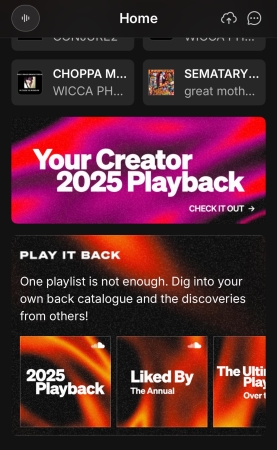
After opening the app, click the Home tab. Then look for "Playback 2025", "Your Year on SoundCloud", or similar banners at the top. This year, it is "Your 2025 Playback is coming today...". Then tap it to open your recap cards.
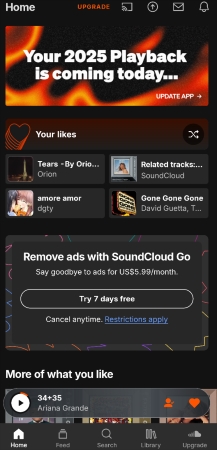
You can save or share your Playback cards once they load.
Method 2. How to Access SoundCloud Wrapped/Playback on Computer
You can also view your SoundCloud Wrapped on the SoundCloud web player by following the steps below:
Step 1. Go to SoundCloud offical webpage on your PC, and log in.
Step 2. On the homepage, you should see a recap banner labeled 'Your 2025 Playback'.
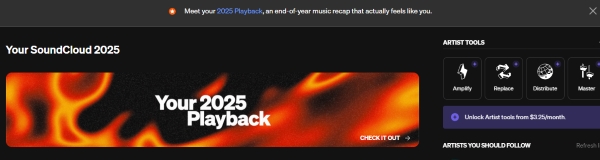
Step 3. Click the banner (or the blue '2025 Playback' link within the box) to access your SoundCloud Wrapped cards.
FYI: Your SoundCloud Playback 2025
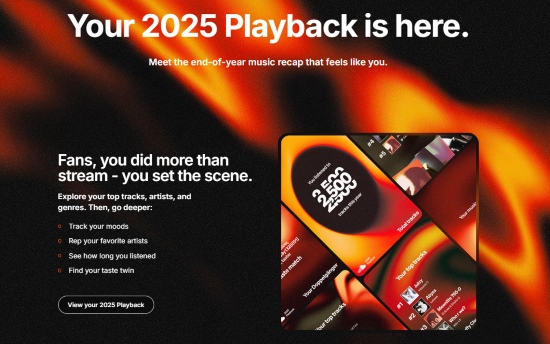
Tip: Artist-Exclusive Playback 2025
SoundCloud also releases recap features specifically for creators and artists. These highlight:
- Top fans and first listeners
- Most supportive followers
- Track performance trends
Creators can view detailed analytics - top tracks, audience engagement, locations, growth trends, and more - by visiting insights.soundcloud.com.
Part 3. How to Fix SoundCloud Wrapped Not Showing up
If you qualify for SoundCloud Playback but it's not appearing in the app or on the web player, try the solutions below.
Quick Tip: Before troubleshooting, check SoundCloud's social media (like Twitter/X or Instagram) for rollout updates. Playback often deploys in waves, so you may simply need to wait a few days.
✅ Update the App:
Older versions of SoundCloud may not support Playback banners.
✅ Clear Cache:
On Android: Settings > Apps > SoundCloud > Storage > Clear Cache
On iPhone: Delete and reinstall the app
On Chrome: Setting > Privacy and security > Delete browsing data
✅ Try Another Device
If your recap isn't rendering correctly on mobile, try accessing SoundCloud other devices such as a mobile browser, on another phone, or on a tablet.
✅ Region Restrictions
Some Playback features are only available in certain countries. Using a VPN temporarily might reveal if your region is restricted.
✅ Log Out and Back In
Refreshing your login session can trigger the banner to appear
✅ Check If the Release Date Has Passed
Playback normally appears from late November to early December (Dec 3 in the U.S. for 2025). If you're checking too early - or too late - the banner might not show.
✅ Ensure You Have Enough Listening Data
Users with very minimal listening activity won't have a SoundCloud Wrapped.
If none of the steps work, continue to Part 4 to export the SoundCloud Wrapped or create your own custom SoundCloud Wrapped using third-party tools.
Part 4. How to Export and Keep Your SoundCloud Wrapped Playlists
Even if your SoundCloud Playback appears, the recap playlists aren't always easy to download or keep permanently. SoundCloud also doesn't allow direct offline backups due to DRM protection - even with Go/Go+. If you want to save, export, or back up your Playback playlist for long-term use, here are the best methods.
Method 1. Save Your Wrapped Playlist on SoundCloud
If you can access your SoundCloud Wrapped or Playback playlist, you can save it to your library for quick access.
Step 1. After browsing your recap cards, tap Saved (or the heart icon) to add your 2025 Playback to your SoundCloud Library.
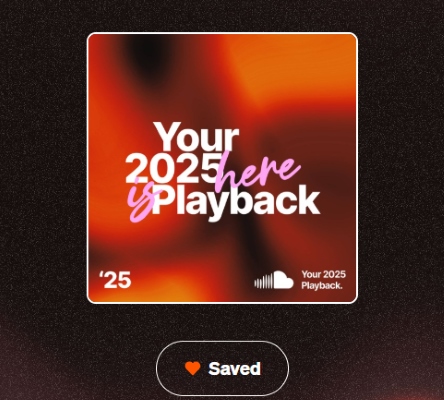
Step 2. The playlist will now appear under Library > Playlists, so you can open it whenever you want.
Saving a playlist does not download the audio files. Even SoundCloud Go/Go+ cannot export or back up Playback playlists locally because all tracks remain DRM-protected.
Method 2. Back Up Your SoundCloud Playback Playlist Using a Third-Party Tool (AudFree)
If you want to keep your SoundCloud Wrapped playlist permanently - including offline playable MP3 files - a third-party tool like AudFree Streaming Audio Recorder offers a practical solution.
This lets you archive your 2025 Playback forever or rebuild your own 'personal Wrapped' by exporting your top-played tracks.
Why Choose AudFree Streaming Audio Recorder?

- Downloads SoundCloud Wrapped Playlist in MP3, FLAC, WAV, and more
- Batch converting SoundCloud tracks to FLAC losslessly
- Automatically preserve the original ID3 tags and audio at 65x faster speed
- Ideal for building a personal SoundCloud Wrapped archive
How to Download SoundCloud Wrapped Playlist Using AudFree Streaming Audio Recorder
- Step 1. Download and Launch AudFree Streaming Audio Recorder

- Install and launch AudFree Streaming Audio Recorder on your computer (Windows or macOS). And you'll see a clean interface with 9 main music streamers on the homepage. Also, don't forget to activate your account to unlock the full features.
- Step 2. Set Output Format of Your SoundCloud Playback Playlist

- Click Menu > 'Preferences' in the top-right corner and under the 'Conversion' tab. Here, you can adjust the output parameters of your tracks. You can choose the output format, for instance, convert SoundCloud to MP3. Besides, you can customize your tracks' audio channel, bit rate, sample rate, and more.
- Step 3. Add SoundCloud Wrapped Playlist to Conversion List

- Back to the main screen, double-click the SoundCloud icon, and log in. Navigate to your SoundCloud Library > Playlist, and then tap the '+' icon to add these songs to the Converting list.
- Step 4. Start downloading the SoundCloud Playback

- Click the 'Convert' button to start conversion process. Once complete, your SoundCloud Playback tracks will be saved as offline files on your computer.
You now have a permanent backup of your 2025 Playback playlist - even if SoundCloud later changes, expires, or removes it. This method also works for any playlist you create manually based on your own listening habits.
Part 5. FAQs about SoundCloud Playback 2025
Below are some questions related to SoundCloud Wrapped or Playback in 2025.
When Does SoundCloud Playback Come Out?
SoundCloud Playback is typically released between late November and early December each year. However, the rollout is often staggered across several days, meaning not all users will receive it at the same time. Furthermore, the timing can sometimes be region-specific. It's also common for creators to receive their detailed recap insights earlier than regular listeners.
Are There Any Effective Third-Party Tools or Alternatives for Generating a Detailed Annual Recap?
Yes, the most reliable and effective third-party alternative for generating a detailed annual recap of your SoundCloud listening is through Last.fm.
By connecting your SoundCloud account to Last.fm (a process known as 'scrobbling'), the service automatically tracks every song you play throughout the year. At the end of the year, Last.fm compiles this comprehensive data into its own 'Year in Music' summary, providing stats that include your full SoundCloud activity, provided you kept the scrobbling active.
What Are the Sharing Options for SoundCloud Playback?
The primary sharing options for SoundCloud Playback are built directly into the mobile app, while the desktop version does not offer the same sharing features. You can instantly share your Playback recap from the app to social platforms or messaging services.
Social Media Stories: You can share your Playback cards - designed as clean, visually appealing graphics - directly to Instagram Stories, Facebook Stories, and other supported platforms using the built-in share button.
Direct Link: The app also lets you copy a direct link to your Playback summary or its associated Your Playback playlist, which you can share manually through messaging apps, email, or anywhere else.
Messaging Services: The app provides options to share directly to various messaging services available on your phone, such as WhatsApp, Messenger, Telegram, or SMS..
Conclusion
While SoundCloud does not yet offer a complete Wrapped-style experience like Spotify or Apple Music, SoundCloud Playback provides an evolving set of recap features that highlight your favorite tracks, artists, and moments of the year.
For users who want a more complete overview, third-party analytics tools like Last.fm offer excellent alternatives for year-round tracking. And if you want to permanently save or export your SoundCloud Wrapped playlists, tools like AudFree Streaming Audio Recorder make it easy to preserve your 2025 listening highlights offline.
And with the right tools, you can build a personalized SoundCloud Wrapped experience that's every bit as rich and detailed as the major streaming platforms.

Staff Editor


