


Now, there are a lot of people who want to switch from Spotify to SoundCloud to explore its unique library of remixes and new artists and still store their favorite songs on SoundCloud. However, there is no direct method to do that. This is frustrating. But the good news is that there are still workarounds.
In this article, we are going to show you 4 ways on how to transfer Spotify playlist to Soundcloud, including official SoundCloud tools, third-party tools and so on.


Part 1. How to Transfer Spotify to SoundCloud via SoundCloud's Official 'Move Your Music' Tool
To move music library from Spotify to SoundCloud, here is a direct and official method. That is to use the 'Move Your Music' tool in the SoundCloud app to do that. But this tool is available in the SoundCloud Android and iOS apps only.
Step 1. Open the SoundCloud app on your mobile device and sign in to your account.
Step 2. Click on the Library icon in the bottom menu bar.
Step 3. Next, touch your profile icon in the top-right corner on the Library screen.
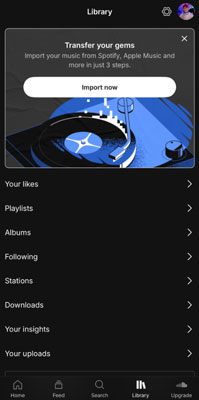
Step 4. Tap the Settings icon, find and choose the 'Import my music' or 'Move Your Music' option.
Step 5. Now, choose Spotify from the list and then log in to your Spotify account.
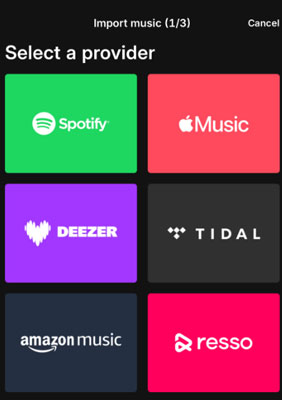
Step 6. Once linked, SoundCloud will show your Spotify library. Then you can choose your Spotify Liked Songs, playlists, etc. that you want to transfer.
Step 7. After that, click the Start transfer button and SoundCloud will start the matching process.
Just close the SoundCloud app and wait, SoundCloud will notify you when the transfer is complete. Once transferred, you will see the imported Spotify playlists on your SoundCloud profile and you can play them.
This tool may fail to find songs that are on SoundCloud.
Part 2. How to Sync Spotify Playlist to SoundCloud via Online Playlist Transfer Tools
If you want a solution to transfer music from Spotify to SoundCloud on your computer, there are online playlist transfer tools like Soundiiz, TuneMyMusic, etc., to help you. Besides, both of them offer a free tier to transfer playlists between services.
1. Transfer Spotify Playlist to SoundCloud Free via Soundiiz
Step 1. Visit Soundiiz official website via a web browser and sign up for a free account.
Step 2. On the left side of the screen, choose Connect Services. Then locate Spotify and choose Connect. Later, you need to log in to your Spotify account and allow Soundiiz to access your library.

Step 3. Now, find and choose SoundCloud and sign in to your account, and grant access.
Step 4. After that, choose the Transfer tool in the left-side panel and choose Playlists.
Step 5. Pick up Spotify as the source platform, select the playlist you want to sync and click Confirm and Configure.
Step 6. Choose SoundCloud as the destination platform and Soundiiz will start the matching process.
Step 7. At last, touch the Start the transfer button to transfer Spotify to SoundCloud.
2. Sync Spotify Playlists to SoundCloud Free via TuneMyMusic
Step 1. Head to TuneMyMusic official website, find the Transfer tool and click the Transfer Your Music button on the screen.
Step 2. Next, choose Spotify as the source and log in to your account.
Step 3. Choose Load from Spotify account to choose the Spotify playlists and Liked Songs you want to transfer. Or, you can copy and paste the Spotify playlist URL into the text box and hit Load from URL.

Step 4. Once selected the playlists and songs, hit Select Destination.

Step 5. Pick up SoundCloud as the destination platform and log in to your account.
Step 6. Finally, hit Start Transfer to start the process.
While using these tools to sync playlists from Spotify to SoundCloud, you may notice that some Spotify tracks are missing and can't be matched. That is because they don't exist in the SoundCloud library.
Part 3. How to Import Spotify Playlist to SoundCloud Manually via SoundCloud 'Upload' Tool
From the above, we know the limitations of the online playlist transfer tools. So, the fix is to upload Spotify audio files to SoundCloud manually via the SoundCloud's Upload tool. In this part, we are going to introduce a tool to allow you to import all Spotify playlists to SoundCloud. The name of the tool is AudFree Spotify Music Converter. It can download music from Spotify without even having a premium account. After downloading the songs from Spotify using this tool, they will not be encrypted, which means that you can play them on any media player and device without any restrictions. You also get to experience an ad-free user experience.
AudFree Spotify Music Converter also supports multiple output formats such as MP3, FLAC, and other SoundCloud compatible files. It can run at a faster speed as compared to other apps. It's able to preserve metadata and ID3 tags from Spotify, making the whole user experience a lot more seamless. With the help of this Spotify to SoundCloud playlist converter, it's easy to transfer Spotify songs between different platforms.
AudFree Spotify Music Converter

- Download Spotify playlists as local files without Premium
- Download Spotify playlists to MP3, etc. for SoundCloud
- Transfer Spotify playlist to SoundCloud, Apple Music, etc.
- Run at a fast speed with zero quality loss
How to Convert Spotify Playlist for SoundCloud
Now, we are going to teach you how to use this Spotify to SoundCloud converter to download Spotify songs and transfer Spotify playlist to SoundCloud.
- Step 1. Add the Spotify songs to Audfree Spotify Music Converter

- First, you have to make sure that Audfree Spotify Music Converter is downloaded and installed on your Windows or Mac computer. Once it is done, you have to import the music from Spotify to it.
- Please log in to the built-in Spotify web player and look for your desired song, playlist, or album. Once you find your desired song, playlist, or album, open the music content, and tap the + icon at the right side on the screen. Later, touch the Add to list button to load files.
- Step 2. Alter the settings and other parameters for Spotify to SoundCloud

- Now, you can change the format for Spotify music to add and play on any media player. First, go to the "Preferences" tab by clicking on the "menu" icon. After the "Preferences" tab is opened, go to the "Conversion" section and select your desired format for Spotify to SoundCloud from the given options. It supports multiple formats such as MP3, FLAC, AIFF, M4A, etc. Once you are done with this crucial part, you can also change other parameters such as bitrate, sample rate, and channel. By changing these settings, you get a more personalized result.
- Step 3. Convert Spotify playlist to SoundCloud supported files

- Now the last step is to confirm the settings and start the downloading; you can confirm the settings by clicking on the "OK" icon on the bottom-right corner of the settings tab. After that, you start downloading by clicking on the "Convert" button. Because of Audfree Spotify Music Converter's advanced technology, it will be done downloading in a very short amount of time. After the conversion, the Spotify music files will be stored locally on your computer.
How to Put Spotify Playlist on SoundCloud
Now, we are going to guide you on how to transfer Spotify playlist to SoundCloud as local files.
Step 1. Open any of your default browsers and visit SoundCloud website.
Step 2. After launching SoundCloud on your webpage, log into your SoundCloud account.
Step 3. Look for the "Upload" option in the top menu bar of the main interface and click on it.
Step 4. Now, simply hit the "Choose files" button in the middle of the interface. A new window will open. Then you can choose and import the converted Spotify song to SoundCloud. You can also import the local Spotify music to SoundCloud using the drag-and-drop action.

Step 5. Once loaded the Spotify track, you can customize its title and genre, give a description to it, and set the track to Private.
Step 6. After that, simply click on the "Upload" button, and it will start uploading. Wait for the end, all your desired Spotify songs will be available for you on your personal SoundCloud library.
With this method, you won't encounter the library mismatch issue and keep Spotify music forever in your SoundCloud library for playback.
Part 4. How to Move Spotify Playlist to SoundCloud on Mobile via SongShift
If you are on a mobile phone, you can still use tools like SongShift to transfer playlists from Spotify to SoundCloud. This tool is available for iOS users only.
Step 1. Download and install SongShift from the App Store on your iPhone or iPad device.
Step 2. Once installed, launch the app and click Add Service. Then connect both Spotify and SoundCloud music services by logging in to each account.
Step 3. Click the + icon to start a new 'Shift', then choose your Setup Source and select Spotify.

Step 4. Now, pick up the Spotify music content you want to transfer.
Step 5. Next, tap Setup Destination and choose SoundCloud. Then click on I'm Finished and SongShift will start to match the track.
Step 6. Later, SongShift will ask you to Match Review. Then you can fix the track that it may have matched wrongly.
Step 7. After that, confirm you matches and you will see the Spotify playlists on your SoundCloud library.
Part 5. Compare Methods to Move Spotify to SoundCloud
So, which method is better for moving Spotify playlist to SoundCloud? Here you can check the differences among them in the comparison table below.
| Feature | Via SoundCloud 'Move Your Music' Tool | Via Online Tools | Via SoundCloud 'Upload' Tool | Via SongShift |
|---|---|---|---|---|
| Platform | iOS/Android | Web browser | Windows/Mac | iOS |
| Ease of Use | Very easy | Easy | Complex | Easy |
| Speed | Fast | Very fast | Slow | Moderate |
| Match Accuracy | Moderate | Very high | No matching (Bypass matching issue) | High |
| Key Feature | Official, built-in and free | Auto-syncing | 100% perfect copy of any Spotify music content | Review Matches |
| Security & Trust | Very high | High | High | High |
| Cost | Free | Freemium | Freemium | Free |
| Best For... | Users who want the safest and free option. | Users who want high accuracy and advanced features. | Users who need a 100% complete library. | iOS users who want an on-the-go and accurate method. |
Part 6. FAQs about Spotify to SoundCloud
Why Are Some Spotify Songs Missing After Transferring to SoundCloud?
It is mainly because Spotify and SoundCloud have different music libraries. Spotify's library is built from official label agreements, while the music in the SoundCloud library is mostly uploaded directly by artists. In this case, the Spotify track will be unmatched or missed if an artist or their label never upload a specific song to SoundCloud.
Is It Safe to Use These Transfer Tools to Move Spotify Playlist to SoundCloud?
Yes, it is safe as long as you use trusted services like SoundCloud's 'Move Your Music' tool, Soundiiz and TuneMyMusic. They use a secure login process called OAuth. That means you just grant them permission to access your music library without giving them your actual password.
Do I Need a Spotify Premium Plan to Transfer Music from Spotify to SoundCloud?
No. You don't need a Spotify Premium account to transfer your Spotify music library to SoundCloud.
Why Is My Spotify Playlist to SoundCloud Transfer Failed or Only Moved 500 Songs?
It is because SoundCloud only allows users to upload 500 tracks per playlist. If your Spotify playlist exceeds this limit, the transfer will fail.
Part 7. In Conclusion
So, you learn how to transfer Spotify playlist to SoundCloud library with the above-given methods. If you want a quick and easy method, you can try SoundCloud 'Move Your Music' tool or other playlist transfer tools. However, both of them just match the track in SoundCloud and sometimes they may fail to match.
If you want to transfer every Spotify song you like to SoundCloud, using Audfree Spotify Music Converter in Part 3 is the most reliable solution. It can help download music from Spotify to computer and import them to SoundCloud library via the Upload tool.
Just choose the right method for you and enjoy Spotify and SoundCloud playlists in one place.

Chief Editor


