


SoundCloud is a go-to platform for indie artists, DJs, and music enthusiasts. While streaming is simple, downloading SoundCloud playlists for offline access can be a challenge. Whether you're looking to save a SoundCloud playlist as an MP3 or download some albums for a trip, this guide provides all the solutions you need.
Below, we explore the top 9 SoundCloud playlist downloaders to get SoundCloud playlists entirely, including official way, online tools, browser extensions, and professional software. Let's get started!


Part 1. Can You Download SoundCloud Playlists Directly?
The answer depends on whether the playlist owner has enabled downloads. SoundCloud offers an optional download button on individual tracks and playlists, but this feature is not universally available.
🔎 When Direct Downloads Are Allowed:
- The uploader has enabled downloads manually.
- You're signed in to your SoundCloud account.
- The track or playlist is not behind a paywall or subscription.
Steps to check if you can download officially:
Step 1. Open a SoundCloud playlist.
Step 2. Look for a "Download" button under each track or at the top of the playlist.
Step 3. If available, click to save directly for offline listening.
🚫 When Downloads Are Not Available:
Many SoundCloud users disable downloads for copyright or monetization reasons. In this case, you'll see no download button. This means you'll need to use a SoundCloud playlist downloader or third-party software (as shown in later sections) to get your tracks.
While SoundCloud sometimes allows direct downloads, it's not a consistent method for saving entire playlists, especially long ones or those with disabled sharing settings.
Part 2. How to Download SoundCloud Playlists [Official Option]
If you're looking for the most common official method to save SoundCloud playlists, SoundCloud Go or Go+ subscriptions are your best bet. These premium services allow you to download SoundCloud playlists for offline listening within the app - although not as MP3 files.
Rating: ★★★★☆ (4.3/5)

How to Download Playlist from SoundCloud for Offline Listening via SoundCloud Go/Go+:
Step 1. Subscribe to SoundCloud Go or Go+ via soundcloud.com.
Step 2. Open the SoundCloud mobile app (iOS or Android).
Step 3. Navigate to your desired playlist.
Step 4. Tap the "Download" icon to save it offline.
Step 5. Access your offline content from the "Library" tab.
Pros and Cons of Official Method
Completely legal and supported by SoundCloud;
High-quality audio with no additional tools required;
Fast, simple, and seamless
Doesn't allow exporting to other devices or converting to MP3;
Monthly subscription required
This method doesn't download SoundCloud playlist to MP3 or your file system. And the tracks are encrypted and accessible only within the SoundCloud app.
Part 3. How to Download SoundCloud Playlists on Desktop [Most Efficient Tool]
If you want the best SoundCloud playlist downloader with high-quality output and full control over settings, try AudFree Streaming Audio Recorder (also known as AudFree SoundCloud Playlist Downloader). This tool allows you to download playlists from SoundCloud to MP3 in original quality and tag the files automatically. Unlike browser extensions or online tools, it ensures stable recording without quality loss, ideal for saving full albums or DJ sets.
Beyond SoundCloud, it seamlessly supports over 10 major platforms - including Tidal, Qobuz, Deezer, and Spotify - making it an essential tool for multi-platform listeners. Combining fast performance with an intuitive interface, it offers exceptional value for any music lover.
Rating: ★★★★☆ (4.6/5)
Why Choose AudFree Streaming Audio Recorder?

- Download SoundCloud MP3 playlists or albums losslessly
- Convert SoundCloud tracks into FLAC, WAV, MP3, etc.
- Automatically preserve the original ID3 tags
- Batch download tracks up to 65X speed
- Works with both Windows and macOS
How to Download SoundCloud Playlist to MP3 via AudFree Program
Here's a detailed step-by-step guide to download playlist from SoundCloud to MP3.
- Step 1. Download and Launch AudFree Streaming Audio Recorder

- Install and launch the software on Windows or macOS to access the streamlined interface, which features built-in support for 10 major streaming platforms. Simply sign in to your account to activate the full range of features.
- Step 2. Choose Output Format and Parameters

- Click Menu > Preferences in the top-right corner, then open the Conversion tab to customize the audio output format and parameters such as bitrate, sample rate, and audio channel. Here, you can choose to download SoundCloud playlists as MP3 (320 kbps) for broad device compatibility and high-quality playback. Alternatively, formats like WAV or AIFF are ideal if you want to preserve more of the original audio dynamics and detail.
- Next, switch to the Output section to select a destination folder for storing the downloaded SoundCloud playlists. You can also enable ID3 tag export to keep metadata such as artist, album, title, and artwork, making it easier to organize and manage your music library.
- Step 3. Add SoundCloud Playlists to AudFree

- Return to the first screen and click the SoundCloud icon. On the following screen, choose the playlist you want to download and then tap the '+' icon to add the SoundCloud playlist to the Converting list of AudFree.
- Step 4. Start Downloading SoundCloud Playlist to MP3

- Click the 'Convert' button located on the bottom right of the Converting section to start conversion process. After converting, you can access your SoundCloud playlist in your presetting folder.
View also: How to Download Songs from SoundCloud
Pros and Cons of AudFree SoundCloud Playlist Downloader
Studio-quality and lossless audio output;
Automatically tags to manage library;
Download entire SoundCloud playlists at up to 65x speed;
Support download SoundCloud playlist to MP3, FLAC, WAV, and more;
Support over 10 major streaming services beyond SoundCloud
Requires installation on Windows or macOS;
Full features require a purchase (Trial version is limited to the first 30 seconds of each track)
Part 4. Top 6 Free SoundCloud Playlist Downloaders Online
If you prefer convenience and don't want to install anything, these online SoundCloud playlist downloaders can help. Here are six of the best, ranked from top to bottom based on ease of use, ad intrusion, and MP3 conversion quality.
Tool 1. Online SoundCloud MP3 Playlist Downloader: Squid WTF
Squid WTF is a versatile and powerful online tool that lets you download SoundCloud playlists or albums in MP3 format up to 320kbps. You can choose to download individual songs or the entire playlist/album as a ZIP file. This service supports five music streaming platforms, including SoundCloud, Tidal, Qobuz, and more - completely free of charge. Additionally, it allows you to download high-quality 24-bit, 192kHz audio from Tidal, Qobuz, and Amazon Music.
However, being a free service, it often faces downtime or access issues, and download speeds can be slow. For larger playlists or albums, the process can take several hours, particularly when your internet speed is poor or the server is overloaded with users.
Website: https://squid.wtf/
Rating: ★★★★☆ (4.2/5)
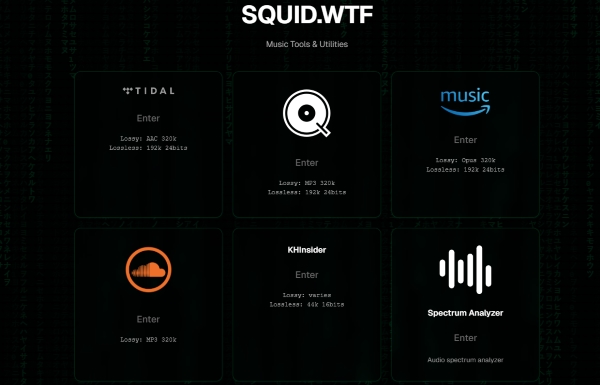
How to Download SoundCloud Playlists Online via Squid WTF:
Step 1. Go to the Squid WTF website.
Step 2. Click on the SoundCloud icon, and select 'Enter'.
Step 3. Head to SoundCloud, click 'Share' on your playlist or album, and copy the link. Paste the URL into the search box of SoundCloud of Squid WTF.
Step 4. Customize the audio quality (up to 320kbps MP3).
Step 5. Once the analysis is complete, a ZIP file will be downloaded to your computer containing the SoundCloud audio in the chosen quality.
While Squid WTF is accessible from mobile devices, it doesn't function well on phones. For best results, use the tool on a desktop or laptop.
Pros and Cons of Squid WTF
Supports a wide range of audio formats and qualities;
Works with multiple streaming services (Tidal, Qobuz, Amazon Music, SoundCloud, etc.);
No ads or pop-ups, providing a clean interface;
Completely free to use;
Allows you to download SoundCloud playlists as ZIP files with ID3 tags
Download speed is slow, especially for larger playlists;
May experience downtime or be inaccessible at times;
Potential privacy risks, as your personal data could be exposed
Tool 2. Online Free SoundCloud Playlist Downloader: DoubleDouble.top
DoubleDouble.top is another free online SoundCloud playlist downloader that supports not only SoundCloud, but also Amazon Music, Qobuz, Deezer, and Tidal. While it is easy to use and free of charge, it lacks the advanced audio customization features offered by Squid WTF.
Additionally, it carries a risk of exposing your personal data, as with most free online tools. Despite these drawbacks, it provides an effective solution for downloading playlists from SoundCloud to MP3 format, with the option to download in ZIP format if multiple tracks are selected.
Website: https://doubledouble.top/
Rating: ★★★★☆ (4.1/5)

How to Download a SoundCloud Playlist Online via DoubleDouble.top:
Step 1. Copy the playlist URL from SoundCloud.
Step 2. Paste it into the site's input box.
Step 3. Hit "Download" download the entire SoundCloud playlist in MP3 format. If downloading multiple tracks, it will be delivered as a ZIP file.
Pros and Cons of DoubleDouble.top
Supports multiple platforms (Amazon Music, Qobuz, Tidal, Deezer, SoundCloud);
Totally free to use;
Allows SoundCloud playlists to be downloaded as ZIP files;
Relatively fast download speeds compared to Squid WTF;
Lacks advanced audio customization options (no bitrate or sample rate adjustments);
Slower response times when downloading large playlists;
Only supports MP3 output format;
Can occasionally fail to download or be unstable;
Does not preserve ID3 tag;
Tool 3. Free Online SoundCloud Playlist Downloader: Loader.to
Loader.to is also a versatile multi-platform playlist downloader that supports YouTube, SoundCloud, and more. This tool allows you to download music and videos in a variety of formats, including MP3, M4A, AAC, and MP4. But it also has no option to adjust audio parameters in the settings area.
It is a simple, no-login-required solution for downloading SoundCloud playlists, but be mindful of its occasional performance issues during peak times due to the volume of users.
Website: https://en.loader.to/4/
Rating: ★★★★☆ (4.0/5)

How to Download SoundCloud Playlists Free Online via Loader.to:
Step 1. Copy and paste the SoundCloud playlist URL into the website's input box.
Step 2. Select your desired output format (MP3, M4A, etc.).
Step 3. Click "Download" and wait for file to compile.
Pros and Cons of Loader.to
No login required to start downloading;
Supports a wide range of formats (MP3, M4A, AAC, MP4, etc.);
Works with multiple platforms, including YouTube and SoundCloud;
Offers a significantly faster download rate compared to tools like Squid WTF or DoubleDouble
Frequent ads that may disrupt the user experience (redirects or pop-ups);
Conversion speed may lag during peak hours or high traffic periods;
No ID3 tags preservation;
No advanced audio customization
Tool 4. Powerful SoundCloud Playlist Downloader Online: SoundCloudDownloader
SoundCloudDownloader is a dedicated tool for downloading SoundCloud songs and playlists in MP3 or M4A format. The tool supports high-quality audio downloads, with an option to download up to 320Kbps audio. While it is a straightforward option, it does come with limitations, such as the ability to only download a few tracks at a time unless you opt for the premium service.
Website: https://scloudplaylistdownloadermp3.com/
Rating: ★★★☆☆ (3.8/5)

How to Download SoundCloud Playlists Free Online via SoundCloudDownloader:
Step 1. Visit the SoundCloudDownloader website and paste the SoundCloud playlist URL.
Step 2. Click on "Download" to go to the download page.
Step 3. Select the audio quality (320Kbps) and choose the tracks.
Step 4. Download each track one by one.

To download entire playlists, you'll need to log in and activate a paid account. The cost is $7.99 per month or $22.99 for a lifetime subscription.
Pros and Cons of SoundCloudDownloader
Offers high-quality audio output (320Kbps);
No ads during the download proces;
Can preserve ID3 tags for better file organization;
Fast processing speed for individual track downloads
Can only download up to 2 songs at a time for free;
Requires a login for full playlist downloads;
Paid account required for bulk downloads (premium features)
Tool 5. Free SoundCloud Playlist Downloader Online: Soundcloudme.com
As a free SoundCloud playlist downloader online, Soundcloudme.com allows users to quickly extract and download individual songs from playlists without logging in or installing any software. Though it lacks advanced features, it's a quick solution for those who want to save selected tracks on the go.
Website: https://www.soundcloudme.com/soundcloud-playlist-downloader/
Rating: ★★★☆☆ (3.7/5)

How to Download SoundCloud Playlists Online via Soundcloudme.com
Step 1. Copy and enter the playlist URL into the provided input field of this site.
Step 2. Hit "Download" to begin the process.
Step 3. Tap individual "Download" buttons next to each track you wish to save.

Pros and Cons of Soundcloudme.com
Fast processing for quick downloads;
Free to use without any hidden fees;
No login required, making it simple and convenient
Frequent ads can be annoying and disruptive;
Requires clicking download for each track, making it less efficient for bulk downloads;
Full downloads for public playlists only (SoundCloud Go/Go+ tracks are limited to the first 30 seconds)
Tool 6. Online SoundCloud Playlist Downloader: Musicverter.com
Musicverter.com is an online-based SoundCloud playlist downloader tool with a clean, ad-free interface. It supports downloading SoundCloud playlists to MP3 and includes limited ID3 tag-editing features. Although free users face daily download limits and lack of format variety, it remains a solid option for occasional downloads of SoundCloud MP3 playlists, especially for desktop users.
Website: https://www.musicverter.com/
Rating: ★★★☆☆ (3.5/5)

How to Download SoundCloud Playlists for Free via Musicverter.com
Step 1. Insert SoundCloud playlist link inro the provided box.
Step 2. Wait as the site fetches all the tracks in the playlist.
Step 3. Download each song for your SoundCloud playlist individually as MP3.
Pros and Cons of Musicverter.com
Clean layout without ads, offering a smoother user experience;
No ads to interrupt the download process
Daily download limits for free users;
Only MP3 format available for free downloads;
Login required for many features, and you may need to purchase a license for a better experience
Part 5. Best SoundCloud Playlist Downloader Extension - Addoncrop
If you're a Chrome or Edge user, the Addoncrop extension is a powerful tool for downloading entire SoundCloud playlists directly from your browser. It eliminates the need for third-party websites, providing a seamless and efficient way to save music with just a few clicks.

Website: https://addoncrop.com/exension/soundcloud-music-downloader/
Rating: ★★★☆☆ (3.9/5)
How to Download SoundCloud Playlist via Addoncrop SoundCloud Playlist Downloader Extension
Step 1. Visit the Addoncrop SoundCloud Downloader page.
Step 2. Install the extension to your browser (or via Chrome Web Store).
Step 3. Open SoundCloud and locate the playlist you want to download.
Step 4. Click the "Download" button next to each track or select the option to download the whole playlist.

Pros and Cons of Addoncrop
Seamless integration directly within the browser for easy access;
Lightweight and free to use without additional software;
No ads, ensuring a clean and uninterrupted experience
Only works on Chromium-based browsers (Chrome, Edge);
MP3 output format is the only option available;
May stop working after browser updates or changes to SoundCloud's site
As of March 2026, this extension is currently inactive. Although it remains listed, it has not worked for some time. You may want to verify its status in the future to see if support has been restored.
Part 6. Comparison of Top 9 SoundCloud Playlist Downloaders
To simplify your decision-making, we've compiled these nine tools into a concise comparison table below:
| Tools | Official App | AudFree Streaming Audio Recorder | Squid WTF | DoubleDouble.top | Loader.To | SoundCloudDownloader | SoundCloudMe | Musicverter | Addoncrop |
|---|---|---|---|---|---|---|---|---|---|
| Type | Software | Software | Online | Online | Online | Online | Online | Online | Extension |
| Format Support | Encrypted | MP3, WAV, FLAC, etc. | MP3, FLAC, AAC, etc. | MP3/M4A | MP3, AAC, MP4, etc. | MP3/M4A | MP3 | MP3 | MP3 |
| Audio Quality | High | High | Medium to High | Medium | Medium | Medium | Low | Low | Low |
| Batch Download | ✅ | ✅ | ✅ | ✅ | ✅ | Limited | Limited | Limited | ✅ |
| Ease of Use | ★★★★☆ | ★★★★★ | ★★★★☆ | ★★★★☆ | ★★★☆☆ | ★★★☆☆ | ★★★☆☆ | ★★★☆☆ | ★★★★☆ |
| Ads/Popups | None | None | None | Low | Moderate | None | High | None | None |
| Download Speed | Fast | Fast | Slow | Moderate | Fast | Moderate | Fast | Slow | Slow |
| ID3 Tags | ❌ | ✅ | ✅ | ❌ | ❌ | ✅ | ❌ | ❌ | ❌ |
| Free Version Limit | Limited catalog with ads | Trial (first 30 seconds) | Unlimited | Unlimited | Unlimited | Limited download files | Unlimited | Daily Limit | Unlimited |
In Summary
Downloading SoundCloud playlists has never been easier with the right tools at your disposal. If you're looking for a quick solution, online SoundCloud playlist downloaders like DoubleDouble.top or Loader.to can get the job done without the need for installation. For Chrome users, Addoncrop offers a seamless extension for direct playlist downloads. However, if you prioritize audio quality and flexibility, AudFree Streaming Audio Recorder remains the top choice for downloading SoundCloud playlists to MP3 in 2026.
Ready to download your favorite SoundCloud playlists without restrictions? Choose the method that best suits your needs and start building your offline music collection today!

Staff Editor


