


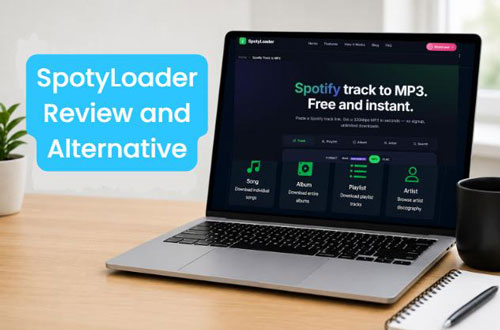
SpotyLoader is a free, browser-based Spotify downloader that supports to download Spotify songs, albums, and playlists to MP3, FLAC, and M4A. You don't need to install software or create an account to use it. Is SpotyLoader Spotify Downloader worth using? Is it output true high audio quality as it claimed? In this review, we'll examine and test its features, downloading process, real performance, advantages, disadvantages, and alternatives to help you decide whether it is worth trying.

Part 1. What Is SpotyLoader Spotify Downloader?
SpotyLoader is an online free tool designed to extract audio from Spotify links. According to its official website, SpotyLoader supports several types of Spotify content, including individual tracks, albums, playlists, artists, and podcasts. It supports to output Spotify music in MP3 320kbps, FLAC and M4A with ID3 tags, such as covert art, artist, etc. Also, it claims it can download Spotify playlist in batches and save as ZIP format. You can directly copy and paste a Spotify URL into its webpage, and it will detect the link and fetch the content of the link. With this tool, you can obtain local audio files without relying on Spotify's built-in offline listening feature. However, it can't support downloading podcasts and audiobooks.
Part 2. How to Use SpotyLoader to Download Spotify Music
Now, let's learn how to use SpotyLoader Spotify music downloader online to download music from Spotify.
Step 1. Open Spotify app or visit Spotify web player on your computer or mobile device and find the song, album, or playlist you want to download. Next, tap the three-dot menu beside the content, choose 'Share', and click 'Copy Song Link', 'Copy Album Link' or 'Copy Playlist Link' option.
Step 2. Visit the SpotyLoader official website in your browser, and paste the copied Spotify URL into the text box on the page. Next, choose the output audio format such as MP3, FLAC or M4A and click the 'Start' button to start processing the link.

Step 3. Later, you will get the result of the Spotify audio content. Then you can click the 'Get Link' > 'Download' button to start to download audio files from Spotify online.

Part 3. Is SpotyLoader Spotify Downloader Good? [Real Tested]
We tested SpotyLoader Spotify converter by the above steps. However, sometimes it is not good as it claimed. Let's check its real performance below.
1. Stability
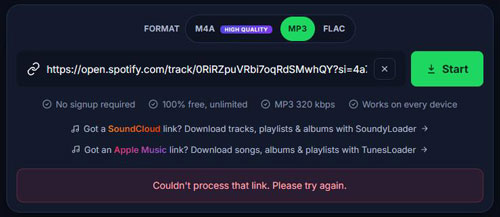
As an online Spotify downloader, SpotyLoader is not stable. Once the network is weak, it can't process the link and proceed the download. After I pasted the link into it and clicked Start, it can't fetch the result but only shows the error message.
2. Search Option Not Working
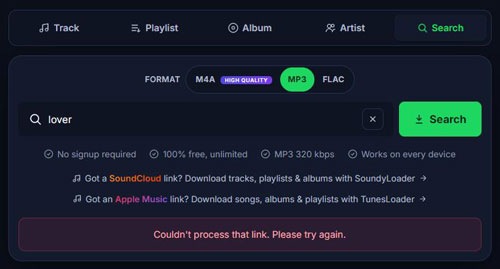
I tap the Search button on the SpotyLoader webpage, typed the artist name 'Taylor Swift' or the track name 'Lover', and it doesn't show the result. It only shows the error "Couldn't process that link. Please try again".
3. No Batch Download
It can read the playlist and album links, but it doesn't offer a bulk download option. I need to download the track from the playlist one by one. This is no ideal for users who have a large music library.
4. Pop-up Redirects
During my test, after I click the Download button to start the downloading, the website opens a new page. To proceed, I have to close the current opening webpage, back to the SpotyLoader website and continue my downloading process.
Part 4. Is SpotyLoader Safe and Legal to Use?
You may wonder if SpotyLoader legal and safe to use. Now, we will illustrate the detail to you.
1. Privacy Policy and Data Collection
SpotyLoader states that it may collect the following information: the Spotify links you paste, the search queries you enter, your browser type and operating system, and your approximate geographic location (at the country/region level, derived from your IP address). Additionally, it automatically collects limited technical information, including: browser and device details, aggregated usage patterns (such as which types of conversions are most frequently performed), and error logs used for debugging and service improvement.
SpotyLoader asserts that it does not permanently store users' download history or Spotify links. Furthermore, it states that conversion data is automatically deleted within 30 minutes.
For more detailed information regarding privacy, please carefully review SpotyLoader's privacy policy before use.
2. Website Security and Potential Redirection Risks
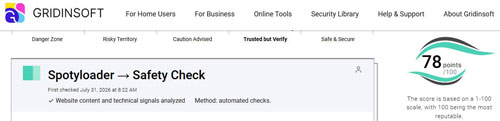
According to an assessment by Gridinsoft, the SpotyLoader domain was registered recently, and it has a security score of 78/100. Among 26 external security services, one has flagged the site as "suspicious". While this does not definitively prove that SpotyLoader distributes malware, it does indicate that the site is not entirely secure.
When using SpotyLoader, avoid clicking on advertisements disguised as "download" buttons. If the site redirects you to an unfamiliar or suspicious page, stop what you are doing immediately. If the source of a downloaded file—or the file's behavior—appears unusual, be sure to perform a security scan on it.
3. Copyright and Usage Notice
When using Spotyloader to download music (saving it as standalone MP3, FLAC, or M4A files), you must comply with Spotify's Terms of Service and applicable copyright laws. While using this tool for personal purposes may be legal, the use of downloaded audio files for commercial purposes is strictly prohibited; such actions may constitute a violation of Spotify's Terms of Service.
Part 5. SpotyLoader Pros and Cons
After testing, let's conclude the pros and cons of SpotyLoader Spotify music downloader below.
Free to use, no subscription or registration;
No installation required;
Supports MP3, FLAC and M4A output audio format;
Work with most web browser;
Support Spotify tracks, playlists, albums and artists
No batch downloading;
Not stable enough;
Not support Spotify audiobooks and podcasts;
Limited output audio formats;
Contain redirect pop-up
Part 6. Best SpotyLoader Alternative
If SpotyLoader doesn't meet your needs, you can seek for an alternative to it. Here we will introduce one tool to you.
AudFree Spotify Music Converter is a desktop application designed for both Spotify Free and Premium users who want more control over Spotify music. It has a built-in Spotify web player, allowing you to access you Spotify music library without opening the standalone Spotify application. It supports converting Spotify songs, albums, podcasts, audiobooks, and playlists in multiple output formats like MP3, FLAC, WAV, AIFF, M4A, and M4B. Besides, it offers customizable audio parameters, such as bitrate and sample rate. Also, it supports ID3 tag and metadata preservation, as well as batch conversion.

Part 7. Final Verdict
SpotyLoader offers a free and convenient way to process Spotify links, requiring neither the installation of desktop software nor the creation of an account. It serves as a handy tool for users who only occasionally wish to save music locally.
However, the tool does not support batch downloads, and its stability can sometimes be inconsistent. If you prioritize consistent audio quality, reliable batch processing, and organized file management, it may not be the best choice.
If you are looking for a more comprehensive solution for managing your local Spotify music library, consider AudFree Spotify Music Converter. As a desktop application, it supports batch conversion, offers customizable output settings, and preserves full music metadata—making it an ideal option for users who frequently manage large music collections.

Editor in chief


