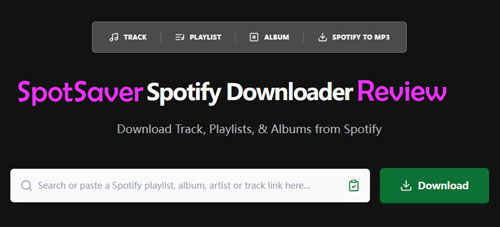
When you search for a tool to download Spotify music for offline playback, you may notice a tool named SpotiFLAC.
What is SpotiFLAC? How does it work? Can it really download Spotify songs in lossless FLAC quality? Is it safe to use?
With these questions, you can read this in-depth SpotiFLAC review. In this post, you will learn its usage, safety, pros and cons, and best alternative. What's more, we will compare SpotiFLAC vs SpotiFLAC Next vs SpotiFLAC Mobile to help you choose the right tool to save Spotify to FLAC.
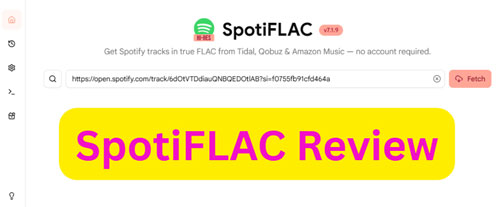

Part 1. What Is SpotiFLAC and How It Works?
SpotiFLAC is a free and open-source music downloader on desktop and mobile devices for users to download lossless HiRes FLAC audio files (up to 24-bit/48kHz) via Spotify links. Unlike other traditional Spotify downloaders, it does not decrypt or extract Spotify's encrypted audio streams. Instead, SpotiFLAC reads the metadata of Spotify tracks, albums, or playlists and then searches for the same recording across supported music services like Tidal, Amazon Music and Qobuz. If a matching lossless version is found, it downloads that version and saves it to your computer.
Main Features of SpotiFLAC
1. Supports playlist and album downloads without Spotify Premium;
2. Uses multiple music provider extensions;
3. Can retrieve lossless FLAC files when available;
4. Saves metadata such as max quality artwork, genre, and artist details;
5. Works across desktop and mobile devices;
6. Community-driven extension ecosystem
Part 2. Is SpotiFLAC Safe and Legal?
You may wonder how safe SpotiFLAC is before using it. Now, you can check the details below.
Is SpotiFLAC Safe to Use?
Yes, SpotiFLAC is safe. From a software perspective, SpotiFLAC is considered relatively transparent due to its open-source nature, allowing users to inspect the code and verify its behavior. Besides, your Spotify account won't be suspended or banned as this tool has no connection to your Spotify account.
However, security still depends on the download source and method. Using unofficial or modified versions may introduce risks such as malware or instability.
To ensure security, please download SpotiFLAC only from its official website or verified code repositories like GitHub. Avoid using third-party modified installers. Besides, keep the SpotiFLAC app up to date and check community feedback before installing major updates.
Is SpotiFLAC Legal?
In general, developing and distributing such software is legal, but downloading copyrighted music without permission may violate local laws. SpotiFLAC is a metadata-based downloader and it does not directly decrypt Spotify's encrypted audio streams. However, its legality depends on how it is used and the copyright laws in your region. Users are responsible for ensuring their actions comply with relevant regulations. As legal interpretations vary by country, it is important to use SpotiFLAC responsibly.
Part 3. How to Use SpotiFLAC to Download Spotify Songs
After learning the features, safety and legality of SpotiFLAC, you can proceed to use SpotiFLAC to download music from Spotify to FLAC audio files.
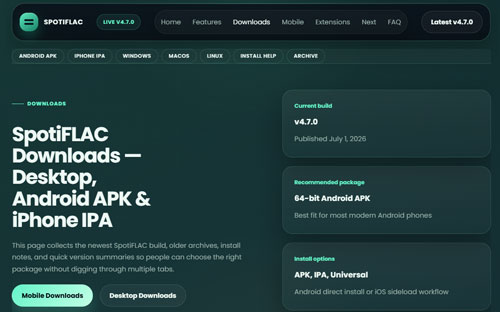
Step 1. Go to SpotiFLAC official website (https://spotiflac.com/) or SpotiFLAC GitHub webpage (https://github.com/spotbye/SpotiFLAC). Then download and install the latest version of SpotiFLAC on your Windows, Mac, Linux, or mobile device.
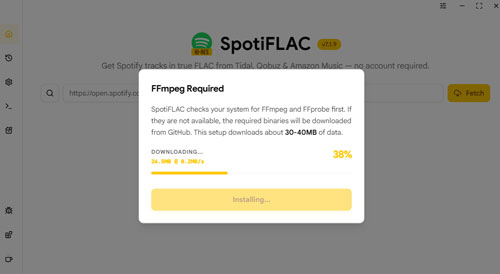
Also, you are required to download FFmpeg once launched SpotiFLAC. You can click Install in the pop-up window and it will automatically install the tools.
Step 2. Before downloading music, please enable or install external music providers extensions as SpotiFLAC relies on these extensions to locate audio files.
Step 3. Go to Spotify platform, find a song, an album or a playlist, click the "Three Dots" > "Share" option, and then find and copy the URL of the Spotify song, album or playlist.

Step 4. Open SpotiFLAC program, then paste the copied URL into the search bar and click the 'Fetch' button. Later, it will automatically analyze metadata and begin searching for matches.
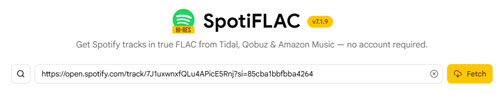
Step 5. Once fetched, you can confirm the artist name, album version, release type, track duration, etc. before downloading the file.
Step 6. At last, choose the right version and click the 'Download' button to download Spotify music to FLAC automatically.
Part 4. Pros and Cons of SpotiFLAC
Now, you can learn SpotiFLAC's strengths and weaknesses to help you make your final decision.
Free and open-source;
Download true FLAC files (when available);
Retail rich metadata;
Download Spotify playlist and album;
Work with multiple platforms and operating systems;
Active community development
Can't download from Spotify directly;
Some songs can't be matched;
Sometimes fetch mismatched versions;
Requires technical setup with extensions;
Success depends on external providers;
Reliability may vary over time
Part 5. How to Fix SpotiFLAC Not Working
As SpotiFLAC relies on external services, occasional issues are inevitable. Listed below are the most common problems and their corresponding solutions.
Problem 1. Song Not Found
Sometimes, the specific Spotify song you are looking for may not be found because no active service provider currently has it in their database.
Fix: You can add and enable additional provider extensions to expand the overall search scope.
Problem 2. Download Fails Midway
Fix: Please ensure that your SpotiFLAC app and all related extensions are updated to the latest versions. Close and restart the application; if downloads still fail, try switching to a completely different service provider.
Problem 3. Download Wrong Version of Song or Album
SpotiFLAC may sometimes retrieve unintended versions of songs, such as live recordings or remasters. This typically occurs when the matching algorithm selects a different version that shares the same name. Therefore, you should carefully verify the content to ensure your local music library accurately reflects your actual preferences.
Fix: Please manually and carefully check the track metadata before confirming the download. To ensure you obtain the original studio mix, please select search results from other providers.
Problem 4. Playlist Downloads Are Incomplete
Fix: Enable multiple service sources simultaneously to broaden coverage and increase the match success rate. Perform a follow-up download specifically for the tracks that were missed during the initial attempt.
Problem 5. FLAC Quality Is Not Available
Not all databases store high-fidelity audio files, meaning you may not always find a lossless version of every track you search for. The availability of these high-quality formats depends entirely on the specific music libraries maintained by individual service providers. You must accept the fact that some sources simply do not offer lossless audio files, so lower-quality versions may be your only option.
Part 6. Best Alternative to SpotiFLAC - AudFree Spotify Music Downloader
From above, you know the limitations of SpotiFLAC. If you want a professional and stable SpotiFLAC alternative, AudFree Spotify Downloader is your choice.
It allows you to download Spotify podcasts, playlists, audiobooks, single tracks, albums, etc. in batches without using Spotify Premium. Besides, it can convert Spotify to MP3, AIFF, FLAC, WAV and more audio formats. It also keeps 100% original audio quality and full ID3 tags of downloaded Spotify music content. What's more, you can reset output audio parameters like bit rate, sample rate, etc. before downloading music.

Compare SpotiFLAC vs AudFree Spotify Music Converter:
| Tool | Download Method | Output Formats | Batch Download | Ease of Use | Platform Support | Keep ID3 Tags | Conversion Speed |
|---|---|---|---|---|---|---|---|
| SpotiFLAC | Metadata matching | FLAC (when available) | ✅ | Medium | Windows, Mac, Linux, mobile | ✅ | Variable |
| AudFree Spotify Music Converter | Direct download | MP3, FLAC, WAV, AIFF, M4A, M4B | ✅ | Very easy | Windows, Mac | ✅ | Fast and stable |
Besides, AudFree Streaming Audio Recorder is another alternative to SpotiFLAC. It can download any music from Spotify in FLAC and more audio formats for offline playback. In addition, it can download music from Amazon Music, Qobuz, Tidal, Apple Music, SoundCloud, YouTube Music and so on.
Part 7. Compare SpotiFLAC vs SpotiFLAC Next vs SpotiFLAC Mobile
SpotiFLAC has evolved significantly since its initial release, spawning various versions, such as SpotiFLAC Next and SpotiFLAC Mobile tailored to different usage environments and user needs. Here you can briefly learn the differences between SpotiFLAC vs SpotiFLAC Next vs SpotiFLAC Mobile.
What Is SpotiFLAC Next?
SpotiFLAC Next is a special, development-focused edition designed for power users and project supporters. Unlike the standard version, it is not publicly distributed but is offered as a reward to those who support the developer on platforms like Ko-fi or Patreon. In exchange for cutting-edge experimental features, faster download speeds, and a more refined user interface, this version makes some trade-offs regarding core stability.
It allows you to download tracks in various formats, such as MP3 and WAV, rather than being limited to FLAC. Additionally, it integrates a wider range of high-quality download sources and metadata providers, including Deezer and Apple Music.
What Is SpotiFLAC Mobile?
SpotiFLAC Mobile brings a powerful lossless audio extraction engine directly to your smartphone. Built with a Flutter interface and a Go backend, the app eliminates the cumbersome need to route downloads through a desktop computer. You can parse links directly from the official Spotify app and save high-fidelity audio to your phone's local storage. While performance may vary depending on device hardware, it offers exceptional convenience for building a music library on the go.
SpotiFLAC Mobile app can automatically detect share links from your clipboard, allowing for immediate processing after you leave the Spotify app. Besides, it features a community-driven registration system that lets you install custom download providers to expand your search sources.
Android users can easily install SpotiFLAC Mobile via a standard APK file, whereas iOS users require sideloading methods such as AltStore.
Compare SpotiFLAC vs SpotiFLAC Next vs SpotiFLAC Mobile:
| Version | Platform | Supported Links | Output Formats | Lossless Output Reliability | Batch Download | Keep ID3 Tags | Ease of Use | Stability |
|---|---|---|---|---|---|---|---|---|
| SpotiFLAC | Windows, Mac, Linux, mobile | Spotify only | FLAC (when available) | Medium | ✅ | ✅ | Medium | Medium |
| SpotiFLAC Next | Windows, Mac, Linux, Android | Spotify, Tidal, Qobuz, Amazon Music, Deezer, Apple Music | FLAC, WAV, MP3 | High | ✅ | ✅ | Medium | High |
| SpotiFLAC Mobile | Android 7.0+, iOS 14.0+ | Spotify, Tidal, Qobuz, Deezer | FLAC | Medium | ✅ | ✅ | Easy | Medium |
Choose SpotiFLAC if you want a free desktop tool to download Spotify music to FLAC.
Choose SpotiFLAC Next if you are a power user who prefers stability and multiple APIs.
Choose SpotiFLAC Mobile if you want on-device downloads without using a PC.
Part 8. FAQs about SpotiFLAC
Can I Choose Where SpotiFLAC Saves Downloaded Spotify Files?
Yes. SpotiFLAC allows users to configure the output folder to store the downloaded files. On desktop version, go to SpotiFLAC Settings > General, then tap the Browse button in the Download Path section to select the folder to save files.
Can I Use SpotiFLAC Offline?
No. SpotiFLAC requires an internet connection to search for music sources, match metadata, and download music. Once the download is complete, you can play the music offline using any compatible media player.
Does SpotiFLAC Support Collaborative Playlists?
Yes, it works as long as the playlist is publicly accessible or the software can read its metadata. However, successful downloading still depends on whether each track can be matched on a supported platform.
Does SpotiFLAC Have Download Limits?
SpotiFLAC itself does not impose download limits, but individual music providers may implement rate limits or other restrictions that affect download frequency.
Why Is SpotiFLAC Stuck on 'Matching Track'?
This typically indicates that the software is still searching for suitable video recordings among the supported service providers. Slow responses, service provider unavailability, or metadata mismatches can all lead to longer matching times.

Chief Editor