


While Spotify offers an excellent music streaming experience, there are still some limitations. It no longer features an official plugin marketplace, and capabilities such as advanced equalization, in-depth data analysis, interface customization, and playback controls are either restricted or entirely absent.
In this case, a wide range of Spotify plugins, extensions, add-ons, and customization tools have emerged. These tools significantly expand Spotify's native functionality, helping users optimize lyric displays, playlist management, audio controls, and interface designs, and even gain deep insights into their personal listening habits.
Here, in this article, we present 10+ best Spotify plugins to enhance your music listening experience.


Part 1. Quick Comparison of the Best Spotify Plugins
Before learning the best Spotify addons in detail, you can look at the comparison table here to quickly choose the tool that suits your needs.
| Plugin | Category | Best For | Platform | Free/Paid | Difficulty | Key Benefit |
|---|---|---|---|---|---|---|
| Musixmatch Lyrics | Lyrics plugin | Synced, immersive lyrics | Mobile/Desktop | Free | Medium | Animated real-time lyrics |
| Last.fm | Stats plugin | Listening analytics | All platforms | Free | Easy | Deep music tracking |
| Soundiiz | Playlist plugin | Playlist transfer | Web | Freemium | Easy | Cross-platform migration |
| Playlist Miner | Playlist plugin | Auto playlist creation | Web | Free | Easy | Keyword-based playlists |
| Equalify Pro | Equalizer plugin | Audio tuning | Windows | Paid | Medium | Built-in EQ control |
| Songkick | Concert plugin | Live events tracking | Mobile/Web | Free | Easy | Concert alerts |
| Discover Quickly | Discovery plugin | Music discovery | Web | Free | Easy | Fast visual browsing |
| Full App Display | UI extension | Immersive playback | Desktop (Spicetify) | Free | Medium | Full-screen Spotify mode |
| Keyboard Shortcuts | Productivity plugin | Fast controls | Desktop | Free | Medium | Workflow efficiency |
| SpotifyTree | Visualizer plugin | Music visuals | Desktop/Web | Free | Medium | Audio-reactive effects |
| Spotify Playback Speed | Control plugin | Speed adjustment | Web/External | Free | Easy | Adjustable playback speed |
| Spicetify Themes | Customization plugin | UI redesign | Desktop (Spicetify) | Free | Medium | Custom Spotify appearance |
Part 2. 10+ Best Spotify Plugins/Addons/Extensions
Now, refer to the Spotify plugins below which should meet your needs and provide you with cool features for your listening habits.
1. The Playlist Miner (Spotify Playlist Plugin)
Best for: Users who want automated playlist creation
Playlist Miner analyses your Spotify library to search and create playlists based on the keywords, moods, and listening patterns. For example, if you are working out, you can type in "workout" and the Spotify plugin will generate an awesome playlist of workout songs to motivate you while you are doing your exercises.

Quickly generates playlists;
Mood-based recommendations;
Helps discover obscure tracks
Limited customization options;
Web-based tool;
Accuracy depends on the quality of input
2. Songkick (Spotify Concert Tracking Plugin)
Best for: Music enthusiasts who frequently attend concerts and live performances.
Songkick helps users discover live show information for artists they follow on Spotify. Once you link your account, it automatically tracks your favorite artists and notifies you about upcoming concerts and tour dates.

Easy setup;
Personalized event recommendations;
Helps users discover nearby concerts;
Runs automatically in the background
Event coverage varies by region;
Relies on artist participation
3. Discover Quickly (Spotify Music Discovery Plugin)
Best for: Users who want a faster, more visually engaging music discovery experience.
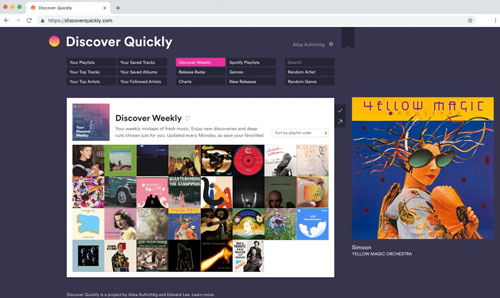
Discover Quickly is a web-based Spotify music discovery tool that helps users find new music through a fast and intuitive visual interface. Simply connect your Spotify account to explore related artists, recommended tracks, playlists, and albums more efficiently than with Spotify's standard navigation.
Fast and smooth browsing experience;
Visual music exploration;
Easily discover new artists;
Clean interface
Web-based;
Limited filtering options;
No official maintenance
Companion for Spotify is also a great playlist generation and music discovery tool that helps you sift through the millions of songs on Spotify and create the most unique playlists for you. The tool will let you know when new songs are available from the artists you follow. Besides, it will analyze your listening habits and create new playlists for you based on newly released songs.
4. Last.fm (Spotify Stats Plugin)
Best for: Music enthusiasts who want to access detailed listening statistics and personalized recommendations.
Last.fm is one of the most well-known Spotify add-ons. It allows you to discover new music and share tracks with others. You can use it to analyze your Spotify listening trends. It works across different platforms, not just Spotify, to make listening to music more interesting.
View also: How to Scrobble Spotify with Last FM

A reliable and mature platform;
Supports multiple music services;
Provides excellent long-term listening data analysis;
Boasts a vast community of music enthusiasts
Interface looks somewhat dated;
Requires a separate account;
Some advanced features require manual setup
Receiptify is also a Spotify stats plugin, which generates your favorite tracks, artists and music genres on Spotify in the form of receipts. This Spotify receipt will show you the 10 most played songs, artists and genres over the last month, six months and all time. It is fully available for Spotify Premium and free users.
5. Soundiiz (Spotify Playlist Plugin)
Best for: Users who manage playlists across multiple streaming services.
It is the perfect Spotify plugin if you've recently shifted to Spotify from another music streaming service. Soundiiz will let you import all your favorite songs and playlists from your previous service to Spotify with ease. All you have to do is log into your previous account, export the song, and then transfer them to Spotify. It is completely integrated with Spotify to make the importation of songs smoother.

Transfer playlists between different platforms;
Supports batch editing;
Supports Spotify, Apple Music, and YouTube Music;
Saves time when managing large music libraries
Premium features require payment;
Web-based version only;
May be slow when processing large playlists
6. Musixmatch Lyrics (Spotify Lyrics Plugin)
Best for: Users looking for reliable, accurate, and synchronized lyrics from a vast music library (including international tracks).
With Musixmatch Lyrics, you'll never get the lyrics to your favorite songs wrong again. The app has millions of songs in its database. When plugged into your Spotify, it detects the song you're listening to, searches the database to find the correct lyrics, and syncs the lyrics with the song so perfectly that you can easily sing along.
It's all done in milliseconds and falls perfectly into place every time a new song comes on. In addition, a window displaying lyrics appears and disappears with a single tap.

Features a vast and frequently updated lyrics database;
High accuracy, backed by a community verification mechanism;
Lyrics synchronize in real-time with Spotify playback;
Robust multilingual support;
Works across both mobile and desktop platforms
Integration with Spotify is not native (requires an app or extension);
Some features require a premium subscription;
The desktop experience is not as smooth or seamless as that provided by plugin tools like Spicetify;
Occasional synchronization delays occur when playing obscure tracks
Besides, you can try Spicy Lyrics or Lyrics Plus plugin to view Spotify lyrics while listening to music.
7. Full App Display (Spotify UI Extension)
Best for: Users who want a distraction-free, full-screen Spotify listening experience and seek a more immersive visual layout.
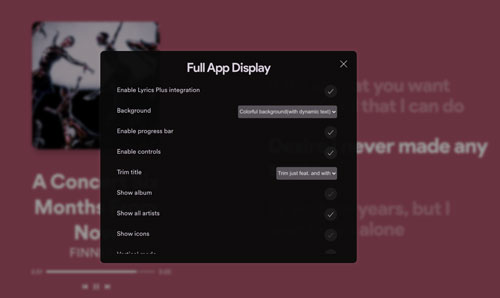
Full App Display is a Spicetify-based extension for Spotify designed to transform the standard desktop interface into an immersive, full-screen music player. It moves away from the typical sidebar-heavy layout, focusing instead on album art, playback visuals, and a minimalist interface to place the music at the heart of the experience.
Creates an immersive, full-screen music experience;
Highlights album art and visual effects;
Minimizes interface distractions to enhance focus;
Seamlessly integrates with the Spicetify ecosystem
Requires Spicetify installation and configuration;
Desktop-only (mobile and web versions not supported);
Not suitable for multitasking or playlist management;
Dependent on Spotify updates and Spicetify compatibility
8. Spicetify Themes (Spotify Customization Plugin)
Best for: Users who want full control over the visual appearance and deep customization of the Spotify desktop interface.
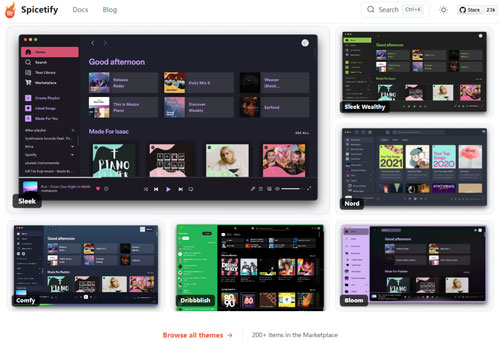
Spicetify Themes is part of the Spicetify ecosystem, allowing users to completely transform the look and feel of the Spotify desktop app through CSS-based customization. You are not limited to Spotify's default interface; you can apply community-created themes or design their own, personalizing details such as layout, color schemes, fonts, and spacing.
Comprehensive interface customization;
Extensive theme library;
Lightweight, high-performance operation;
Active community support
Requires Spicetify installation;
May stop working after Spotify updates;
Requires advanced configuration
9. Spotify Playback Speed (Spotify Playback Plugin)
Best for: Users who use Spotify web player and want to control music playback speed.
Spotify Playback Speed is a Chrome browser extension designed to add playback speed controls to the Spotify web player. Since Spotify does not natively support adjusting the playback speed of music tracks, this extension offers a simple way for users to speed up or slow down playback directly within their browser.
Once installed, it integrates with the Spotify web player and adds speed adjustment options, allowing users to listen to music at their preferred speed without leaving Spotify.

Adds missing features to Spotify playback;
Easy to install and use;
Runs directly within the Chrome browser;
Useful for learning, study, and music analysis
Works only with the Spotify web player;
Cannot be used with the Spotify desktop or mobile apps;
May stop working after Spotify or browser updates;
Audio quality may be affected at very high playback speeds
View also: How to Change Spotify Playback Speed
10. Keyboard Shortcuts (Spotify Productivity Plugin)
Best for: Users who listen to Spotify in their browser while working, studying, or multitasking.
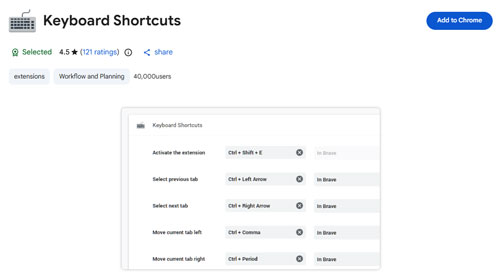
Keyboard Shortcuts is a Chrome extension that adds convenient keyboard controls to the webpage. Instead of switching tabs or using your mouse to manage playback, you can control Spotify directly via your keyboard, making music management faster and more efficient. With customizable shortcuts, you can skip tracks, pause playback, adjust volume, and control other functions without interrupting your current workflow.
Faster music control without using a mouse;
Improves productivity and workflow;
Easy to install and configure;
Customizable hotkeys;
Lightweight and resource-friendly
Not work with Spotify desktop or mobile apps;
Some shortcuts may conflict with browser hotkeys;
Functionality may be affected by Spotify web updates
11. Equalify Pro (Spotify Equalizer Plugin)
Best for: Users who want advanced audio customization and sound control.
If you want to mix your tracks at a professional level, then Equalify Pro is the Spotify plugin you must have. It gives you the ability to tweak your music, create fantastic playlists and test how different mixes will work. It's an amazing tool for music lovers who want to take control of their playlists and create an amazing new listening experience every time they want to play Spotify music.

Built-in Spotify equalizer;
Customizable sound presets;
Bass and treble adjustments;
Significantly enhances the audio experience
Primarily supports Windows;
Paid software;
Not officially supported by Spotify
12. SpotifyTree (Spotify Visualizer Plugin)
Best for: Users who prefer visual music organization.
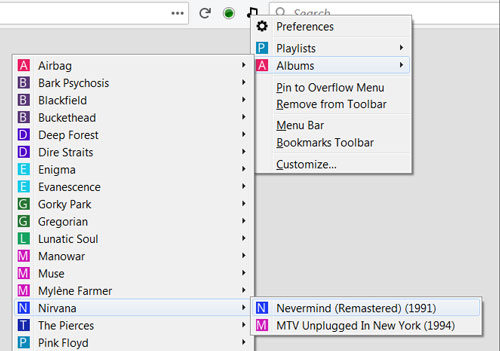
SpotifyTree visualizes your playlists and music library in a tree structure, making it easier for you to browse.
Unique playlist visualization effects;
Helps in understanding musical structure;
Suitable for large music libraries
Niche use cases;
Limited scope of support;
Infrequent updates
MusicScapes is also a Spotify visualizer addon. It generates a unique music landscape based on your recent Spotify activity. This is a fun way to visualize your musical tastes, such as the background colors in the landscape representing the mood of the tracks you typically listen to. Each detail of the artistic landscape symbolizes a different aspect of your musical taste, and it visualizes the musical attributes in your favorite songs.
Part 3. Are Spotify Plugins Safe?
Most reputable Spotify plugins are completely safe to use, provided you download them from trusted sources. Since Spotify lacks a traditional built-in "app store" for plugins, the responsibility for verifying safety largely falls on the user. Using tools with large user bases can significantly reduce risk.
Trusted tools like Last.fm, Soundiiz, and Songkick use official connection channels and have proven their reliability over the years. Similarly, established community mods like Spicetify feature open-source code that undergoes continuous scrutiny by thousands of developers.
To ensure the security of your account and device, you should follow these basic safety guidelines:
1. Stick to official repositories: Download extensions or themes only from verified GitHub repositories or the developer's official website.
2. Avoid running unknown executables: Never run '.exe' or '.bat' files from untrusted sources, as these can easily harbor malware.
3. Review requested permissions: When connecting your Spotify account, pay close attention to the permissions the plugin requests to ensure it isn't seeking full control over your credentials.
Part 4. Why Does Some Spotify Plugins Stop Working?
The primary reason Spotify plugins fail is that Spotify frequently updates its desktop and mobile applications as well as its backend APIs (Application Programming Interfaces). Spotify employs a rapid deployment strategy, often rolling out minor tweaks or major overhauls without prior notice to external developers. When the underlying code changes, the connections established by third-party plugins often break.
These disruptions typically occur during specific platform changes:
1. API Modifications: Spotify may restrict or completely remove certain data endpoints that plugins rely on to fetch track information or playlist data.
2. Interface Overhauls: Desktop mods like Spicetify inject code directly into the visual layout; consequently, even a slight shift in button placement or a redesign of the sidebar can cause an entire theme to break.
3. Enhanced Security Restrictions: Spotify occasionally tightens security protocols to prevent ad-blocking or data scraping, which can inadvertently cause legitimate tools to malfunction.
When these updates occur, the continued functionality of a plugin depends entirely on its creator. If a developer stops maintaining the project or loses interest, the plugin will remain permanently broken. So, choosing software that is actively maintained is the best way to ensure your tools continue to work reliably over the long term.
Part 5. Bonus Tips: How to Download and Listen to Spotify Music Anywhere without Restrictions
If you want to have real freedom with your Spotify songs, then your best option is to download the songs as MP3. Then you can play the Spotify MP3 songs on multiple devices, create playlists and use the songs as you want. For format conversion of Spotify songs, you are better off turning to AudFree Spotify to MP3 Converter.
It is a powerful downloading tool designed to download songs, podcasts, playlists and albums from Spotify. It can convert your downloaded Spotify content not only to MP3, but also to several other common formats such as FLAC, M4B, AIFF, M4A and WAV. Besides, you can customize parameters such as bitrate, sample rate, etc. to enhance the quality of your Spotify songs. Now, follow the steps below to download and convert Spotify music to MP3.
Step 1. Launch AudFree Spotify to MP3 Converter, then drag and drop the songs or playlists you want to convert to MP3 from Spotify web player to the converter's '+ ♫' section. In the new window, click the 'Add to list' button to import files.

Step 2. Tap on the "Menu" icon of the tool, then open the format screen by clicking on "Preferences". Here select MP3 as your preferred audio output and change other settings if needed.

Step 3. Click the "Convert" key in the Converting window to start the conversion process. The tool will convert your Spotify tracks to MP3 and download them to your computer locally so that you can listen to them as you wanted.

Also, you can use AudFree Streaming Audio Recorder to download Spotify music content for offline playback. In addition, it allows you to download music from Tidal, YouTube Music, Amazon Music, Apple Music, SoundCloud, Deezer, Qobuz, and so on.
Part 6. Summary
This article has outlined the 10+ best Spotify plugins designed to enhance the Spotify listening experience in different ways. Alternatively, if you want to play Spotify music with complete freedom, you may use AudFree Spotify Music Converter to download Spotify tracks as MP3 files. Just take action to perfect the Spotify listening experience.

Chief Editor


