


For years, DeezLoader was one of the most popular tools for downloading music from Deezer. It offered an easy way to save tracks, albums, and playlists to local storage, making offline listening possible without relying on streaming apps. However, if you've recently searched for DeezLoader, you've probably noticed that many download links are broken, official websites are gone, and users are reporting that the software no longer works as expected.
So, is DeezLoader still working in 2026?
The short answer is: not really. While some old APK files and desktop versions can still be found online, the original DeezLoader project has been discontinued for years, and most versions no longer function properly due to changes in Deezer's infrastructure.
In this guide, we'll explain what happened to DeezLoader, whether you can still use it today, and the best alternatives available for Windows, Mac, Android, and iOS users.


Part 1. Why Is DeezLoader Remix No Longer Working?
To understand why DeezLoader stopped working, it's helpful to look at its history.
What Was DeezLoader Remix?
DeezLoader originally gained popularity because it allowed users to download music from Deezer without a Premium subscription and stored them in MP3. Unlike many audio recording tools, DeezLoader could retrieve tracks quickly while preserving metadata such as album artwork, artist names, and track information.

The application was highly versatile, offering cross-platform support for Windows, macOS, Linux, and Android. Because it pulled data directly from the source rather than hosting its own database, it provided a seamless, ad-free experience.
Key Features of the Original DeezLoader App
✅ Batch Downloading: The ability to download entire albums, playlists, and podcasts simultaneously at high speeds.
✅ Perfect Metadata Tagging: Automatically embedded ID3 tags and album art into downloaded files.
✅ Format Flexibility: Allowed users to export music in MP3 format, or lossless FLAC quality (note: extracting FLAC required a valid Premium account token).
✅ Clean Interface: A completely ad-free user interface with customizable download directories.
The Downfall and Current Status of DeezLoader Remix
As Deezer modernized its platform and tightened data security, the original DeezLoader project began facing severe technical roadblocks. Independent developers launched various forks to keep the tool alive - most notably DeezLoader Remix (in Part 4) - which temporarily resolved connection errors through continuous community patches.
However, maintaining these projects became increasingly difficult. Changes to Deezer's APIs, authentication methods, and content delivery systems caused frequent download failures. At the same time, legal concerns surrounding unofficial music downloading tools led many developers to abandon active development.
Eventually, DeezLoader Remix is entirely obsolete, leaving users with broken code and a need for modern alternatives.
Since DeezLoader and its forks are no longer viable, you will need a modern replacement that keeps up with Deezer's current security. If you want an intuitive, GUI-based Deezer downloader, we highly recommend the AudFree Deezer Music Converter (detailed in Part 3).
Unlike broken legacy tools or complex command-line scripts, AudFree offers a streamlined desktop interface for fast batch processing. Simply link it to an active Deezer Premium account, and you can seamlessly export flawless, native 1411 kbps FLAC files.
Part 2. Can You Still Download and Use DeezLoader in 2026?
The answer depends on what you mean by "use".
If you're asking whether old DeezLoader APKs and installation packages still exist online, the answer is yes. A quick search will reveal numerous third-party websites hosting archived versions of DeezLoader for Windows, Mac, Linux, and Android.
Because there is no longer an official repository or official website for DeezLoader, any surviving installer or APK you find online is an unverified mirror. Downloading executable files (.exe, .dmg, or .apk) from random file-sharing servers poses a severe security risk, as these abandoned packages are frequently weaponized with malware, adware, or credential-stealing scripts.
However, downloading and installing these versions is only part of the story - the software is completely non-functional.
Because the backend codebase of DeezLoader has been abandoned for years, it cannot adapt to Deezer's modern platform infrastructure. If you attempt to boot up an old build today, you will routinely encounter systemic failures:
- Authentication & Login Failures: The application can no longer bridge a connection to user accounts.
- Blank Search Strings: The internal scraper cannot parse Deezer's updated database directories.
- Decryption & Download Errors: The app cannot decode modern server-side audio streams.
- Broken Metadata Delivery: Album artwork and ID3 tracking tags fail to load entirely.
Retrospective: How DeezLoader Used to Work
To illustrate why the software broke, it helps to look at the historical workflow users relied on back when the app was functional.
Step 1. Users would launch the desktop client or mobile APK and navigate to the 'Settings' menu on the home dashboard to configure output paths and format preferences.

Step 2. While early versions allowed a basic email login, Deezer patched that vulnerability early on. Users had to open a desktop web browser, log into Deezer, extract their account's secure cookie string (known as the ARL token), and paste it into DeezLoader to handshake with the servers.
Step 3. Once authenticated, users would use the internal search bar to ping Deezer's servers directly, bypassing the official interface to pull up track indices, albums, or playlists.
Step 4. Clicking the download arrow triggered DeezLoader to intercept the raw audio stream from Deezer's content delivery network, saving it locally as a standard, unprotected MP3 or lossless FLAC file.

Because Deezer completely overhauled the token structures and stream encryption keys involved in Step 2 and Step 4, this entire pipeline is permanently broken. For stable, modern music archiving, users must transition to actively maintained utilities.
Part 3. Best GUI Alternative to DeezLoader for Windows/Mac - AudFree
As discussed above, DeezLoader is no longer a practical solution in 2026. Even if you manage to locate an archived installer, the software can no longer reliably authenticate with Deezer's servers, retrieve music libraries, or complete downloads successfully.
For users who still want a simple way to save Deezer music for offline listening, the most sensible approach is to switch to an actively maintained alternative.
Among the many Deezer downloaders available today, AudFree Deezer Music Downloader stands out as one of the most user-friendly options for Windows and Mac. Unlike abandoned DeezLoader builds or open-source projects that often require manual configuration, AudFree offers a modern graphical interface that lets both beginners and experienced users download Deezer content with minimal effort.
Whether you want to save individual songs, entire albums, playlists, podcasts, or audiobooks, AudFree offers a streamlined workflow while preserving the original listening experience.
Key Features of AudFree Deezer Music Downloader

- Download Deezer songs, albums, playlists, podcasts, etc. without premium
- Convert Deezer music to FLAC, WAV, MP3, M4A, AIFF, etc.
- Support Lossless output mode for higher-quality listening and archiving
- Preserve ID3 tags, album artwork, artist information, and track metadata
- Batch download large playlists and albums efficiently
- User-friendly and easy to use on Windows and macOS
How Does AudFree Alternative to DeezLoader Work
Unlike the old DeezLoader workflow that relied on extracting ARL tokens and interacting with outdated APIs, AudFree simplifies the entire process through its built-in Deezer web player.
- Step 1. Add Deezer Music to AudFree Deezer Music Downloader

- Download and install AudFree Deezer Music Downloader on your Windows or Mac computer. Launch the software and sign in to your Deezer account through the integrated web player. Browse Deezer as usual and open the song, album, playlist, or podcast you want to save. Then click the "+" button to load the content into the conversion list.
- Step 2. Customize Output Parameters for Deezer Tracks

- Click on the "Menu" > "Preferences" in the upper right corner to set the Deezer output parameters. In the "Conversion" tab, select the output formats of Deezer music like Lossless, MP3, AIFF, FLAC, WAV, etc., as needed. You can also adjust advanced parameters such as bit rate, sample rate, audio channels, and output organization settings according to your listening needs.
- Step 3. Download Deezer Music Locally for Free

- After completing the settings, click the 'Convert' button. The program will begin processing and saving the selected Deezer tracks to your computer. Once finished, click the Converted section to access all downloaded files and play them offline on any compatible device.
If your creative workflow extends beyond Deezer and you need high-resolution source material from other major platforms like Apple Music, Tidal, or Qobuz, consider utilizing AudFree Streaming Audio Recorder. This advanced companion tool offers an all-in-one capture pipeline that extracts pristine, lossless audio from more than 10 major streaming platforms simultaneously.
With open-source projects, users may need to configure settings, troubleshoot dependencies, or monitor GitHub discussions for fixes. AudFree focuses on a plug-and-play experience, making it attractive to users who simply want to build a local music collection without technical complications.
Regularly updated to bypass Deezer security patches without crashing;
A polished graphical interface (GUI) with a orginal web player;
Export directly to WAV, AIFF, FLAC, and MP3 with full ID3 tagging;
Batch conversion for whole albums or playlists;
Offer a 24/7 customer support service
Full conversion require a commercial license;
Require a Mac or Windows PC to execute conversions
Part 4. Best Free Open-Source Alternative to DeezLoader on Mac/PC
For creators and data hoarders who prefer sticking to completely free, community-driven software, Deemix stands out as the definitive open-source alternative.
As a direct spiritual successor and fork of the original DeezLoader Remix codebase, Deemix operates on a nearly identical architecture. It does not host any music on its own; instead, it pings Deezer's servers directly to fetch and extract files. While the original development group moved on, the project remains highly active today through community-maintained forks on GitHub, making it a staple recommendation in digital archiving circles.
How to Use Deemix to Archive Music
Because Deemix bypasses standard consumer interfaces, the modern setup process requires extracting an authentication token from your web browser to handshake with Deezer's servers.
Step 1. Download the latest stable build of the Deemix GUI or CLI from an active community GitHub Remix repository. Install and launch the application on your system.
Step 2. Open your desktop web browser, navigate to Deezer, and log into your account. Open your browser's Developer Tools (F12), head to the Application/Storage tab, locate your site cookies, and copy the value string next to "arl".
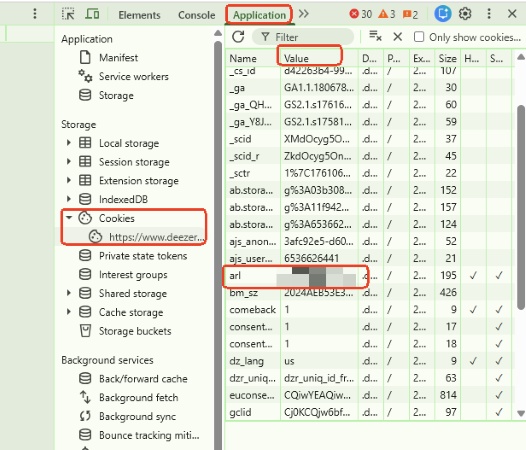
Step 3. Paste this copied ARL string into the login field within the Deemix settings dashboard. This securely authenticates the application, granting it direct access to Deezer's content delivery networks.
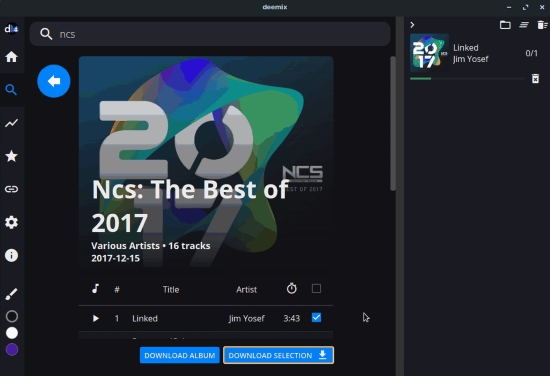
Step 4. Use the internal Deemix dashboard to search for artists, albums, or playlists, or paste a direct Deezer URL. Select your desired output quality and click download to save the tagged files to your local drive.
See also: How to Download Deezer Songs for Free
No paywalls, subscriptions, or feature locking;
Excellent tracking of advanced ID3 info, including synced lyrics (.lrc files);
Can be deployed via Docker to automate music libraries alongside server software like Plex or Lidarr
Requires an active paid Deezer Premium account token to access 320kbps MP3 or lossless FLAC files, and free accounts are capped at 128kbps;
Manual extraction of ARL cookies can be intimidating for non-technical users;
Relying on unofficial API workarounds means the tool routinely breaks whenever Deezer patches its server encryption keys
Part 5. Other Free DeezLoader Alternatives for Android/iPhone Users
If you prefer downloading music directly to your smartphone without dealing with desktop installations or extracting manual cookie files, mobile-centric workarounds are highly convenient. These solutions run directly through your mobile browser or communication apps, keeping your local device free of bulky third-party software.
1. Deezer Telegram Bot (e.g., @deezload2bot)
Telegram music scrapers have become a staple for mobile users due to their frictionless configuration. These automated bots run on independent servers, effectively pulling media streams and delivering them right into your chat interface as downloadable audio files.
How to Use:
Open the Telegram app on iOS or Android, search for @deezload2bot in the global directory, and tap Start. Use the /search command to look up an artist, album, or playlist, or simply paste a direct Deezer sharing link. The bot fetches the track from its backend proxy and pushes a standalone audio file back to your chat window, which you can save directly to your mobile storage.

2. Online Browser-Based Downloaders (e.g., DeezMate)
Web-based services provide an OS-independent solution that works on any mobile browser, whether you are using Safari on iOS or Chrome on Android. One of the useful online Deezer downloader is DeezMate.
How to Use:
Launch your official Deezer app, navigate to the track or album you want to grab, tap the Share icon, and copy the URL. Next, open your mobile browser, navigate to the DeezMate web portal, paste the URL into the conversion box, and tap Download. The server handles the stream conversion on its side, providing you with a direct download link for an MP3 file.

As of June 2026, DeezMate is currently offline. It remains unclear whether this outage is temporary or permanent. We are monitoring the situation closely and will update this section with fresh information as soon as the platform becomes responsive or an alternative domain surfaces.
Completely skips the risk of downloading unverified mobile DeezLoader APKs or sideloading unsigned scripts;
Works seamlessly across iOS, Android, and tablets;
You do not need to log in with your personal Deezer credentials or risk leaking your browser's ARL token cookie
Web platforms and Telegram bots face constant DMCA takedown orders, leading to frequent server migrations and unexpected downtime;
Streams are frequently compressed. Free users are usually hard-capped at standard 128kbps or 320kbps MP3 files, even if the container claims to be a FLAC;
Extracted audio often contains generic cover art, missing lyrics, and corrupted ID3 tagging data
Part 6. Which DeezLoader Alternative Is Best in 2026?
After reviewing the current state of DeezLoader and exploring several modern replacements, one question remains: Which alternative should you actually choose?
The answer largely depends on your priorities. Some users want a completely free solution, while others prioritize stability, audio quality, and ease of use. Mobile users may prefer a quick Telegram bot, whereas desktop users often need advanced features such as batch downloading, metadata preservation, and flexible output formats.
To help you decide, we've compared DeezLoader with the most popular alternatives available in 2026.
| Feature | DeezLoader | AudFree Deezer Music Downloader | Remix | Telegram Bots / Online Downloaders |
|---|---|---|---|---|
| Tool Type | Desktop App | Desktop App | Open-Source GUI / CLI / Docker | Telegram Bot/Web-Based |
| Current Status | ❌ | ✅ | ✅ | ✅ |
| Supported Platforms | Windows, Mac, Linux, Android | Windows, Mac | Windows, Mac | Android, iPhone, Browser |
| Download Deezer Songs | ❌ | ✅ | ✅ | ✅ |
| Download Albums & Playlists | ❌ | ✅ | ✅ (Limited) | ❌ |
| Batch Conversion | ❌ (Used to) | ✅ | ✅ (Limited) | ❌ |
| Financial Cost | Completely Free | Free Trial / Paid License | Completely Free | Usually Free |
| Output Formats | MP3, FLAC | MP3, FLAC, WAV, AIFF, M4A, M4B, Lossless | Usually MP3 | Usually MP3 Only |
| Download Speed | 0x (Fails to connect) | Up to 46x Batch Acceleration | Moderate | Moderate |
| ID3 Tags Perservation | ❌ (Used to) | ✅ | ✅ (Limited) | ❌ |
As demonstrated throughout this guide, AudFree Deezer Music Downloader delivers the ultimate balance of speed, stability, and ease of use. By allowing you to customize sample rates, bitrates, and audio containers, it ensures an uncompromised high-fidelity playback experience tailored exactly to your setup. Click the download button below to start your free trial and experience hassle-free Deezer archiving today.
Conclusion
In short, if you're simply looking for a quick way to grab a few tracks on your phone, a Telegram bot or online downloader may be sufficient. However, these tools often disappear without notice, support limited formats, and rarely preserve complete metadata.
For users who want a stable, long-term solution for building an offline Deezer library, AudFree Deezer Music Downloader is the strongest choice overall. It offers the best balance of reliability, audio quality, format flexibility, metadata preservation, and ease of use.
As for DeezLoader itself, it remains an important part of Deezer downloading history, but in practical terms, it is no longer a viable option for everyday use in 2026.

Staff Editor


