


With a Spotify Premium account, you can download music for offline listening, but only within the Spotify app. You can't play these Spotify downloads in other media players. In this case, many users search for third-party tools to download music.
When looking for the tools on the web, there comes the SpotubeDL. But what can it do? Is it safe? Is it legal to use? Here in this full SpotubeDL review, you will learn its features, safety, limitations and even the best alternative to SpotubeDL.

Part 1. What Is SpotubeDL?
SpotubeDL is an online Spotify music downloader and Spotify artwork downloader. It allows you to paste Spotify URL to songs, artists, albums or playlists into its website and start downloading music from YouTube or other sources at up to 320kbps with cover art. Besides that, you can directly type and search for the track, playlist, artist, etc. This tool can save audio in MP3, OGG and Opus audio formats and keep ID3 tags of the track. As an online tool, you don't need to install any additional program on your device and you don't need to log in to your Spotify account.
If you upgrade to SpotubeDL Premium, you can get cover arts and artist gallery without watermark. Also, you can download music with lyrics and Max-Res cover art. What's more, you can batch download music and save them in M4A, AAC, and WAV audio formats. In addition, you can customize filename format as needed.
Part 2. Is SpotubeDL Safe and Legal?
So, is SpotubeDL safe and legal to use? Before trying it, you should check below.
Is SpotubeDL Safe?
SpotubeDL is a third-party website that is not developed or endorsed by Spotify. Besides, there is no official documentation explaining how it handles user data, processes downloads, or secures its infrastructure. So, there may contain security risks and you should be cautious to use SpotubeDL. Please remember to visit the official SpotubeDL website to download music. And avoid sharing your personal information and clicking misleading advertisements on the website.
Is SpotubeDL Legal?
The legality of SpotubeDL lies in a very ambiguous and gray area in internet law, and is often illegal. SpotubeDL works by scraping metadata from Spotify and retrieving the actual audio files from third-party sources such as YouTube or other sources. By bypassing these platforms' Digital Rights Management (DRM) and paywalls, users can access copyrighted content for free. This exposes users to potential legal consequences, although enforcement actions against individual downloaders are relatively rare.
Besides, using SpotubeDL directly violates the Terms of Service of Spotify, YouTube, and any other streaming platforms from which the tool scrapes data. Spotify explicitly prohibits the use of automated scripts to scrape its database, bypass Premium features, or combine its proprietary metadata with third-party audio streams. Streaming platforms reserve the right to ban or suspend user accounts if they detect such activity.
So, remember to use SpotubeDL to download royalty-free tracks and use the downloaded music files for personal use only. Do not share the downloads with others or use the files in public.
Part 3. How to Use SpotubeDL Spotify Downloader
Now, you have learned the safety and legality of SpotubeDL, you can follow the steps to use SpotubeDL to download Spotify music.
Step 1. Go to the Spotify app or Spotify web player on your device. Then find any song, album, playlist, or artist that you want to download. Next, get and copy its link address.

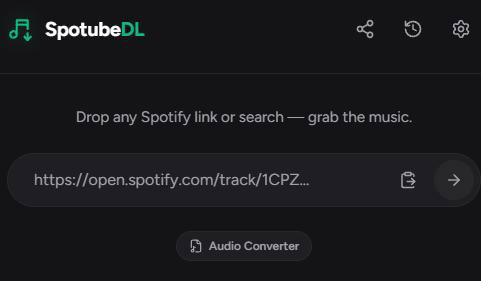
Step 2. Enter SpotubeDL online website (https://spotubedl.com/). Then paste the copied URL into the text box on the screen. Later, tap the big arrow button next to the box.
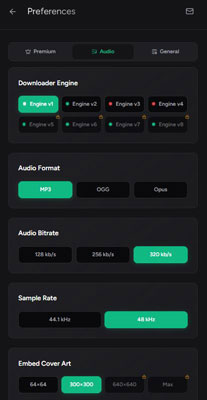
Step 3. Now, you will see the result of the content you want to download. There are cover art, artist name, song title, etc. on the screen. Before downloading, go to Settings at the right-corner of SpotubeDL. Then you can choose the output audio format from MP3, OGG and Opus. Also, you can select the audio bitrate, including 128kbps, 256kbps and 320kbps. What's more, you can set sample rate as 44.1kHz or 48kHz. Besides, you can choose to get embedded cover art at 64 x 64 or 300 x 300.
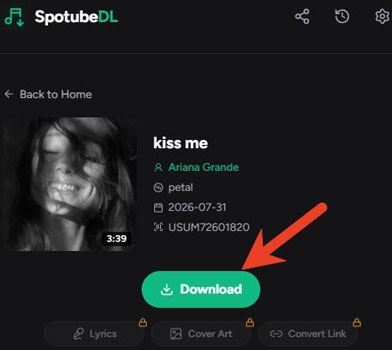
Step 4. At last, touch "Download" to start to download Spotify music files online for free with metadata and artwork.
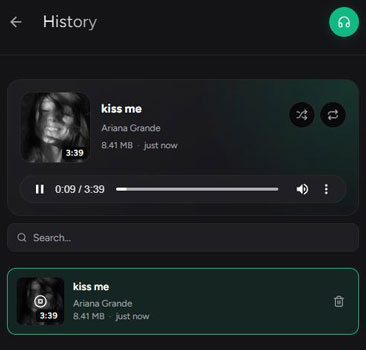
Step 5. After downloading, you can click the History icon to check your downloaded files. Also, you can play the track with the built-in media player.
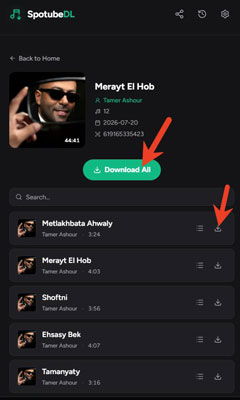
If you try to download Spotify music from an album, a playlist or an artist, you can paste the link and click Download All to download music in ZIP file at once. Or, you can tap the download icon next to the track to download them one by one.
Part 4. How to Fix SpotubeDL Not Working
When using SpotubeDL, you may encounter problems. And here we will list the common issues and show you the solutions.
Problem 1. SpotubeDL Download Failed
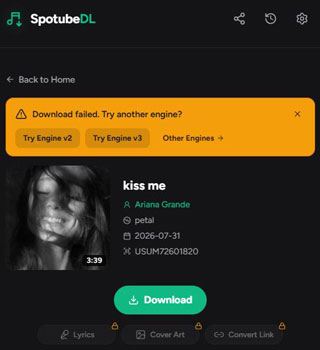
Fix: You can change to another engine to start downloading again. SpotubeDL offers several engines to get music download.
Problem 2. Spotify Playlist Won't Load onto SpotubeDL
Fix: You should refresh the webpage, paste the link into the box again, and wait a few minutes. Or, you need to split a very large playlist into smaller ones as SpotubeDL may take a long time to process a large playlist.
Problem 3. Missing ZIP Files and Silent Failures on SpotubeDL
Fix: Split large playlists into smaller batches of 20 to 30 songs to prevent server timeouts during the ZIP compression phase. Also, check your browser's security settings to ensure it is not silently blocking automatic or background downloads from the site.
Part 5. SpotubeDL Pros and Cons
Now, we will conclude the strengths and limitations of SpotubeDL to help you make a decision.
No software installation required;
Works on many devices;
Supports to batch download Spotify songs, playlists, artists, and albums;
Supports to download music with lyrics and cover artwork;
Supports to search for music content;
Allows to customize output audio parameters such as bit rate and sample rate
Lacks some output audio formats like FLAC, AIFF, etc.;
Sometimes download failed;
May not work after Spotify updates;
Can't download Spotify podcasts and audiobooks
Part 6. Best Alternative to SpotubeDL - AudFree Spotify Music Downloader
If you want more output audio formats, want to download podcasts and audiobooks, and want greater control over your Spotify music library, you should use a desktop software.
AudFree Spotify Downloader is such a better alternative to SpotubeDL. It can download all content from Spotify, like podcasts, playlists, audiobooks, single tracks, albums, etc. Besides, it can convert Spotify to FLAC, MP3, AIFF, M4A, WAV and more. It also supports batch downloading Spotify music files with full ID3 tags and 100% original audio quality kept. Moreover, you can reset output audio parameters like bit rate, sample rate, etc. In addition, it supports to keep lyrics if available.

Besides, AudFree Streaming Audio Recorder is another SpotubeDL alternative. It supports to download any music from Spotify for offline playback. Moreover, it can download music from YouTube Music, Apple Music, Amazon Music, Qobuz, SoundCloud, Audible, Pandora, Deezer and so on.
Our real test: We attempted to download a Spotify playlist containing 50 songs; SpotubeDL took 15 minutes and failed to download 5 of them, whereas AudFree Spotify Music Downloader successfully downloaded all the songs in just 3 minutes.
Part 7. Compare SpotubeDL vs AudFree Spotify Music Converter
So, which one should you choose? You can check the comparison of SpotubeDL and AudFree Spotify Music Converter below to learn more.
| Features | SpotubeDL | AudFree Spotify Music Downloader |
|---|---|---|
| Operating System | Online | Windows, Mac |
| Download Content | Spotify songs, artists, playlists and albums | All Spotify content |
| Audio Source | YouTube or other sources | Spotify platform (Built-in web player) |
| Supported Output Format | MP3, OGG, Opus, M4A, AAC, WAV | MP3, FLAC, M4A, WAV, AIFF, M4B |
| Batch Download | ✅️ | ✅️ |
| Output Quality | 128kbps - 320kbps | 320kbps/FLAC/WAV |
| Download Speed | Medium | Fast |
| ID3 Tags Retained | ✅️ (Full ID3 tags) | ✅️ (Full ID3 tags) |
| Personalized Settings | ✅️ | ✅️ |
| Conversion Success Rate/Stability | Medium | High |
| Safety | Risky (May contain redirect ads) | 100% Safe (No ads, verified software) |
| Price | Free | $14.95/month |
| Ratings | ⭐️⭐️⭐️ | ⭐️⭐️⭐️⭐️⭐️ |
Part 8. Conclusion
In a word, for users who want a simple and quick method to download Spotify music, SpotubeDL is your best choice. However, it still lacks of some features than a desktop software.
So, if you preserve audio quality and metadata, want more functions, and have a large Spotify library, you can opt to tools like AudFree Spotify Music Converter. It allows you to batch download music with full ID3 tags and higher sound quality at once. After that, you can manage and play Spotify music offline anywhere and anytime.

Chief Editor


