


Without a Spotify Premium, you can't listen to your favorite Spotify music offline. This frustration has led to a massive surge in third-party downloading tools like Spotdown, etc. However, does this free tool get the job done well?
In this comprehensive Spotdown review, we will test the tool's true capabilities, explore its drawbacks and show you the best alternative to it.

Part 1. Spotdown Spotify Audio Downloader: Detailed Review
Spotdown is a Spotify downloader, available both as a web-based platform and as an Android application. It can help users to bypass Spotify's DRM restrictions completely for free without needing to register for an account or install complex software on their device. Now, let's check the key features of this tool below.
1. Download Spotify Songs/Playlists/Albums/Arists for Free without Ads
Spotdown Spotify Downloader allows users to download songs, playlists, artists and albums from Spotify without using Spotify Premium and save music without ads.
2. Keep Metadata Automatically
This tool will automatically embed song's basic metadata into the MP3 files, including cover art, title, artist, etc.
3. In-App Track Previews
Spotdown Android app version allows you to listen to a short audio clip of a song before starting the download to ensure you are downloading the correct track.
4. Download History Manager
Spotdown Android app has a built-in library interface that helps you track, organize, and find all MP3 files that have been successfully saved to your device.
5. Direct Audio Sharing
You are allowed to share the MP3 file directly to friends or family within the Spotdown Android app once you have downloaded a song.
Part 2. How to Use Spotdown Spotify Downloader
Now, let's learn how to use Spotdown to download music from Spotify for free step by step. We will take the online version as an example.
Step 1. Open the Spotify app or Spotify Web Player on your desktop or mobile device and log in to your account. Then find the song, playlist, artist or album you want to download.
Step 2. Tap the "Three Dots" icon, then proceed to copy the URL of the Spotify song, artist, album or playlist.

Step 3. Enter Spotdown Spotify Downloader online website. Then paste the copied Spotify track's URL into the search bar on the screen. Later, tap the "Download" button. Also, you can directly type the artist name or song title in the text box to search for the content you want to download.
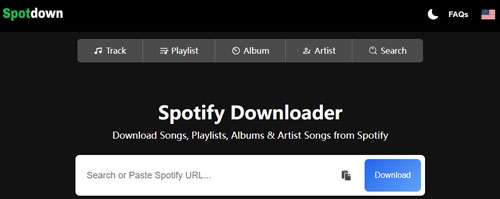
Step 4. Now, you can click the "Get Link" button and start downloading Spotify music online.
Part 3. Drawbacks of Spotdown Spotify Music Downloader
Spotdown is completely free, which is undoubtedly very attractive, but user reviews and independent testing have revealed many flaws. Since the platform runs simultaneously as a web version and an Android app, its shortcomings cover a range of areas, including audio quality, device security, and overall stability. If you're looking to build a permanent, high-quality offline music library, these issues make Spotdown a very disappointing option.
1. Low Audio Quality and Unstable Audio Sources
While Spotdown claims to offer high-fidelity downloads, it actually performs heavy compression on the audio output. Downloaded MP3 files are typically limited to a lossy 128kbps, resulting in muddy bass and significantly lower clarity than Spotify's native premium streaming service. Furthermore, because these tools often obtain audio from third-party platforms like YouTube rather than Spotify's official servers, the sound quality can vary greatly between different tracks.
2. Intrusive Advertising and Security Risks
As a free tool, Spotdown relies heavily on an aggressive monetization model that severely impacts user experience. When using the online version, users are frequently bombarded with multiple redirects and pop-up ads before the download even begins. These unverified ads can expose your computer or mobile device to malware.
The Android app's monetization strategy is equally frustrating. It forces users to watch an unskippable 30-second video ad before they can even start downloading a song.
3. App Instability and Functionality Limitations
Spotdown's instability is one of its biggest pain points, as evidenced by its dismal 2.5-star rating on the Google Play Store for its Android app. Users frequently report Spotdown not working issues such as infinite loading, URL parsing failures, and sudden app crashes when trying to search for music. More worryingly, a common complaint is that successfully downloaded files sometimes show as 0 KB or simply disappear from the device's local storage.
4. Functionality Limitations
Spotdown also lacks some key features that advanced users typically require: It can't download Spotify podcasts or audiobooks. And the downloaded track filenames often have the annoying "spotdown.org" suffix. Besides, files frequently lack album art or have incorrect metadata.
Part 4. Best Alternative to Spotdown - AudFree Spotify Music Downloader
So, if you prefer high-quality output, full ID3 tags, safety and stability, you should look at this best Spotdown alternative.
It is AudFree Spotify Music Downloader. This tool is stable and reliable, and offers more features. It allows you to download all audio content from Spotify, like podcasts, playlists, artists, audiobooks, single tracks, albums, etc. without Spotify Premium. Besides, it can convert Spotify to FLAC, MP3, AIFF, Lossless, WAV and common audio files in 320kbps. It also supports downloading Spotify music files in batches and keeps 100% original audio quality of downloaded Spotify music tracks. You can also preview the converted Spotify music files and edit the ID3 tags within the AudFree tool.
AudFree Spotify Music Converter

- Download Spotify songs, albums, playlists, audiobooks, podcasts, etc.
- Convert Spotify to MP3, WAV, FLAC, M4A, Lossless, AIFF and M4B
- Retain 100% original audio quality, full ID3 tags and metadata information
- Work at a fast speed, adjust Spotify output audio parameters you want
How to Use the Best Spotdown Spotify Downloader Alternative
Step 1. Tap the "Try It Free" button above to download and install AudFree Spotify Downloader on your PC or Mac to test its safety and quality forever. Then open the program. In the built-in Spotify web player, log in to your Spotify account, find the track and click the "+" button. Next, touch the 'Add to list' button to load Spotify music into AudFree tool.

Step 2. Later, head to the top-right corner of the AudFree tool, click the "Menu" > "Preferences" > "Conversion" option. Now, you can alter Spotify music's output audio formats. You can choose from MP3, FLAC, AIFF, WAV, etc. Besides, you can set other audio parameters like bit rate, sample rate, etc. to get better output quality before converting. After that, tap "OK".

Step 3. Now, click the "Convert" button to start to download Spotify songs. Once done, tap the "Converted" button and click the "folder" icon to locate the downloaded Spotify songs in your computer's local folder. Besides that, you can edit Spotify music info by clicking the "i" icon next to the track name.

Besides, you can use AudFree Streaming Audio Recorder to download Spotify audio content without Premium. Apart from this, this tool allows you to download music from Tidal, YouTube Music, Amazon Music, Apple Music, SoundCloud and so on with original quality and full ID3 tags.
Part 5. Compare Spotdown vs AudFree Spotify Music Converter
Both Spotdown and AudFree Spotify Music Downloader supports to download music from Spotify without Premium. But there are still some differences between them. Now, learn more in the table below.
| Features | Spotdown | AudFree Spotify Music Downloader |
|---|---|---|
| Operating System | Online/Android OS | Windows, Mac |
| Download Content | Spotify songs, playlists, artists and albums | All Spotify content |
| Audio Source | YouTube | Spotify platform (Built-in web player) |
| Supported Output Format | MP3 | MP3, FLAC, M4A, WAV, AIFF, Lossless, M4B |
| Batch Download | ❌ | ✅️ |
| Output Quality | Lossy (128kbps) | Lossless (320kbps/FLAC/WAV/Lossless) |
| Download Speed | Medium (1X) | Fast (Up to 13X) |
| ID3 Tags Retained | ✅️ (Title/Artist) | ✅️ (Full ID3 tags) |
| Personalized Settings | ❌ | ✅️ |
| Conversion Success Rate/Stability | Low | High |
| Safety | Risky (Contains redirect ads) | 100% Safe (No ads, verified software) |
| Price | Free | $14.95/month |
| Ratings | ⭐️⭐️⭐️ | ⭐️⭐️⭐️⭐️⭐️ |
Part 6. In Conclusion
In a word, Spotdown is not a reliable Spotify music downloader. The 128kbps lossy audio, annoying ads, and frequent server errors will frustrate you. For a truly smooth experience, we strongly recommend using tools like AudFree Spotify Music Converter. With this professional software, you can get Spotify music safely and with high quality for offline playback.

Chief Editor


