


Many users are searching for a tool to save Spotify music for offline listening. There are lots of tools on the market. When it comes to sssSpotify, users want to know how it works and if it works well. In fact, sssSpotify is a free Spotify music downloader. However, it lacks professional features and outputs lossy audio.
So, here is a comprehensive sssSpotify review. We will explore its key features, safety, output quality and everything you want to know. Also, if you are an audiophile who prefers superior sound quality, we will share a professional alternative to it.

Part 1. sssSpotify Spotify Downloader: Full Review
sssSpotify is a free and web-based Spotify song downloader. It is designed for quick downloading and conversion, as it doesn't need to install an extra software on your device. Also, it doesn't require to connect to your Spotify account to do the job. You can just paste the Spotify song link into the tool and it will help convert Spotify music to MP3 files quickly.
However, sssSpotify outputs low audio quality of Spotify music tracks (128kbps). Because it doesn't download music from Spotify's server, instead, it searches music track title you offered and extracts the audio from YouTube or other video sites. In this case, the audio quality won't reach the true 320kbps high-fidelity audio as it states.
Free and no software installation required;
No need to create a registered account
Only outputs 128kbps audio quality;
Can't convert tracks in batches;
Only supports MP3 output audio format;
Can't support podcasts and audiobooks
Part 2. Is sssSpotify Safe to Use?
Before using an online tool, safety is important. sssSpotify does not require you to provide your Spotify login credentials, thereby protecting your primary account from direct hacking attempts. Besides, the MP3 files actually generated by the site are typically standard audio files that do not contain any embedded malware.
However, free conversion tools rely heavily on on-page advertisements and pop-up redirects to cover their server costs. So, when browsing the interface, you must remain vigilant to avoid inadvertently clicking on deceptive elements. Many such advertisements are designed to closely resemble official download buttons and may redirect you to unrelated or malicious third-party websites. By using a reliable ad-blocking tool and clicking only on officially generated links, you can effectively mitigate the vast majority of these security risks.
Part 3. How to Use sssSpotify Spotify Music Downloader to Download Spotify Music
If you just want to get a song quickly and don't mind the 128kbps output audio quality, you can proceed to use sssSpotify to download music from Spotify to computer.
Step 1. Open the Spotify app or Spotify Web Player on your desktop or mobile device. Then log in to your account.
Step 2. Then find the song, playlist, or album you want to download. Tap the "Three Dots" icon, and choose 'Share', then copy the URL of the Spotify song, album or playlist.

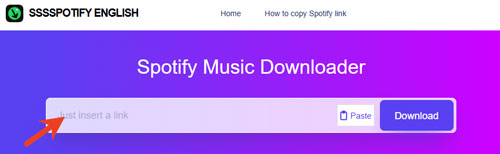
Step 3. Enter sssSpotify Spotify Downloader official website via the web browser. Then put the copied Spotify track's URL into the text box on its home screen. Later, tap the "Download" button and it will analyze the track.
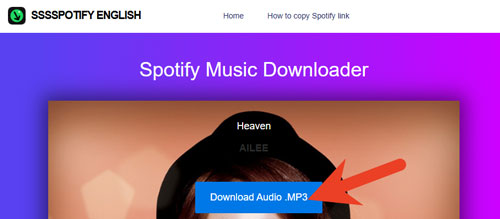
Step 4. Now, you can click the "Download Audio .MP3" button in the new page and start downloading Spotify music online.
Part 4. Best Alternative to sssSpotify (Lossless Quality & Batch Downloading)
If you have a large music library, prefer high-fidelity quality and batch process, then sssSpotify is not ideal for you. So, here we highly recommend AudFree Spotify Music Downloader to you. It could be the best alternative to sssSpotify as it is stable and reliable, and offers more features.
This tool allows you to download all audio content from Spotify server directly, like podcasts, playlists, artists, audiobooks, single tracks, albums, etc. What's more, you don't need a Spotify Premium account to download music. For the audio format and quality, it supports to convert Spotify to FLAC, MP3, AIFF, Lossless, WAV, M4A and common audio files. And it outputs music in 100% original quality like 320kbps and even up to 24-bit/192kHz Lossless quality.
Besides, it supports downloading Spotify music in batches. You can load entire album or playlist at a time and it will batch downloading automatically. Moreover, it can keep essential ID3 tags like album art, artist name, year and more, and you can customize the ID3 tags within the AudFree tool.
AudFree Spotify Music Converter

- Download Spotify songs, albums, playlists, audiobooks, and podcasts
- Convert Spotify to MP3, WAV, FLAC, M4A, Lossless, AIFF and M4B
- Retain 100% original audio quality, full ID3 tags and metadata information
- Work at a fast speed, adjust Spotify output audio parameters you want
Now, follow the step-by-step guide below and start to use this sssSpotify alternative to download music from Spotify.
Step 1. Tap the "Try It Free" button above to install and then open AudFree Spotify Music Downloader on your PC or Mac. In the built-in Spotify web player, log in to your Spotify account, find the track, click the "+" > "Add to list" button to load Spotify music into AudFree tool.

Step 2. After that, click the "Menu" > "Preferences" > "Conversion" option on the Windows version. For Mac, move to the top-left corner of your screen and tap AudFree Spotify Music Converter. Now, you can choose MP3, FLAC, AIFF, WAV, etc. Besides, you can customize bit rate, sample rate, etc. to get better output quality before converting. Once set, tap "OK".

Step 3. Now, click the "Convert" button to start to download songs from Spotify. Once converted, tap the "Converted" button > the "folder" icon to locate the downloaded Spotify music in your computer's local folder. Before that, you can edit Spotify music info by clicking the "i" icon next to the track name.

Besides, to download Spotify music, you can use AudFree Streaming Audio Recorder. This tool allows you to download music from Spotify, Tidal, YouTube Music, Amazon Music, Deezer, Apple Music, SoundCloud and so on with original quality and full ID3 tags.
Part 5. Compare sssSpotify vs AudFree Spotify Music Converter
To help you make the most informed decision, the following provides a clear comparative analysis between sssSpotify free web-based tool and the dedicated professional application - AudFree Spotify Converter.
| Features | sssSpotify | AudFree Spotify Music Downloader |
|---|---|---|
| Ease of Use | Web-based, no installation | Desktop software installation required |
| Download Content | Spotify songs, playlists, and albums | All Spotify content |
| Audio Source | YouTube | Spotify platform (Built-in web player) |
| Supported Output Format | MP3 | MP3, FLAC, M4A, WAV, AIFF, Lossless, M4B |
| Batch Download | ❌ | ✅️ |
| Output Quality | Lossy (128kbps) | Lossless (320kbps/FLAC/WAV/Lossless) |
| Download Speed | Medium (1X) | Fast (Up to 13X) |
| ID3 Tags Retained | Often missing or inaccurate | ✅️ (Full ID3 tags) |
| Personalized Settings | ❌ | ✅️ |
| Conversion Success Rate/Stability | Low | High |
| Safety | Risky (Contains ads and redirects) | 100% Safe (No ads, clean and verified software) |
| Price | Free | $14.95/month |
| Ratings | ⭐️⭐️⭐️ | ⭐️⭐️⭐️⭐️⭐️ |
Part 6. In Conclusion
In a word, if you need to quickly save a single track to your phone or computer without installing any software, then sssSpotify is undoubtedly a perfectly viable and albeit temporary solution. However, it contains advertisements on the site and it outputs lower audio quality.
If your true aim is to get high-quality music and meticulously curate a permanent offline music library, then you should use a professional tool like AudFree Spotify Music Converter. With it, you can get the lossless audio quality, batch processing capabilities, and stable performance environment necessary to efficiently manage your playlists. After that, you can enjoy high-quality Spotify music offline and forever on any device you want.

Chief Editor


