


As DJ software continues to evolve, streaming integration has become one of the most important features for modern DJs. Instead of downloading and organizing thousands of audio files manually, many DJs now rely on streaming platforms to access huge music libraries instantly. Among these platforms, SoundCloud remains a favorite because of its massive catalog of remixes, underground tracks, DJ edits, and independent releases.
At the same time, DJUCED has become increasingly popular among beginner and intermediate DJs thanks to its intuitive interface, strong learning tools, and compatibility with Hercules DJ controllers.
So, can you connect SoundCloud to DJUCED in 2026? The answer is yes - but there are some important things you should know about subscriptions, online streaming limitations, and offline playback options. And this guide will cover all your needs.
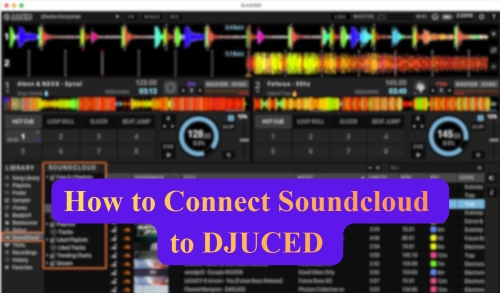

Part 1. Does DJUCED Work with SoundCloud GO+?
Yes. As of 2026, DJUCED officially supports SoundCloud integration through the SoundCloud Go+ subscription plan. This means you can connect your SoundCloud Go+ account directly to DJUCED and access millions of tracks without downloading them manually.
Once connected, DJs can search, load, and mix SoundCloud tracks in real time for both practice sessions and live performances. It's a convenient solution for users who want instant access to online music libraries and exclusive remixes.
To use SoundCloud Go+ with DJUCED, you will need:
- The latest version of DJUCED
- A stable internet connection
- An active SoundCloud Go+ subscription
- A supported Hercules DJ controller (recommended)
Free SoundCloud accounts generally do not support integration with DJ software. In most cases, only SoundCloud Go+ unlocks access to DJ platforms like DJUCED.
Strengths & Limitations of SoundCloud Streaming in DJUCED
Browse SoundCloud playlists directly in DJUCED;
Stream and mix SoundCloud music online instantly;
Access remixes, mashups, and underground DJ edits;
Build live DJ sets without storing local files
Requires a constant internet connection;
Some tracks may become unavailable unexpectedly;
Streaming performance depends on network stability;
Streamed tracks cannot be permanently kept offline;
Recording DJ sets may be restricted due to licensing
Although the official SoundCloud integration is convenient, it still comes with several limitations. Because of these restrictions, many DJs prefer offline alternatives for more stable and flexible mixing. In Part 3, we'll explore how to use SoundCloud music in DJUCED offline without streaming limitations.
Part 2. How to Connect SoundCloud to DJUCED Online (Official)
Despite the limitations of official integration of DJUCED and SoundCloud, there's no doubt that it's the simplest method. So, how to connect SoundCloud to DJUCED officially? Follow the steps below to start streaming music directly inside the software.
Step 1. First, download and install the latest version of DJUCED from the DJUCED official website.
Step 2. After installation, launch DJUCED on your computer. Also, connect to your DJ controller if required.
To prevent login or streaming compatibility issues, verify that you are running the most recent software version.
Step 3. Inside DJUCED, locate the streaming or music sources panel on the left sidebar. You should see available streaming services, including SoundCloud. Click the SoundCloud option to continue.
Step 4. DJUCED will open a login authorization window. Now, sign in with your SoundCloud Go+ account and authorize DJUCED to access your SoundCloud library. Once linked successfully, your SoundCloud playlists and liked tracks should appear inside DJUCED automatically.
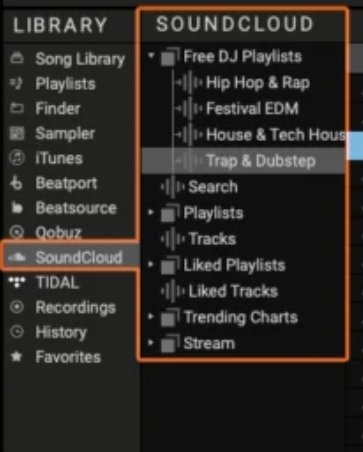
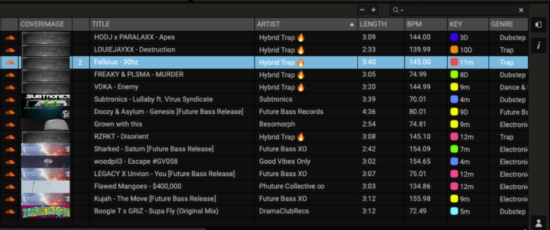
Step 5. Now, you can mix SoundCloud tracks from your playlists in real-time using DJUCED. Besides, you can:
- Search for songs on SoundCloud
- Load tracks onto decks
- Create playlists
- Access whole online music libraries instantly
For best performance, use a fast and stable internet connection, especially during live events.
Even though the official method is convenient, relying completely on internet access during performances can still fluctuate and be risky. So in the next section, we'll offer a more stable method for real-time mixing.
Part 3. How to Use SoundCloud on DJUCED Offline (Local Files)
For DJs who prefer stable offline mixing in DJUCED, using local SoundCloud files is often the best solution. While SoundCloud Go+ allows online streaming inside DJUCED, it still depends heavily on internet stability. In addition, due to SoundCloud's DRM protection, tracks from SoundCloud cannot be permanently stored as regular local audio files, even with an active subscription.
So, how can you use SoundCloud tracks offline in DJUCED without streaming limitations?
In this case, AudFree SoundCloud Music Converter can help. It is a powerful tool designed to download high-quality SoundCloud music and convert it into common audio formats supported by DJUCED. After conversion, you can freely import the downloaded SoundCloud songs into DJUCED for offline mixing.
More importantly, the converted tracks are saved as local files on your computer, allowing you to keep your SoundCloud playlists permanently. Even if your SoundCloud subscription expires or is canceled, you can still access and mix your downloaded tracks anytime.
Besides, with AudFree, you can enjoy:
- Faster track loading in DJUCED
- Easier local music library management
- More freedom when recording DJ sets
- Compatibility with multiple DJ software programs
- Stable offline mixing and better live performance reliability
Key Features of AudFree Soundcloud Music Converter

- Download SoundCloud tracks as clean, lossless local audio files
- Convert SoundCloud music to MP3, WAV, FLAC, AIFF, M4A, and more
- Preserve full ID3 tags for easier track organization
- Keep SoundCloud songs permanently for offline DJ mixing
Besides SoundCloud, AudFree also supports downloading music from multiple streaming platforms, including Spotify, Apple Music, Tidal, Deezer, Amazon Music, and more. This makes it a flexible choice for DJs who mix tracks from different services.
- Step 1. Install and Launch AudFree SoundCloud Music Downloader

- Download and install AudFree SoundCloud Music Converter on your computer (both Mac and Windows work). After launching the program, you will see multiple supported streaming platforms on the main interface. To unlock all features, activate your AudFree license after installation.
- Step 2. Set SoundCloud Output Format for DJUCED

- Click the top-right 'menu' icon and go to 'Preferences > Conversion'. Here, choose an output format supported by DJUCED, such as MP3, WAV, FLAC, or AIFF. You can also customize audio parameters, including bitrate, sample rate, and audio channels. Then switch to the 'Output' section to select your output folder and enable the option to preserve ID3 tags for easier music management.
DJUCED supports various local audio formats for offline mixing, including MP3, M4A, WAV, AIFF, FLAC, and OGG.
- Step 3. Add SoundCloud Tracks to Conversion List

- Open the built-in SoundCloud web player inside AudFree and sign in with your SoundCloud Go+ credentials. Browse for the tracks, playlists, or albums you want to use in DJUCED. Then click the green "+" button to add them to the conversion list. There is no limit on how many songs you can add at once.
- Step 4. Start Converting SoundCloud Music for DJUCED

- Click the 'Convert' button to start downloading and converting SoundCloud tracks. Once the process is complete, you can find your downloaded DRM-free SoundCloud songs in the 'Converted' section or directly in the local output folder you selected earlier.
- Step 5. Import Converted SoundCloud Tracks into DJUCED
- Now you can import the converted SoundCloud songs into DJUCED just like regular local music files. In DJUCED, go to the 'Explorer' or 'Finder' section on the left sidebar and navigate to the folder containing your downloaded SoundCloud tracks. After importing them, you can freely mix, edit, and perform offline without relying on an internet connection.
Part 4. FAQs about SoundCloud to DJUCED
What format should I choose for SoundCloud to DJUCED?
MP3 (320kbps) is the most commonly recommended format because it offers excellent compatibility and smaller file sizes. However, if you want higher audio quality for professional performances, you can also use FLAC, WAV, or AIFF. They preserve more audio detail but require significantly more storage space.
Why is recording disabled when using SoundCloud tracks in DJUCED?
This usually happens because of music licensing and DRM restrictions and licensing agreements. Many streaming services, including SoundCloud, integrate with DJ software and limit recording functionality to protect copyrighted music. Even if streaming playback works normally, recording may be disabled automatically. To record your sets without interruption, using local audio files sourced through tools like AudFree is the most reliable workaround.
Can I use SoundCloud's offline mode on DJUCED?
Not exactly. Some DJ platforms, like Rekordbox or VirtualDJ, offer limited offline locker functionality for specific streaming partners, but DJUCED mainly relies on active internet streaming for SoundCloud integration. This means you generally cannot access SoundCloud tracks offline directly through DJUCED's official streaming mode. If offline playback is important, local audio file conversion remains the more reliable option.
See also:
How to Add SoundCloud to Rekordbox
How to Use SoundCloud with Virtual DJ
Is there a difference between SoundCloud DJ and SoundCloud Go+ for DJUCED users?
Functionally, no. SoundCloud Go+ provides the necessary license to stream within DJ software. While the SoundCloud DJ tier offers an offline locker feature on other platforms, DJUCED does not currently support this specific functionality. In practice, an active SoundCloud Go+ subscription is sufficient for SoundCloud DJUCED integration.
Conclusion
Connecting SoundCloud to DJUCED in 2026 is easier than ever thanks to official streaming integration. But it do exist limitations, especially regarding internet dependence and recording restrictions.
For DJs who prioritize stability, offline performance, and full library control, converting SoundCloud tracks into local files and importing them into DJUCED remains one of the most practical solutions in 2026.

Staff Editor


