


SoundCloud is a popular platform for discovering independent artists, remixes, podcasts, DJ sets, and other audio content. While the platform offers convenient online streaming, some users may also want to save SoundCloud tracks as local audio files for offline listening or personal library management.
One convenient option is to use a SoundCloud Telegram bot. These bots work directly inside Telegram and can often process a SoundCloud track URL without requiring additional desktop software. However, different bots vary considerably in availability, supported formats, processing speed, and playlist support.
In this guide, we'll introduce three SoundCloud Telegram bots worth trying in 2026, along with several other options. We'll also explain how these bots work, discuss their potential limitations and safety considerations, and introduce a more flexible desktop alternative for users who need greater control over their audio files.


Part 1. Best SoundCloud Telegram Bots in 2026
If you wonder, "Can you use a Telegram bot to process your SoundCloud links?" Yes. Several third-party Telegram bots are designed to recognize SoundCloud URLs and return playable audio files through a Telegram chat.
The main advantage is convenience: you can use them directly from your phone or computer without installing dedicated audio software. However, their performance can vary depending on the bot's server, SoundCloud availability, file size, and current service status.
Here are three SoundCloud Telegram bots to try in 2026.
At the time of writing, these Telegram bots successfully process SoundCloud links. However, because third-party bots operate independently, their features and overall availability can change, be restricted, or be discontinued at any time without notice. Always verify that a bot is currently active before using it, and avoid sharing passwords or other sensitive account information with bots.
For a more stable and reliable experience, we recommend checking out the desktop tools we covered in Part 3. They offer simpler workflows alongside 24/7 customer support.
1. @scload_bot
@scload_bot is a Telegram bot designed for processing SoundCloud links. Its straightforward workflow makes it suitable for users who want a quick way to process individual SoundCloud tracks directly within Telegram.
Site: https://www.grambots.com/bots/scload_bot
The basic process is simple: find the bot, start a conversation, and send it the SoundCloud URL you want to process.
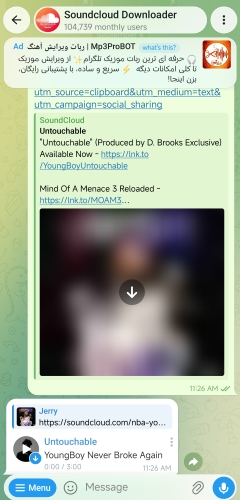
Step 1. Open Telegram and search for @scload_bot.
Step 2. Open the bot and tap Start to activate it.
Step 3. Open SoundCloud and copy the shareable URL of the track you want to process.
Step 4. Return to Telegram and send the SoundCloud link to the bot.
Step 5. Wait for the bot to process the link. If the track is supported and the bot is operating normally, it should return an audio file or an available file link. You can simply save it to your local storage and open it using your preferred media player on your phone.
Free to use;
Simple Telegram-based workflow;
Convenient for individual SoundCloud tracks
Bot availability can be inconsistent;
Output options may be limited;
Large tracks or playlists may take longer to process;
Results depend on the bot's current server status;
Audio quality can be inconsistent, often limited to moderate or low MP3 bitrates (such as 128kbps)
2. @scdownbot
If you're specifically looking for a SoundCloud MP3 Telegram bot, @scdownbot is another option to consider.
Site: https://telegram.im/@scdownbot?lang=en
As its name suggests, this bot focuses entirely on SoundCloud links, offering another reliable option for grabbing tracks in MP3 format. This makes it a solid choice if your primary goal is collecting widely compatible audio files that play smoothly across all your devices.
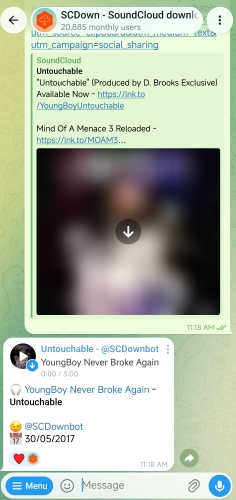
Step 1. Open Telegram and search for @scdownbot.
Step 2. Tap Start to initialize the bot.
Step 3. Copy a SoundCloud track URL from the SoundCloud app or website.
Step 4. Paste the URL into the bot's chat.
Step 5. Wait for the bot to process the link and return the available audio file.
If the bot provides additional commands or settings, follow its current on-screen instructions rather than relying on outdated commands.
Focuses on an MP3-based workflow;
Free and with easy URL-to-audio process;
No additional audio software required;
Convenient for quick, individual tracks;
Works on both mobile and desktop versions of Telegram
Offers only lossy formats with no quality customization;
Output quality may vary;
Bot features and availability can change;
May not be ideal for large music libraries
3. @MusicsHuntersbot
@MusicsHuntersbot is another Telegram bot aimed at users who want to process music content from multiple platforms through a simple URL-based workflow, including SoundCloud, Spotify, Apple Music, Deezer, Tidal, etc.
See also: Best Deezer Music Bots on Telegram
Site: https://t.me/MusicsHuntersbot
Instead of toggling between multiple applications, you can simply paste a SoundCloud link into the chat and wait for the file to generate. This makes it particularly convenient when using Telegram on mobile devices. Additionally, the bot supports full album and playlist downloads, as well as customized FLAC outputs - though unlocking these advanced features requires a paid subscription of $5 per month.

Step 1. Search for @MusicsHuntersbot in Telegram and open the bot.
Step 2. Tap Start to begin.
Step 3. Copy the URL of a publicly accessible SoundCloud track.
Step 4. Paste the link into the Telegram chat and send it.
Step 5. Follow the bot's prompts and wait for the processed audio file.
Depending on the bot's current configuration, the available options may differ. If the bot cannot process the URL, check whether the track is publicly accessible or try another supported SoundCloud link.

Convenient for mobile users;
Multi-source downloads supported;
No login needed;
Unlocks full playlist/album grabs on the $5/mo tier;
Fast response and simple download process
Must download albums track-by-track without donation;
Large tracks and playlists process slowly during peak loads;
Subject to sudden bot downtime, bans, or server maintenance;
FLAC and quality customization are locked behind paywalls
Not all SoundCloud tracks can be processed. Some links are protected or restricted, preventing Telegram bots from analyzing and downloading them. Additionally, ensure you adhere to relevant copyright laws and terms of service when using any downloaded content.
Other SoundCloud Telegram Bots You Can Try
Beyond the three options listed above, several other Telegram bots previously offered SoundCloud support or multi-platform capabilities. However, during our latest testing, these bots were unresponsive. Given how frequently third-party Telegram bots go offline and come back, they may become functional again in the future, so we are including them here for reference purposes only.
- @deezermusicbot - primarily associated with multi-platform audio processing across supported services, including Deezer, Spotify, and SoundCloud.
- @scdlbot - specifically engineered for fetching tracks and playlists from SoundCloud alongside platforms like Bandcamp and YouTube。
- @soundcloud_youtube_music_bot - designed to process direct links across major streaming services including SoundCloud and YouTube Music.
Part 2. Are SoundCloud Telegram Bots Safe to Use?
SoundCloud Downloader Telegram bots can be convenient, but they are third-party services, so you should use them with some caution. The biggest advantage is that you normally don't need to install unfamiliar software. However, the fact that a bot operates inside Telegram does not automatically mean that it is fully trustworthy.
Here are several things to keep in mind.
1. Never Share Your SoundCloud Password
A bot generally shouldn't need your SoundCloud password just to process a publicly accessible track URL. If a bot asks for your SoundCloud login credentials, treat that as a warning sign and don't provide them.
2. Avoid Unnecessary Personal Information
Be cautious if a bot asks for personal information that isn't relevant to its stated function. A simple URL-processing bot should not normally require sensitive information such as passwords, payment credentials, or private account details.
3. Be Careful with External Links and Files
Some bots may redirect users to external websites or provide files through third-party services. Don't open suspicious links or install unfamiliar applications simply because a bot claims they are required to process a SoundCloud track.
4. Check Whether the Bot Is Still Active
Telegram bots can disappear or change functionality without much warning. A bot that worked previously may become unavailable later.
For this reason, third-party Telegram bots are best treated as convenient secondary tools rather than dependable solutions for building a long-term music library. If you need a stable, permanent setup for archiving audio, dedicated desktop software like AudFree SoundCloud Music Converter in next part offers a far more reliable alternative.
5. Consider Copyright and Terms of Use
Whether you can save or reuse a particular SoundCloud track depends on the rights attached to that content and the applicable terms of the service.
For personal use, stick to audio that you have permission to save or otherwise have the right to use. Don't assume that the ability to process a URL means that you have permission to redistribute the resulting file. Violating platform terms or copyright restrictions can result in account suspension - or, in severe cases, civil legal action.
Part 3. Best Alternative to SoundCloud Telegram Bots
While Telegram bots offer quick convenience, they aren't built for managing a long-term music archive. Stability remains a major issue, for instance, even after paying a $5/month subscription for tools like @MusicsHuntersbot, there's no guarantee the service won't abruptly go offline. Furthermore, audio quality and bitrates can vary significantly from track to track.
In contrast, dedicated desktop software offers a far more stable long-term solution. Desktop applications typically provide full control over audio formats, bitrates, metadata, batch processing, and output organization. Among these tools, AudFree SoundCloud Music Converter stands out as a reliable option for users looking to save SoundCloud tracks as high-quality local files.
AudFree SoundCloud Music Converter
AudFree SoundCloud Music Converter is tailored for users who prefer batch-downloading high-quality SoundCloud tracks into standard local audio formats rather than processing individual links through a Telegram chat. The software supports multiple output formats alongside customizable audio parameters. Furthermore, it automatically preserves ID3 tags and album artwork, making local media organization effortless.
✅ Support downloading SoundCloud to FLAC, MP3, WAV, M4A, AIFF, and M4B;
✅ Batch processing for multiple SoundCloud tracks;
✅ Adjustable output settings, including bitrate, sample rate, audio channel, and more;
✅ Faster processing compared with manually handling tracks one by one (up to 65x);
✅ Local audio files that can be organized and played with compatible media players.
How to Save SoundCloud Music with AudFree
- Step 1. Set SoundCloud Output Format
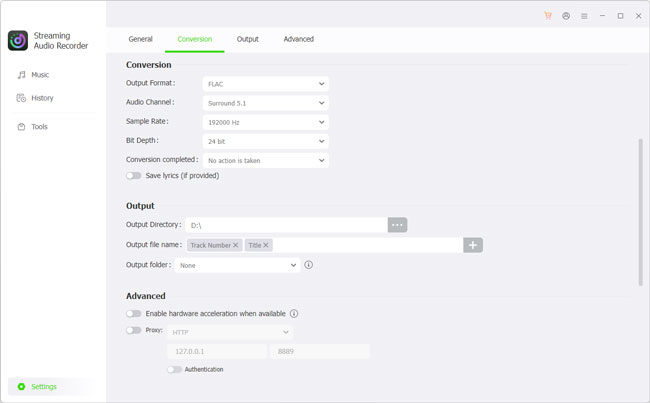
- Download and launch the AudFree SoundCloud Music Converter on your computer. Then click the Settings > Music, then choose one of your preferred formats as the output format, like MP3 or FLAC. Then you can customize bitrate, sample rate, and more as needed.
- Step 2. Add SoundCloud Tracks to Conversion List
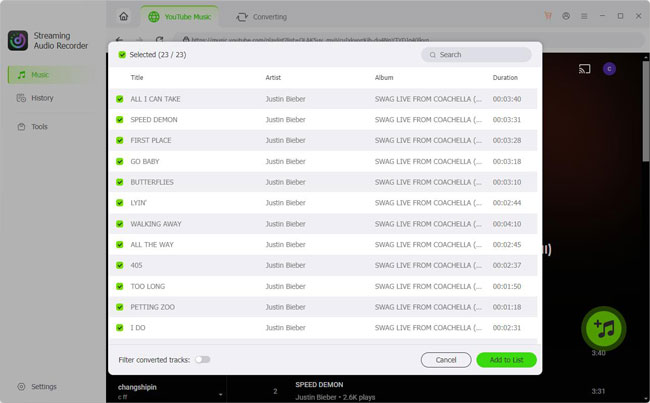
- Click the SoundCloud icon on the main interface and sign in. Browse for songs, playlists, or albums, Click the '+' button to load them into the conversion list. There is no limit on the number of tracks you can add at once.
- Step 3. Start the Conversion
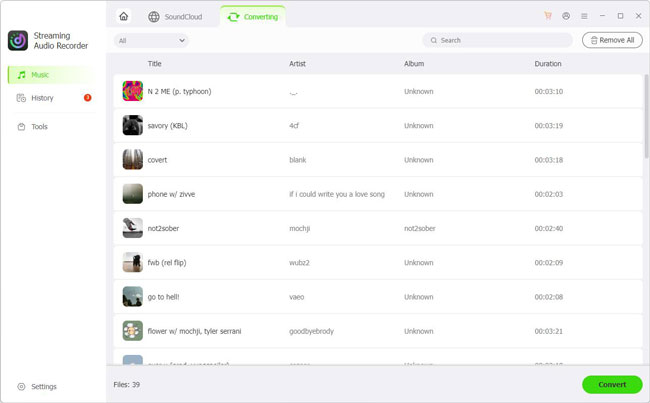
- Click the Convert button to begin processing the selected tracks. Once the process is complete, open the output folder to find your local audio files from SoundCloud. You can then organize them in your music library or transfer compatible files to supported devices for offline playback.
See also: How to Access SoundCloud Anywhere
Supports multiple common output formats;
Lossless audio quality offered;
Better suited to batch processing;
Provides more control over audio settings;
Convenient for organizing a local music library;
Built for consistent operation, complemented by 24/7 dedicated user support
Requires desktop software installation;
Requires a paid license to get full conversion;
Less convenient than a Telegram bot for processing a single track quickly
Part 4. SoundCloud Downloader Telegram Bots vs AudFree: Which Is Better?
Both Telegram SoundCloud bots and AudFree SoundCloud Music Converter effectively download SoundCloud audio, but they excel in different scenarios. Use the comparison below to quickly identify which solution aligns with your download habits.
| Feature | SoundCloud Telegram Bots | AudFree SoundCloud Music Converter |
|---|---|---|
| Ease of Use | Easy | Very easy |
| Software Installation | ✅ | ✅ |
| Platform | Telegram on mobile or desktop | Windows / Mac |
| Individual Tracks | ✅ | ✅ |
| Batch Processing | ❌ | ✅ |
| Output Formats | Usually MP3 | MP3, FLAC, WAV, AIFF, M4A, M4B |
| Audio Settings | ❌ | ✅ |
| Metadata | ❌ | ✅ |
| Processing Speed | Moderate to slow (Depends on server load) | Designed for faster batch processing (65x) |
| Stability | ★☆☆☆☆ | ★★★★☆ |
| Offline Local Library | Possible after saving files | Designed for local library management |
| Best For | Quick, occasional use | Larger collections and advanced control |
Which Should You Choose?
For users who only need occasional individual tracks, Telegram remains the simpler option. For larger collections, however, the additional control offered by desktop software can make the workflow much easier.
- If your priority is quick and simple processing without installing software, a SoundCloud Downloader Telegram bot can be convenient.
- If you regularly process multiple tracks and care more about output formats, batch processing, audio settings, metadata, and long-term library management, a dedicated desktop tool is generally more practical.
Part 5. SoundCloud Telegram Bot Not Working? Try These Fixes
Sometimes a SoundCloud Telegram bot may stop responding, fail to process a link, or return an error. Since these bots are third-party services, the problem isn't always caused by your SoundCloud URL.
Fix 1. Check the SoundCloud URL
Make sure you've copied the complete and correct SoundCloud track URL. Open the link in your browser first to confirm that the track is publicly accessible.
Some SoundCloud content may have access restrictions or other limitations. If a bot can't process a particular track, try another publicly accessible SoundCloud track to determine whether the issue is specific to that content.
Fix 2. Clear Telegram Cache and Restart the SoundCloud Downloader Telegram Bot
Outdated cache data can occasionally cause Telegram bots to freeze or fail to process requests. To clear your Telegram cache, navigate to Settings > Data and Storage > Storage Usage > Clear Telegram Cache. Afterward, reopen the bot, tap Start (or enter its restart command), and resend your SoundCloud URL if the previous request timed out.
Fix 3. Join Bot's Official Channel
Many Telegram bots require users to subscribe to their official update channel before processing requests. Joining the channel ensures you satisfy any access checks, avoid sudden service blocks, and stay informed about server maintenance, domain updates, or temporary downtime announcements.
Fix 4. Use a VPN to Bypass Region Restrictions
Geographic blocks or IP-based throttling can prevent bots from fetching content from certain regions. If a track fails to generate, connect to a reputable VPN server, ideally located in the US or Europe, and try re-sending the link. This bypasses regional SoundCloud restrictions and refreshes your connection to the bot.
Fix 5. Use a Desktop Alternative
If the bot remains unresponsive after trying the previous fixes, its backend API or server hosting may be permanently offline. To bypass the persistent instability, rate limits, and sudden downtime of third-party chat bots, switch to a dedicated desktop converter like AudFree (detailed in Part 3) for consistent, high-speed downloads.
Part 6. FAQs About SoundCloud Downloader Telegram Bots
Are SoundCloud Downloader Telegram Bots Free?
Yes, most SoundCloud Telegram bots are completely free to use for basic single-track downloads. However, many operate on a freemium model - offering core functionality for free while locking advanced capabilities like batch playlist downloads, higher bitrates, or customizable output formats behind paid tiers or developer donation subscriptions (like @MusicsHuntersbot).
Can I Download SoundCloud Playlists with a Telegram Bot?
Yes, but support varies by bot. Some SoundCloud Telegram bots support downloading SoundCloud playlists or albums, while others are mainly designed for individual tracks. Playlist processing may also be limited or slower, especially for larger collections.
Can a SoundCloud Telegram Bot Download Private or Restricted Tracks?
Generally, no. Telegram bots rely on public APIs and web scrapers to parse URLs. Tracks set to private, geo-blocked, or protected by SoundCloud Go+ DRM cannot be indexed or accessed by public bots. Attempting to paste a link to a restricted track will usually result in a extraction error or a timeout response.
Can SoundCloud Telegram Bots Provide High-Quality Audio?
Audio quality varies by the bot and the available source. Standard free bots fetch the default streaming stream from SoundCloud, which capped at 128 kbps MP3/AAC. While some premium multi-platform bots promise up to 320 kbps or FLAC outputs, they cannot upscale a native 128 kbps SoundCloud file without lossless source access - meaning true high-fidelity audio depends heavily on the original upload.
Conclusion
SoundCloud Telegram bots offer a quick and convenient way to process individual tracks without installing dedicated software. However, their availability, playlist support, output formats, and audio quality can vary, making them less suitable for users who need a stable solution for larger music collections.
For occasional use, a Telegram bot may be enough. If you need batch processing, more output formats, customizable audio settings, and better local library management, a dedicated desktop tool like AudFree SoundCloud Music Converter provides a more flexible and consistent alternative. Whichever method you choose, make sure you only save and use SoundCloud content you have the right to access and use.

Staff Editor


