


SoundCloud is unparalleled for finding underground tracks, rare DJ mixes, and indie releases you simply can't get on mainstream platforms. But I know exactly how frustrating it is when you're commuting, traveling, or trying to save mobile data, and your music suddenly stops buffering because of a dropped connection. We've all experienced that pain of losing access to our favorite discoveries the second we step off the Wi-Fi grid.
Officially, if you want to listen without a WiFi connection, you're forced behind the SoundCloud Go or Go+ paywall. But what if you don't want to pay for yet another monthly subscription? Is it possible to listen to SoundCloud offline for free?
In this guide, I'll walk you through how the official offline mode actually works, how to use official downloads on mobile devices, expose its hidden limitations, and show you exactly how to keep SoundCloud music permanently available for offline listening for free without ever relying on a premium account.

Part 1. Does SoundCloud Work Offline? Everything You Need to Know
Yes, SoundCloud supports offline listening, but it functions quite differently from mainstream platforms like Spotify or Apple Music. How you access offline tracks depends entirely on the device you are using and whether you have a premium subscription.
On Mobile Devices (The Paywall)
Officially, the offline listening feature on the iOS and Android apps is reserved exclusively for paid subscribers. If you are using the free version of SoundCloud, you can stream music online (limited with ad-supported), but you cannot save tracks directly to your phone.
On the Web Player (The Free Exception)
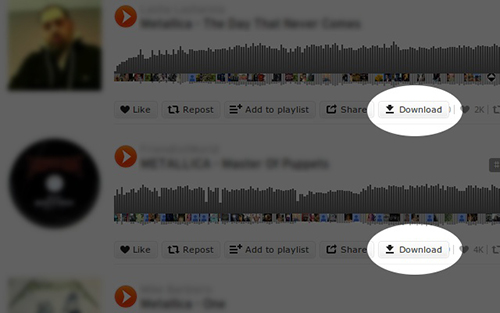
If you are using a web browser, the rules change slightly. Some independent creators - looking to boost their exposure and share their work - choose to make their tracks available for direct, free download. By clicking a 'download' button beneath the audio waveform, you can save the track directly to your computer (usually as an MP3 file). However, this is largely limited to indie musicians and remixes; the vast majority of tracks do not offer this button.
It's also important to understand that SoundCloud's offline listening feature is designed primarily for mobile devices. Even with a SoundCloud Go+ subscription, there is currently no official way to download your playlists or library to a Windows or Mac computer for offline listening. If you primarily listen on desktop, your music experience remains dependent on an internet connection.
The Catch: Not All Tracks Are Downloadable
Even if you upgrade to SoundCloud Go or Go+, you don't get absolute control over your music. It is crucial to understand that offline availability is tied heavily to digital licensing and creator permissions, not just your subscription tier.
Even as a paying subscriber, tracks in your library:
- May not support offline playback if the rights holder disables it.
- May be geo-restricted and suddenly become unavailable if you travel to certain countries.
- Can be removed or made private by the creators at any time.
- Can disappear from your cache due to changing copyright agreements.
Because of this, your official offline library is never truly permanent - it can shift or shrink without warning.
SoundCloud offline downloads aren't the same as owning music files. They're simply encrypted cache files that work only while your subscription remains active. The moment your Go or Go+ membership ends, your offline library becomes unavailable. If you're looking for a way to keep SoundCloud music permanently and listen offline without subscription restrictions, check out Part 4 for the best solutions.
So, how exactly do you navigate the official offline mode on your phone? In the next section, I will walk you through the detailed steps to set it up.
Part 2. How to Use SoundCloud Offline on iPhone/Android (Premium Required)
If you have a SoundCloud Go or Go+ subscription, downloading music for official offline playback is relatively straightforward. However, before you begin, you need to ensure your setup meets the platform's requirements.
The Offline Requirements: Choose Your Subscription
Official SoundCloud offline syncing is strictly a mobile feature and requires an active premium subscription. You can choose between two tiers depending on your needs:
| Feature | SoundCloud Go | SoundCloud Go+ |
|---|---|---|
| Ad-Free Listening | ✅ | ✅ |
| Offline Playback | ✅ | ✅ |
| Audio Quality | Standard (128kbps MP3) | High Quality (256kbps AAC) |
| Catalog Access | Limited Preview Tracks | Full Catalog (Over 300M Tracks) |
| DJ App Integration | ❌ | ✅ |
Make sure you download or update to the latest version of the SoundCloud app from the Apple App Store or Google Play Store. Older versions frequently suffer from cache sync glitches.
How to Download Songs on SoundCloud to Listen Offline on iPhone/Android
Once your subscription is active, follow these steps below to cache music directly to your iPhone or Android device.
Step 1. Open the SoundCloud app on your iPhone or Android device, and navigate to your "Likes" or a custom Playlist you have created.

Step 2. Tap the 'Download' icon (an downward-facing arrow) at the top of the playlist or liked tracks section.
Step 3. Keep the app open while the progress wheel fills. SoundCloud will begin caching the encrypted audio files locally to your device's internal storage.
Step 4. Go to your 'Library' tab, toggle your phone into Airplane Mode, and try playing the tracks. The music will stream smoothly without using a single byte of cellular

What's 'Smart Offline'?
SoundCloud also features an automated setting called 'Smart Offline'. When enabled, the app automatically caches a rotating selection of your recently played tracks and liked songs in the background. While convenient, it is completely managed by an automated algorithm - meaning you lose direct control over exactly what stays on your phone and what gets deleted to save space.
While this official method works perfectly under ideal conditions, it comes with heavy operational constraints that can easily disrupt your listening experience. In the next section, I'll dive into the critical limitations of SoundCloud's official offline mode - including hidden DRM locks and the audio quality trade-offs you should know about.
Part 3. Limitations of Official SoundCloud Offline Mode
While upgrading to a premium tier makes offline listening convenient, it is far from a perfect solution. SoundCloud's official offline feature does not grant you ownership of your music; instead, it operates under strict digital guardrails.
Understanding these limitations is essential if your goal is to build a reliable, long-term music collection.
1. Cached App Data vs True Permanent Downloads
The most common misconception is that tapping the download button saves a standard audio file (like an MP3) to your device. It does NOT.
Officially downloaded tracks are merely encrypted local caches wrapped in Digital Rights Management (DRM) protection. Because they are application-dependent data rather than raw audio files, you face heavy ecosystem restrictions:
- No File Access: You cannot locate these files in your iOS Files app or Android File Manager.
- No Media Portability: You cannot transfer these tracks to a USB drive, an SD card, an external hard drive, or a dedicated standalone MP3 player.
- No External Playback: You cannot import these files into external media management ecosystems like Plex or Roon, nor can you load them into standalone hardware audio players.
2. Total Subscription Dependency
Your SoundCloud offline library only exists as long as your credit card is linked to an active subscription. The moment you cancel your SoundCloud subscription (SoundCloud Go or Go+), the app instantly revokes access to your offline dashboard. You are essentially renting access to the music, not owning it.
3. Temporary SoundCloud Offline Cache
Because your offline music is stored as a temporary cache rather than a permanent file, your library is incredibly fragile. Your downloaded tracks can turn grey or disappear entirely due to a variety of triggers:
- Signing Out: Logging out of your account or switching accounts instantly wipes the entire local offline cache from your phone to protect copyright. You will have to re-download everything from scratch next time you log in.
- App Reinstalls or Updates: Reinstalling the app clears its local storage directory, erasing your music.
- Licensing & Creator Actions: If an indie artist suddenly takes down their track, changes its privacy settings, or if geo-restrictions change while you travel, the track vanishes from your offline library - even if it was fully cached five minutes prior.
4. Rigid Device & Platform Restrictions
SoundCloud's official offline framework is almost entirely mobile-centric. It is engineered for smartphones and tablets running iOS or Android. If you prefer listening via a desktop environment on a Mac or Windows PC, you are completely out of luck - the official SoundCloud web player offers no offline caching infrastructure for premium subscribers.
5. The Audio Quality Reality: Why SoundCloud Offline Isn't Truly Lossless
For audiophiles and music collectors, it's important to understand how SoundCloud handles audio behind the scenes. There is a significant difference between the file an artist uploads and the audio that listeners ultimately stream or save for offline playback.
Even if a creator uploads a studio-quality 24-bit WAV or lossless FLAC master, SoundCloud does not deliver that original file for normal streaming. Instead, every upload is processed through SoundCloud's transcoding system, which creates optimized streaming versions for playback across different devices and network conditions.
In practice, it means:
- Free-tier streaming: typically delivered in compressed formats such as MP3 (128kbps) or Opus (64kbps) at lower bitrates.
- Premium Go+ Offline Quality: capped at a maximum of 256kbps AAC (roughly equivalent to a 320kbps MP3).
- Original uploaded files: remain stored on SoundCloud's servers but are not normally accessible through streaming or offline caching.
As a result, the tracks you save for offline listening through the SoundCloud app are not identical to the original WAV or FLAC files uploaded by the artist. They are compressed versions optimized for streaming efficiency.
The One Exception: Creator-Enabled Direct Downloads
There is one notable exception, as I mentioned before in Part 1.
If a creator manually enables the 'Direct Download' option for a track on the SoundCloud website, listeners can download the original file supplied by the uploader. Depending on what the creator uploaded, this file may be WAV, FLAC, AIFF, MP3 or other supported formats.
In these cases, you may obtain a genuine lossless file directly from SoundCloud. However, this feature is most commonly used by independent artists, producers, and DJs. Major labels and commercial artists rarely make their master files available for direct download.
SoundCloud Official Offline vs Permanent Local Downloads
To better understand the difference between SoundCloud's built-in offline mode and locally stored music files, consider the following comparison:
| Feature | SoundCloud Official Offline | Permanent Local Downloads |
|---|---|---|
| Internet Required for Verification | ✅ | ❌ |
| Subscription Required | ✅ | ❌ |
| DRM Protected | ✅ | ❌ |
| Accessible Outside SoundCloud App | ❌ | ✅ |
| Transfer to USB/MP3 Players | ❌ | ✅ |
| Survives Subscription Cancellation | ❌ | ✅ |
| Permanent Ownership | ❌ | ✅ |
Be cautious when a downloader or converter claims to provide "lossless FLAC downloads" from SoundCloud streams. No software can magically recreate audio data that was already removed during SoundCloud's transcoding process. If a tool downloads a 256 kbps AAC stream and simply saves it as a FLAC file, the resulting file may have a larger size, but it does not contain more audio information than the original stream.
This limitation applies to virtually all SoundCloud downloaders and converters, including desktop applications such as AudFree. While these tools can preserve the highest-quality stream available from SoundCloud and provide permanent offline access, they cannot recover the original lossless master unless the creator has explicitly made that file available through SoundCloud's Direct Download feature.
In the next section, I'll explore the most practical ways to save SoundCloud music for permanent offline listening, avoid subscription-related restrictions, and maintain access to your favorite tracks across all your devices.
Part 4. How to Download and Listen to SoundCloud Offline Without Go/Go+
If you've reached this point, you've probably realized that SoundCloud's official offline mode isn't designed for long-term music ownership. Downloads are tied to your subscription, protected by DRM, and restricted to the SoundCloud app.
Personally, when I want to keep my favorite SoundCloud tracks available regardless of subscription status, internet connectivity, or device limitations, I prefer saving them as local audio files. Once stored locally, I can play them anywhere - on my computer, smartphone, USB drive, car stereo, media server, or portable music player.
Below are two practical ways to listen to SoundCloud offline without relying on SoundCloud Go or Go+, each with its respective strengths.
Method 1. Download SoundCloud Music Permanently on Windows/Mac via Desktop Software (Best for Dedicated Collectors)
If you are like me and prefer listening to music on a desktop environment (Windows or Mac), or if you manage a massive collection of tracks, dedicated desktop software is the most robust route.
Tools like AudFree SoundCloud Music Converter are engineered specifically to extract audio data from SoundCloud and output them into standard, highly compatible local audio files like MP3, M4A, FLAC, or WAV.
Why Choose AudFree SoundCloud Music Converter

- Download entire SoundCloud playlists and albums in batches
- Convert SoundCloud music to MP3, M4A, WAV, FLAC, and more
- Download at speeds up to 65X faster than real-time playback
- Preserve important metadata and album artwork
- No dependency on the SoundCloud app after conversion
- Play downloaded SoundCloud music offline on virtually any device
- Organize and back up your SoundCloud library more easily
After downloading from SoundCloud via AudFree, the music becomes part of my personal library rather than being locked inside an app. I can organize tracks, back them up, transfer them between devices, and play them without needing to sign into SoundCloud.
How to Download SoundCloud Music Offline with AudFree
- Step 1. Install and Launch AudFree SoundCloud Music Converter

- Download and install AudFree SoundCloud Music Converter on your Windows PC or Mac. Launch the program after installation and activate it.
- Step 2. Set an Output Format for SoundCloud Offline Playback

- Navigate to the 'Menu > Preferences > Conversion' to select your preferred output format, such as MP3, M4A, or WAV. Here, you can also fine-tune advanced parameters like bitrate, sample rate, and audio channels. Finally, switch to the 'Output' tab to specify your destination folder and enable 'Preserve ID3 Tag' to protect your track's metadata.
When choosing an output format, it's important to set realistic expectations about audio quality - SoundCloud streaming itself is not truly lossless, as discussed in the previous section. For most listeners, exporting tracks as 320kbps MP3 or M4A offers the best balance among sound quality, file size, and device compatibility.
However, WAV can still be a useful choice if you plan to edit, remix, sample, or process the audio in professional software. Just keep in mind that a larger file size doesn't necessarily mean better sound quality when the source itself comes from a compressed stream.
- Step 3. Add SoundCloud Tracks to Conversion List

- Click on the SoundCloud icon in the main window. Within the built-in web player, log in to your SoundCloud account and browse your library as usual. Navigate to the songs you want to save and click the '+' to load them to your conversion list.
- Step 4. Start the Download Process

- Click the 'Convert' button in the bottom right corner to begin the extraction. Once the process is complete, navigate to the 'Converted' history tab to locate your new, DRM-free audio files. From there, you are free to transfer and play them on virtually any device, portable digital audio player, or media server.
Permanent offline access and personal ownership;
No subscription verification required;
Batch-download playlists and albums supported;
Offer multiple output formats;
Transfer music to virtually any device;
Keep your library even if tracks disappear from SoundCloud later
Requires software installation;
Full conversion requires a paid license;
A laptop or desktop computer needed
Method 2. Download SoundCloud Music Online for Free via Web-Based Downloader (Best for Quick, Occasional Use)
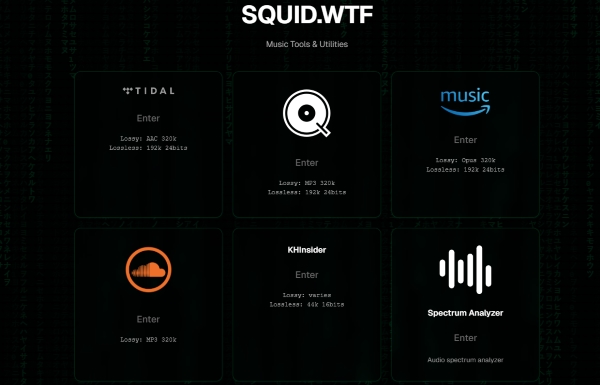
If you don't care about managing a permanent, pristine archive and just need to grab a single remix quickly for an upcoming flight, web-based tools like Squid.wtf or similar browser-driven SoundCloud downloaders will do the trick without any hassle.
How I Use an Online SoundCloud Offline Downloader
Step 1. Open the SoundCloud website, locate the track you want to save, and then copy its URL.
Step 2. Visit the downloader website, choose SoundCloud service, and paste the copied SoundCloud link into the provided field.
Web-based downloaders can be convenient, but they often rely on third-party servers that receive little ongoing maintenance. As a result, download success rates can be inconsistent, the service may occasionally go offline, and performance can vary significantly over time.
Step 3. Click the 'Download' or 'Convert' button and wait for the service to process the track. If successful, the website will generate a downloadable audio file.
Step 4. Download the generated file to your device and store it in your preferred music folder. Once saved, you can play it offline using virtually any media player on Windows, Mac, Android, or iPhone.
Completely free to use;
No software installation required;
Beginner-friendly with minimal setup;
Fast and convenient for downloading individual tracks;
Works directly in most modern browsers (desktop browsers offer a vastly superior experience compared to mobile)
Typically limited to one track at a time;
Playlist and album downloads are rarely supported;
Download reliability can vary from day to day;
Audio quality depends on the source stream;
Services may become unavailable without warning;
Metadata, album artwork, and track information are often missing;
Not ideal for building or managing a large offline music library
Which Method Should You Choose?
In my experience, the answer depends on how often you use SoundCloud.
If you only need to save a song or two occasionally, an online downloader like Squid.wtf is usually sufficient and completely free.
However, if you're building a serious SoundCloud offline library, downloading playlists regularly, or want a more reliable long-term solution, a desktop tool like AudFree SoundCloud Music Converter is significantly more practical. It offers better organization, batch downloading, metadata preservation, and device compatibility.
Most importantly, both methods give you something that SoundCloud's official offline mode cannot: music files that remain accessible even after you disconnect from the internet, switch devices, or stop paying for a subscription.
Part 5. Troubleshooting: Fix SoundCloud Offline Not Working Issues
Even with a premium subscription, SoundCloud's offline mode can occasionally glitch. Because official offline tracks are stored as a temporary, encrypted cache, everything from authentication errors to low phone storage can cause your music to freeze or disappear.
If your offline library suddenly stops working, work your way through these proven fixes.
Phase 1. Quick Account & App Verifications
Fix 1. Verify Your Subscription Status
It sounds obvious, but a declined monthly payment or a lapsed renewal will instantly lock you out of your offline dashboard. Open your account settings to ensure your SoundCloud Go or Go+ plan is explicitly marked as "Active".
Fix 2. Force an Online Authentication Refresh
SoundCloud requires your app to "check in" with its servers periodically to verify DRM licenses. If you've been completely offline for days (e.g., during a long trip), toggle your Wi-Fi or cellular data back on and launch the app. Let it sit open for a minute to automatically refresh your account permissions.
Fix 3. Update to the Latest App Version
Outdated app builds frequently suffer from server sync issues. Head to the Apple App Store or Google Play Store and ensure you are running the absolute latest version of SoundCloud to patch known playback bugs.
Phase 2. Storage & File Management
Fix 4. Inspect Your Device Storage Space
If your phone is running out of local storage, iOS and Android will automatically prevent SoundCloud from downloading new tracks - and may even silently delete existing caches to save system space. Ensure you have at least a few gigabytes of free space, and double-check your storage permissions if you are caching files to an external SD card on Android.
Fix 5. Delete and Re-download Corrupted Playlists
If a specific song gets stuck on "Waiting to download" or skips repeatedly, the local file wrapper is likely corrupted. Uncheck the download arrow on that specific playlist, wait for the files to clear, and then tap the download icon again over a stable Wi-Fi connection.
Phase 3. The Nuclear Options (Proceed with Caution)
Unlike other apps, performing the two fixes below will completely wipe your local official offline library. Only use them as a last resort, as you will be required to re-download all of your music from scratch.
Fix 6. Log Out and Sign Back In
If the app is suffering from a deep-seated authentication glitch, signing out and logging back in can force a clean handshake with SoundCloud's servers. Just remember that logging out completely flushes the encrypted offline cache from your phone's storage.
Fix 7. Clear the SoundCloud App Cache (Android Only)
If the application is completely frozen or constantly crashing, a corrupted system cache is likely the culprit. You can fix this by navigating to your device's "Settings > Apps > SoundCloud > Storage" and selecting "Clear Cache". Restart your phone and relaunch the app.
If you find yourself constantly battling SoundCloud app crashes, sync errors, or disappearing tracks, it might be time to move away from the official mobile container entirely. By utilizing the desktop extraction methods (AudFree or Squid.wtf) we covered in Part 4, you can save your music as independent, DRM-free local files that will never suffer from app data corruption or authentication lockouts.
Part 6. FAQs About SoundCloud Offline Music Listening
What Happens to My Offline Library If I Sign Out of the SoundCloud App or Reinstall It?
In most cases, your downloaded offline content will be removed. Because SoundCloud stores offline music as protected cache files linked to your account, signing out or reinstalling the app typically deletes local offline data. After signing back in, you'll usually need to re-download your playlists and tracks.
What Is the Exact Bitrate and Audio Format for SoundCloud Offline Downloads?
SoundCloud does not publicly provide detailed specifications for every downloaded file. The exact format and bitrate depend entirely on your subscription tier and the original file uploaded by the creator, but the absolute maximum quality for official downloads is 256kbps AAC.
Can SoundCloud Offline Tracks Be Exported Natively as Lossless Formats Like FLAC or WAV?
No, within the official app ecosystem, files are locked behind Digital Rights Management (DRM) and can only be played inside the SoundCloud application itself.
Furthermore, even if you use third-party desktop tools that offer FLAC or WAV options, this does not yield true lossless audio. Because SoundCloud encodes and streams its catalog at a maximum of 256kbps AAC, converting that file to FLAC or WAV is simply an upscale. It will inflate the file size significantly, but it cannot restore the high-frequency audio data lost during the platform's initial compression.
Where Are SoundCloud Offline Files Locally Cached on iOS and Android Devices?
On both operating systems, SoundCloud buries its offline files inside hidden app data directories. Even if you navigate to these folders, the files are split into fragmented, unreadable data chunks without file extensions (like .mp3) and are heavily DRM-encrypted.
• On Android: The files are typically cached in the application's secure data folder, located under:
Android/data/com.soundcloud.android/files/ or .../cache/ (either on internal storage or the external SD card, depending on your app settings).
• On iOS: Due to Apple's strict sandboxing security, the files are kept within the app's private container directory:
App Sandbox/Library/Caches/
Conclusion
Navigating SoundCloud's offline ecosystem comes down to a choice between quick convenience and true library control. Officially, a SoundCloud Go or Go+ subscription provides easy mobile syncing, but it keeps you trapped within a mobile-only app framework restricted by strict DRM locks, fragile local caches, device restrictions, and so on.
If you want a permanent, reliable music collection, relying on the official app will leave you frustrated. While free web-based downloaders work for quick, one-off rips, they strip away crucial ID3 metadata and sacrifice audio quality. For true music collectors, utilizing a dedicated desktop tool like AudFree SoundCloud Music Converter is the superior route. It allows you to bypass recurring fees, avoid the pitfalls of lossy upsampling traps, and extract high-quality, DRM-free local files complete with intact artwork and tags.
But the best solution still depends on your listening habits. If you only need temporary offline playback, SoundCloud Go may be sufficient. But if you want a permanent offline music library that works across all your devices, saving tracks as local audio files remains the most reliable option.

Staff Editor


