


As high-resolution music streaming becomes increasingly popular, more listeners are looking for ways to enjoy lossless or Hi-Res audio offline. Platforms like TIDAL, Qobuz, and Amazon Music offer premium sound quality, but they also come with strict DRM protection that limits how and where downloaded tracks can be played. This is where third-party tools such as SQUID.WTF come into the spotlight.
SQUID.WTF has gained attention as an online tool that claims to download or rip high-quality audio from major streaming services, sometimes even advertising so-called 24-bit/192kHz Hi-Res output. For users who want permanent access, offline playback, or local backups of streaming music, this sounds extremely appealing. However, questions quickly arise: Is SQUID.WTF safe to use? Is the audio quality truly lossless? And is there a more stable and secure alternative?
In this in-depth SQUID.WTF review, we'll break down how the service works, analyze its safety and risks, compare it with a trusted alternative, and answer the most common questions users ask before using similar tools. By the end, you'll have a clear understanding of whether SQUID.WTF is right for you - or if another solution is the smarter choice.


Part 1. What Is SQUID.WTF and How Does It Work?
SQUID.WTF is a web-based music ripping tool that lets users download tracks from popular streaming platforms by pasting a song, album, or playlist link - or by entering a track or album keyword - directly into its online interface. Unlike desktop software, SQUID.WTF requires no installation, which makes it appealing to casual users looking for a quick and straightforward solution.
The platform also promotes support for high-resolution audio from services such as TIDAL, Qobuz, and Amazon Music, including lossless formats like FLAC and high sample rates (up to 24-bit/192 kHz). This positioning has helped SQUID.WTF gain attention among audiophiles seeking lossless downloads without purchasing permanent digital copies.
How SQUID.WTF Works
At a basic level, SQUID.WTF operates by accessing streaming audio sources and converting them into downloadable files. The general workflow is as follows:
Step 1. Open the SQUID.WTF website in your web browser.
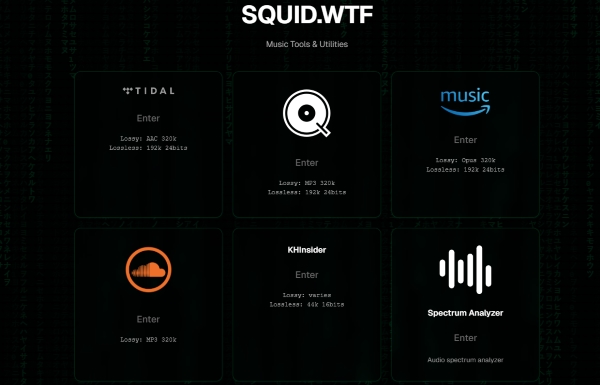
Step 2. Select the streaming service you want to download from, such as TIDAL or Qobuz.
Step 3. Paste a track, album, or playlist URL from the selected service. Alternatively, enter the song or album name to search.
Download behavior varies by platform. TIDAL, Amazon Music, and some other services usually require a direct link. Qobuz and SoundCloud support keyword-based searches without a URL. Besides, changing the location or region may affect SoundCloud availability in some cases.
Step 4. After SQUID.WTF analyzes the link or search term, click the Download icon to save the processed audio file to your device.
SQUID.WTF does not allow users to manually select output settings. Except when using TIDAL-dl integration, the platform automatically exports files at what it determines to be the highest available quality.
Supported Platforms and Formats of SQUID.WTF
SQUID.WTF is commonly associated with ripping music from services such as:
• TIDAL
• Qobuz
• Amazon Music
• SoundCloud
• Other major streaming platforms, like Spotify, YouTube Music, Apple Music, etc.
Output formats may include MP3, FLAC, or WAV, depending on availability and platform. However, the actual source and quality of these files are not always transparent - a critical point we'll explore in the next section.
Pros and Cons of SQUID WTF Downloader
No software installation or login required;
Simple, browser-based interface;
Advertised support for lossless and hi-res audio formats;
Album download supported;
Multiple major streaming services support
No manual control over output format or audio settings;
Actual audio source and quality are not clearly disclosed;
Service stability and availability can vary;
High-resolution claims of 192kHz are inconsistent, and many tracks default to a maximum of 44.1kHz;
Download may be unstable and unavailable in some cases
Part 2. Is SQUID.WTF Safe to Use?
Safety is the biggest concern when using any third-party online downloader. While SQUID.WTF may appear convenient, it comes with several potential risks that users should understand before relying on it.
1. Security and Malware Risks
Because SQUID.WTF is a web-based service, users must trust that the website itself is free from malicious scripts, intrusive ads, or hidden downloads. In practice, many users report aggressive pop-ups, redirects, or bundled downloads - all of which increase the risk of malware exposure, especially on Windows systems.
2. Privacy Concerns
SQUID.WTF does not clearly disclose how user data is handled. When you paste links or interact with the service, there is no guarantee that your activity is not being logged. This lack of transparency raises concerns for users who value privacy or want to avoid account-related issues.
3. Account Safety and Bans
Using online ripping tools may violate the terms of service of streaming platforms like TIDAL or Qobuz. If you log in or interact with such services through third-party tools, there is a potential risk of account suspension, especially if abnormal activity is detected.
4. Audio Quality Authenticity
One of the most controversial aspects of SQUID.WTF is its claim of providing Hi-Res audio. In many cases, users cannot verify whether downloaded files are true lossless sources or simply upscaled versions of lower-bitrate streams. This uncertainty makes SQUID.WTF less appealing for serious audiophiles.
In short, while SQUID.WTF may work for occasional downloads, it is not the safest or most reliable option for long-term or high-quality music archiving.
Bonus Tip: SQUID.WTF Not Working? Common Reasons and Fixes
User reports frequently highlight that SQUID.WTF is prone to service outages, often leading to the common 'SQUID.WTF not working' error. In addition to the safety and privacy concerns discussed above, instability is one of the most frequent complaints about SQUID.WTF.
Below are the main reasons why SQUID.WTF may fail to work as expected.
Reason 1. Service Downtime and Link Processing Failures
One common issue is service downtime or failed link analysis. SQUID.WTF may suddenly stop responding, get stuck while processing a link, or return errors without explanation. This often happens when streaming platforms such as TIDAL, Qobuz, or Amazon Music update their systems or strengthen anti-scraping protections, causing unofficial online downloaders to break.
Reason 2. Regional and Network Restrictions
Another factor is regional and network-related limitations. Some features may only work in certain regions, while others depend heavily on IP location, browser settings, or whether ad blockers are enabled. As a result, downloads may work one day and fail the next, even when using the same links.
Reason 3. Server Load and Traffic Spikes
Server load and traffic spikes can also affect performance. Because SQUID.WTF runs entirely online, users have no control over backend stability. Album or playlist downloads, especially those advertised as high-resolution, are more likely to fail, slow down, or stop midway.
Reason 4. Lack of Official Support and Transparency
Finally, SQUID.WTF offers no official status page, update notes, or user support, making it difficult to know whether a problem is temporary or permanent. When the site is down or features stop working, users are often left with no clear solution other than waiting or switching tools.
Because of these ongoing issues, many users eventually begin looking for more stable and secure SQUID.WTF alternatives, particularly those that offer better reliability, clearer output control, and lower long-term risk. In the next section, we'll look at the best alternative to SQUID.WTF for users who want a more dependable solution for downloading and managing their music.
Part 3. Best SQUID.WTF Alternative for Stable and Secure Use
For users who prioritize stability, security, and consistent audio quality, a desktop-based solution is often a better choice. One of the most reliable alternatives to SQUID.WTF is AudFree Streaming Audio Recorder.
AudFree Streaming Audio Recorder stands out as a powerful and professional downloader that supports music from Spotify, Qobuz, TIDAL, YouTube Music, and many other streaming platforms. It allows you to save tracks in multiple audio formats while offering fast processing speed and a safe, ad-free working environment. This makes it ideal for users who want to build a private offline music library in a controlled and lower-risk way.
More importantly, AudFree Streaming Audio Recorder is designed to capture and save music losslessly on your computer. Since all operations are handled locally, users avoid the instability, pop-ups, and privacy risks commonly associated with web-based tools like SQUID.WTF.
AudFree Streaming Audio Recorder

- Stable desktop performance with no pop-ups or redirects
- Support for multiple streaming platforms (Spotify, TIDAL, and more)
- Automatic recognition and preservation of ID3 tags
- High-quality output formats such as FLAC, WAV, AIFF, and MP3
- Batch downloading of multiple tracks, playlists, or entire albums
- No need to expose or share streaming account credentials
If you prioritize security and consistent audio quality over the hit-or-miss nature of online tools like SQUID.WTF, AudFree Streaming Audio Recorder is the superior choice. Get started with these easy steps:
- Step 1. Launch and Activate AudFree Streaming Audio Recorder

- After clicking the Download button above, install and launch AudFree Streaming Audio Recorder on your computer. On the home screen, you'll see icons for more than nine supported streaming services. If you've purchased a license, activate it to unlock all features.
- Step 2. Set Output Format As Needed

- Click the Menu icon > Preferences > Conversion. Here, you can choose your preferred output format such as MP3 or FLAC, and adjust bitrate, sample rate, and audio channels as needed. Under the Output tab, select your destination folder and enable ID3 tag retention.
- Step 3. Add Tracks to Conversion List

- Click any streaming service icon (for example, TIDAL) to launch its built-in player. Sign in to your account, browse for a track, playlist, or album, and then click the green "+" button to add the selected content to the conversion list.
- Step 4. Start Conversion Process

- Switch to the Converting tab at the top and click Convert. Once the process is complete, go to the Converted section or your output folder to access your downloaded, DRM-free music files.
Pros and Cons of AudFree Streaming Audio Recorder
Highly stable and reliable compared to online tools;
Supports lossless audio formats and preserves original quality;
Works with multiple major streaming platforms;
Automatically keeps metadata and album artwork;
Better account security and privacy, as login credentials are handled locally;
24/7 dedicated support team available;
Ideal for batch downloads and long-term music archiving
Requires software installation on a computer;
Free trial has feature limitations
Overall, if you are looking for a safe, stable, and long-term alternative to SQUID.WTF, AudFree Streaming Audio Recorder is one of the most dependable solutions available, especially for users who care about audio quality, privacy, and reliability.
Part 4. SQUID.WTF vs Its Best Alternative: Feature Comparison
The table below highlights the key differences between SQUID.WTF and AudFree Streaming Audio Recorder:
| Features | SQUID.WTF | AudFree Streaming Audio Recorder |
|---|---|---|
| Platform | Web-based | Windows/macOS |
| Installation | Not required | Required |
| Stability | Inconsistent | Highly stable |
| Security | Potential risks | Secure local environment |
| Audio Quality | Unverifiable (44.1kHz in common) | High (true 24-bit/192kHz) |
| Batch Support | Yes, but limited | Yes |
| Ads & Pop-ups | Common | None |
| 24/7 Customer Service | ❌ | ✅ |
| Best For | Occasional quick use | Long-term, reliable recording |
From this comparison, it's clear that while SQUID.WTF may appeal to users looking for a quick solution, AudFree Streaming Audio Recorder is the better choice for consistent, secure, and high-quality results.
Part 5. FAQs About SQUID.WTF and Its Alternative
Are there other online alternatives to SQUID.WTF?
Yes. There are similar web-based ripping tools (such as Lucida or MP3 Juice) and Telegram bots (like Music Downloader) that claim to download music from platforms including TIDAL, Qobuz, and Amazon Music. However, most of these tools rely on unofficial APIs or leaked credentials, making them highly unstable. They may stop working, disappear without notice, or fail after platform updates. As a result, their availability and reliability are inconsistent.
See also: MP3 Juice Downloader Review and Its 5 Alternatives
Is it safer to use a Telegram bot (like Deezload) than using SQUID.WTF?
Neither option is truly safe. Telegram bots often lack transparency regarding data handling and may log IP addresses or account activity, while web-based tools like SQUID.WTF can expose users to tracking scripts, injected ads, or sudden service shutdowns. From a security and privacy perspective, both carry notable risks. For better reliability and account safety, a legitimate desktop solution such as AudFree Streaming Audio Recorder is generally a safer choice.
In Summary
SQUID.WTF may appear to be a convenient solution for downloading music from streaming platforms, but it comes with notable risks related to security, privacy, and audio authenticity. For users who care about consistent quality and long-term reliability, a professional desktop solution like AudFree Streaming Audio Recorder is a far safer and more dependable alternative.
Ultimately, choosing the right tool depends on your priorities. If safety, stability, and genuine audio quality matter to you, investing in a trusted alternative is the smarter choice.

Staff Editor


