


SoundCloud is home to millions of songs, DJ mixes, podcasts, and independent artists. While some creators allow direct downloads, many tracks can only be streamed online, leading many users to search for third-party downloaders like KlickAud.
But does KlickAud still work in 2026? Is it safe to use? Can it download playlists or high-quality audio? More importantly, is it still the best free option compared with newer online tools and desktop software?
To answer these questions, we tested KlickAud ourselves and evaluated its performance, ease of use, download quality, supported features, and overall user experience. This review also covers its advantages, limitations, safety concerns, and the best alternatives available today.

Part 1. What Is KlickAud and How Does It Work?
KlickAud has long been one of the most well-known free web-based SoundCloud downloaders. It's designed to download publicly accessible SoundCloud tracks as MP3 files. Simply paste a SoundCloud URL, click a button, and the music is ready for download - or at least that's the promise.
One of KlickAud's biggest advantages is its simplicity. It can be accessed from almost any modern browser on Windows, macOS, Linux, Android, or iOS. There is no software to install, no account to create, and no subscription fee. As long as you have a SoundCloud track URL and an internet connection, you can usually begin downloading within seconds.
Site: https://www.klickaud.org/
Main Features of KlickAud
Some of KlickAud's core features include:
- Download individual SoundCloud tracks via URL
- No installation or registration required
- Works on desktop and mobile browsers
- Free to use
- Saves music in MP3 format
- Simple and beginner-friendly interface
However, it is worth noting that KlickAud focuses primarily on individual tracks rather than complete playlists. It also provides limited control over output quality, file naming, and metadata compared with dedicated desktop software. For a batch conversion with full metadata from your SoundCloud playlist, you can skip to Part 6 for a flexible and top alternative.
How Does KlickAud Work?
Unlike official download features offered by SoundCloud creators, KlickAud acts as an intermediary between the user and publicly available audio streams.
Here is how you use it to download SoundCloud songs:
Step 1. Open SoundCloud (via app or browser) and locate the specific song or podcast you want to save.
Step 2. Click the "Copy" button beneath the waveform to copy the track's URL.
Step 3. Navigate to KlickAud.org and paste the copied URL into the main search box.

Step 4. Click the "CONVERT" button. Once the track is processed, click "DOWNLOAD THE SONG" button to get the MP3 files.
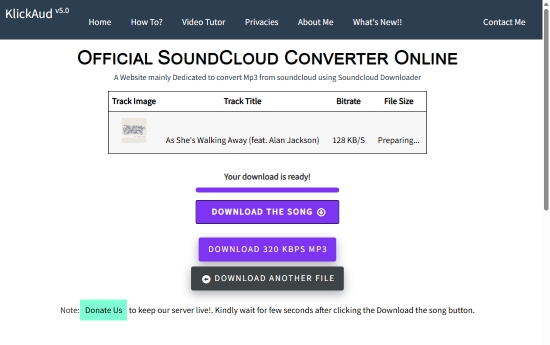
Because everything happens in the browser, users don't need to install additional software. However, this also means the service depends heavily on its online servers and SoundCloud's current website structure. When SoundCloud updates its platform, online downloaders like KlickAud may temporarily stop functioning until they're updated.
Part 2. Testing KlickAud: How Well Does It Really Work?
Rather than relying solely on the developer's feature list, we tested KlickAud using several publicly available SoundCloud tracks to evaluate its real-world performance.
The evaluation focused on the following areas:
| Category | Rating |
|---|---|
| Ease of use | ★★★★★ (5/5) |
| Download Speed | ★★★★☆ (4/5) |
| Audio Quality | ★★★☆☆ (3/5) |
| Metadata Preservation | ★★★☆☆ (3/5) |
| Playlist Support | ★★☆☆☆ (2/5) |
| Overall User Experience | ★★★★☆ (3.4/5) |
1. Ease of Use
Getting started with KlickAud is straightforward. The homepage contains a single input box where users paste a SoundCloud URL before clicking the download button.
No login, account creation, or software installation is required, making it accessible even for first-time users.
Rating: ★★★★★ (5/5)
2. Download Speed
For individual songs, KlickAud processed most links quickly. During testing, short tracks generally became available within several seconds, depending on internet speed and server load.
Longer audio files naturally required more processing time, but overall performance remained acceptable for occasional downloads.
However, processing speed can vary during busy periods because the service relies on shared online servers.
Rating: ★★★★☆ (4/5)
3. Audio Quality
KlickAud generates MP3 files that sound suitable for everyday listening. However, unlike professional desktop converters, it does not allow users to select different output formats or manually adjust bitrate settings. If you need lossless formats such as FLAC or WAV, KlickAud cannot provide them.
For casual listening, the quality is generally satisfactory, but audiophiles may find its limitations noticeable.
Rating: ★★★☆☆ (3/5)
Although KlickAud displays a 320kbps download option, clicking it will redirect you to download a separate desktop software called KeepMusic - which is completely unrelated to KlickAud. Currently, true 320kbps MP3 downloads are not supported directly through the online converter (only 128 kbps).
4. Metadata Preservation
Downloaded files generally retain basic information such as the track title. However, metadata consistency varies depending on the original SoundCloud upload. Album artwork, artist information, and other ID3 tags are not always preserved accurately.
Users who organize large local music libraries may need to edit metadata manually afterward.
Rating: ★★★☆☆ (3/5)
5. Playlist Support
This is where KlickAud falls behind many modern alternatives.
During testing, the service focused on downloading individual tracks. Users looking to save entire SoundCloud playlists or albums will likely need to download each song separately, making the process time-consuming.
For occasional downloads, this may not be an issue. For larger music collections, however, the lack of batch downloading becomes a significant drawback.
Rating: ★★☆☆☆ (2/5)
6. Overall User Experience
Overall, KlickAud remains one of the simplest free online SoundCloud downloaders available.
Its clean interface and quick processing make it suitable for downloading an occasional song without installing software.
However, limitations such as inconsistent metadata, lack of playlist support, and limited format options make it less appealing for users who frequently build offline music libraries.
Part 3. Pros and Cons of KlickAud SoundCloud Downloader
Based on our testing, KlickAud still performs well as a lightweight online downloader for individual SoundCloud tracks. Its biggest strength is convenience - users can save music directly from a browser without installing additional software.
Completely free to use;
No software installation & registration required;
Beginner-friendly interface;
Compatible with most desktop and mobile browsers;
Fast processing for individual tracks;
Works across multiple operating systems
Only supports MP3 output (128 kbps);
No lossless audio formats;
No batch downloading;
No playlist support;
Metadata may be incomplete;
Processing success depends on server availability;
Cannot bypass encryption to download SoundCloud Go+ exclusive tracks;
Downloaded files often include the website's name in the title;
Online ads may affect the user experience
Overall, KlickAud SoundCloud Downloader is a practical choice for users who only need to save a few SoundCloud songs occasionally. However, if you regularly download playlists, prefer higher-quality audio formats, or need more reliable batch processing, its limitations become more noticeable.
Part 4. Is KlickAud Safe to Use and Is It Legal?
Before using any third-party SoundCloud downloader, two questions naturally come to mind: Is it safe? And is it legal? So does the KlickAud converter, and the answer depends largely on how you use it.
Is KlickAud Safe?
Based on our testing, KlickAud itself does not require software installation or account registration, which reduces some common security risks associated with downloadable applications. We did not encounter prompts to install additional programs during normal use.
However, because KlickAud is a free web-based service, users may still come across advertisements, pop-up windows, or redirect links depending on the browser (like the KeepMusic mentioned above), region, or ad network being used. As with any free online downloader, it's best to access the official website, avoid clicking suspicious ads, and keep your browser's security features enabled.
If you're downloading files frequently, it's also good practice to scan downloaded files with reputable antivirus software, even when using well-known online tools.
Is KlickAud Legal?
The legality of using KlickAud depends primarily on what you download and whether you have permission to download it.
SoundCloud allows creators to decide whether their tracks can be downloaded officially. If an artist has enabled downloads or you have permission to save the content, downloading is generally straightforward. You can download them directly through the official SoundCloud web player.
However, downloading copyrighted content without the copyright owner's permission may violate local copyright laws or SoundCloud's Terms of Service, even if a third-party tool makes the download technically possible. Before saving any track, make sure you have the necessary rights to do so, and avoid redistributing or uploading downloaded music without authorization.
As for KlickAud itself, the service simply processes publicly accessible SoundCloud URLs and does not bypass account logins or DRM protection. Even so, users should only use it to download content that is legally available to them, such as officially downloadable tracks, royalty-free music, Creative Commons works, or audio for which they have obtained permission.
In the next section, we'll look at some of the most common issues users encounter with KlickAud and explore several reliable alternatives for situations where it doesn't meet your needs.
Part 5. Troubleshooting: What to Do If KlickAud Is Not Working?
Although KlickAud is easy to use, it doesn't always work flawlessly. Because it's a browser-based service that relies on online servers and SoundCloud's public pages, occasional issues are inevitable.
If KlickAud isn't working for you, try the following fixes.
Fix 1. Check Whether the SoundCloud Track Is Public
KlickAud only works with publicly accessible SoundCloud URLs. If the track has been deleted, made private, or restricted by the uploader, the downloader won't be able to retrieve it.
Try opening the track directly in your browser first. If it doesn't play normally on SoundCloud, KlickAud won't be able to process it either.
Fix 2. Verify That You Copied the Correct URL
A malformed or incomplete URL is one of the most common reasons for download failures. Instead of copying the browser's search results or shortened links, copy the full SoundCloud track URL from the address bar or use the platform's Share button.
Fix 3. Refresh the Page or Try Again Later
Sometimes the problem isn't your browser, it's the server.
Free online downloaders often experience heavy traffic, which can slow processing or cause temporary failures. If the website doesn't respond or displays an error, wait a few minutes and try again.
Fix 4. Disable Ad Blockers or Browser Extensions
Certain privacy extensions, VPNs, or ad blockers may interfere with KlickAud's processing scripts. If the download button doesn't respond, temporarily disable these extensions or try using your browser's Incognito/Private mode.
Fix 5. Clear Your Browser Cache
Cached website data can occasionally prevent pages from loading correctly. Clear your browser cache and cookies, then reopen KlickAud before trying another download.
Fix 6. Try Another Browser or Device
If the issue persists, switch to another browser such as Chrome, Edge, Firefox, or Safari. Testing on another device can also help determine whether the problem is browser-related or server-related.
Fix 7. Use an Alternative Tool
If KlickAud continues to fail, the issue may be caused by changes to SoundCloud's platform or temporary server outages. In that case, switching to another online downloader or a dedicated desktop application is often the quickest solution.
Part 6. Best Alternatives to KlickAud (Online & Desktop Options)
While KlickAud website remains a convenient choice for downloading individual tracks, it isn't the only option available. Depending on your needs, another downloader may offer better stability, playlist support, higher audio quality, or additional output formats.
Below are four popular alternatives worth considering.
Quick Comparison Table (KlickAud vs Alternatives)
| Feature | KlickAud | AudFree SoundCloud Music Converter | SoundCloudDL | Squid.WTF | Loader.to |
|---|---|---|---|---|---|
| Type | Online | Desktop | Online | Online | Online |
| Installation Required | ❌ | ✅ | ❌ | ❌ | ❌ |
| Free to Use | ✅ | ❌ (Trial Available) | ✅ | ✅ | ✅ |
| Batch Download | ❌ | ✅ | ✅ (Limited) | ✅ (Limited) | ✅ (Limited) |
| Playlist Support | ❌ | ✅ | ✅ (Limited) | ✅ (Limited) | ✅ (Limited) |
| Output Formats | MP3 | MP3, FLAC, WAV, AIFF, M4A, M4B | MP3, M4A, FLAC | MP3 | MP3, FLAC, M4A, WAV, etc. |
| Lossless Audio Output | ❌ | ✅ | ❌ | ❌ | ❌ |
| Metadata Preservation | ❌ | ✅ | ❌ | ❌ | ❌ |
| Ad-Free Experience | ❌ | ✅ | ✅ (Mostly) | ✅ (Mostly) | ❌ |
| Stability | Medium | High | Medium | Medium to low | Medium |
| Best For | Quick single-track downloads | Bit-perfect audio & large music libraries archiving (multi-platform) | Batch downloads for SoundCloud | Fast browser downloads (multi-platform) | Multi-platform online downloads |
1. AudFree SoundCloud Music Converter
If you frequently save SoundCloud music for offline listening or maintain a large local music library, desktop software generally provides a more reliable experience than browser-based downloaders.
AudFree SoundCloud Music Converter is built for users who need more than just occasional MP3 downloads. Instead of depending on third-party web servers, it runs locally on your computer, offering greater stability, faster batch processing, and more control over audio quality and output settings.
Compared with free online downloaders like KlickAud, AudFree supports downloading multiple SoundCloud tracks simultaneously while preserving the original audio quality and complete ID3 tags. It also offers a wider selection of output formats, making it easier to organize and enjoy your music across different devices.
AudFree SoundCloud Music Converter

- Losslessly convert SoundCloud to FLAC, WAV, MP3, and more
- Batch download multiple SoundCloud tracks up to 65X speed
- Automatically preserve full ID3 tags and metadata
- Organize downloaded music more efficiently
- Maintain original audio quality
- Support SoundCloud Free, SoundCloud Go, and SoundCloud Go+
- Available for both Windows and macOS
Besides SoundCloud, AudFree also supports audio conversion from several other popular streaming platforms, including Spotify, Apple Music, Amazon Music, TIDAL, Deezer, YouTube Music, and more. This makes it a practical choice for users who subscribe to multiple music services instead of relying on separate download tools for each platform.
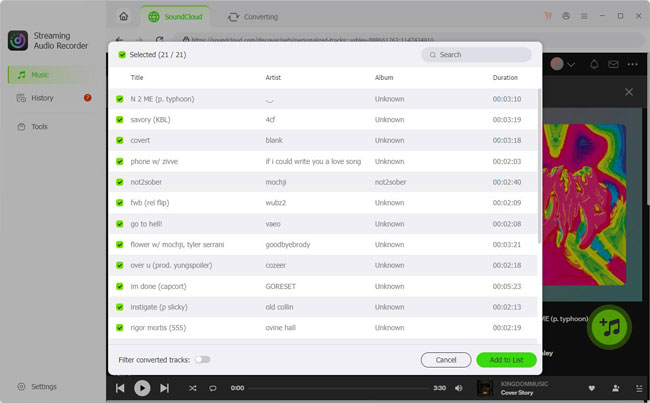
Supports batch downloading at high speed;
Multiple output formats, including lossless formats;
Excellent metadata preservation;
Stable performance without relying on browser servers;
Supports multiple streaming music services
Requires software installation;
Free trial includes conversion limitations (first 30 seconds)
Best for: Music enthusiasts who regularly download SoundCloud songs, archive playlists, or want higher-quality offline audio with complete metadata.
See also: Best SoundCloud Playlist Downloader
2. SoundCloudDL
SoundCloudDL is a lightweight online downloader that focuses on simplicity. Like KlickAud, it only requires a SoundCloud URL and works directly in your browser without requiring installation or registration.
Compared with KlickAud, one advantage is its support for playlist URLs and additional output formats such as FLAC and M4A. However, these formats are generated from the original SoundCloud stream rather than true lossless sources, so the actual audio quality depends on the source file.
Like most online downloaders, SoundCloudDL only works with publicly accessible SoundCloud tracks and relies on the availability of its web servers.
Site: https://soundclouddl.cc/

No installation required;
Supports playlist URLs;
Offers more output formats than KlickAud;
Simple, clean, and beginner-friendly interface
Public tracks only;
Batch processing is limited;
Metadata preservation is inconsistent;
Performance depends on server availability
Best for: Casual users who occasionally download public SoundCloud songs and prefer a simple online tool with basic playlist support.
3. Squid.WTF
Squid.WTF is one of the more feature-rich online downloaders available today. Besides SoundCloud, it supports several other streaming services, including Deezer and Amazon Music, making it a convenient all-in-one web-based converter.
Compared with KlickAud, Squid.WTF offers broader platform compatibility and additional output options. It is also among the few online tools that attempt to provide higher-quality audio processing for supported sources.
However, during testing, the biggest drawback wasn't its features - it was reliability. Some functions were temporarily unavailable or stopped working without notice, and service availability appeared to change frequently. For users who rely on consistent access, this can be frustrating.
In contrast, desktop software such as AudFree generally provides a more stable experience because it doesn't depend on shared online servers.
Site: https://squid.wtf/
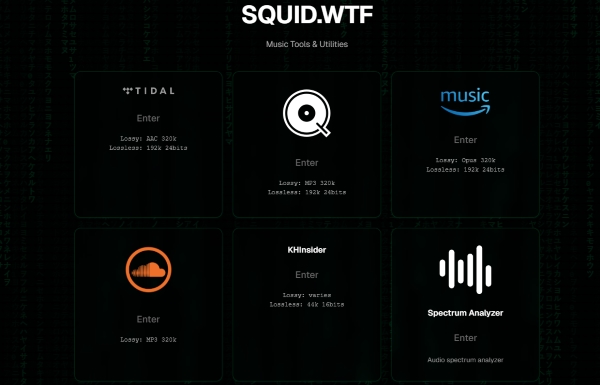
Supports multiple music services;
Clean and modern interface;
Multiple output options;
No software installation
Service stability is inconsistent;
Features occasionally become unavailable;
Processing speed varies depending on server load;
Less suitable for downloading large music libraries
Best for: Users who occasionally download music from different streaming platforms and prefer a browser-based solution.
4. Loader.to
Loader.to is a versatile online media downloader that supports numerous websites beyond SoundCloud, including YouTube, TikTok, Facebook, Instagram, Vimeo, and many others. If you frequently save audio or videos from multiple online platforms, it can be a convenient all-in-one solution.
Unlike KlickAud, which focuses exclusively on SoundCloud, Loader.to supports several output formats such as MP3, M4A, WAV, and FLAC for supported websites. However, download speed and available formats may vary depending on the source platform.
Because it is a browser-based service, Loader.to shares many of the same limitations as other online tools, including occasional advertisements, waiting times, and dependence on server availability.
Site: https://en.loader.to/4/

Loader.to may offer FLAC or WAV as output formats for some supported services, but the resulting quality depends on the original source. Converting a compressed SoundCloud stream to FLAC does not create true lossless audio, which is why it is marked as Limited rather than a full lossless solution.
Supports numerous websites;
Multiple output formats;
No installation required;
Works on desktop and mobile browsers
Download speed can fluctuate;
Advertisements may affect the experience;
Batch downloading is limited;
Audio quality depends on the source platform
Best for: Users who download audio or videos from multiple websites, including SoundCloud, YouTube, TikTok, Facebook, and other online platforms.
Conclusion
KlickAud remains one of the easiest ways to download individual SoundCloud tracks without installing software. Its simple interface, free access, and browser-based design make it an attractive option for casual users who only need to save a song once in a while.
However, our testing also revealed several limitations. It offers only basic MP3 downloads, lacks reliable playlist support, preserves metadata only to a limited extent, and relies on online servers that may occasionally become unavailable.
If your needs are limited to downloading a few public SoundCloud tracks, KlickAud is still a practical choice. But if you're a user who wants batch downloading, multiple output formats, better metadata management, or more reliable long-term performance, you may find a dedicated desktop app like AudFree more suitable.
Ultimately, the best downloader depends on how often you save SoundCloud music and what features matter most to you.

Staff Editor


