


In recent years, Telegram has become a hub for all sorts of bots and automation tools, including ones that can help users download music from popular streaming platforms like Apple Music. These bots have gained significant attention for their ability to provide quick and simple access to Apple Music playlists, albums, and tracks.
In this article, we will discuss the best Apple Music Telegram bots available in 2026, explore some alternatives to Telegram bots for downloading Apple Music, and compare these options to help you make an informed decision. Interested? Let's dive in.

Part 1. 3 Best Apple Music Downloader Bots on Telegram
Can you use Telegram bots to download Apple Music? The answer is definitely yes. While many music bots are short-lived due to copyright or API restrictions, several reliable options remain available for casual users. However, with great convenience comes potential risk; not all bots offer the same stability, audio quality, or security features. If you're ready to explore these mobile-friendly shortcuts, here are the three best Telegram Apple Music bots to try right now.
#1. Pink Music Bot
One of the most popular Apple Music bots on Telegram is Pink Music Bot (@GlomaticoPinkMusicBot). This bot is widely known for its user-friendly interface and its ability to handle multiple types of music downloads from Apple Music. With it, you can easily search for songs, albums, or playlists from Apple Music and get direct download links to MP3 files.
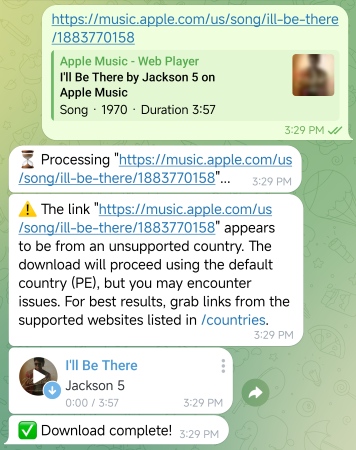
Step 1. Open Telegram and type "Pink Music Bot" or @GlomaticoPinkMusicBot into the search bar at the top.
Step 2. Select the official bot from the results and tap the "Start" button to activate its features.
Step 3. Copy the URL of a song, album, or playlist (up to three tracks at a time) from Apple Music and paste it into the chat. After a brief processing period, the bot will send the M4A audio file directly to your chat.
Free users are limited to 50 downloads per day in high-quality AAC format. But for unlimited daily downloads and access to high-fidelity ALAC (Lossless) files, a paid membership is required ($3.49/31-day).
#2. Link Music
Link Music Telegram bot (@LinkMusicBot) operates differently than a direct downloader. When you send an Apple Music link to the bot, it generates equivalent links for other streaming platforms, such as YouTube. This allows you to stream your favorite tracks for free on alternative services without needing an Apple Music subscription. However, keep in mind that this bot is designed for cross-platform streaming only and does not provide a direct download option.
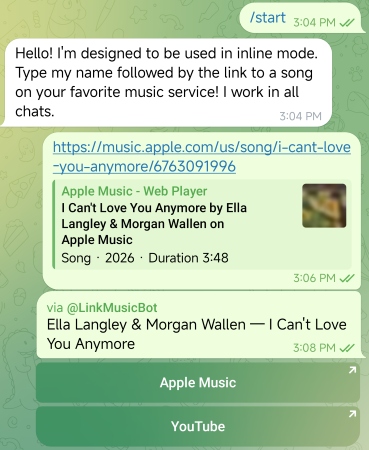
Step 1. Search for @LinkMusicBot in your Telegram search bar and tap "Start" to begin the session.
Step 2. Open Apple Music and copy the shareable URL of the track or album you want to hear.
Step 3. Paste the Apple Music link into the Telegram chat. The bot will instantly analyze the metadata and scan multiple platforms for a match.
Step 4. The bot will return a list of buttons (e.g., YouTube, Spotify, Deezer). Simply tap the "YouTube" button to open the track in your browser or app for free, high-quality streaming.
#3. Music Downloader
Music Download (@MusicsHuntersbot) is another noteworthy Apple Music downloader bot on Telegram. It allows users to download music from Apple Music by simply sharing a song or playlist link. The bot will then generate a download link for the user to retrieve the music in AAC (256 kbps) format. It also offers options to change the output quality, up to ALAC (Hi-Res).

Step 1. Search for @MusicsHuntersbot in Telegram and tap the "Start" button to view the command menu.
Step 2. Before downloading, use the bot's settings (usually via a /settings command) to select your preferred output format, such as AAC (256 kbps) or ALAC.
Step 3. Copy a song or playlist link from Apple Music and paste it into the chat box.
Step 4. The bot will process the request and send the file back to you. Tap the "Download" icon and select "Save to Music" or "Save to Files" to enjoy your music offline.
While the bot supports multiple music services for free, some premium features require an account upgrade. Specifically, to enable Apple Music downloads, a one-time donation of at least $5 is required to unlock access and support server maintenance.
Pros and Cons of Telegram Apple Music Bots
Easy to use, even for beginners;
No need for an Apple Music subscription;
Some support playlist downloads;
Great for casual music collectors
Download speed varies depending on the bot's server load;
Usually don't support higher-quality audio for free;
Potential risks related to account and privacy security;
Quality of tracks may not always match the original Apple Music quality;
Some users report inconsistent performance
Part 2. Alternative to Apple Music Telegram Bot - AudFree Apple Music Downloader
While Apple Music Telegram bots are convenient, they come with a few limitations, such as file format restrictions and potential risks related to security and quality. A more reliable and feature-rich alternative is AudFree Apple Music Downloader, a software solution designed specifically to download Apple Music tracks, albums, and playlists in high quality.
AudFree Apple Music Converter

- Preserves the original ALAC source, ensuring bit-perfect audio quality during the conversion process
- Effortlessly downloads entire albums or massive playlists in a single session to save time
- Convert Apple Music from protected M4P to MP3, WAV, FLAC, AIFF, Lossless, etc., making library playable on any device or high-res DAP
- Batch downloading at a 17x faster conversion speed
- Automatically retains ID3 tags, including high-resolution album art, artist details, and track numbers
- Enjoy your library anywhere, anytime - even after your subscription ends (with no DRM restrictions)
How to Download Apple Music via AudFree Apple Music Downloader
See also: How to Remove DRM from Apple Music
Get the free version of AudFree Apple Music Converter for Mac or Windows by clicking the button above. Please ensure you have an active Apple Music account before starting the installation.
- Step 1. Add Apple Music to Conversion List

- After installation, launch the AudFree Apple Music Converter program and log in. Then browse your Apple Music library and click the target songs you want to download, and then click the "Add" icon to load Apple Music to the conversion list.
- Step 2. Customize Apple Music Output Settings

- Once your tracks are loaded into the converter, click the "AudFree Apple Music Converter" icon in the top menu and select "Preferences". In the "Preferences" window, switch to the "Conversion" tab, where you can customize output settings such as audio format, channels, sample rate, and bit rate to match your needs.
- For the best balance between compatibility and file size, especially across all players, we recommend converting Apple Music to MP3 at 320 kbps. If you prefer the highest possible audio quality and don't mind larger file sizes, you can select the Lossless option instead.
See also: How to Download Apple Music to WAV
- Step 3. Get Apple Music Downloads for Offline Stream

- Click the "Convert" button at the bottom of the interface. AudFree will begin downloading and converting your Apple Music tracks at high speed. Once the process is finished, click the "Converted" icon (marked with a red notification spot). This will open your history list, where you can view and play your newly unprotected, DRM-free Apple Music files.
Pros and Cons of AudFree Apple Music Downloader
Offer lossless downloads with no compromises;
Allow for batch downloading of playlists and albums;
Intuitive user interface and simple workflow;
Ideal for users who want to keep the metadata intact;
Retain your Apple Music library permanently with DRM-free files that never expire
Need a paid license (but offers a free trial);
Requires installation on your PC or Mac
Need more variety? AudFree Streaming Audio Recorder supports 10+ streaming services, including Spotify, Apple Music, and Tidal. Get lossless quality and high-speed conversions in one powerful package - the perfect companion for any serious music enthusiast.
Part 3. Comparison Table About Apple Music Telegram Bots vs AudFree: Which Is Better?
To help you make an informed choice, here's a side-by-side comparison of Telegram Apple Music bots and AudFree Apple Music Downloader.
| Feature | Apple Music Telegram Bot | AudFree Apple Music Downloader |
|---|---|---|
| Output Audio Quality | Usually AAC (256 kbps); lossless often limited or paid | Up to Lossless (ALAC) |
| Output Format | Limited (mainly MP3/M4A/AAC) | MP3, WAV, FLAC, AIFF, Lossless, etc. |
| Conversion Speed | Depends on server load, slow | Up to 17× faster batch conversion |
| Stability | Unstable, bots may go offline or fail | Highly stable with regular updates |
| Batch Conversion | Limited or restricted | Fully supported for playlists and albums |
| Metadata/ID3 Tags | ❌ | ✅ |
| Cost | Free (Or $3.49/mon or $5) | Free trial available ($14.95/mon) |
| Success Rate | Inconsistent (depends on matching sources) | High success rate with direct Apple Music integration |
Part 4. FAQs About Apple Music Bot on Telegram
What are the risks of using an Apple Music Telegram bot?
Using an Apple Music bot on Telegram comes with certain risks, such as potential malware or viruses. Bots can also violate Apple's terms of service, which may lead to issues with your Apple Music account. Additionally, bots may not always offer the best audio quality, and your personal data might not be as secure as with a trusted application like AudFree.
Can I download a full Apple Music playlist at once using an Apple Music bot on Telegram?
Most Telegram bots do not support batch downloads. You may need to download tracks individually, and the process can be slow, especially for large playlists or albums. However, bots like @MusicsHuntersbot claim to offer playlist downloads in a more streamlined manner.
Does an Apple Music Telegram bot need a subscription?
Typically, Apple Music bots do not require a subscription, as they work by extracting music directly from the Apple Music service. However, some premium content may be inaccessible without a valid Apple Music subscription.
Do Apple Music Telegram bots provide lossless (ALAC) audio?
Most Apple Music Telegram bots provide only MP3 or M4A downloads, which are compressed and lower in quality compared to lossless formats like ALAC. While some Telegram bots claim to support ALAC lossless output, it is often unclear whether these files are sourced directly from the original stream or simply upscaled from lower-quality files. So if you are looking for true lossless downloads, a tool like AudFree Apple Music Downloader is a better alternative.
Conclusion
Apple Music Telegram bots provide an easy and convenient way to download music, but they come with limitations in terms of quality, format, and reliability. If you're looking for high-quality downloads and more flexibility, an alternative like AudFree Apple Music Downloader is a better choice. With its support for lossless formats and batch downloading, AudFree offers a far more robust solution for Apple Music fans. However, for quick and casual downloads, Telegram Apple Music bots can still serve their purpose, just be aware of their limitations and risks.

Staff Editor


