


SoundCloud is one of the world's largest hubs for discovering indie tracks, exclusive DJ sets, underground hip-hop, trending podcasts, and tracks you may not find on other streaming platforms. But access isn't always straightforward. SoundCloud may fail to load on a school or workplace network, certain tracks may be unavailable in your region, or a shared Wi-Fi connection may interfere with streaming.
In this guide, we'll explain how to access SoundCloud anywhere using six practical methods. You'll learn what to try when SoundCloud is blocked on a network, how to troubleshoot access without relying on a VPN, and how to keep compatible SoundCloud audio available for offline playback when online access isn't practical.


Part 1. Why Is SoundCloud Blocked or Unavailable?
Before looking for a SoundCloud unblocked solution, it's worth figuring out why the service isn't accessible in the first place. Not every "SoundCloud not working" situation is caused by the same type of restriction. The most common reasons SoundCloud is blocked include:
• Distraction control at school or workplaces: Schools, offices, and other institutions may block entertainment platforms such as SoundCloud to limit distractions during working or study hours.
• Network bandwidth limitations: Music streaming can use a considerable amount of bandwidth. Some shared networks, such as those in schools, libraries, or dorms, may restrict streaming services to reduce network congestion.
• Content filtering policies: Network administrators may use filters that block categories such as social media, video, or music streaming, which can include SoundCloud.
• Regional restrictions: A specific track may be unavailable in certain countries because of licensing agreements. This is different from SoundCloud itself being blocked, so getting SoundCloud unblocked won't necessarily make every track available.
Identifying the type of restriction you're facing can help you choose the right solution, especially if you're trying to access SoundCloud at school, work, or on a restricted network.
Quick Guide: What Kind of SoundCloud Problem Do You Have?
| What you're seeing | Possible cause | What to try |
|---|---|---|
| SoundCloud won't load on one Wi-Fi network | Network or firewall restriction | Try another connection or a VPN where permitted |
| SoundCloud works on mobile data but not Wi-Fi | Network-specific restriction | Test a different network |
| The website loads, but a track is unavailable | Regional or licensing restriction | Check whether the track is available in your region |
| SoundCloud keeps buffering | Connection or network performance | Check your connection or try another network |
| You want a stable listen experience without an internet connection | Offline listening need | Use an official offline feature or compatible local files |
Once you've identified the problem, you can choose the right way to get SoundCloud unblocked for your particular situation instead of treating every "SoundCloud unavailable" message as a blocking issue at school or elsewhere. However, no matter what issue you encounter, the offline method described in Part 3 can still give you a reliable way to listen to SoundCloud at school, at work, or in other places where access is restricted.
Part 2. 5 Ways to Access SoundCloud at School (or Anywhere)
If you're having trouble accessing SoundCloud at school or dealing with similar internet restrictions, don't worry. Below are five practical ways to get SoundCloud unblocked, whether you're at school, at work, using public Wi-Fi, or traveling abroad.
Way 1. Use a VPN When SoundCloud Is Blocked on Your Network
When SoundCloud works normally on other networks but is inaccessible on your current connection, such as a school network, a VPN (Virtual Private Network) can be a practical way get unblocked SoundCloud access. It hides your IP and reroutes your traffic through servers in locations where SoundCloud is unblocked.
However, a VPN isn't a universal solution. It doesn't guarantee access to every region-restricted track, and its effectiveness can depend on the network, VPN server, and local policies.
How to Access SoundCloud with a VPN
Step 1. Download a trusted VPN like NordVPN, ExpressVPN, or ProtonVPN.
Step 2. Connect to a country where SoundCloud is accessible (e.g., US or Germany).

Step 3. Launch SoundCloud and enjoy unblocked streaming.
Always use a verified no-logs VPN to protect your online privacy when unblocking SoundCloud on restricted networks.
Can help with some network-level restrictions;
Works across many websites and apps;
Doesn't require changing SoundCloud itself
May not work on heavily restricted networks;
Connection speed can vary;
Doesn't guarantee access to region-restricted content;
May be prohibited by some school or workplace network policies
Way 2. Use Proxy Servers to Visit SoundCloud at School
A proxy server is also a quick solution to access unblocked SoundCloud websites, especially in schools with strict network restrictions. Proxy tools act as intermediaries between your device and the target website, masking your IP address to trick the firewall. When you enter SoundCloud's URL into a proxy site, the proxy retrieves the web page content on your behalf.
Step 1. Visit a proxy site like CroxyProxy, HideMyAss, or ProxySite.
Step 2. Enter the SoundCloud URL and let the proxy fetch it.

Step 3. Stream directly from the proxy interface.
Avoid logging into your SoundCloud account through an unknown proxy. A proxy is not automatically trustworthy simply because it can unblock and load the SoundCloud website.
No software installation required;
Instant access SoundCloud
Not always practical on managed devices;
Privacy and security depend heavily on the provider;
Not suitable for entering sensitive account credentials on an untrusted proxy;
Some proxies can't stream high-quality audio
Way 3. Modify DNS Settings for SoundCloud Unblocked
DNS, or Domain Name System, helps translate website addresses into the network addresses used to connect to online services. Modifying DNS settings can bypass basic filters used by schools or workplaces. Though it lacks encryption, it's an easy way to get SoundCloud music unblocked when browser-level restrictions are in place.
If the network blocks SoundCloud at a deeper level, such as through IP filtering or a firewall, changing DNS alone won't remove that restriction.
How to Change DNS for SoundCloud Access
The exact steps vary by device, but the general process is:
Step 1. Go to your device's network settings.
Step 2. Replace DNS with:
a. Google DNS: 8.8.8.8 and 8.8.4.4
b. Cloudflare DNS: 1.1.1.1

Step 3. Save settings and refresh SoundCloud.
Easy to test;
Doesn't require a VPN subscription;
Bypassing DNS-based blocks at school
Won't overcome every network restriction;
Doesn't change your physical location;
Doesn't make region-restricted tracks automatically available
Way 4. Use an Alternative Website or Mirror
If the official SoundCloud website is blocked on a particular network, you may come across unofficial websites described as SoundCloud mirrors or SoundCloud unblocked 66 sites. These pages are designed to provide an alternative way to browse or access SoundCloud-related content without directly opening the main SoundCloud domain.
However, availability and functionality can vary considerably. Some pages may simply embed public SoundCloud content, while others may no longer work. They are also not operated or endorsed by SoundCloud.
Examples you may encounter:
1. SoundCloud Unblocked 66
2. SoundCloud Mirror Weebly
Great for:
- Users researching alternative ways to access SoundCloud-related content
- Situations where the official SoundCloud domain is temporarily inaccessible
Step 1. Open a known mirror or alternative page in your browser. Keep in mind that an older mirror may no longer work.

Step 2. If the page provides playable SoundCloud content, search for the track you want and try playing it.
May provide an alternative route when the main SoundCloud domain is inaccessible;
Usually accessible through a standard web browser;
No separate SoundCloud app may be required
Availability and functionality can change or disappear;
Unofficial sites are not controlled by SoundCloud;
Privacy and security cannot be guaranteed;
Avoid entering your SoundCloud username, password, or other sensitive information;
Do not download unknown files or browser extensions from an unofficial mirror
Way 5. Access SoundCloud Anonymously with the Tor Browser
The Tor Browser routes web traffic through multiple encrypted nodes, hiding your identity and bypassing censorship. It's a strong option for accessing unblocked SoundCloud where heavy censorship is in place, such as in some schools or countries. However, it can be considerably slower than a normal browser and is not specifically designed for music streaming.
Step 1. Download and install the Tor Browser from the official Tor Project website.

Step 2. Launch Tor, connect to the Tor network, and choose "New Identity" to refresh IP.

Step 3.Visit SoundCloud and enjoy anonymous, unblocked access.
Can provide an alternative connection route when direct access is restricted;
Designed to improve browsing privacy;
Does not require you to visit an unofficial SoundCloud mirror
Connection speeds can be slower than a regular browser;
Streaming audio may buffer more frequently;
Some networks may block access to the Tor network itself;
Tor should not be treated as a guarantee that every SoundCloud restriction can be bypassed
Part 3. How to Keep SoundCloud Music Available Offline
Beyond VPNs, proxies, and DNS tweaks, there's another permanent solution to get SoundCloud unblocked - especially when you want SoundCloud music unblocked at school, at work, or even without internet.
These methods focus on offline access, letting you enjoy your favorite tracks without being blocked by school firewalls, geo-restrictions, or unstable public Wi-Fi. Here's how to unblock SoundCloud permanently and take control of your listening freedom.
Option 1. Use SoundCloud's Official Offline Listening Features
SoundCloud Go and Go+ include offline listening, allowing subscribers to save tracks for playback without an internet connection. This is especially useful for flights, commutes, or places with unreliable internet. You can simply save your favorite songs to your device before heading to school or work and listen to them later without needing a connection.
However, offline saves are tied to your subscription and SoundCloud's licensing terms, so they are not permanent local files. Availability may also vary by region due to licensing and copyright restrictions.

Offline listening is not the same as unblocking SoundCloud. If your school, workplace, or public Wi-Fi blocks SoundCloud, Go or Go+ will not remove the network restriction. Instead, the idea is to download your tracks in advance while you have access to SoundCloud, then listen to them offline later.
See also: SoundCloud Offline Free: How to Listen Without SoundCloud Go
In short:
- No internet: Go/Go+ can let you listen to saved tracks offline.
- SoundCloud is blocked: A subscription alone still won't bypass the network restriction.
Option 2. Save Artist-Provided Downloads as Local Files
Another option is to use an official download provided by the artist when one is available. Some SoundCloud creators make tracks available for direct download. When you see an official download option, you can save the file and use it with compatible local music players or devices.
While this approach is helpful for free tier users accessing DRM-free tracks, it does not bypass network blocks on SoundCloud, either. Rather, it offers another alternative way to secure offline files in advance for playback in restricted environments.
Step 1. Open the SoundCloud website or app and log in to your account.
Step 2. Browse or search for the track you want to download.
Step 3. Click the "More" button (three dots) next to the track.
Step 4. If the artist has enabled downloads, you will see a "Download file" button.

Not every SoundCloud track has an official download option. Availability depends on what the creator has made available.
Step 5. Click the option and follow the prompts to save the file to your device.
Option 3. Build a More Flexible SoundCloud Local Library with AudFree
If you want more control over your local music library, a desktop audio tool can provide another workflow for supported SoundCloud content.
AudFree SoundCloud Music Converter is designed for Windows and Mac and supports common output formats such as MP3, FLAC, WAV, AIFF, M4A, and others. It can also retain metadata, process multiple tracks, and handle albums or playlists in batches. According to the product information used for this guide, playlist and album processing can reach up to 65X speed.
The main advantage here isn't that AudFree can "unblock" SoundCloud on a school or workplace network. Instead, it lets you reduce your reliance on online SoundCloud playback by creating compatible local audio files for offline use. Unlike Option 1, which requires a SoundCloud subscription, or Option 2, which only works with certain tracks, this approach can be used with a free SoundCloud account and provides a consistent way to save tracks for offline listening.
Why Choose AudFree SoundCloud Music Converter?

- Convert SoundCloud to MP3, WAV, FLAC, and more formats
- Convert Soundcloud's entire albums or playlists up to 65X speed
- Auto-recognizes and tags artist, album, and title (ID3)
- Support batch-processing multiple tracks simultaneously
- Compatible with over 10 major streaming platforms beyond SoundCloud
- Fully compatible with Windows & Mac
Steps to Unblock SoundCloud via AudFree SoundCloud Music Converter
Here's a complete step-by-step guide to unblock your SoundCloud and get offline listening.
- Step 1. Launch and Activate AudFree SoundCloud Music Converter
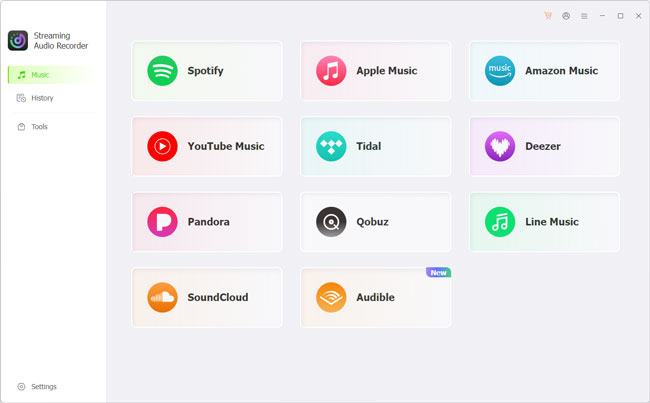
- Download and open AudFree SoundCloud Music Converter on your PC/Mac. Register your license to unlock full features.
- Step 2. Set SoundCloud Output Format for you Device
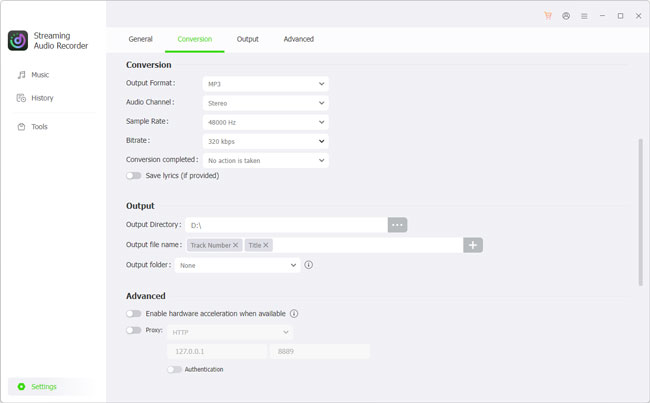
- Click the Settings > Music and select a format such as MP3, FLAC, or WAV. You can also configure parameters such as bitrate, sample rate, and output location.
- Step 3. Add SoundCloud Tracks for Conversion
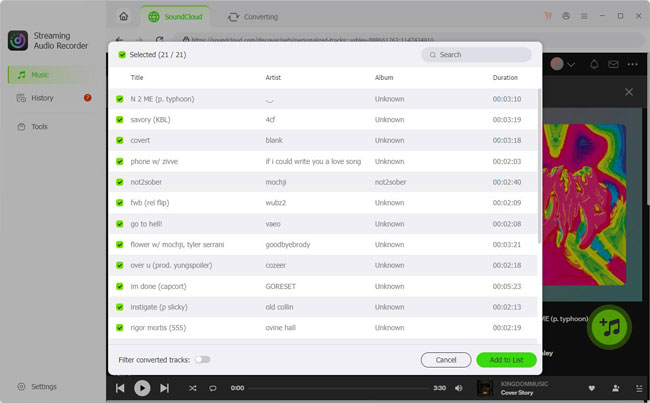
- Click on the SoundCloud icon in the main screen. Sign in to your SoundCloud account and use the built-in SoundCloud access to find the supported track, playlist, or album you want to process, then add it to the task list by clicking the green "+" button.
- Step 4. Start Converting SoundCloud tracks
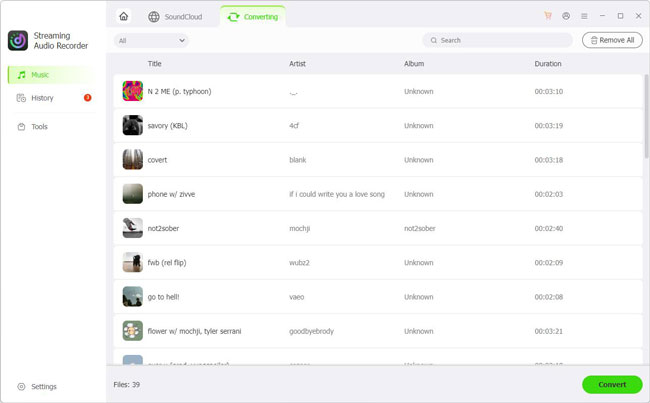
- Open the Converting tab and click 'Convert' to start the process. Once complete, navigate to the History section or open your designated output folder to access your unrestricted audio files. Now, whether the SoundCloud website is unblocked on your network or not, you can now enjoy your favorite tracks offline anywhere without restrictions.
Why consider this approach?
- Supports multiple common audio formats
- Batch-processes multiple tracks
- Retains relevant track metadata
- Works on Windows and Mac
- Creates a local-file workflow rather than depending entirely on online playback
Part 4. Which SoundCloud Access Method Should You Choose?
By now, you have several ways to deal with SoundCloud access problems, but they aren't interchangeable. The right option to unblock SoundCloud depends on whether you're dealing with a network restriction, a connection problem, unavailable content, or a need for offline playback.
| Situation | What to try | Why |
|---|---|---|
| SoundCloud works on other networks but not your current Wi-Fi | Try a VPN or proxy | Helps identify or work around a network-level restriction |
| SoundCloud may be affected by DNS problems | Change DNS settings | Can resolve some DNS-related connection issues |
| You only need browser-based access | Try a proxy or a Tor Browser | Provides another route to the website without installing a VPN |
| A specific track isn't available | Check regional/track availability | The issue may be related to licensing rather than your network |
| You want to listen without an internet connection | SoundCloud's official offline feature | Keeps supported content available within the SoundCloud app |
| You want compatible local audio files | Artist-provided downloads or a local-file workflow | Lets you use audio outside continuous SoundCloud streaming |
A Simple Rule of Thumb
First, check whether SoundCloud works on another network. If SoundCloud doesn't work only on one network, start by testing another connection. This is the quickest way to determine whether the network is responsible.
If you need access on that same network and using a VPN or proxy is permitted, a VPN may be worth trying.
If the problem appears to be DNS-related, changing DNS can be a relatively simple troubleshooting step. A proxy can also be useful in situations where you only need browser-based access, although its performance and privacy depend on the provider.
On the other hand, if your main concern is offline listening, trying to unblock the website may not be the best approach at all. SoundCloud's official offline feature or a collection of legitimate local audio files can be more appropriate.
The key is to match the solution to the specific problem rather than relying on the same method to unblock SoundCloud in every situation.
We don't recommend relying on sites such as "SoundCloud Unblocked 66" or other unofficial SoundCloud mirror websites. These sites are not operated or verified by SoundCloud, and their availability and functionality can change or disappear without notice. Some may also expose you to intrusive ads, tracking, malicious downloads, or other security risks.
If you use an unofficial mirror, never enter your SoundCloud login details or download unknown files. For a safer and more reliable experience, use SoundCloud's official website, app, or legitimate offline listening options whenever possible.
Part 5. SoundCloud Unblocked: Common Problems and Fixes
Even after trying one of the methods above, SoundCloud may still fail to load or play correctly. The following checks can help narrow down what's going wrong.
1. SoundCloud Won't Load at All
If the SoundCloud website is blocked or the app won't open, start with the basic troubleshooting steps. However, check your network first. If SoundCloud works normally on mobile data but not on a specific Wi-Fi network, that network is likely a key part of the problem.
1. Refresh the page or restart the app.
2. Check whether other websites load normally.
3. Try another browser.
4. Switch to another trusted network.
5. Test SoundCloud on another device.
6. If it works elsewhere, investigate the original network connection.
2. SoundCloud Works, but Some Tracks Are Unavailable
If the SoundCloud website loads normally but only certain songs are unavailable, don't assume that SoundCloud itself is blocked. The issue may be related to track or regional availability, such as licensing restrictions in your location.
This distinction matters because network troubleshooting methods are mainly designed to fix access problems; they cannot guarantee that every track will be available in your region. You can also check whether the artist has provided another official way to listen to or download the track.
If you suspect a regional restriction, you can try connecting through a VPN server in another supported region and check whether the track becomes available. However, this is not guaranteed to work, as availability can also depend on the track's licensing and the artist's settings.
3. SoundCloud Keeps Buffering
A page loading successfully doesn't necessarily mean the connection is suitable for streaming. If SoundCloud repeatedly pauses or buffers:
- Check your internet speed and stability.
- Move closer to your Wi-Fi router if applicable.
- Close bandwidth-heavy apps or downloads.
- Try another network.
- Test SoundCloud on another device.
If the problem occurs only on one network, switching connections may be more useful than repeatedly changing SoundCloud settings.
4. A VPN Doesn't Make SoundCloud Work
A VPN isn't guaranteed to solve every SoundCloud access problem. If you've connected to a VPN but SoundCloud is still blocked and doesn't work, try the following:
- Switch to another VPN server.
- Disconnect and reconnect to the VPN.
- Restart your browser or SoundCloud app.
- Clear relevant browser cache or cookies.
- Test SoundCloud on another network.
- Check whether the issue occurs with other websites as well.
If SoundCloud still doesn't work after these troubleshooting steps, consider an offline listening approach instead. Rather than relying on continuous access to SoundCloud, you can prepare supported tracks in advance and build a local music library for offline playback.
For users who want more flexibility with their SoundCloud library, AudFree SoundCloud Music Converter provides an option to create compatible local audio files for offline use. This doesn't unblock the network itself, but it can reduce your dependence on SoundCloud being accessible when you want to listen.
Part 6. FAQs About How to Access SoundCloud
Is it safe to log into your SoundCloud account through a free web proxy?
It is not recommended. A free proxy may handle your traffic and could expose your login credentials or other sensitive information. If you use a proxy to access SoundCloud, avoid signing in and never enter your password unless you fully trust the service.
How to bypass 'SoundCloud is not available in your country/region' errors?
This usually indicates a regional licensing or availability restriction, rather than a problem with your internet connection. You can check whether the track is available through an official source in your region, or, where permitted, try a VPN server in another region. However, a VPN cannot guarantee access because availability may also depend on the track's licensing and the artist's settings.
Why does SoundCloud throw '403 Forbidden' or audio buffering errors when using a VPN?
A VPN can trigger 403 errors if SoundCloud rejects or restricts traffic from a particular VPN server or IP address. Buffering can also occur because VPN routing adds latency or reduces connection speed. Try another VPN server, reconnect to the VPN, or test SoundCloud without the VPN to determine whether the VPN connection is causing the problem.
In Summary
Getting SoundCloud unblocked starts with identifying what is actually preventing access. A restricted Wi-Fi network, DNS or firewall issue, regional track availability, and simple connection problems require different approaches. VPNs, proxies, DNS changes, or Tor may help with certain network restrictions, but their effectiveness and availability can vary.
If your main goal is reliable listening rather than accessing the website itself, offline playback can be a more practical alternative. SoundCloud's official offline features and legitimate local audio files can reduce your dependence on a stable SoundCloud connection, especially when you're dealing with restricted networks or unreliable internet access.

Staff Editor


