


"Is Spotify Lossless audio available?" Yes. After years of rumors, delays and a famous 2021 announcement for Spotify HiFi, the wait is over finally. As of September 2025, Spotify has rolled out high-fidelity audio to users, which is named Spotify Lossless.
But what does this new 'lossless' tier deliver? How to get it? What's the price of it? How does it compare to the lossless audio that other music services have offered for years?
To explain all these, here is a detailed review of lossless audio on Spotify. After reading this post, you will learn everything about Spotify Lossless.


Part 1. What Is Spotify Lossless: Latest News and All You Need to Know
Let's start with what does Spotify Lossless actually mean, how much it costs, its sound quality, and availability.
What Is Spotify Lossless?
Spotify Lossless is a new quality setting that is available to Spotify Premium subscribers without extra cost. Now, it is the top-tier streaming option on Spotify. Previously, 320 kbps Ogg Vorbis was the highest quality and it compresses audio by removing data to save space.
But now, the lossless formats will keep every single bit of the original studio recording. The lossless file is compressed to save bandwidth. But it's designed so that every bit of the original recording can be perfectly restored during playback. This means you still get a full, detailed, and dynamic listening experience.
What Is the Audio Quality of Lossless on Spotify?
Spotify Lossless streams music in FLAC (Free Lossless Audio Codec) at up to 24-bit/44.1kHz. This is better than the standard CD quality as the 24-bit offers a significantly greater dynamic range than 16-bit.
How Much Is Spotify Lossless (Spotify HiFi)?
For years, it was rumored that the Spotify HiFi feature would be part of a new and more expensive 'Music Pro', 'Supremium' or 'Premium Plus' tier. The great news is that Spotify Lossless is included at no extra cost in the Spotify Premium subscription. That means you will get the lossless audio on Spotify directly if you have a Spotify Premium Individual, Duo, Family or Student plan.
When Will I Get Spotify Lossless?
The Spotify Lossless release date is September 2025. And now, Spotify is continuing to reach new users and markets throughout October and November 2025.
Where Can I Get Spotify Lossless?
Now, the Spotify Lossless feature is rolling out to over 50 countries gradually, including the United States, the United Kingdom, Canada, Germany, Japan, Australia and more.
Part 2. How to Enable Spotify Lossless on Desktop and Mobile
Spotify Lossless feature is not enabled by default in the Spotify app. In this case, you must activate it manually. Now, we will walk you through how to enable it on your mobile, desktop and Spotify Connect devices.
How to Enable Lossless on Spotify on iPhone, iPad or Android
Step 1. Open the Spotify app on your Android or iOS device.
Step 2. Touch your profile icon in the top-left corner and choose the Settings & Privacy option on the screen.
Step 3. Next, choose the Media Quality option.
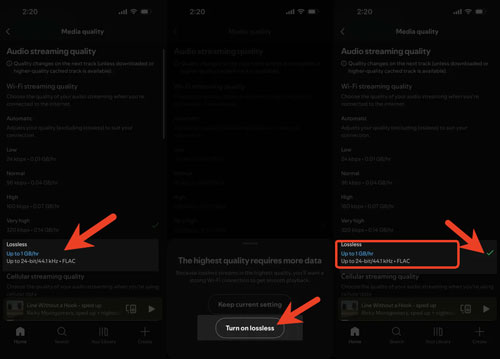
Step 4. Under the WiFi streaming section, select Lossless. Then tap 'Turn on Lossless' in the pop-up.
How to Enable Spotify Lossless on Mac or Windows
Step 1. Open the Spotify app on your Windows or Mac computer.
Step 2. Tap your profile name in the upper-right corner and choose Settings.
Step 3. Scroll down the page and find the Audio Quality section.

Step 4. Tap the dropdown menu next to the Streaming quality text and choose Lossless.
Tips: How to Enable Lossless Audio for Spotify Connect & Speakers
If you listen to Spotify music on your smart speakers like Sony, Bose, Sonos, etc. via Spotify Connect, you need to enable the Lossless feature while you are connected to the device.
Step 1. Start your Spotify app on your device and play any music you want.
Step 2. In the Now Playing screen, tap the Spotify Connect icon and choose the speaker you like to connect.
Step 3. Once connected and the music is playing on the connected device, go back to Spotify app's Settings > Audio Quality.
Step 4. Now, tap your device's name and choose Lossless from the quality options.

You need to do this once for each device you connect via Spotify Connect. Besides, make sure your device is updated to support Spotify Lossless audio playback.
After enabling Lossless feature on Spotify, you can check if you are listening to lossless music on Spotify. Just play the music and check if there is a 'Lossless' tag show in the Now Playing view or bar, and via the Connect Picker.
Part 3. How to Listen to True Lossless Audio on Spotify
It is noted that turning on the Lossless quality settings does not guarantee you are listening to lossless music on Spotify. It depends on the device and method you stream.
If you listen to Spotify via Apple AirPods, AirPods Pro, AirPods Max and other standard Bluetooth headphones and speakers, you can't get true lossless audio from Spotify. That is because the standard Bluetooth doesn't have enough bandwidth to transmit a full lossless file. The audio from your phone to your Bluetooth device will be recompressed into a lossy format. So, choose Very High setting to stream music and save your data.
So, what is the best solution to stream true lossless audio on Spotify? Here are two methods for you.
1. Via Wired Headphones
The easiest, cheapest and most reliable way to play Spotify Lossless is using a pair of wired headphones. When connecting the headphones to your phone (using a 3.5mm jack or a Lightning/USB-C dongle) or computer, you will create a direct and wired path. In this case, you will transmit the full and uncompressed audio signal from your device's audio processor to your ears directly.
2. Via Spotify Connect
You can connect Spotify to a compatible device like speaker, streamer, game console, etc. via Spotify Connect to listen to true lossless audio on Spotify. But the streaming music goes over WiFi, not Bluetooth.
3. Via Advanced Bluetooth Codecs
There are some newer and high-bandwidth Bluetooth codecs like aptX Lossless, LDAC, etc. that can transmit near-lossless audio. aptX Lossless can transmit true 16-bit/44.1 kHz (CD-quality) lossless audio. LDAC works with Android phones and Sony headphones, which offer a 'best-effort' high-resolution stream close to lossless, but still 'lossy' technically. To use them, you need both a phone and headphones that support the codec.
But this is expensive and mostly limited to the high-end Android ecosystem.
In short, for most people, it is highly recommended to use wired headphones or Spotify Connect to stream Spotify Lossless music.
Part 4. Compare Spotify Lossless vs Apple Music Lossless vs Tidal vs Qobuz
Now, you may wonder what the differences are between the Lossless audio on Spotify and other services. Here we have compared them in the table below. You can take a look at it to learn more.
| Features | Spotify | Apple Music | Tidal | Qobuz |
|---|---|---|---|---|
| Max Audio Quality | Lossless: 24-bit/44.1kHz | Hi-Res Lossless: 24-bit/192kHz | Hi-Res Lossless: 24-bit/192kHz | Studio Quality: 24-bit/192kHz |
| Lossless Codec | FLAC | Apple ALAC | FLAC | FLAC |
| Spatial Audio | ❌ | Dolby Atmos (Good) | Dolby Atmos (Excellent) | ❌ |
| Audiophile 'Extra' | Spotify Connect | Apple Digital Masters | DJ Extension | Digital liner notes, download store |
| Cost | Included with Premium ($11.99/month) | Included with subscription ($10.99/month) | Included with subscription ($10.99/month) | Studio Plan ($10.83/month) |
In a word, Spotify Lossless is a massive leap over its old quality, but it does not (yet) match the absolute highest-resolution ceiling of its rivals.
Part 5. FAQs About Spotify HiFi Lossless Audio
Why Don't I Have the Spotify Lossless Option Yet?
Currently, Spotify Lossless is available for Spotify Premium users in the United States and other selected countries. Please make sure that you are a Spotify Premium user and in an eligible country. Besides, you will receive a notification on Spotify once this feature becomes available to you. If not, you need to wait. Or you can try to update your Spotify app to the latest version to get the feature.
Is Spotify Lossless Worth It?
It is worth using Spotify Lossless only if you are a Spotify Premium subscriber and use wired headphones. If you use Bluetooth or AirPods, it is not worth it.
Does Spotify Lossless Work with Sonos or Amazon Echo?
Yes. But you need to check for firmware updates for your specific device to see if it supports Spotify Lossless. If not, you need to wait for the rollout.
How Much Data Does Spotify Lossless Use?
A lot. Streaming 24-bit FLAC files from Spotify can consume more 1GB of data per hour. So, you should only enable lossless on WiFi streaming or you have an unlimited data plan.
Do I Need a DAC to Listen to Spotify Lossless Audio?
No, you don't, as there is a built-in DAC on your device to play the lossless audio. But for audiophiles, using an external DAC will help hear the full potential of the lossless file.
Can I Stream True Spotify Lossless Audio on My Speakers via Spotify Connect?
Yes, you can as long as your Spotify-Connected device is compatible with Spotify Lossless and you choose the Lossless quality setting for it in the app manually.
Part 6. Tips to Download Spotify Lossless Music and Keep Permanently
As a Spotify Premium user, you can download lossless Spotify music for offline playback. However, they are cached files and only allow you to use them within the Spotify app. So, if you want local and permanent Spotify music files for use on other devices, third-party tools like AudFree Spotify Music Converter can help you.
It is designed to convert Spotify music to Lossless, FLAC and WAV formats, helping you get an original quality listening experience. Also, it can output Spotify music to AIFF, MP3, M4A and M4B audio formats locally.
Besides, since all Spotify songs are in Ogg Vorbis format, this makes it impossible for users to listen to Spotify music on most popular devices. But with this smart Spotify music converter, you can play these high-quality Spotify tracks on more music players and devices easily at any time.
To use AudFree Spotify Music Converter, please hit the 'Download' button above to download and install the correct version of it on your computer. After that, start the program to proceed.
- Step 1. Import Spotify Music to AudFree Spotify Music Converter

- First, log in to your Spotify music account in the built-in Spotify web player on AudFree main screen. Then find any track you like to download in lossless. Next, tap the track, tap the big + icon and touch the Add to list button to load the files.
- Step 2. Customize Spotify Music Output Format

- Please click Menu bar > Preferences to open the window. Then tap the Conversion option and you can choose Lossless, FLAC and WAV as Spotify music output formats. In general, you can also customize other output parameters such as bit rate, sample rate, audio channels, etc.
- Step 3. Get Spotify Lossless Music

- When all settings meet your needs, click the OK button to apply. Then touch the Convert button in the lower-right corner at the Converting window to begin the conversion process. AudFree Spotify Music Converter will automatically download and convert Spotify audio files with no quality loss. After the conversion, you can download music from Spotify to computer locally and freely put Spotify HiFi lossless music on any player for offline listening.
Part 7. In Conclusion
Now, you must have a more systematic understanding of Spotify Lossless. For Spotify Premium users, you can directly stream and download lossless music on Spotify for offline playback. But you can't stream them on other devices. Besides, this feature is not available in all countries now and you need to wait for it.
So, if you are eager to try Spotify Lossless music, AudFree Spotify Music Converter will be a good assistant. You can use it to download music from Spotify with lossless quality and save the music for playback as local files forever.

Chief Editor


