


Pandora is known for personalized radio stations and music recommendations, but accessing it isn't always as easy as opening the app or website. You might find Pandora blocked on your school's Wi-Fi, restricted by your company's network, or unavailable when traveling outside the United States. Sometimes, even a VPN or proxy doesn't help you get past the problem.
So, how can you get Pandora unblocked and enjoy your favorite stations again? In this guide, we'll explain why Pandora gets blocked in detail and walk you through several possible ways to access it at school, work, or elsewhere. We'll also cover what you should know about using Pandora outside the US.
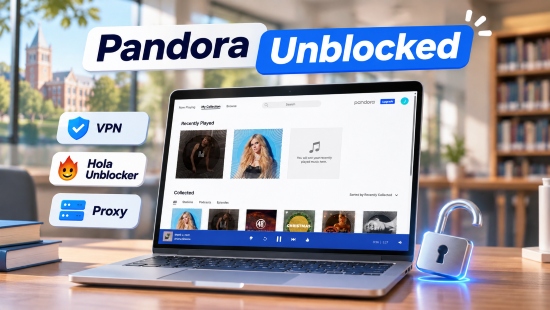

TL;DR: Quick Comparison of Pandora Unblocking Methods
If Pandora is blocked on your current network, the following methods may help you identify or resolve the problem. Their effectiveness depends on whether the restriction comes from your network, device, browser, or location.
| Method | Best For | Main Advantages | Limitations |
|---|---|---|---|
| Mobile Hotspot | School or workplace Wi-Fi restrictions | Uses your mobile connection instead of the restricted network | Consumes mobile data and doesn't remove geographic restrictions |
| VPN | Some network restrictions | Encrypts traffic and changes your apparent IP location | May be blocked by school networks or Pandora; doesn't guarantee access |
| Proxy Server | Some basic network restrictions | Can route browser traffic through another server | Less reliable and may expose your browsing activity |
| Browser Extension (Hola Unblocker) | Limited browser-based restrictions | Easy to try without installing a full VPN | Privacy, security, and compatibility concerns |
| Offline Pandora Music Downloads (via AudFree) | Users who archive Pandora songs and want to save Pandora music for offline listening | Directly get Pandora songs as MP3, FLAC, WAV, AIFF, M4A, and more for flexible offline playback | Require a computer and a desktop program |
The best way to unblock Pandora depends on why you can't access it. If your school or workplace blocks streaming sites, a personal mobile hotspot may be the simplest option. VPNs like NordVPN, proxies like CroxyProxy, and browser unblockers like Hola offer other alternatives, but none guarantees access, especially outside the US.
If you also want to enjoy Pandora music offline, AudFree Streaming Audio Recorder lets you get and save Pandora songs in formats like MP3, FLAC, and WAV. Let's see how each method works and which one best suits your needs.
View also: How to Download Music from Pandora
Part 1. Why Is Pandora Blocked?
Struggling with Pandora being blocked at school or elsewhere? You're not the only one. Before jumping to a solution, it's best to identify the root cause of the Pandora block. The service may be restricted by your network, unavailable in your region, or affected by a technical issue. Each situation calls for a different approach.
1. Network Restrictions at School or Work
One of the most common reasons people search for Pandora unblocked is that they cannot open it on a school or office network.
Schools and workplaces often use firewalls, content filters, or network management systems to control internet access. These systems may block music streaming platforms such as Pandora because they consume bandwidth, distract students or employees, or fall outside the organization's acceptable-use policy.
For example, you might be able to browse regular websites and watch educational videos but receive an access-denied message when visiting Pandora.com. The same restriction may apply to other music services, including Spotify and Apple Music.
View also: How to Get Apple Music Unblocked
In some cases, the website itself is blocked. In others, the network may prevent the Pandora app from connecting to its servers. This explains why switching between the website and app doesn't always solve the problem.
2. Geographic Restrictions Outside the US
Another reason Pandora may not work is your physical location. Pandora's music streaming service is officially available only in the United States and its territories under its current standard service terms. Its music catalog and distribution rights are subject to geographic licensing agreements, so the service isn't officially available worldwide.
If you try to open Pandora while traveling or living outside the US, you may see a location-related error or find that the app cannot stream music. This is different from the Pandora block at school or workplace. Even if your local Wi-Fi allows unrestricted access to music websites, Pandora may still be unavailable because of its regional service limitations.
VPNs and proxy servers cannot guarantee access to Pandora because, although they can change your visible IP address, Pandora may still detect your actual location or block such connections. They also cannot override regional licensing restrictions, so successful access is never guaranteed.
3. Browser Cache, App, or Connection Issues
Sometimes, Pandora isn't blocked by your school, workplace, or country at all. The problem may simply be related to your browser, the Pandora app, or your internet connection, like:
- Browser cache and cookies: Outdated or corrupted cached data and cookies may prevent Pandora's website from loading properly or cause login and playback errors.
- Browser compatibility: An outdated browser or unsupported settings may interfere with Pandora web player.
- Browser extensions: Ad blockers or privacy extensions may prevent certain website elements or playback features from working correctly.
- Pandora app issues: An outdated app, temporary glitches, or corrupted app data may cause Pandora to freeze, crash, or stop playing music.
- Unstable internet connection: Weak Wi-Fi, temporary connection drops, or DNS issues may interrupt website access and music playback.
If Pandora worked before but suddenly stopped loading, don't immediately assume that your school or workplace has blocked it. The issue may be as simple as clearing your browser cache, updating the app, or restarting your device.
Part 2. How to Unblock Pandora at School or Work
If Pandora is blocked on your school's or workplace's network, there are several things you can try. However, always follow the network's acceptable-use policy. If streaming services are explicitly prohibited on your place's network, don't attempt to bypass administrative controls without permission.
Method 1. Switch to a Personal Mobile Hotspot
Using your phone as a mobile hotspot is one of the simplest ways to check whether Pandora is being blocked by your school or office Wi-Fi.
Instead of connecting through the restricted network, your computer, Chromebook, or tablet uses your phone's cellular data connection. If Pandora works over mobile data but not over school or office Wi-Fi, that suggests the original network may be filtering access to the service.
Step 1. On an iPhone, open Settings > Personal Hotspot and turn on Allow Others to Join. On Android, open Settings and look for Hotspot & Tethering or Mobile Hotspot. The exact menu name varies by device.

Step 2. Open the Wi-Fi settings on your laptop or tablet. Find your phone's hotspot name, select it, and enter the password if prompted.
Step 3. Visit Pandora.com or launch the Pandora app. Sign in to your account and check whether music playback works.
Doesn't require installing additional software;
Uses a different internet connection from the restricted school or office Wi-Fi;
Helps identify whether the original network is causing the problem
Requires a phone with an active mobile data connection;
May consume your data allowance quickly;
Won't remove Pandora's geographic restrictions outside the US;
Should only be used where personal hotspot access is permitted
Method 2. Check VPN Options and Network Policies
A VPN encrypts your online connection and routes your data through an external server. Depending on the network configuration, this can help protect your connection on public Wi-Fi or provide access to services that are restricted by certain network filters.
However, VPNs aren't a guaranteed way to get Pandora unblocked. Some schools and workplaces block VPN connections themselves, while Pandora may restrict traffic from certain VPN servers.
If you're allowed to use a VPN to unblock Pandora on your network, here's how to get started:

- Step 1. Download the official VPN application (NordVPN) from the provider's website or your device's authorized app store. Install it and sign in to your account.
- Step 2. Choose a server location in the U.S. from the VPN provider. Remember that connecting to a US server does not guarantee Pandora access, particularly when you're physically outside the US.
- Step 3. Once connected, open Pandora in your browser or app. If the service still doesn't load, disconnect the VPN and test your regular connection. This can help determine whether the VPN itself is causing the problem.
Encrypts internet traffic, which can improve privacy on public Wi-Fi;
Provides another way to route your internet connection;
May help diagnose certain network-related access restrictions
Some school and workplace networks block VPN traffic;
Even when successful, loading speeds can be quite slow;
Pandora may restrict connections from VPN servers;
A VPN subscription may cost extra;
It doesn't guarantee official access to Pandora in unsupported regions
Method 3. Try a Proxy Server
Operating as a bridge between your browser and the destination site, a proxy server forwards your web requests to Pandora rather than connecting directly. Unlike a VPN, however, a standard proxy fails to encrypt your overall internet traffic. Your connection metadata may remain visible to your network provider or proxy operator, who may also log your browsing activity. You can be easily monitored or tracked.
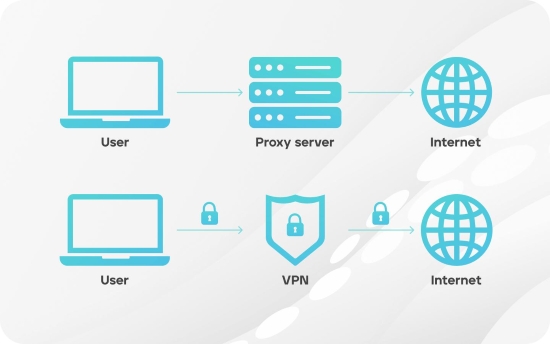
Some browser-based proxy services, such as CroxyProxy, can help access websites blocked by school or workplace networks, including Pandora. However, they are generally less reliable for streaming and may not work with every website or network restriction. They also cannot override Pandora's geographic licensing restrictions.
Please choose a provider with a clear privacy policy and HTTPS support. Be cautious with free proxy websites that display excessive advertisements, request account credentials, or ask you to install unknown software.

- Step 1. Visit CroxyProxy's official website in your browser. (Some proxy services offer a simple web-based interface, while others require you to configure proxy settings manually.)
- Step 2. Locate the URL field, enter https://www.pandora.com, and submit your request.
- Step 3. If Pandora loads, check whether you can navigate the website and access your account. Some proxies may load the homepage but fail to handle music playback, login requests, or other interactive features.
Some web proxies work directly in a browser without installing a full application;
Can provide an alternative route for basic website access;
Useful for testing whether a restriction affects direct browser connections
Free proxies may offer limited privacy and security protections;
Untrusted proxy providers may log browsing activity or expose sensitive information;
Streaming audio may be slow, unstable, or unsupported;
Some websites block known proxy IP addresses
Method 4. Try a Browser Extension Like Hola Unblocker
Browser-based unblockers and extensions offer another way to access websites through alternative connections. Unlike traditional VPN applications, many of these tools work directly in your browser without requiring separate desktop software, making them relatively easy to install and try.
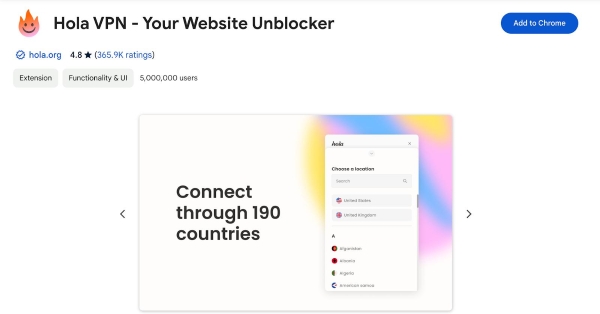
Hola Unblocker is one example. It offers a free browser-based service that can help users access certain restricted websites, including those blocked by school networks. However, its underlying technology differs from that of conventional VPNs. Rather than relying solely on dedicated VPN servers, Hola's free service has historically used a peer-to-peer (P2P) network in which users share some of their unused bandwidth. This model comes with different privacy and security considerations, so it's worth understanding how it works before using it.
If you choose to try a browser-based Pandora unblocker where permitted, follow these general steps:
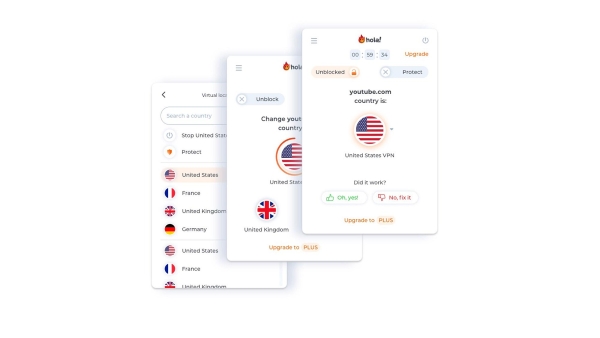
Check the extension's publisher, user reviews, privacy policy, and requested permissions before installing it. Pay particular attention to its bandwidth-sharing model and privacy implications.
- Step 1. Visit the official Chrome Web Store or your browser's extension store and search for Hola VPN (Hola Unblocker). Install it.
- Step 2. Once installed, open the Hola Unblocker extension and follow its on-screen instructions to configure the connection.
- Step 3. Choose an appropriate option (the United States) and visit Pandora to check whether the website loads.
- Step 4. If Pandora still doesn't work, check whether the issue is related to your network, browser, or Pandora's VPN/proxy restrictions. Also, Hola does not guarantee access to Pandora, particularly outside the US.
If you ask if Hola is a reliable way to unblock Pandora, the answer is: not always. In our testing, Hola was able to access Pandora on a restricted network, but music playback still suffered from buffering. The connection was also inconsistent, with occasional stability and compatibility issues. Ultimately, its performance depends on how it routes network traffic and how Pandora detects and handles the connection. Free services also warrant extra caution when it comes to privacy, data collection, and security.
Browser extensions are generally easy to install and use;
May offer an alternative way to access websites restricted by certain networks;
Often work directly in the browser without requiring a separate desktop application
Broad extension permissions and unclear data-handling practices may pose privacy and security risks;
Some unblockers struggle with audio streaming, resulting in buffering or playback failures;
Browser extensions may stop working or become incompatible after website updates;
Cannot guarantee access to Pandora, especially beyond the U.S.
What If You Want to Access Pandora Outside the US?
The methods above mainly address network restrictions at school or work. If you're outside the United States, the situation is different. Pandora's geographic availability is determined by its licensing arrangements and service policies, not simply by whether your local network blocks its website.
If you're a US-based Pandora subscriber traveling abroad, check whether your subscription supports offline listening before your trip. Eligible subscribers may be able to download supported content through the official Pandora app and listen in Offline Mode, subject to account, subscription, and device requirements.
View also: How to Get Pandora Premium for Free
However, the official offline feature still has certain limitations. Downloads remain within the Pandora app, and you can't freely transfer them to other music players or use them as regular local audio files. For users who cannot access Pandora, another option is to maintain a separate offline music library using compatible audio files from supported sources.
Bonus Tip: Build an Offline Pandora Music Library with AudFree Tool
If you enjoy listening to Pandora music but don't always want to rely on an internet connection or the Pandora app, keeping a personal collection of local audio files can be useful, especially when traveling abroad. You can organize your saved tracks, transfer compatible audio files to supported devices, and enjoy offline playback without opening Pandora every time.
AudFree Streaming Audio Recorder offers a convenient way to get music from Pandora and save it as common local audio files. It supports multiple output formats, including MP3, FLAC, WAV, AIFF, and M4A, giving you more flexibility in how you store, manage, and play your music.
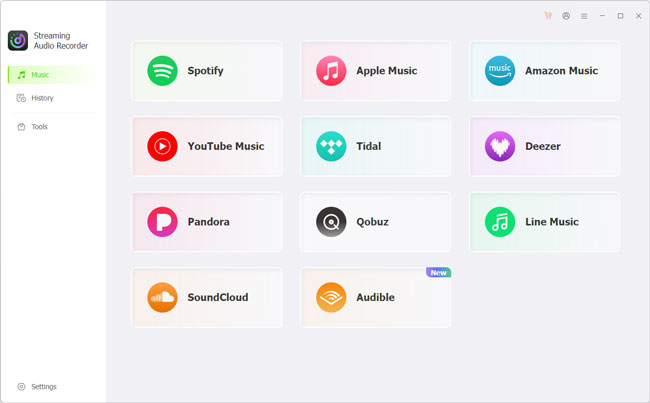
- Step 1. Install the program on your Windows or Mac computer and open it.
- Step 2. Go to Settings > Music to select your preferred audio format. You can also customize available audio parameters, such as bit rate and sample rate, to suit your listening preferences and storage needs.
- Step 3. Click Music and select Pandora. Use the built-in web player to log in to your account, browse your favorite tracks, albums, or playlists, and add the music you want to download to the conversion list.
- Step 4. Start the conversion process. Once finished, open the History tab to locate your offline Pandora tracks. You can then access the saved audio files for local playback and organize them in your personal music library.
View also: How to Download Pandora to MP3
Part 3. How to Fix Pandora When It Is Still Blocked or Not Working
Tried the methods above, but Pandora still won't load or play music? The problem may not be a network restriction. Connection issues, outdated software, browser data, or account-related problems can cause similar symptoms. Before trying another Pandora unblocker, work through these checks to identify the cause.
1. Check Your Internet Connection
A weak or unstable connection can prevent Pandora from loading, signing in, or streaming music smoothly.
Open a few other websites or try playing audio on another platform. If they are also slow, your internet connection may be the problem.
Try reconnecting to Wi-Fi, restarting your router, or switching to another available network. If other services work normally but Pandora doesn't, move on to the next step.
2. Disconnect Your VPN or Proxy
VPNs and proxies can sometimes interfere with Pandora's connection, particularly when their IP addresses are blocked or their routing is unstable. To check whether one is causing the problem:
- Disconnect your VPN or disable your proxy settings.
- Close and reopen Pandora.
- Try signing in Pandora and playing music through your regular connection.
If Pandora unblocked and works afterward, the VPN or proxy may have been interfering with the connection. Otherwise, continue with the following checks.
3. Clear Your Browser Cache and Cookies
Outdated or corrupted browser data can interfere with website loading, sign-in, and playback. Clearing the stored data for Pandora may resolve these issues.
In Chrome or Edge:
- Open Settings and go to Privacy and Security.
- Select Delete Browsing Data or Clear Browsing Data.
- Choose Cached images and files. You can also clear cookies, but this may sign you out of Pandora.
- Clear the selected data, restart your browser, and try Pandora again.
If you prefer not to remove data for all websites, look for Pandora's stored site data in your browser settings and clear it separately.
4. Update the App or Try Another Browser
An outdated app or browser may cause compatibility issues. Check your device's app store for Pandora updates, or install the latest version of your browser.
If Pandora isn't working in Chrome, try another supported browser, such as Microsoft Edge or Firefox. You can also temporarily disable extensions, particularly ad blockers and privacy tools, to check whether they interfere with playback.
If disabling an extension fixes the problem, re-enable your extensions one at a time to identify the cause.
5. Check Your Account and Pandora's Service Status
If Pandora loads but you still can't access your music, check whether the issue is related to your account or the music service itself.
- Account status: Make sure you're using the correct login details and that your subscription is active if you're accessing paid features.
- Regional availability: Confirm that Pandora is available in your current location. A paid subscription does not automatically provide worldwide access.
- Offline listening: Check whether your subscription supports the download and offline playback features you're trying to use.
- Service interruptions: If Pandora suddenly stops working, check its official support channels for service announcements or known issues.
If the problem persists, contact Pandora Support. Include your device model, operating system, browser or app version, approximate location, and any error message you see. These details can help narrow down the cause.
Part 4. FAQs About Pandora Music Unblocked
Can You Unblock Pandora at School Without a VPN?
It depends on how your school network is configured. If Pandora is blocked only on school Wi-Fi, a personal mobile hotspot may help you determine whether the network is responsible, provided hotspot use is allowed. If your Chromebook or browser is managed, device-level restrictions may still apply.
Why Is Pandora Blocked at School or Work?
Pandora is often blocked at schools and workplaces because network administrators use firewalls and content filters to restrict music streaming websites. These restrictions may be intended to reduce bandwidth consumption, prevent distractions, or enforce an organization's internet usage policies.
Why Does Pandora Say It Is Not Available in My Country?
Pandora's current Terms of Use state that its services are available only in the United States and its territories. This applies to both free and paid services. Users traveling or living outside these authorized areas may encounter geographic access restrictions. If you're in the US but receive this message, a VPN, proxy, or inaccurate location information may be contributing to the problem.
Can You Listen to Pandora on a School Chromebook?
Yes, if your Chromebook, browser, and school network allow access to Pandora. You can try opening the Pandora website in Chrome first. If it doesn't load, check whether the device is managed or whether the school network restricts music streaming. Contact your school administrator if you need clarification about its access policies.
Conclusion
Unblocking Pandora starts with identifying what's preventing access. If it's a school or workplace network restriction, a permitted alternative connection may help. VPNs, proxies, and browser unblockers are other options to consider, but their effectiveness varies, and none guarantees access.
If you're outside the US, geographic licensing restrictions are a separate issue that changing networks cannot reliably resolve. US subscribers traveling abroad can check whether their subscription supports Pandora's official Offline Mode. Alternatively, if you prefer having music available without relying on a streaming connection, you can build a separate local music library using tools like AudFree Streaming Audio Recorder.
If Pandora still won't load or play music, check your internet connection, browser or app settings, and account status before trying more other tools. Understanding the cause will help you choose the most practical way to enjoy your music, whether through Pandora or your own offline collection.

Staff Editor


