


Whether you're trying to stream your favorite playlist at school, listen during work hours, or travel abroad, seeing "Deezer blocked", "Access Denied", or "Deezer is not available in your country" can be frustrating. That's why many users search for "Deezer unblocked" hoping to find a quick solution.
However, not all Deezer restrictions are the same. In some cases, your school or workplace firewall may block access to the Deezer website. In others, the service or specific songs may be unavailable due to regional licensing agreements. Some users also encounter login errors after connecting through a VPN.
The good news is that most of these issues have practical solutions. In this guide, we'll explain the common reasons why Deezer gets blocked, show you how to fix different types of restrictions, and introduce a long-term way to enjoy your Deezer music without relying on unstable workarounds.
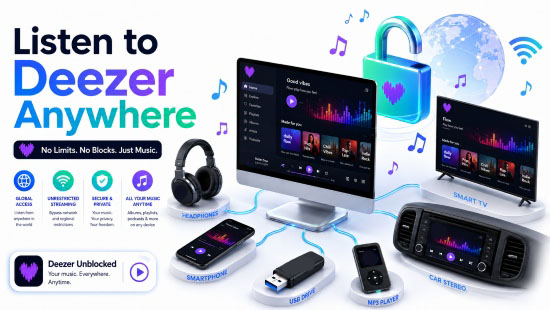

Part 1. Why Is Deezer Blocked at School, Work, or Abroad?
Before trying to unblock Deezer, it's important to understand what's actually causing the problem. Different error messages often point to different underlying issues.
| Situation | What You See | Possible Cause |
|---|---|---|
| Possible Cause | Website won't load or streaming is blocked | Network firewall or administrator |
| Public Wi-Fi | Network firewall or administrator | Network filtering or limited bandwidth |
| Country or region restriction | "Deezer is not available in your country" | Licensing agreements |
| VPN connection | Access denied or login failure | Deezer security measures or VPN detection |
| Certain songs or albums unavailable | Track can't be played | Regional music licensing |
In short, "Deezer unblocked" doesn't always mean bypassing a firewall. Sometimes the issue is your network, while other times it's related to copyright licensing, account settings, or security protection.
Once you identify the actual cause, finding the right solution becomes much easier.
Part 2. How to Unblock Deezer at School or Work
Schools, universities, libraries, and corporate offices often restrict access to entertainment websites in order to save bandwidth or improve productivity. If Deezer won't open on your campus or office network, try the following methods.
Method 1. Switch to Mobile Data
The easiest solution is to disconnect from the restricted Wi-Fi network and use your mobile data instead.
Since the restriction usually comes from the local network rather than your Deezer account, switching to a different internet connection often restores access immediately.
Keep in mind that streaming music can consume mobile data, especially when using High Fidelity or lossless audio quality. If you have a limited data plan, consider lowering the streaming quality in Deezer's settings.
Method 2. Try the Deezer Desktop or Mobile App
Sometimes only the Deezer website is blocked while the desktop or mobile app remains accessible.
If you've only been using your browser, install the official Deezer application and sign in with the same account. Depending on how your school's or company's firewall is configured, the app may still function normally.
Likewise, if the desktop Deezer app doesn't work, testing the Deezer web player or switching devices may help determine whether the restriction applies only to a specific platform.
Keep in mind that switching from the website to the app will not help when the network blocks Deezer's main domains, servers, or streaming connections.
Method 3. Contact Your Network Administrator
If you need Deezer for educational purposes, language learning, or background music in a workplace where streaming is permitted, you can ask your network administrator whether the restriction can be removed.
Many organizations maintain strict internet policies, so approval isn't guaranteed. However, it's worth checking before trying other workarounds.
Method 4. Use a Reliable VPN
A Virtual Private Network (VPN) encrypts your internet traffic and routes it through a remote server before connecting to Deezer. If your school or workplace blocks Deezer based on its domain, IP address, or website category, using a VPN may help you access the service.
Before using a VPN, however, make sure it complies with your school's or employer's acceptable-use policy. Some organizations prohibit VPNs or any attempt to bypass network restrictions. Always use a VPN only where it is permitted and in accordance with applicable laws and regulations.
Choose a reputable VPN provider that offers reliable apps for your device, such as NordVPN, ExpressVPN, or PrivateVPN. Avoid unknown free VPN services, as they often come with data limits, slower speeds, intrusive ads, or less transparent privacy practices. In addition, many free VPNs offer only a limited selection of server locations, reducing your chances of finding one that works with Deezer.
Once you've confirmed that VPN use is allowed, follow these steps:
Step 1. Download the VPN app from its official website or your device's authorized app store.
Step 2. Sign in and connect to a nearby server in a country where Deezer is officially available, such as Germany. A nearby server will generally provide better speed than a distant one.

FYI: See the full list of countries where Deezer is officially available.
Step 3. Close and reopen the Deezer app or refresh the Deezer web player. Sign in again if your previous session has expired.
Step 4. Play a song to check whether streaming works normally.
If Deezer still doesn't work, disconnect and try another nearby VPN server. Shared VPN IP addresses can sometimes be restricted, so changing servers may produce a different result.
Which Deezer Unblocking Method Should You Try First?
Start by switching to mobile data, as this is the quickest way to determine whether your school or workplace Wi-Fi is causing the problem.
If that doesn't help, compare the Deezer app with the web player, then check with your network administrator to see whether music streaming is permitted on the network.
If the restriction is network-related and VPNs are allowed by your organization, trying a reputable VPN may be worthwhile. Keep in mind, however, that a VPN isn't a guaranteed solution. Network policies, regional licensing, VPN server quality, and Deezer's own security measures can all affect whether it works.
If none of these methods provides a satisfactory solution - or you simply want to enjoy your Deezer music anytime, anywhere without worrying about network restrictions - continue to Part 5. There, we'll introduce the most reliable offline solution for listening to Deezer across virtually any device, even without an internet connection.
Part 3. How to Fix "Deezer Is Not Available in Your Country"
Another common situation occurs when Deezer itself - or certain content within Deezer - isn't available in your current location.
Unlike school or office restrictions, this issue is usually caused by regional licensing agreements. Music publishers and record labels grant streaming rights on a country-by-country basis, so the availability of songs, albums, or even the Deezer service may vary depending on where you are.
Fortunately, there are a few things you can check before assuming the problem can't be fixed.
Fix 1. Verify Your Account Country/Region
If you've recently relocated or traveled internationally, your account information may no longer match your current region.
Log in to your Deezer account and review your country, payment method, and subscription details. Updating your account information may restore access to content that's licensed for your new location.
Fix 2. Check Whether the Music Is Licensed in Your Region
Sometimes the problem isn't with your account, it's with the music itself.
Record labels frequently update licensing agreements, which means albums or songs may appear or disappear over time. If only a few tracks are unavailable while the rest of Deezer works normally, regional licensing is the most likely explanation.
Unfortunately, users can't manually override these restrictions. Waiting for licensing updates or searching for alternative releases may be the only available option.
Fix 3. Contact Deezer Support
If you believe your account has been assigned to the wrong country or you've encountered an unexpected regional error, contacting Deezer Support is your best option.
Provide details such as:
- Your current country
- Your Deezer subscription type
- The exact error message
- Whether the problem affects all content or only specific songs
Support can verify your account status and determine whether the issue is related to licensing, billing, or account configuration.
Deezer Premium is officially available across more than 185 countries and territories, but Deezer Free is limited to a much smaller group of markets. Even then, access may depend on the location, account region, subscription plan, and local network policy. To enjoy unlimited offline playback for your Deezer music, saving your tracks locally is still highly recommended.
Part 4. How to Fix Deezer Access Denied Errors
Sometimes Deezer opens normally, but you can't log in or receive an Access Denied message when trying to use the service. These errors are usually related to account security, browser settings, or network conditions rather than licensing restrictions. Here are several solutions worth trying.
Fix 1. Disable Your VPN or Proxy
If you're connected through a VPN, proxy server, or privacy-focused network, temporarily disconnect it and try signing in to Deezer again.
Because Deezer monitors unusual login activity, some VPN servers may be flagged as suspicious, resulting in authentication failures or temporary access restrictions. Some Deezer users have reported login or web-player problems that disappeared after the VPN connection was removed.
After disconnecting, close the browser completely before trying again.
Fix 2. Clear Deezer Cookies and Site Data
An expired login session or damaged site data can occasionally interfere with Deezer's web player.
Clear your browser's cache and cookies, restart the browser, and then log back into your Deezer account. If you're using the web player, you can also try opening Deezer in a private or incognito window to rule out cached data issues.
Fix 3. Try Another Browser or Device
If the issue only occurs on one browser or computer, test Deezer using another browser or a different device.
For example, if the web player isn't working in Chrome, try Firefox, Microsoft Edge, or the Deezer desktop application. This simple step can help determine whether the problem is related to your browser, operating system, or account.
Fix 4. Wait if Your Account Has Been Temporarily Restricted
In rare cases, Deezer may temporarily limit account access after detecting unusual login attempts or other security-related activity.
If you've already ruled out VPNs, browser issues, and network problems, waiting for a short period before trying again may resolve the issue automatically. If the restriction continues, contact Deezer Support with the specific error code or message for further assistance.
Part 5. Best Way to Enjoy Deezer Without Restrictions (Offline Playback)
If you've tried switching networks, disabling your VPN, or contacting support but still run into restrictions, there's another solution worth considering.
Instead of relying on an internet connection every time you want to listen, you can save your Deezer music as local audio files and play it with any compatible media player. This approach avoids many of the limitations associated with streaming, such as school or workplace firewalls, unstable internet connections, and recurring login issues.
One practical tool for this purpose is AudFree Streaming Audio Recorder.
Designed for Deezer users who want greater flexibility, AudFree lets you save your favorite Deezer songs, playlists, albums, podcasts, and audiobooks as common audio formats such as MP3, FLAC, WAV, AIFF, M4A, and M4B while preserving the original audio quality and ID3 tags. Once converted, the files are stored locally on your computer, allowing you to enjoy them without depending on the Deezer app or an active internet connection.
Why Choose AudFree Streaming Audio Recorder?

- Save Deezer songs as local files for unrestricted playback
- Losslessly convert Deezer to MP3, FLAC, WAV, AIFF, and more
- Preserve the original audio quality and complete ID3 metadata
- Support multiple music services beyond Deezer, including Spotify, TIDAL, Apple Music, YouTube Music, etc.
- Batch convert playlists, albums, podcasts, and audiobooks (audiobook support available only in Germany, the Netherlands, and Austria)
- Enjoy up to 46× faster conversion speed
- Play your music on virtually any device or media player
- Keep your converted music available even when you're offline
If your goal is simply to enjoy your music anywhere without worrying about network restrictions, this is often a more stable long-term solution than repeatedly searching for ways to unblock Deezer.
How to Listen to Deezer Anywhere with AudFree
Using AudFree is super easy, even if you've never converted streaming music before.
- Step 1. Choose Deezer Music You Want to Save
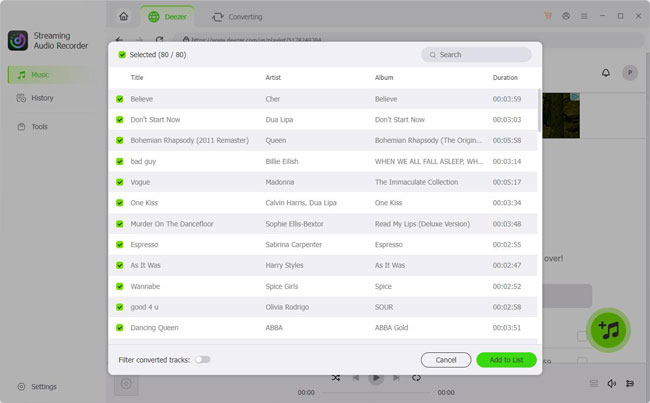
- Install and open AudFree Streaming Audio Recorder on your Windows or Mac computer. Click the 'Deezer' icon, and the built-in Deezer web player will open automatically. Log into your Deezer account and browse your library as you normally would. Open a playlist, album, podcast, or audiobook, then click the '+' button to load the selected content into the conversion list.
- Step 2. Select an Output Format for Deezer
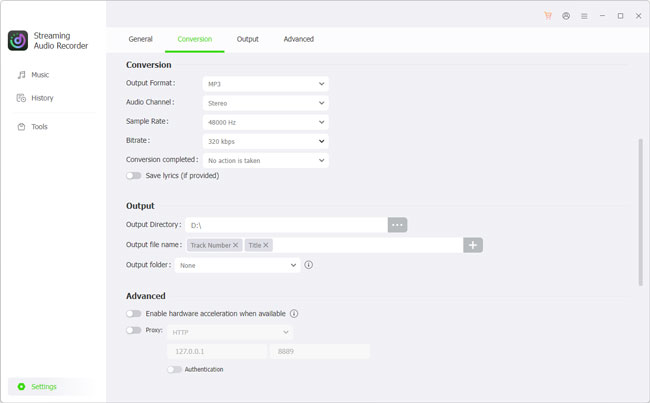
- Click the 'Settings' icon and Conversion. Here you can select your preferred output format, audio quality, sample rate, bitrate, and other settings. For the highest audio quality, FLAC or WAV is recommended. If you want maximum compatibility across devices, MP3 is a great choice.
See also: How to Download Deezer to FLAC
- Step 3. Start Processing Deezer Music
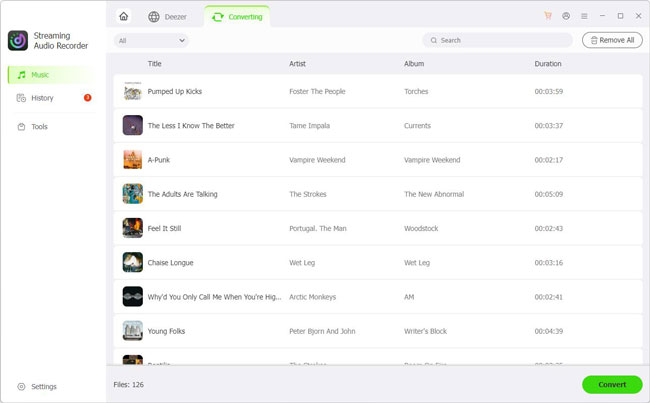
- Click the 'Convert' button to begin the conversion process. After the conversion finishes, your Deezer tracks will be stored locally on your computer. You can then transfer them to a USB drive, smartphone, MP3 player, smart TV, car stereo, game console, NAS, or any other compatible device for offline listening without network restrictions.
Operating similarly to AudFree Streaming Audio Recorder, AudFree Deezer Music Converter is a powerful tool to unblock Deezer and permanently save your favorite tracks. Unlike all-in-one audio recorders, it is tailored specifically for Deezer at a much more affordable price.
Part 6. Comparison of Methods to Get Deezer Unblocked
There are several ways to regain access to Deezer, but not all methods offer the same level of reliability. The table below compares the most common options.
| Method | Requires Internet | Works at School/Work | Affected by Region Restrictions | Long-Term Stability |
|---|---|---|---|---|
| Switch to Mobile Data | ✅ | Usually | ✅ | Good |
| Use a VPN | ✅ | Sometimes | ✅ | Moderate |
| Contact Network Administrator | ✅ | Depends | ✅ | Good |
| Offline Local Files via AudFree | ❌ | ✅ | ❌ | Excellent |
As you can see, methods like changing networks or using a VPN may work in certain situations, but they still depend on internet access and can be affected by regional policies or network configurations.
Saving your favorite Deezer music as local files provides a more flexible listening experience. Once the music is stored on your own device, you can play it anytime without worrying about firewalls, unstable connections, or repeated access issues.
Part 7. FAQs About Deezer Unblocked
Is It Legal to Use a VPN to Access Deezer?
Using a VPN is legal in many countries, but the laws vary depending on where you live. Even where VPN use is permitted, accessing Deezer through a VPN may conflict with the platform's Terms of Use or licensing policies. Before using a VPN, it's a good idea to review both your local regulations and Deezer's terms.
Can I Listen to Deezer Unblocked Without a Premium Account?
Yes, but it depends on what you mean by 'unblocked'. If you simply want to access Deezer on an unrestricted network, a free Deezer account can still stream music in supported regions, although you'll encounter limitations such as advertisements, lower audio quality, and restricted playback features.
If your goal is to listen without network restrictions after saving music locally, you can use AudFree to convert the songs you have access to and then play the resulting files offline with your preferred media player.
Why Does Deezer Keep Blocking My VPN Connection?
Deezer may detect VPN servers as unusual or suspicious connections. Since music availability depends on regional licensing agreements, some VPN IP addresses may trigger additional security checks or prevent you from signing in successfully. If you're unable to log in while connected to a VPN, try disconnecting it and accessing Deezer through your normal internet connection instead.
Will Unblocked Deezer Songs Lose Sound Quality?
Not necessarily. If you're streaming directly through Deezer, the audio quality depends on your subscription plan and streaming settings.
If you save your Deezer music locally using a tool like AudFree Streaming Audio Recorder or AudFree Deezer Music Converter, you can choose high-quality output formats such as FLAC or WAV while preserving the original audio quality. As a result, your offline listening experience remains virtually identical to the source.
Conclusion
There isn't a single solution that works for every Deezer blocked situation. A school firewall, workplace network, regional licensing restriction, or VPN-related security check can all lead to different error messages, which means the best fix depends on the underlying cause.
For temporary issues, switching networks, checking your account settings, or enabling/disabling your VPN may be enough to restore access. However, if you frequently encounter restrictions or simply want a more dependable way to enjoy your music, keeping a personal offline library offers greater flexibility.
With AudFree, you can save your favorite Deezer songs, playlists, albums, podcasts, and audiobooks as standard audio files and play them on virtually any device. Whether you're traveling, studying on a restricted network, or listening without an internet connection, your music remains accessible whenever and wherever you want.

Staff Editor


