


SoundCloud has become one of the most influential platforms for discovering independent music, DJ sets, remixes, podcasts, and underground tracks. Yet, the platform's diverse library comes with a significant challenge: highly inconsistent audio fidelity. While some tracks are professionally mastered, many others suffer from sonic flaws - be it muddy low-end, harsh treble, or recessed mids. This inconsistency makes a dedicated SoundCloud equalizer an indispensable tool.
Many listeners, however, encounter immediate confusion: Does SoundCloud have a built-in equalizer? How can I effectively apply precise equalization on my Android, iOS, PC, or Mac device? And what is the best equalizer for SoundCloud?
To address the first question upfront: No. SoundCloud's official mobile and web apps do not include a native EQ. Unlike Spotify or Apple Music - which offer built-in equalizer settings - SoundCloud leaves this feature out entirely.
If you're looking for the best ways to use EQ with SoundCloud and want practical solutions, this complete guide covers everything. You'll get simple step-by-step instructions, a comparison table of the best tools, universal EQ workarounds, and the most effective method to equalize SoundCloud on any device. Whether you want to boost bass, clean up muddy mixes, or enhance clarity, this guide walks you through every option.

Part 1. Best Equalizers for SoundCloud [Comparison Table]
Despite the lack of a native EQ for SoundCloud, you can still achieve excellent results with the right tools. Below is a comparison of the best EQ apps for every platform.
| Equalizer | Platform | Works With SoundCloud? | System-Wide EQ | Cost | Best For |
|---|---|---|---|---|---|
| Built-in System EQ | Android | Yes (system audio) | Yes | Free | Basic EQ adjustments |
| Advanced Audio Equalizer | Chrome Extension | Yes (SoundCloud Web) | Browser-wide only | Free | Quick EQ for web streaming |
| FXSound | Windows | Yes | Yes | Free | Enhancing clarity & loudness |
| Soundly | Windows/Mac | No | No | Free | Casual listening with presets |
| Equalizer APO | Windows | Yes | Yes | Free | Advanced users & headphone tuning |
| Boom 3D | Windows/Mac | Yes | Yes | Free | Bass boosting & spatial |
| EverMusic | iOS/Mac | No | No | Paid | Playing downloaded SoundCloud tracks |
| EQ+ | Android | Yes | Yes | Free | Offline library EQ |
| Poweramp Equalizer | Android/iOS | Yes | Partially (depends on device) | Paid/Free | Bass lovers & audiophiles |
| Neutron Player | Android/iOS | No | No | Paid/Free | High-end DSP & advanced tweaking |
| Equalizer+ | iOS | Yes | No | Paid | Online EQ for SoundCloud |
| Vox Player | Mac/iOS | Yes | No | Paid | High-quality playback on SoundCloud |
| Bass Booster | iOS | No | No | Free | Boosting bass for casual listening |
Part 2. How to Equalize SoundCloud Audio Using the Simplest Ways
Even though SoundCloud does not include a built-in equalizer, you can still apply EQ to SoundCloud audio using several simple and effective methods. As shown in the comparison table above, many tools - such as Chrome's Advanced Audio Equalizer extension, FxSound, Equalizer APO, Boom 3D, EQ+, Poweramp Equalizer, Equalizer+, and Vox - can adjust SoundCloud playback directly or system-wide.
Below, we highlight the three easiest ways to equalize SoundCloud audio. These methods require no downloading, no complicated setup, and work instantly on Android, iOS, Windows, and Mac for smooth, enhanced playback. The remaining tools will be covered in detail in Part 4.
Method 1. Use a Built-in Android Sound Enhancer (Android SoundCloud Equalizer)
Most Android devices include a system-wide audio equalizer that automatically affects SoundCloud playback. This makes it the fastest and most convenient option for mobile users without extra apps on the phone. And here is how to use the EQ for SoundCloud:
Menu names may vary depending on your phone model.
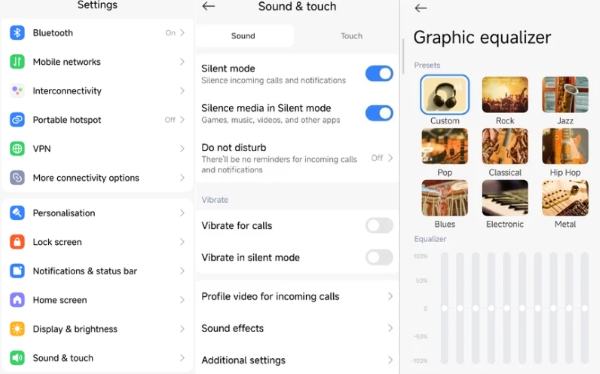
Step 1. Turn your phone on and open Settings > Sound & Touch (or Sound & Vibration).
Step 2. Tap Sound effects > Graphic Equalizer, then adjust the EQ sliders to shape your SoundCloud audio.
Step 3. Open the SoundCloud app, and your system EQ will apply to all playback automatically.
iOS does not offer such a detailed global EQ for SoundCloud. However, you can adjust basic audio settings under: Accessibility > Audio/Visual. Here you can modify Mono Audio and left-right channel balance, which provides minor tuning for SoundCloud playback.

Method 2. Use a SoundCloud Equalizer Chrome Extension (Advanced Audio Equalizer)
For desktop listeners, the simplest solution is to add an EQ extension to Google Chrome. One of the most reliable options is Advanced Audio Equalizer, which works seamlessly with SoundCloud and most other streaming sites.
It's easy to use and require no downloads, though some may offer limited control or introduce minor distortion. Still, they provide a convenient 'built-in EQ' experience for SoundCloud web player.
Step 1. Go to the Chrome Web Store, search for Advanced Audio Equalizer, and add it to Chrome.
Step 2. Visit SoundCloud.com, open the extension, and adjust EQ settings while your track plays.
Method 3. Use a Desktop Equalizer App (FXSound - Windows)
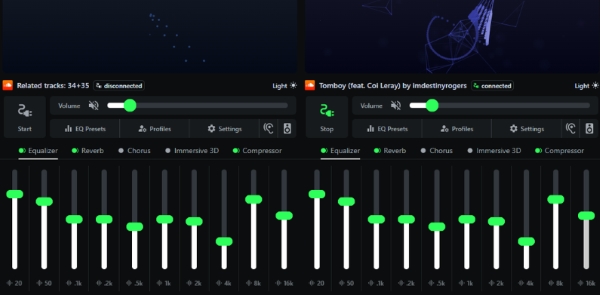
If you want stronger audio shaping, better sound enhancement, and more stable results than a browser extension, a dedicated desktop equalizer like FXSound is an excellent choice. With richer control, deeper bass enhancement, and clearer highs, it's ideal for users who want a more professional EQ effect without downloading SoundCloud tracks.
Step 1. Download and install FXSound on Windows or Mac.

Step 2. Open FXSound and choose a preset (Bass Boost, Clarity, Streaming, etc.), or switch to the EQ tab to adjust the sliders manually.
Step 3. Play your music on SoundCloud.com or in the SoundCloud desktop app - FXSound will process all system audio in real time.
Part 3. How to Equalize SoundCloud Audio on ANY Equalizer [Best Way]
If you truly want the best equalizer settings for SoundCloud across all devices - Android, iOS, Windows, Mac, or Chrome - the most effective approach is to download SoundCloud tracks in common audio formats and apply EQ using any player or system-wide equalizer.
Apps like EQ+, EverMusic, Neutron Player, Poweramp Equalizer, Equalizer+, Vox, and Bass Booster offer excellent EQ engines. However, none of them work directly with SoundCloud streaming. These third-party EQ apps only process local audio files.
To use them with SoundCloud, you must first save SoundCloud tracks offline using third-party tools like AudFree Streaming Audio Recorder for Soundcloud, then play the downloaded MP3, FLAC, WAV, or AIFF files using any equalizer you prefer.
Why Choose AudFree Streaming Audio Recorder?

- Remove all ads & playback restrictions
- Apply platform-wide EQ after downloading
- Download original SoundCloud tracks with clean, lossless quality
- Offer multiple output audio formats, such as WAV, MP3, FLAC, etc.
- Batch saving Soundcloud's entire albums or playlists up to 65X speed
- Preserve ID3 Tag of SoundCloud tracks for better organization
Phrase 1. Download SoundCloud Audio to Common Audio Format Using AudFree Streaming Audio Recorder
- Step 1. Install and Launch AudFree Streaming Audio Recorder

- Download and open AudFree Streaming Audio Recorder on your Windows/Mac computer. The home screen shows several supported platforms, including SoundCloud. And please make sure your license is activated to unlock unlimited downloads.
- Step 2. Set SoundCloud Output Format for Equalizers

- Click the menu > Preferences, and to navigate to Conversion section. Here, you can select the output audio format, e.g., FLAC, WAV, AIFF, M4A, MP3. You can also adjust the bitrate, sample rate, and audio channels as needed. Under the Output tab, choose your destination folder and keep ID3 tags enabled.
- View also: How to Convert SoundCloud to FLAC
For the best EQ response, FLAC, WAV, or MP3 320kbps is recommended.
- Step 3. Add SoundCloud Tracks to Conversion List

- On the home window, click on the SoundCloud icon and sign in. Navigate to your desired track, playlist, or album, and add them to the Conversion List by clicking the green "+".
- Step 4. Start Converting SoundCloud tracks for Equalizers

- Press Convert to begin downloading your selected SoundCloud songs. After conversion, navigate to the Converted section to find your new DRM-free audio files. They are now ready to be imported into any equalizer app or player.
Phrase 2. Apply EQ to SoundCloud Using VLC Media Player (Windows/Mac/Linux/Android/iOS)
Once you have legally downloaded your preferred SoundCloud tracks (or have them available as local files), you can utilize a dedicated media player with a built-in equalizer for playback. This approach is useful if you prefer not to install system-wide EQ software. Here is the general method, using VLC media player as an example:

1. Download and Install VLC media player on your computer or phone.
2. Add the downloaded SoundCloud tracks to the player's library or playlist.
3. Access the player's internal equalizer settings through Tools > Effect and Filters. From here, you can apply detailed adjustments - like shaping the frequency curve or utilizing specific presets - to optimize the sound of your downloaded SoundCloud audio.
Why This Method Works Best
Because you can:
✅ Use any equalizer app you prefer
✅ Apply precise SoundCloud EQ settings without limitations
✅ Fix muddy mixes, flat bass, harsh highs, or low-volume tracks
✅ Avoid distortion caused by real-time streaming EQ
✅ Use high-resolution FLAC or WAV for more accurate EQ shaping
Part 4. Best SoundCloud Equalizers on Windows/Mac/Android/iOS
If you want more precise control than basic system EQs or browser extensions, these professional-grade equalizers offer the best way to enhance SoundCloud playback across all platforms. Below are the top tools for Windows, Mac, Android, and iOS - each with easy steps for setup.
1. Soundly (Windows/Mac)
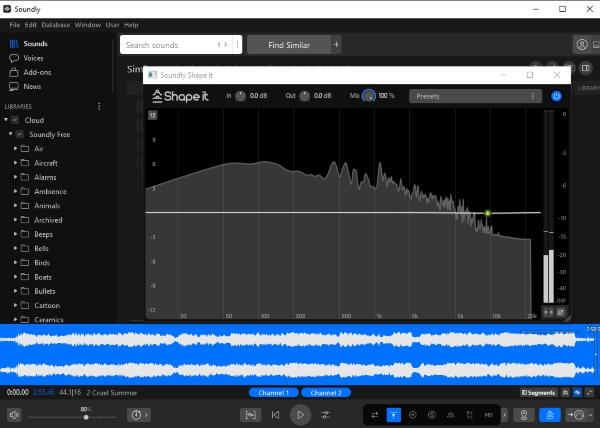
Soundly is an audio control and enhancement tool originally designed for media creators, but its powerful DSP engine also works perfectly for SoundCloud playback. It includes multiband EQ, audio normalization, effects, and detailed frequency shaping.
How to Use Soundly for SoundCloud
Step 1. Install Soundly on Windows or Mac.
Step 2. Open the built-in EQ panel and customize your preferred profile.
Step 3. Play SoundCloud in Chrome, Firefox, or Safari, the EQ effects apply automatically.
2. Equalizer APO (Windows)
Equalizer APO is an open-source parametric/graphic eq for SoundCloud on Windows 10 and 11. It has an easy-to-use design that is also suitable for basic users. Plus, it has many powerful features such as unlimited filters, compatibility with multiple channels, and fast response time. Furthermore, it is very lightweight, not demanding on memory and processor, and uses very few system resources.

Step 1. Download Equalizer APO from its official website and install it on Windows.
Step 2. Select your output device when prompted, then restart your PC.
Step 3. Open the Configuration Editor and add filters (e.g., bass boost, peak filters, high-shelf).
Step 4. Play SoundCloud through any browser - the APO EQ will apply instantly.
3. Boom 3D (Windows/Mac)
Boom 3D is known for its immersive 3D surround sound engine and powerful system-wide equalizer. It's ideal for users who want richer bass, cleaner mids, or an overall more spacious sound from SoundCloud.
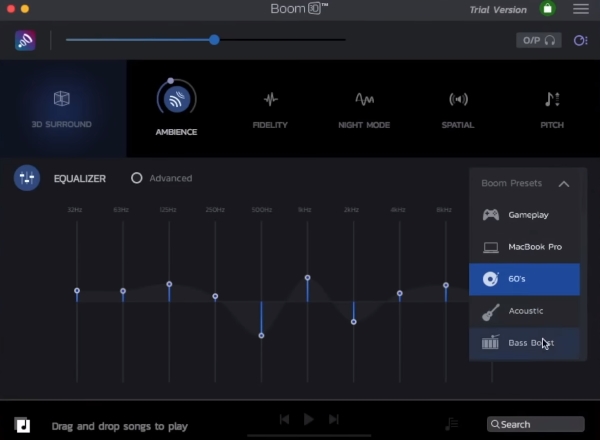
How to Use Boom 3D for SoundCloud
Step 1. Download and install Boom 3D on Windows or Mac and install it.
Step 2. Enable Boom effects and choose an EQ preset or create your own curve.
Step 3. Play SoundCloud on your computer, the enhanced audio will apply instantly.
4. EverMusic (iOS/Mac)
EverMusic is a versatile music player for iOS and Mac that offers a built-in equalizer, audio enhancement tools, and flexible file management. Although you cannot stream SoundCloud directly inside EverMusic, its audio engine can still enhance playback when you use AirPlay, external speakers, or locally downloaded SoundCloud files.
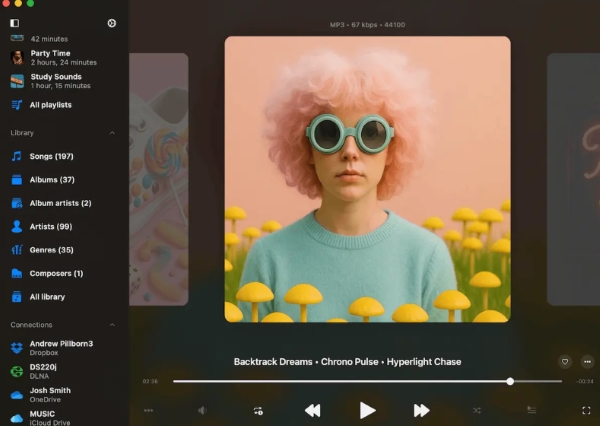
How to Use EverMusic Player to Equalize SoundCloud Audio
Step 1. Install EverMusic from the App Store.
Step 2. Go to Setting > Audio Player > Audio equalizer to enable the Equalizer, and choose a preset or customize your own curve.
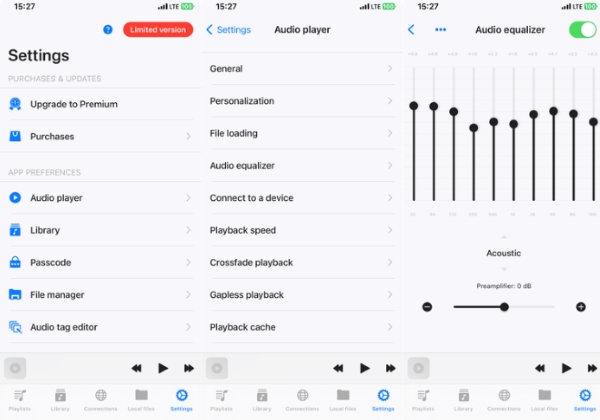
Step 3. Play SoundCloud through Safari or Chrome, or import downloaded SoundCloud tracks - EverMusic's enhancements will apply when using compatible output methods.
5. EQ+ (Android)
EQ+ provides a clean Android interface with a 10-band EQ and multiple presets. While it cannot modify audio inside the SoundCloud app directly, it significantly improves system-wide playback when used with supported audio sources.
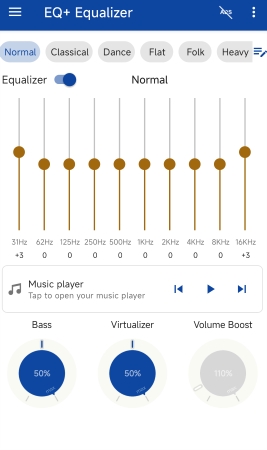
How to Use EQ+ for SoundCloud
Step 1. Install EQ+ from the Google Play Store.
Step 2. Set your preferred EQ curve or load a preset.
Step 3. Transfer your downloaded SoundCloud songs to your phone and import them into EQ+ to listen with customized EQ settings.
6. Poweramp Equalizer (Android/iOS)
Poweramp Equalizer is one of the most advanced EQ apps on both Android and iOS, offering parametric bands, bass and treble controls, limiters, and deep DSP customization. Because it works system-wide, it can equalize SoundCloud playback in real time.

How to Use Poweramp Equalizer for SoundCloud
Step 1. Install Poweramp Equalizer from Google Play Store or App Store.
Step 2. Enable the app's audio enhancement features for your system output.
Step 3. Open SoundCloud and adjust EQ sliders, bass boost, preamp, and other parameters as you listen.
7. Neutron Player (Android/iOS)
Neutron Player includes a high-precision parametric EQ, a powerful DSP engine, and a professional-grade audio processing pipeline. It works well with many audio apps and provides highly accurate control for listeners who want detailed tuning of SoundCloud audio.

How to Equalize SoundCloud Audio with Neutron Player
Step 1. Install Neutron Player on your Android device or iPhone.
Step 2. Configure your preferred equalizer presets and customize your DSP effect under Settings > Playback.
Step 3. Play your downloaded SoundCloud tracks to enjoy enhanced, fine-tuned sound quality.
8. Equalizer+ (iOS)
Equalizer+ features a 7-band EQ, bass booster, and a rich preset library. Unlike many iOS equalizer, it offers direct SoundCloud integration, letting you sign in, stream your playlists, and adjust EQ settings without downloading tracks first.
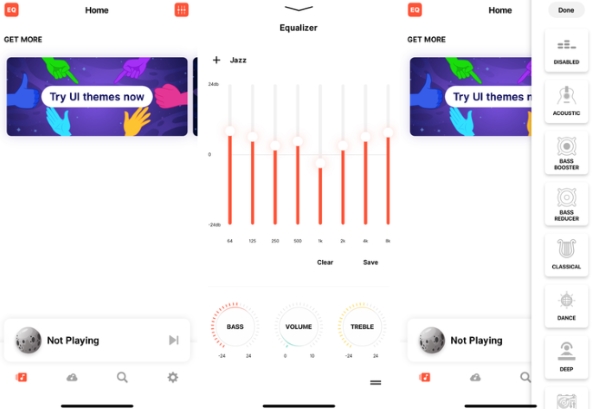
How to Use Equalizer+ for SoundCloud on iPhone
Step 1. Install and open Equalizer+ on your iPhone.
Step 2. Connect your SoundCloud account within the app.
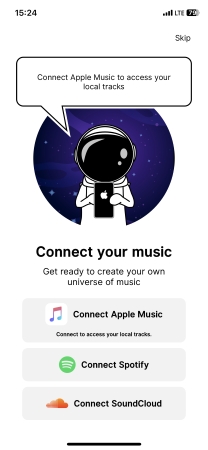
Step 3. Adjust EQ sliders from the top-left panel or switch presets using the top-right menu, then enjoy your equalized SoundCloud playlist.
9. Vox Player (iOS/Mac)
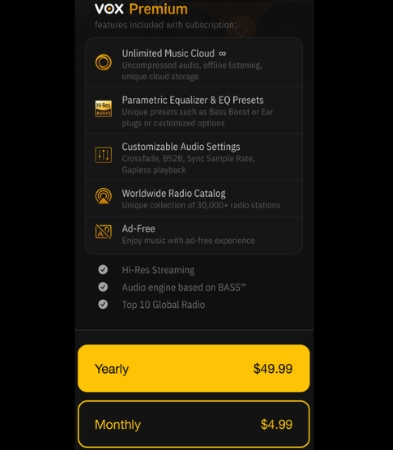
Vox is a premium audio player for iOS and Mac with a 10-band EQ and Hi-Res audio support. It offers built-in SoundCloud integration, allowing you to sign into your SoundCloud account and stream in high quality with full EQ control. Vox requires a paid subscription ($4.99/month or $49.99/year) for online streaming features.
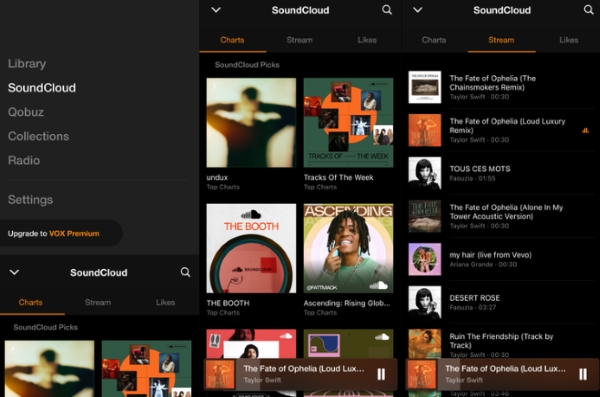
How to Use Vox for SoundCloud Audio Equalization
Step 1. Install Vox on your Mac or iPhone and launch the app.
Step 2. Go to Settings > Equalizer & Audio Settings to fine-tune your SoundCloud playback.
Step 3. Log into SoundCloud within the app, pick a track, and enjoy it with Vox's high-fidelity equalizer applied.
While the VOX player offers a robust, high-fidelity equalizer, users must upgrade to a premium subscription to unlock and fully utilize this key feature.
10. Bass Booster (iOS)
Bass Booster focuses on low-frequency enhancement and is ideal for users who want stronger depth and punch from SoundCloud tracks. It includes customizable presets and a simple interface that works with most local audio players.
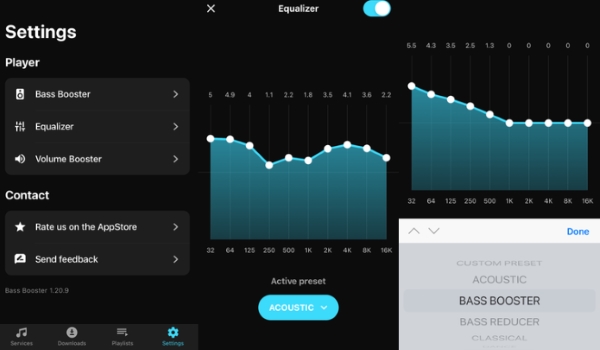
How to Use Bass Booster for SoundCloud Tracks
Step 1. Install Bass Booster on your iPhone.
Step 2. Open Settings > Equalizer inside the app and choose a preset or adjust the bass slider manually.
Step 3. Import your downloaded SoundCloud tracks and enjoy playback with the enhanced low-end profile. Adjust presets anytime for different genres.
Part 5. FAQs about SoundCloud Equalizers
Below are the most common questions users may ask about equalizer SoundCloud settings.
Can equalizers improve low-quality tracks on SoundCloud?
Yes, an equalizer can enhance the listening experience, but it cannot restore missing audio detail. EQ can boost clarity, reduce muddiness, and balance frequencies, but poorly recorded or heavily compressed tracks will still have limitations.
Why does EQ cause distortion on SoundCloud?
Distortion usually happens when you boost frequencies too much. Large boosts (especially bass) can overdrive your device's output and cause clipping. To avoid this, apply smaller boosts, cut frequencies instead of boosting when possible, and reduce overall preamp gain.
Why doesn't my equalizer work with SoundCloud Bluetooth streaming?
Some Bluetooth codecs and devices bypass system-wide EQ and use their own audio processing. If the EQ is applied at the system level but the Bluetooth device uses an independent profile, your EQ adjustments may not carry over. Switching codecs (AAC, LDAC, aptX) or using an app-based EQ usually solves the issue.
Is there a 'universal best' SoundCloud equalizer setting?
No. The best EQ depends on your headphones, speaker type, genre, and personal taste. SoundCloud tracks also vary widely in mastering quality, so a single setting won't work for everything.
How should I adjust EQ for the best SoundCloud playback quality?
Use subtle changes instead of aggressive boosts. Common improvements include:
Fix Muddiness: Slightly cut (-2 dB) the 200 Hz to 500 Hz range to eliminate a 'muddy' or hollow sound, especially in bass-heavy tracks.
Enhance Clarity: Slightly boost (+2 dB) the 2 kHz to 4 kHz range to bring vocals and lead instruments forward, and the 10 kHz to 16 kHz range for 'air' and detail.
Control Bass: Adjust the 60 Hz to 120 Hz range to control the punch and depth of the bass, but avoid heavy boosting that causes clipping (see Q2).
Adjust Pre-Gain: Always reduce the overall gain if you are boosting frequencies to avoid distortion.
Always start with small adjustments and fine-tune based on the track.
Can I use EQ with SoundCloud on smart TVs?
Yes, but the EQ must come from an external source. As SoundCloud's app lacks a native equalizer, you must rely on the EQ capabilities of either your Smart TV's built-in audio menu, a connected audio device (like a soundbar or receiver), or by connecting the TV to an external device (computer or phone) that runs a system-wide equalizer application.
Why can't I use Soundy Equalizer for SoundCloud anymore?
Soundy was discontinued and many browsers removed support for its audio-routing method due to security and compatibility changes. As a result, it no longer works reliably with modern browsers or with SoundCloud's latest updates.
Conclusion
Whether you want deep bass, clearer vocals, or a more balanced sound, the right equalizer for SoundCloud can completely transform your playback quality, even though there is no built-in eq on SoundCloud.
For beginners, system-wide EQ apps like Poweramp EQ (Android) or FxSound (Windows) offer simple and powerful solutions. For advanced users, Equalizer APO or Boom 3D provide complete control and audiophile-level processing.
And if you want the most reliable, distortion-free experience on any device, downloading SoundCloud tracks using tools like AudFree Streaming Audio Recorder and playing them with a dedicated EQ app remains the best overall method.

Staff Editor


