


SoundCloud remains the ultimate hub for discovering independent artists, DJ mixes, podcasts, and exclusive tracks. As Apple Watch becomes more powerful - with cellular connectivity, onboard storage, and standalone audio playback - many users are asking the same question: how to get SoundCloud for Apple Watch, especially without an iPhone nearby.
In this guide, we'll walk you through 4 proven ways to use SoundCloud on Apple Watch, covering both official and alternative solutions. You'll also learn what's possible without an iPhone, how offline playback really works, and how to fix common SoundCloud Apple Watch issues.


Part 1. Can You Listen to SoundCloud on Apple Watch Without Phone?
This is a frequent point of confusion for many users. The short answer is no. The official SoundCloud app for Apple Watch is not a true standalone music player. Instead, it functions primarily as a remote control for the SoundCloud app on your iPhone. To listen to SoundCloud, your iPhone must remain nearby and connected via Bluetooth.
Compared with the fully independent, phone-free listening experiences offered by Apple Music and Spotify, SoundCloud's Apple Watch support is still surprisingly limited.
When available, the SoundCloud Apple Watch app works as a controller rather than a player. This means:
• Your iPhone must be nearby (within Bluetooth range)
• Music actually plays from the phone, not the watch
• Apple Watch is used only for browsing, pausing, or skipping tracks
Why SoundCloud Is Limited on Apple Watch
Unlike Apple Music or Spotify, SoundCloud currently does not support:
- Native offline SoundCloud downloads on Apple Watch
- Full standalone playback with watchOS integration
- Seamless iCloud or Apple Watch music library syncing
As a result, listening to SoundCloud on Apple Watch without an iPhone isn't possible through the official app alone. That said, there are still three practical workarounds if phone-free listening is your goal - and we'll walk you through them in Part 3.
Technically, you can play SoundCloud music on your Apple Watch using the built-in browser, but this method is not recommended. Playback is often unstable, prone to buffering, and can easily get stuck. For these reasons, we won't provide step-by-step instructions for this approach.
However, if you don't mind these limitations, you can ask Siri to open a SoundCloud web link (e.g., 'Hey Siri, open soundcloud.com') on your Apple Watch, sign in to your account, and stream music directly from the browser.
Part 2. How to Play SoundCloud on Apple Watch With Phone Officially
The official and easiest way to use SoundCloud on Apple Watch is by pairing it with your iPhone. In this setup, the Apple Watch works as a remote control, while music playback still happens on the phone.
Requirements
Before getting started, make sure you have the following:
- iPhone paired with Apple Watch
- SoundCloud app installed on your iPhone
- Bluetooth connection enabled
- Same SoundCloud account logged in on both devices
How to Use SoundCloud on Apple Watch with iPhone
Once the requirements above are met, follow these steps:
Your Apple Watch typically connects to your iPhone via Bluetooth. If Bluetooth is unavailable, the devices may switch to Wi-Fi as a backup, allowing for a slightly longer connection range.
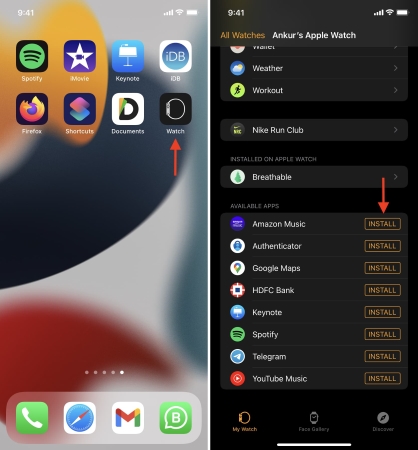
Step 1. Open the Watch app on your iPhone and tap My Watch at the bottom.
Step 2. Scroll down to Available Apps, find SoundCloud, and tap Install.
Step 3. Launch the SoundCloud app on your iPhone and log in to your account. Start playing any track on your phone. Once playback begins, you can control it directly from your Apple Watch - pause or resume music, skip tracks, like songs, browse recent playlists, and adjust the volume.
Pros and Cons of the Official Method With Phone
Official and safe to use;
No extra tools needed;
Supports SoundCloud Free, Go, and Go+
iPhone must remain nearby;
No offline SoundCloud playback on Apple Watch;
Music does not play independently from the watch
Part 3. How to Access SoundCloud on Apple Watch Without Phone Online/Offline (3 Ways)
If you want to listen to SoundCloud on your Apple Watch without needing your iPhone nearby, or you're simply looking for more flexible methods, you'll need to rely on some workarounds. Below, we've outlined three effective solutions, depending on whether you prefer offline listening or online streaming.
Method 1. Use WatchCloud - The Best Standalone Alternative to SoundCloud on Apple Watch
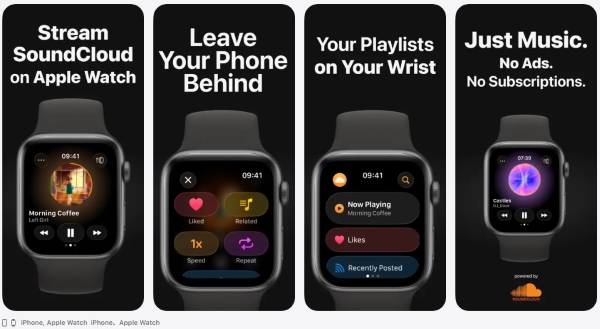
Created by the community, WatchCloud is a third-party app that offers online SoundCloud playback for Apple Watch users. It's available on the App Store and is specifically designed for watchOS with an intuitive interface. Features include easy navigation, track search, and the ability to like tracks with a double-tap.
While the app costs $3.99, you don't need a SoundCloud Go or Go+ subscription to use it. However, keep in mind that it does not support offline playback, meaning you'll still need an internet connection.
How to Play SoundCloud on Apple Watch via WatchCloud
Step 1. Download WatchCloud from the App Store on your watch.
Step 2. Follow the instructions to sign in to your SoundCloud account.
Step 3. Browse and play music directly on your Apple Watch.
Pros and Cons of the WatchCloud App
Simple, user-friendly interface designed for Apple Watch;
Access to SoundCloud's full library for streaming;
No ads for free tiers;
No subscription required (Go+ catalog still needs a subscription)
No offline playback;
An internet connection is needed;
Limited features compared to SoundCloud's mobile app;
Not officially supported by SoundCloud
Method 2. Listen to SoundCloud on Apple Watch Offline via Local Music
For the most reliable offline listening experience, downloading SoundCloud tracks to your Apple Watch is your best option. However, SoundCloud music is DRM-protected, so you'll need a tool to download the tracks first. AudFree Streaming Audio Recorder is an excellent choice, offering lossless audio conversion from SoundCloud, Spotify, and 8 other platforms.
Why Choose AudFree Streaming Audio Recorder?

- Losslessly convert SoundCloud to FLAC, WAV, MP3, and more
- Convert Soundcloud's entire albums or playlists up to 65X speed
- Automatically recognize and retain ID3 tags
- Ad-free output with original audio quality
- Fully compatible with Windows & Mac
How to Stream SoundCloud on Apple Watch Offline via AudFree Streaming Audio Recorder
- Step 1. Set Output Format for SoundCloud Music

- Launch the AudFree Streaming Audio Recorder for SoundCloud on your computer. Click the menu icon > Preferences > Conversion, then select your preferred output format. You can also customize bitrate, sample rate, and audio channels as needed. Under the Output tab, select your preferred destination folder and enable ID3 tag retention.
Apple Watch supports MP3, ALAC, WAV, and AAC audio formats.
- Step 2. Add SoundCloud Tracks for Conversion

- After saving the Preferences above, click the SoundCloud icon on the main interface and sign in to your account in the built-in web player. Navigate to your desired tracks, albums, or playlists, and then tap the green '+' button to add them to the conversion list. There is no limit to the number to add at a time.
- Step 3. Start Conversion for Apple Watch

- Go to the Converting section and click Convert button on the bottom right corner to process the conversion. Once completed, SoundCloud local audio files will be available in the Converted section or you can access them in the the output folder you selected.
- Step 4. Import Converted SoundCloud Tracks to iTunes/Apple Music

- Open Apple Music (Mac) or iTunes (Windows) and click File > Import/Add Files to Library to upload your converted SoundCloud tracks. Connect your iPhone to your computer via USB, and sync the newly added SoundCloud tracks to your iPhone's music library.
- Step 5. Sync SoundCloud to Apple Watch for Offline Playback

- Disconnect your iPhone from your computer. Launch the Watch app on your iPhone, go to the Music section under My Watch, and select Add Music to transfer the SoundCloud tracks to your Apple Watch. Once synced, open the Music app on your Apple Watch, and you can start listening offline now.
Apple Watch storage typically reserves 25% of its total space specifically for offline media. Depending on your model, you will have between 2GB and 16GB available for SoundCloud tracks. This limit prevents your music library from interfering with critical system updates or app functionality.
Pros and Cons of Offline Playback
Fully offline playback on Apple Watch without needing your iPhone;
Can listen without Wi-Fi or cellular connection;
No subscription needed;
Store the SoundCloud original audio files permanently;
No third-party apps needed after conversion
DRM protection on SoundCloud tracks requires a conversion tool;
Uses up the Apple Watch's internal storage (limited storage)
Method 3. Stream SoundCloud on Apple Watch via iTunes Match or Apple Music
After converting your SoundCloud music into local files, you can stream it using iTunes Match or Apple Music if you have a subscription. Both services allow you to upload your converted tracks to your iCloud Music Library, which is accessible on your Apple Watch.

How to Stream SoundCloud on Apple Watch with iTunes Match or Apple Music Cloud
iTunes Match works through the "Sync Library" (formerly iCloud Music Library) feature. You must turn this on for both your iPhone and your computer where your main library lives. And only SoundCloud songs that are added to your Apple Music library can sync to Apple Watch.
Step 1. Upload your converted SoundCloud tracks to your iCloud Music Library via Apple Music or iTunes Match.
Step 2. On iPhone, go to Settings > Music and toggle on Sync Library; On Mac/PC, open the Music app (or iTunes), go to Settings/Preferences > General, and ensure Sync Library (or iCloud Music Library) is checked.
Step 3. Open the Music app on your iPhone, find the iTunes Match-synced tracks, and tap Add to Library. This step is required, even for songs already in iCloud.
Step 4. Open the Music app on your Apple Watch.
Step 5. Go to your Library, where you'll see all your cloud-synced music.
Step 6. Stream music if you have a Wi-Fi or cellular connection, or download it directly to the watch for offline use.
Pros and Cons of Streaming with iTunes Match or Apple Music Cloud
Easy access to all your music from any Apple device;
Seamless integration with Apple's ecosystem;
Offline listening possible with downloaded tracks
Requires an Apple Music or iTunes Match subscription;
You need a stable internet connection for streaming or downloading;
Converted tracks must be uploaded to the iCloud Music Library before streaming
These three methods offer practical ways to enjoy SoundCloud on your Apple Watch without needing your iPhone close by. Whether you prefer offline listening or online streaming, you now have flexible solutions to enhance your listening experience.
Part 4. FAQs about SoundCloud on Apple Watch
Can I access SoundCloud tracks uploaded to iCloud+ on my Apple Watch?
Not directly. iCloud+ does not support music library syncing across different devices. Even if your SoundCloud tracks are stored in iCloud Drive, they won't appear in the Apple Watch Music app. To access SoundCloud music on Apple Watch, the tracks must first be added to Apple Music or iTunes and synced to your watch, using iTunes Match service, or streamed using a compatible third-party app.
How much storage does a SoundCloud playlist take up on Apple Watch?
Storage requirements depend on the audio format, bitrate, and playlist length. As a rough estimate:
• MP3 (256 kbps): About 2 MB per minute
• AAC (256 kbps): About 2 MB per minute
• WAV or ALAC: About 5-10 MB per minute
Most Apple Watch models reserve only 25%-35% of total storage for music and media. For example, a 10-song playlist averaging 4 minutes per track in MP3 format would take up about 80 MB.
Can I download SoundCloud music directly to Apple Watch?
No. The official SoundCloud app does not support direct downloads to Apple Watch. Offline playback is unavailable, even for SoundCloud Go or Go+ subscribers. To listen without an iPhone or internet connection, SoundCloud tracks must first be downloaded on a computer, added to Apple Music or iTunes, and then synced to the Apple Watch.
Why won't the SoundCloud app log in on my Apple Watch?
This issue usually occurs because the Apple Watch app relies on the SoundCloud iPhone app for authentication. Common causes include:
• You're not logged in to SoundCloud on your iPhone
• Bluetooth or Wi-Fi connection between the iPhone and watch is unstable
• The SoundCloud app is outdated or not properly installed
• Temporary server or account sync issues
To fix this, make sure SoundCloud is logged in on your iPhone, keep both devices connected, update the app to the latest version, and try restarting both the iPhone and Apple Watch.
Conclusion
In short, SoundCloud's native support on Apple Watch is still quite limited and requires an iPhone nearby for playback. While the official app works reliably as a remote control, it doesn't offer standalone or offline listening. For users who want more freedom, third-party solutions like WatchCloud enable online streaming directly on the watch, and converting SoundCloud tracks to local files via AudFree tool allows true offline playback through Apple Music syncing.
By choosing the method that best fits your listening habits - official control, online streaming, or offline playback - you can enjoy SoundCloud on Apple Watch with far more flexibility than the default experience provides.

Staff Editor


