


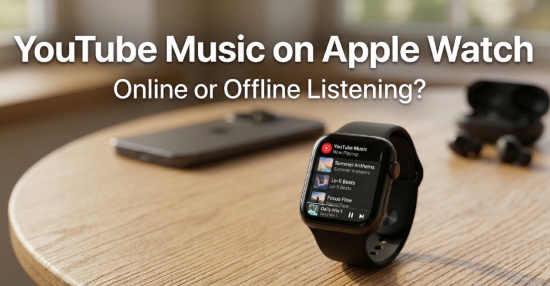
With the growing popularity of wearable technology, more users want to enjoy their favorite music directly from their wrist. The Apple Watch has evolved into a powerful companion device, capable of streaming music, tracking workouts, and even functioning independently from an iPhone. However, when it comes to YouTube Music on Apple Watch, many users still face limitations - especially when trying to play music without a phone.
So, can you play YouTube Music on Apple Watch? The answer is yes, but the experience depends on whether you choose the official method or a more flexible offline solution.
In this guide, we'll walk you through how to get YouTube Music on Apple Watch both online and offline, explain how to achieve phone-free playback, and answer common questions about storage, bitrate, and features.

Part 1. How to Play YouTube Music on Apple Watch Without Phone Online (Official Way)
We are pleased to share that the official YouTube Music app now supports standalone playback on the Apple Watch, allowing you to stream your favorite tracks directly from your wrist. However, there are specific technical requirements and limitations to keep in mind for a smooth experience.
Requirements for Official Playback
To get YouTube Music on Apple Watch without your iPhone nearby, you will need:
- YouTube Music Premium: An active subscription is required for Watch features.
- Hardware: Apple Watch Series 3 or later.
- Software: watchOS 7.0 or higher.
- Connectivity: A stable Wi-Fi connection or an active LTE/Cellular plan on your Watch.
- Audio: Bluetooth headphones (such as AirPods) paired directly to your Watch.
Steps to Use YouTube Music on Apple Watch Online Without Phone
Step 1. Download the YouTube Music app on your iPhone via the App Store.

Step 2. Open the Watch app on your iPhone, locate YouTube Music, and tap GET to add it to your Apple Watch.
Step 3. Connect your AirPods or other Bluetooth headphones directly to your Watch's Bluetooth settings.
Step 4. Open the YouTube Music app on your Watch. Provided you have a Wi-Fi or LTE connection, you can browse your library, playlists, and recommendations to start streaming directly to your headphones.
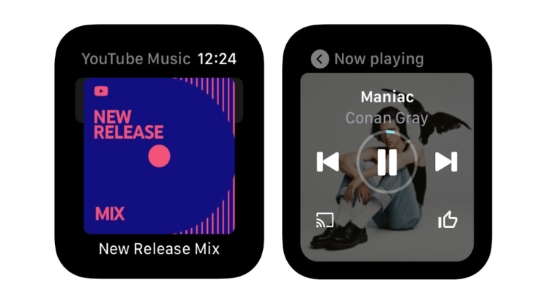
While online streaming is possible via cellular or Wi-Fi, the official YouTube Music Apple Watch app still has limitations regarding offline storage. If you plan to be in an area without a signal, you may still need to rely on your iPhone for downloaded content or use the conversion method detailed in Part 2.
❌ Limitations of the Official Method Without Phone Online
Although convenient, the official online method comes with several drawbacks:
- Streaming depends on internet connectivity
- Limited control compared to the mobile app
- Audio quality is compressed (lossy streaming)
For users who want higher audio quality or complete independence from internet access, this method may not be sufficient.
Bonus Tip: How to Download YouTube Music for Apple Watch With iPhone Offline
Since the Apple Watch does not support true standalone downloads from YouTube Music, the 'Downloads' section on the Watch simply mirrors the tracks already saved on your iPhone. In other words, the music isn't independently stored on the Apple Watch, it relies on synchronization with your phone instead.
That said, by pairing your Apple Watch with your iPhone, you can still enjoy YouTube Music offline in a limited way.
Step 1. Open the YouTube Music app on your iPhone and download your desired songs, albums, or playlists.
Step 2. Make sure Bluetooth is enabled and your Apple Watch is paired with your iPhone.
Step 3. Launch the YouTube Music app on your Apple Watch.
Step 4. Go to the 'Downloads' section to access and play the synced tracks offline.
Playback still depends on your iPhone, as the files are not truly stored on the Apple Watch itself.
❌ Limitations of the Official Method With Phone Offline
- Requires an active YouTube Music Premium subscription
- No true standalone offline playback on YouTube Music Apple Watch app
- Audio quality remains compressed (no lossless support)
- Playback depends on iPhone proximity
Part 2. How to Play YouTube Music on Apple Watch Without Phone (Offline & Lossless)
Whether official online method or offline way, both of them lack lossless streaming and cannot 'keep' your YouTube Music library on your watch all the time.
If you want true offline playback and higher audio quality of YouTube music on your Apple Watch, or just simply look for a more flexible solution for YouTube Music stream, consider using a professional tool like AudFree YouTube Music Converter.
Since YouTube Music downloads are protected and cannot be transferred directly to Apple Watch, the key is to convert YouTube Music tracks into compatible local files. This tool not only gives you high-quality audio but also offers you permanent access to your YouTube music library.
AudFree YouTube Music Converter

- Download YouTube Music tracks as local files losslessly (up to 30x)
- Convert YouTube Music to MP3, FLAC, AIFF, and more
- Maintain the original audio quality and ID3 tags
- Keep your music permanently without subscription limits
How to Download Youtube Music for Apple Watch via AudFree Streaming Audio Recorder
- Step 1. Set Output Settings of YouTube Music for Apple Watch

- Launch the AudFree Streaming Music Converter for YouTube on the computer. Click the menu icon > Preferences > Conversion. From here, choose FLAC as your output format. You can also customize bitrate, sample rate, and audio channels. Under the Output tab, select your preferred destination folder and ensure ID3 tag retention is enabled to keep your track metadata (like artist and album art) intact.
| Audio Formats | |
| Streaming YouTube Music | Protected AAC (256kbps) |
| Apple Watch Supported Formats | MP3, FLAC, WAV, AAC, ALAC |
| AudFree Output Formats | MP3, FLAC, M4A, M4B, Lossless, AIFF, and WAV |
- Step 2. Add YouTube Music Tracks to the Converting List
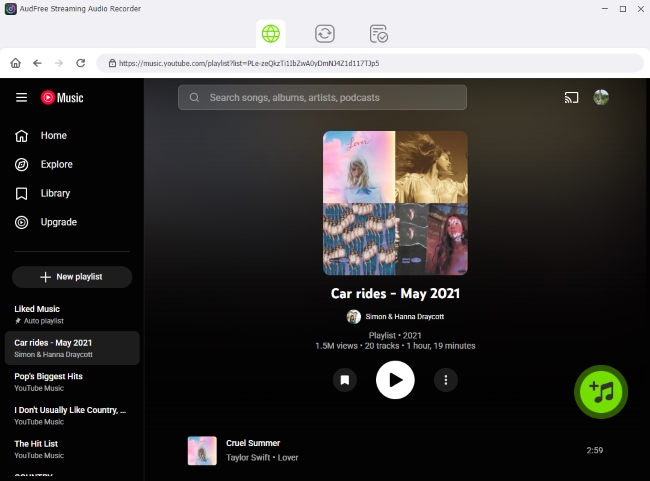
- Once your preferences are saved, use the built-in web player to sign in to your YouTube Music account. Navigate to your favorite songs, playlists, or albums, and click the green '+' button to load them into the conversion list. There is no limit to how many tracks you can add.
- Step 3. Start Converting YouTube Music for Apple Watch

- Go to the 'Converting' tab and click Convert button. The powerful tool will start downloading and converting YouTube Music to FLAC in bulk. Once the process is complete, you can find the files in your designated output folder, ready for transfer.
- Step 4. Sync Local YouTube Music Files to Apple Watch

- To enjoy these files phone-free, simply transfer the converted FLAC tracks to your iPhone via iTunes (or the Music app) and sync them to your Apple Watch.
- 1. Locate your YouTube Music FLAC files and import them to Apple Music or iTunes by 'File > Import' (or 'File > Add Folder to Library').
2. Sync the music to your iPhone.
3. Open the Watch app on your iPhone.
4. Go to 'My Watch > Music > Add Music'.
5. Select the converted tracks or playlists.
6. Keep your Apple Watch on its charger while syncing. Once completed, your music will be stored locally on your Apple Watch for offline playback.
✅ Benefits of the Conversion Method via AudFree
With such a approach, your Apple Watch becomes a fully independent music player - no iPhone or internet connection required. This approach is ideal for users who prioritize audio quality, flexibility, and true offline listening on Apple Watch.
- Better sound quality (up to lossless formats)
- Full control over your YouTube music library
- Permanent access to your YouTube music library
- Play YouTube Music without internet or phone
- Avoid streaming interruptions
- No subscription limitations after download
Part 3. FAQs About Adding YouTube Music to Apple Watch
Why is YouTube Music not working on my Apple Watch?
The most common reasons are an inactive YouTube Premium subscription, an outdated watchOS (needs 7.0+), or lack of a stable LTE/Wi-Fi connection. If you are trying to play music without your phone nearby, ensure your AirPods are paired directly to the Watch, as the app will not play through the Watch speaker.
How much storage is available on an Apple Watch for YouTube Music downloads?
While the Apple Watch itself typically has 32GB to 64GB of total storage, the YouTube Music app does not currently support standalone local downloads to the watch's internal memory. The 'Downloads' section in the app simply mirrors what is saved on your paired iPhone.
When using the conversion method, you can typically store between 2 GB and 8 GB of music - roughly 500 to 2,000 songs - depending on your audio quality settings and available system storage.
What is the maximum bitrate for YouTube Music downloads on the Apple Watch?
Since the Watch app mirrors the iPhone's downloads, the quality is determined by your iPhone's settings. The maximum bitrate for YouTube Music 'High' quality is 256kbps AAC.
Does the YouTube Music app on Apple Watch support Siri voice commands?
Yes. You can use Siri to control playback, skip tracks, and adjust volume. On newer models (like the Apple Watch Ultra), you can also use commands like 'Hey Siri, play my Supermix on YouTube Music' to start specific playlists.
Does YouTube Music's 'Smart Downloads' feature work on the Apple Watch?
No. The Smart Downloads feature, which automatically downloads music based on your listening history, is currently exclusive to the iPhone and Android apps. It does not automatically save or cache music onto the Apple Watch hardware.
Conclusion
Getting YouTube Music on Apple Watch is easier than ever. If you prefer convenience and real-time streaming, the official YouTube Music app allows you to play music online without your phone. However, it requires a stable internet connection and a Premium subscription.
On the other hand, if you want complete freedom, offline playback, and higher audio quality, converting YouTube Music into local files and syncing them to your Apple Watch is the most powerful solution.
In short:
- Choose the official method for simplicity and streaming
- Choose the offline method for flexibility and quality

Staff Editor


