


If you want to save Apple Music tracks as MP3, FLAC, WAV, or other common audio files, you may have come across ViWizard Apple Music Converter. It is a desktop-based tool designed to work with Apple Music content and convert it into more widely supported audio formats for local playback and personal music management.
But is ViWizard still a good choice in 2026? In this ViWizard Apple Music Converter review, we look at its current features and pricing, explain how the converter works, examine its main advantages and drawbacks, and evaluate user feedback to give you a more realistic idea of what to expect.
ViWizard is a feature-rich and relatively easy-to-use Apple Music converter for Windows and Mac. It is particularly appealing if you want batch conversion, flexible output settings, and a built-in Apple Music browsing experience. However, the free trial is very limited, and the advertised maximum conversion speed should not be treated as a guaranteed real-world speed.

Part 1. ViWizard Apple Music Converter Overview: Key Features & Pricing
What Is ViWizard Apple Music Converter?
ViWizard Apple Music Converter is a desktop application for Windows and macOS that allows users to process Apple Music content and save the resulting audio in commonly supported formats.
Unlike the normal Download feature in Apple Music, which keeps subscription downloads inside Apple's ecosystem, ViWizard is designed around creating locally accessible audio files. The current version integrates an Apple Music Web Player, allowing users to browse their Apple Music library and catalog within the application before adding songs, albums, or playlists to the conversion list.
The software supports a relatively broad range of Apple Music content, including songs, albums, playlists, artists, iCloud Music Library content, and other catalog content. For users building a personal local music library, this can be useful because the resulting files can be organized independently of the Apple Music app and played through compatible third-party players.
Key Features of ViWizard Apple Music Downloader
ViWizard Apple Music Downloader at a Glance
| Feature | ViWizard Apple Music Converter |
|---|---|
| Windows | Windows 10 or later |
| Mac | macOS 11 or later |
| Main Purpose | Convert Apple Music and related audio content to local files |
| Output Formats | MP3, M4A, M4B, WAV, FLAC, AIFF |
| Batch Conversion | Yes |
| Metadata Preservation | Yes |
| Output Customization | Bit rate, sample rate, channel, bit depth and more |
| Lyrics Preservation | Yes |
| Built-in Apple Music Web Player | Yes |
| Built-in Music Player | Yes |
| Free Trial | Yes |
| Trial Limitation | First 30 seconds of each song |
| Paid Plans | Monthly, yearly and lifetime |
| Main Target Users | Users who want local copies and flexible playback |
1. Convert Apple Music to Multiple Audio Formats
The supported output formats are one of ViWizard's stronger points. ViWizard supports MP3, M4A, M4B, WAV, FLAC, and AIFF. MP3 remains the safest choice for broad device compatibility, while FLAC and WAV are more suitable when you want a lossless workflow. M4A, M4B, and AIFF are useful for users who have more specific Apple or audio-production requirements. This range makes ViWizard more versatile than a converter limited to MP3.
2. Batch Conversion
You do not have to process songs individually. ViWizard Apple Music Converter allows you to add entire playlists or albums to the queue and convert multiple tracks in a single operation. Batch processing is far more practical for users handling large libraries, and built-in organization options make building an offline collection fast and effortless.
3. Customizable Audio Settings
ViWizard Apple Music Downloader goes beyond simply selecting an output format. You can customize technical parameters - including bit rate, sample rate, channels, bit depth, output paths, and file naming rules - to match your specific playback targets. For example, you can select a moderate MP3 bitrate for a car USB drive while keeping lossless settings for a desktop setup.
4. Metadata and Lyrics Preservation
Preserving track details is essential when converting a large music library. ViWizard automatically retains core ID3 tags - such as title, artist, album, and genre - while offering an option to save synchronized lyrics. You won't need to manually rename or re-tag hundreds of converted files after processing. This tag preservation saves significant time when organizing your offline library.
5. Built-in Apple Music Web Player
ViWizard Apple Music Converter features an integrated Apple Music Web Player that eliminates the need to switch between separate apps. You can search, browse, and add songs directly to the conversion queue from within its interface. The streamlined workflow is simple and intuitive:
Sign in → Browse music → Add to list → Adjust settings → Convert → View output
This seamless integration makes ViWizard exceptionally beginner-friendly compared to traditional recording tools.
ViWizard Apple Music Converter Pricing
ViWizard currently offers monthly, yearly, and lifetime licensing options for Apple Music Converter.
| Plan | Current Listed Price | License | Upgrade | Money-Back Policy |
|---|---|---|---|---|
| Monthly | $19.95 | 1 PC or 1 Mac / 1 month | During license period | 14-day policy |
| Yearly | $44.95 | 1 PC or 1 Mac / 1 year | During license period | 30-day policy |
| Lifetime | $89.95 | 1 PC or 1 Mac / lifetime | Lifetime | 30-day policy |
Prices can change during seasonal promotions, so it is worth checking the official checkout page before purchasing.
The lifetime plan is particularly interesting for long-term users. If you expect to use an Apple Music converter for several years, paying once may make more sense than continuing a monthly subscription.
However, there is an important distinction between the plans. A monthly license is cheaper upfront, but the subscription renews automatically unless canceled. The lifetime plan costs more initially but does not require recurring payments.
ViWizard's refund policy also distinguishes between monthly and lifetime purchases. Its current policy states that monthly licenses have a 14-day money-back period, while lifetime purchases have a 30-day money-back period, subject to the company's refund conditions.
Part 2. How Does ViWizard Apple Music Converter Work?
ViWizard's current workflow is relatively simple because the software integrates an Apple Music Web Player.
Instead of manually locating protected Apple Music cache files on your computer, you browse Apple Music through the converter, select the content you want, configure the output settings, and start the conversion.
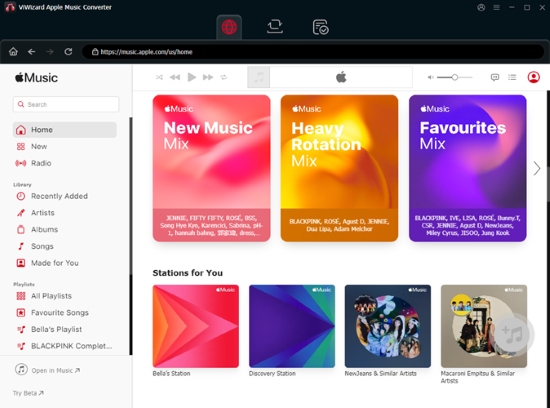
Before using the tool to download Apple Music, please make sure your computer meets the following system requirements:
- Windows: Windows 10 or later, 32-bit or 64-bit
- Mac: macOS 11 or later
- Processor: 1 GHz or above
- RAM: 512 MB or above
- Display: 1024 × 768 or higher
In practice, the conversion process itself can benefit from a faster CPU and sufficient free storage, especially when processing large playlists or choosing lossless output.
Step 1. Download the appropriate version for Windows or Mac from the official ViWizard Apple Music Converter website and complete the installation.
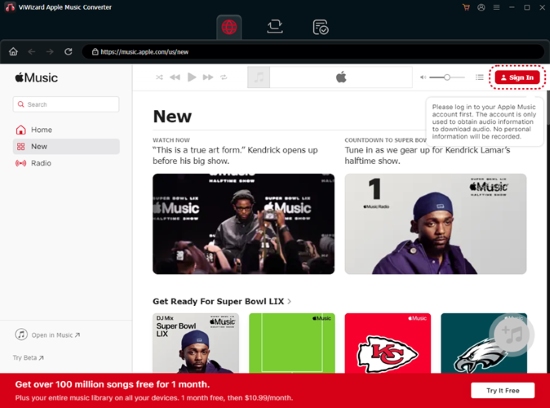
Step 2. Launch ViWizard and open the built-in Apple Music Web Player. Click 'Sign In' and log in with your Apple ID to access your music catalog. Generally, you will need an active Apple Account to access the relevant Apple Music content.
Step 3. Once the Apple Music Web Player loads, you can search for the content you want to process. The tool supports:
- Single tracks & songs
- Full albums
- Curated playlists
- Artist pages
- Your saved Library content
After selecting your tracks, click the 'Add' button to add them to the conversion queue.
Step 4. Before starting the conversion, open Preferences and choose the desired output format. For example:
| Use Case | Suggested Format |
|---|---|
| Maximum Compatibility | MP3 |
| Lossless Music Library | FLAC |
| Audio Editing | WAV |
| Apple-Oriented Workflow | AIFF or M4A |
| Audiobook-Style Files | M4B |
You can also adjust parameters such as bit rate, sample rate, bit depth, and channel if needed.
For general listening, there is little reason to select an extremely high output setting if the original source does not contain equivalent audio information. Choosing a sensible format and quality level usually provides a better balance between file size and audio quality.
Step 5. Now, click 'Convert' to begin. The software processes the selected Apple Music content and saves the resulting audio files to your chosen output directory. For large playlists, it is also sensible to avoid running several other demanding applications at the same time.
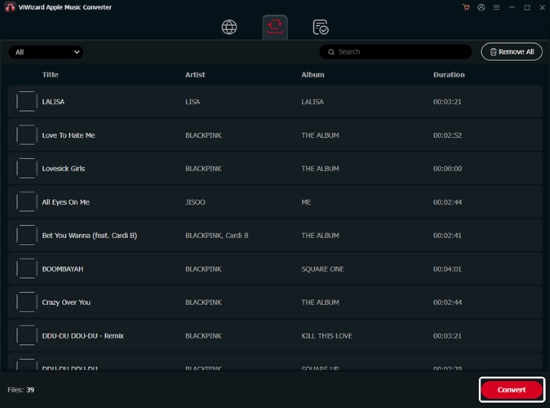
Step 6. When conversion finishes, open the 'Converted' section to review completed tasks. You can use the folder icon to open the output location directly. From there, you can organize the local audio files into folders, back them up, import them into compatible music players, or transfer them to other personal devices that support the chosen format.
Apple's Media Services terms limit content usage to personal, non-commercial purposes and prohibit circumventing or tampering with embedded security technologies. Therefore, users should treat converted Apple Music files as personal-use material only and check the laws and terms applicable to their situation. Using converted files for redistribution, commercial exploitation, or unauthorized sharing is a different matter and should not be assumed to be permitted.
Part 3. Pros and Cons of ViWizard Apple Music Converter
No Apple Music converter is perfect. ViWizard Apple Music Converter offers a solid set of features, but its trial limits, variable conversion speed, and reliance on third-party compatibility are worth considering before purchase.
Supports both Windows and Mac;
Multiple output formats, including MP3, FLAC, WAV, AIFF, and M4A;
Batch conversion for playlists and multiple tracks;
Provides flexible bit rate, sample rate, bit depth, and channel settings;
Includes a built-in Apple Music Web Player for easier music selection;
Preserves key metadata such as title, artist, album, and genre
Free trial limited to 30 seconds per track;
20x speed is a maximum, not a guaranteed real-world speed;
Actual speed varies by system, network, and output settings;
Compatibility may change after Apple Music updates;
Unnecessary for users who only need official offline playback;
Converted files should be used for permitted personal purposes
Part 4. ViWizard Apple Music Converter Review: Our Testing & User Feedback
A good software review should go beyond the feature list. We evaluated ViWizard based on its interface, output options, conversion performance, metadata handling, stability, and recent user feedback. Here is what we found.
1. Interface and Ease of Use
ViWizard is relatively easy to use, even for first-time users. You don't need to understand audio codecs or deal with complicated configuration files to get started. The built-in Apple Music Web Player is particularly convenient because you can find and select music within the same workflow instead of constantly switching between applications.
Advanced users can also access the Preferences section to customize output quality and other settings, while the default configuration remains simple enough for beginners.
Our assessment: 4.6/5 for ease of use.
2. Output Formats and Audio Quality
ViWizard supports a wide range of output formats, including MP3, FLAC, WAV, AIFF, M4A, and M4B, giving users plenty of flexibility for different playback environments.
From our daily testing and usage, high-quality MP3 is completely sufficient for everyday playback in the car or on mobile devices. But for a long-term personal archive, we prefer FLAC or a similar lossless format to preserve full audio quality.
See also: How to Play Apple Music in Car
Our assessment: 4.5/5 for format flexibilit.
3. Conversion Speed
Conversion speed is one area where marketing specifications need some context. ViWizard advertises speeds of up to 20x, but this should be understood as a maximum rather than a guaranteed speed for every conversion.
In our testing on a Windows 11 PC with a 500 Mbps Ethernet connection, processing a song from a 50-track playlist took around 28 seconds under normal network conditions, while a 20-track playlist averaged about 16 seconds. Actual results can vary depending on your computer, network, audio settings, track length, and location.
For larger playlists, consistency may be more important than peak speed. A stable conversion process that handles a large library reliably can be more useful than simply reaching a high speed for a short period.
Our assessment: 4.4/5. Good overall, but don't buy it solely for the '20x' claim.
4. Metadata and Library Organization
Metadata preservation is another practical strength of ViWizard. Depending on the content and supported fields, converted files can retain information such as:
- Song Title
- Track Number
- Artist
- Album
- Playlist Index
- Artwork
- Year
- Lyrics (If provided)
This can make a significant difference when managing a large local music library. It is especially useful if you plan to organize the files on a USB drive, NAS, media server, or third-party music player.
Our assessment: 4.5/5 for metadata and library management.
5. Stability and Software Updates
ViWizard generally provides a stable workflow, but compatibility can sometimes be affected by changes to Apple Music or its Web Player.
Recent user feedback also shows that some customers have encountered issues involving installation, license recognition, or software updates. At the same time, many users report successful support when resolving these problems.
Our assessment: 4.6/5. Generally stable, with occasional compatibility or update-related issues.
6. What Do Users Say About ViWizard?
Current Trustpilot feedback is generally favorable. ViWizard's profile currently shows around 4.3/5 from 348 reviews, with a large majority of reviews receiving five stars.
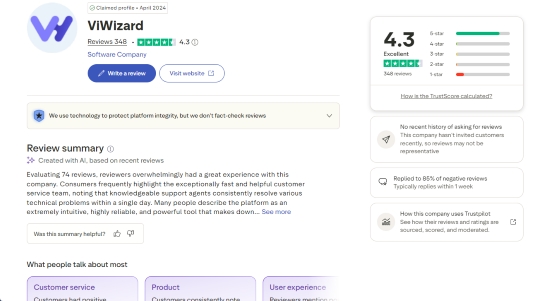
Positive comments commonly focus on:
- Easy-to-use software
- Reliable conversion
- Good audio quality
- Helpful customer support
- Quick responses to technical issues
- Long-term usability
However, the review distribution is not uniformly positive. A smaller but meaningful group of users reports problems involving software installation, license recognition, payment, or conversion performance.
Recent examples include users who needed support after a software update, users who experienced installation difficulties on Mac, and a small number of customers who encountered payment problems.
User reviews should therefore be treated as useful indicators of real-world experience rather than a guarantee of performance on every computer. Your experience may vary depending on your operating system, hardware, network, and the current Apple Music environment.
7. Overall Assessment of Viwizard Apple Music Converter
| Category | Assessment |
|---|---|
| Ease of use | ⭐⭐⭐⭐⭐½ |
| Output formats | ⭐⭐⭐⭐⭐½ |
| Batch conversion | ⭐⭐⭐⭐ |
| Metadata management | ⭐⭐⭐⭐⭐½ |
| Customization | ⭐⭐⭐⭐ |
| Conversion speed | ⭐⭐⭐⭐ |
| Stability | ⭐⭐⭐⭐ |
| Customer support | ⭐⭐⭐⭐⭐ |
| Free trial | ⭐⭐⭐ |
| Value for money | ⭐⭐⭐⭐ |
| Overall | 4.3/5 |
Part 5. Best Apple Music Converter Alternatives to ViWizard
ViWizard Apple Music Converter is a capable Apple Music converter, but it is not the only option. If its pricing, conversion workflow, trial limitations, or performance do not fit your needs, it is worth comparing alternatives before purchasing.
For this review, we focus on two established desktop alternatives: AudFree Apple Music Converter and Sidify Apple Music Converter. Both provide similar core functions, including Apple Music conversion, multiple output formats, batch processing, and metadata retention, but their interfaces, pricing structures, and feature emphasis are somewhat different.
1. AudFree Apple Music Converter - Best Overall ViWizard Alternative
AudFree Apple Music Converter is our first alternative to consider if you want a more flexible desktop solution for managing Apple Music tracks as local audio files.
Like ViWizard, AudFree is designed for Windows and Mac and supports common output formats such as MP3, WAV, FLAC, AIFF, M4A, and M4B. It also focuses on batch conversion, customizable output parameters, and metadata preservation.
One advantage of AudFree is its focus on a simple and consistent workflow. Its built-in Apple Music Web Player lets you sign in, browse your music library, select individual tracks or entire playlists, configure the output settings, and process multiple songs from one interface.
AudFree also provides extensive output controls. Depending on your needs, you can adjust parameters such as bit rate, sample rate, audio channel, and other audio settings rather than being limited to a fixed output configuration.
In terms of processing speed, AudFree supports speeds of up to 17x. While this advertised maximum is lower than ViWizard's 20x figure, actual conversion speed is only one part of the overall experience. For larger playlists, consistent processing and reliable batch conversion can be more important than peak speed alone.

Another advantage is AudFree's broader product ecosystem. In addition to its dedicated Apple Music Converter, AudFree offers tools for services such as Spotify, Tidal, Amazon Music, Audible, and YouTube Music. Its AudFree Streaming Audio Recorder also brings support for multiple streaming platforms into a single application.
This can be particularly useful if you regularly work with music or audio from different services and would rather use one software ecosystem instead of purchasing separate tools for each platform.
The overall AudFree process is just as simple as ViWizard's. Once you open the program and sign in, you can easily select the tracks or albums you need. The default output is already set to high-quality 320kbps MP3, allowing you to batch-download all your music into your target format with one click.
2. Sidify Apple Music Converter - Best for Apple Music, iTunes & Podcasts
Sidify Apple Music Converter is another well-established alternative worth considering, particularly if you work with content beyond Apple Music tracks.
Its current product offering supports Apple Music and iTunes content and provides output formats such as MP3, AAC, WAV, FLAC, AIFF, and ALAC. It also supports batch processing and advertises speeds of up to 20x, while retaining metadata such as song information and lyrics.

A key advantage of Sidify is its broader support for Apple-related audio content. In addition to music, it supports iTunes content, podcasts, and audiobooks, making it a more versatile option for users who manage different types of Apple audio in one library.
According to the pricing information reviewed for this comparison, Sidify's promotional pricing includes a one-year plan at $44.95 and a lifetime plan at $89.90, with one license for one computer. The lifetime plan includes lifetime updates and a 30-day money-back guarantee, while the annual plan includes one year of updates and a shorter refund period. Pricing and promotions may change over time, so it is worth checking the current pricing before purchasing.
However, Sidify may be more appealing to users who specifically need its broader Apple/iTunes content support than to those who simply want a straightforward Apple Music workflow.
ViWizard vs AudFree vs Sidify Apple Music Converter
If you are still unsure which Apple Music converter to choose, the table below provides a quick comparison of ViWizard, AudFree, and Sidify based on their supported platforms, formats, workflow, and key features.
| Feature | ViWizard Apple Music Converter | AudFree Apple Music Converter | Sidify Apple Music Converter |
|---|---|---|---|
| Windows/Mac | ✅ | ✅ | ✅ |
| Apple Music | ✅ | ✅ | ✅ |
| iTunes Content | ✅ (Only iTunes purchases) | ✅ (Only iTunes purchases) | ✅ |
| Built-in Web Player | ✅ | ✅ | ✅ |
| Conversion Success Rate | ⭐⭐⭐⭐⭐ | ⭐⭐⭐⭐⭐ | ⭐⭐⭐⭐ |
| Lossless Quality | ✅ | ✅ | ✅ |
| MP3 | ✅ | ✅ | ✅ |
| FLAC | ✅ | ✅ | ✅ |
| WAV | ✅ | ✅ | ✅ |
| AIFF | ✅ | ✅ | ✅ |
| M4A | ✅ | ✅ | ❌ |
| ALAC | ❌ | ❌ | ✅ |
| M4B | ✅ | ✅ | ❌ |
| Batch Conversion | ✅ | ✅ | ✅ |
| ID3 Metadata | ✅ | ✅ | ✅ |
| Lyrics | ✅ | ✅ | ✅ |
| Custom Output Settings | ✅ | ✅ | ✅ |
| Free Trial | ✅ (Only first 30 seconds) | ✅ (Only first 30 seconds) | ✅ (Only first 1 minute) |
| Advertised Max. Speed | Up to 20x* | Up to 17x* | Up to 20x* |
| Pricing | $19.95/month; $44.95/year; $89.95/lifetime | $14.95/month; $44.95/year; $89.95/lifetime | $59.95/year; $129.90/lifetime |
| Best For | Built-in Apple Music workflow | Broader downloads option similiar to ViWizard | Apple Music, iTunes & broader Apple audio content |
*Advertised maximum speeds are not guaranteed real-world rates. Actual performance can vary depending on the software version, computer hardware, network conditions, track length, output settings, and other factors.
Which One Should You Choose?
All three tools cover the basic requirements for Apple Music conversion, including batch processing, multiple output formats, and metadata preservation. The main differences are in their workflow, supported formats, and overall focus.
• Choose either ViWizard or AudFree Apple Music Converter if you prioritize flexible output settings, a simple Web Player-based workflow, stable batch processing, and broader audio-tool coverage.
• Choose Sidify if you also need to work with iTunes content, podcasts, or audiobooks and want broader support for Apple-related audio content.
Overall, AudFree Apple Music Converter is our recommended alternative to ViWizard Apple Music Converter for most users. It offers a well-balanced combination of supported formats, customizable output settings, batch processing, metadata preservation, and a straightforward workflow, while its broader product ecosystem can also be useful if you work with multiple streaming services.
Part 6. FAQs About ViWizard Apple Music Converter
Is ViWizard Apple Music Converter legal and safe to use?
ViWizard states that its software is intended for legally managing and converting users' own digital content. However, whether using a converter is permitted depends on applicable copyright laws, Apple's terms, and how the resulting files are used. ViWizard also states that it does not store users' Apple Music account information.
Can I use ViWizard with a free Apple Music account?
Yes. ViWizard's current user guide states that you can sign in with either a free or paid Apple Music account, provided the account is active and can access the desired content through Apple's Web Player. However, the content available to a free account may be more limited than that available with a paid Apple Music subscription.
What's the difference between the Free Trial and Paid Version of ViWizard?
The free trial lets you process only the first 30 seconds of each song. The paid version removes this limitation and allows full-track conversion, along with the software's full functionality.
Why does ViWizard feel slower than the advertised 20x speed?
The 20x figure is a maximum advertised speed, not a guaranteed real-world rate. Actual performance can vary depending on your computer, network connection, track length, output format and settings, and the current Apple Music environment. For large batches, a stable and consistent conversion rate can be more meaningful than reaching the maximum speed on individual tracks.
Part 7. In Conclusion
ViWizard Apple Music Converter remains a solid desktop option for users who want to move beyond Apple's standard in-app offline listening and manage Apple Music content as local audio files. Its built-in Apple Music Web Player, batch conversion, broad output-format support, metadata preservation, and customizable audio settings make it a fairly complete solution. Recent user feedback is also generally favorable, particularly regarding ease of use and customer support.
However, "worth it" depends on your specific needs. If you only want to listen to Apple Music offline, the official Apple Music app is usually the simpler choice. If you need flexible local files, ViWizard is worth considering, but you should compare its current price, trial restrictions, conversion performance, and features against alternatives. Among the options discussed here, AudFree is our first alternative to ViWizard for users who want more flexible local music management, while Sidify is a good choice for those who prefer broader Apple content.

Staff Editor


