


YouTube is one of the largest music and video platforms in the world, offering millions of songs, live performances, DJ sets, podcasts, and rare audio content that cannot always be found on traditional streaming services. However, YouTube does not offer an official option to download audio in lossless formats like FLAC, nor does YouTube Music.
For audiophiles, DJs, and users who demand maximum audio quality, converting YouTube to FLAC is often the preferred solution. FLAC (Free Lossless Audio Codec) preserves the original sound data without compression loss, making it ideal for high-end speakers, DACs, studio monitors, and offline music libraries.
So, is there a possible way to convert YouTube to FLAC from YouTube videos and YouTube Music? In this guide, we'll introduce the best YouTube to FLAC converters for high-quality output, walk you through step-by-step methods to convert YouTube and YouTube Music to FLAC, and also recommend several free online YouTube to FLAC tools. If you're looking for the best way to download YouTube audio in lossless quality, keep reading.


Part 1. Can You Get YouTube to FLAC 24-Bit Files?
Understanding YouTube's Original Audio Quality
Before converting YouTube videos to FLAC, it's essential to understand the original audio quality of the source. YouTube does not store or stream audio in lossless formats such as FLAC or WAV. Instead, all YouTube audio is delivered using lossy codecs, primarily:
• AAC (up to ~256 kbps) for standard videos
• Opus (up to ~160-256 kbps) for some YouTube Music tracks and newer uploads
These codecs are designed to reduce file size while maintaining acceptable sound quality, but they permanently discard some audio data.
How About the Audio Quality Offered by YouTube Music?
The audio quality peaks at 256kbps AAC/Opus for YouTube Music Premium users (with Low and Normal tiers at 48kbps and 128kbps). Free users are limited to 128kbps. Although the quality is decent for casual listening, it still falls short of the lossless and Hi-Res audio offered by competitors like TIDAL or Amazon Music HD.
In short, all audio from YouTube and YouTube Music is already compressed at the source.
Can YouTube Be Converted to 'True' 24-Bit FLAC?
Technically, no. Since YouTube does not provide native lossless or 24-bit audio streams, it is impossible to extract true lossless 24-bit FLAC directly from YouTube. Any FLAC file converted from YouTube is essentially a lossless container created from a lossy source, not a genuine Hi-Res file.
However, converting YouTube to FLAC still offers several practical advantages:
✅ No further quality loss during conversion
✅ Better compatibility with professional audio software
✅ Ideal for editing, DJ software, and archiving
✅ Avoids additional MP3/AAC recompression
In other words, converting YouTube audio to FLAC helps preserve the maximum available sound quality and avoids further degradation as much as possible.
In the following sections, we'll show you how to convert YouTube and YouTube Music to FLAC, and explain why professional desktop converters outperform most online tools.
Part 2. Best YouTube to FLAC Converter [High Quality]
To convert YouTube to FLAC in high quality, it's important to choose the right tool based on the source platform.
• For standard YouTube videos, you can use a professional audio capture tool to extract the original audio stream, such as AudFree Audio Capture.
• For YouTube Music, a dedicated streaming music downloader is required, since YouTube Music tracks are protected by DRM. In this case, AudFree Streaming Music Converter is the most suitable option.
If you care about sound fidelity, stability, metadata accuracy, and batch playlist conversion, professional desktop software clearly outperforms online converters. Below are the two most reliable solutions for downloading YouTube and YouTube Music to FLAC in high quality.
2.1 How to Convert YouTube Music to FLAC in Bulk (High Quality)
AudFree Streaming Music Converter is a professional-grade solution for downloading and converting streaming audio from platforms such as YouTube Music, Spotify, Tidal, Apple Music, and more. Unlike basic downloaders, it enables users to extract true 24-bit FLAC files from YouTube Music with zero quality loss.
Built for performance and precision, AudFree prioritizes lossless output, ultra-fast conversion speeds, and flexible format options. It supports bulk downloads of entire YouTube Music playlists at up to 30× speed and offers a wide range of high-quality audio formats, including FLAC, WAV, AIFF, and others - ideal for building a premium, device-independent music library efficiently.
AudFree Streaming Music Converter

- Convert YouTube music to MP3, WAV, FLAC, and more
- Preserve original bitrate, sample rate, and audio channels
- Batch download playlists and albums at up to 30x speed
- Automatically recognize and retain ID3 tags
- Work on both Windows & Mac
How to Download FLAC 24-Bit Songs from Youtube Music via AudFree Streaming Music Converter
- Step 1. Set YouTube Music Output Format to FLAC

- Downloading and installing Streaming Music Converter on your computer. Launch it and click the menu icon > Preferences > Conversion. Here, you can adjust the output format to FLAC, and you can also customize the sample rate up to 192kHz and the bit depth to 24-bit. Under the Output tab, select your destination folder and ensure ID3 tag retention is enabled.
- Step 2. Add YouTube Music Tracks for Conversion
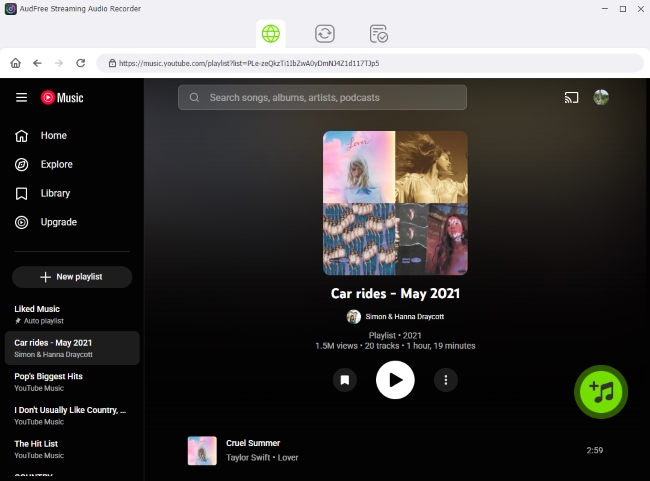
- Return to the main interface and click the YouTube Music icon to access the built-in web player. Sign in to your account, then browse songs, playlists, or albums. Click the green '+' button to add tracks to the conversion list. There is no limit on the number of songs you can add.
See also: How to Download YouTube Music to WAV
- Step 3. Convert YouTube Music to FLAC 24-Bit Files

- Go to the Converting tab and click Convert. The AudFree converter will start downloading and converting YouTube Music to computer as FLAC in bulk. Once finished, all converted FLAC files will appear in your selected output folder and can be accessed under the Converted section.
Pros and Cons of AudFree Streaming Music Converter
High-quality FLAC output with no additional compression;
Fast batch conversion for large playlists;
Full ID3 tag preservation;
Stable performance and clean interface
Desktop installation required;
Free version has conversion limits
2.2 How to Record YouTube to FLAC (High Quality)
To convert standard YouTube videos to FLAC, AudFree Audio Capture is one of the best solutions available. It captures system audio directly and saves it as lossless FLAC, making it suitable for YouTube videos, live streams, DJ sets, and podcasts.
This tool not only supports YouTube but also works with YouTube Music, Apple Music, Amazon Music, Qobuz, and other platforms. It maintains original audio quality and allows you to edit, split, and tag audio files easily.
AudFree Audio Capture

- Losslessly capture audios from YouTube and YouTube Music
- Support FLAC (24 bit), WAV, MP3, OGG, AAC, M4A, and more
- Record Apple Music, Qobuz, Amazon Music, and more in you computer
- Automatically split tracks from playlists or albums
- Available for Windows and macOS
How to Record and Download YouTube to FLAC via AudFree Audio Capture
- Step 1. Add YouTube or YouTube Music as the Audio Source

- Launch the AudFree Audio Capture on your computer. On the main interface, click the '+' icon and open YouTube or YouTube Music in the built-in browser. For best stability, it's recommended to use Google Chrome as the playback browser.
- Step 2. Set YouTube Audio Output Format to FLAC

- Please tap on the Format in the bottom and click Audio to adjust output format of YouTube as FLAC. Here, you can also refine other audio parameters, like quality, sample rate, bit depth, channel, etc. And don't forget to click Creat and apply to save these preferences.
- Click Format at the bottom of the interface and select Audio > FLAC as the output format. Here, you can refine the bit depth (24-bit) and sample rate to match your needs. Click Create and apply to save your settings.
- Step 3. Record YouTube Audio to FLAC 24 bit

- Click Start, then play the YouTube video or music you want to convert. It will automatically capture and save the audio based on your preset settings. When finished, click Stop to end the recording and save the YouTube FLAC file to your computer.
- You can also trim recordings, edit ID3 tags, and manage files directly within the software before saving them locally.

If Chrome was already open before recording, AudFree may prompt you to restart the browser. Simply follow the on-screen instructions to continue.
Pros and Cons of AudFree Audio Capture
High-quality FLAC output from YouTube videos and YouTube Music;
Flexible format and parameter settings;
Built-in audio editing and splitting tools
Requires real-time playback;
Not as fast as direct download tools for large playlists
Part 3. How to Download YouTube to FLAC Online For Free
If you don't want to install desktop software, online YouTube to FLAC converters can be a quick solution. These tools work directly in your browser and are suitable for short videos or casual downloads. Below are five popular free online YouTube to FLAC converters, along with their steps, pros, and cons.
While these online YouTube-to-FLAC converters claim to export audio in .flac format, they typically cannot bypass YouTube's native compression. As a result, the output quality is still capped by the original streaming bitrate - usually around 128 kbps to 256 kbps - meaning the files are FLAC in name only, not truly lossless.
1. Loader.to
Loader.to is a popular web-based YouTube downloader that supports multiple output formats, including FLAC, AAC, WAV, MP3, and more. One of its biggest advantages is that it supports playlist downloads, making it useful for downloading multiple YouTube or YouTube Music tracks at once.
However, its limitations are also quite noticeable. When downloading large playlists, the process can be slow, and downloads may fail if your internet connection is unstable. In addition, pop-up ads and redirects may appear during use.
Website: https://en.loader.to/4/
Steps to Convert YouTube or YouTube Music to FLAC Online with Loader.to

Step 1. Open YouTube or YouTube Music and copy the video or playlist URL.
Step 2. Visit the Loader.to website and paste the URL into the search box.
Step 3. Select FLAC as the output format.

Step 4. Click Download and wait for the conversion to complete.
Pros and Cons of Loader.to
Playlist download supported;
No registration required;
Supports multiple platforms and audio formats
Audio quality depends on the source;
Occasional failed downloads;
Heavy ads and pop-ups
2. AceThinker Free YouTube to FLAC Converter
AceThinker provides a clean and user-friendly online tool for converting YouTube videos and YouTube Music tracks to FLAC. It is best suited for single-track downloads and beginners who want a quick solution without advanced settings.
Website: https://www.acethinker.com/convert-youtube-to-flac
Steps to Download YouTube & YouTube Music to FLAC Online for Free with AceThinker
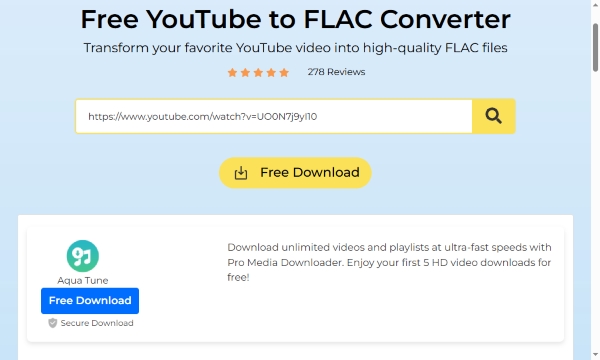
Step 1. Copy the URL of the YouTube video or YouTube Music track you want to convert.
Step 2. Open the AceThinker YouTube to FLAC converter page in your browser.
Step 3. Paste the URL into the input box and click Search icon.
Step 4. After the analysis is complete, click Download FLAC to save the YouTube FLAC file to your computer.
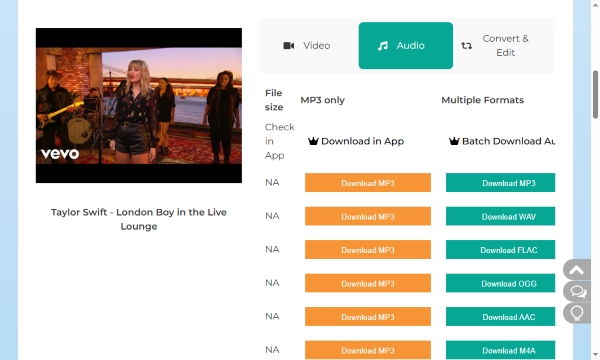
Pros and Cons of AceThinker Free YouTube to FLAC Converter
Simple and beginner-friendly interface;
No software installation or account required;
Supports both YouTube and YouTube Music
No playlist or batch download support;
Often redirects users to download desktop software;
May re-encode audio;
Premium features require a paid license
3. Cutyt
Cutyt is also a lightweight online YouTube to FLAC downloader that focuses on speed and simplicity. It focuses on a "one-click" conversion approach, making it one of the fastest options for users on both desktop and mobile browsers.
Website: https://www.cutyt.com/yt-flac
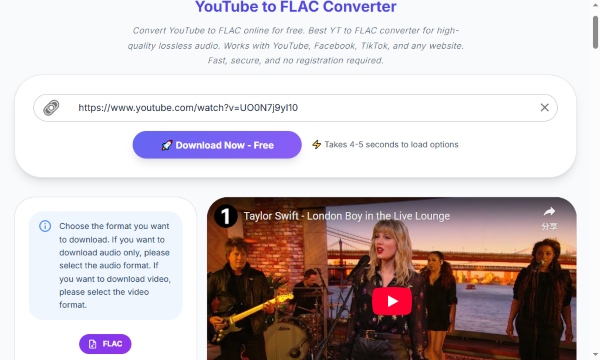
Steps to Download YouTube to FLAC Online for Free with Cutyt
Step 1. Copy the URL of the YouTube video from the YouTube website.
Step 2. Go to the Cutyt YouTube to FLAC page and paste the link into the input field.
Step 3. Click Download Now - Free to analyze the video link.
Step 4. Then click FLAC button to download the FLAC file once it is ready.
Pros and Cons of Cutyt
Simple and beginner-friendly interface;
Fast conversion speed;
Fewer ads compared to many other online converters
Limited advanced audio settings;
No playlist download support;
No metadata customization
4. Evano
Evano is another free online YouTube to FLAC converter designed for quick, one-click conversions. It supports common browsers and does not require user registration.
Website: https://evano.com/youtube-to-flac
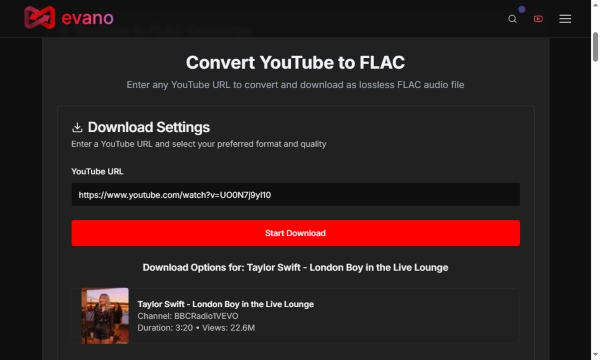
Steps to Convert YouTube to FLAC Online with Evano
Step 1. Copy the YouTube video link you wish to convert.
Step 2. Visit the Evano YouTube to FLAC converter page.
Step 3. Paste the URL into the converter box, and click the red Start Download button.
Step 4. After the analysis finishes, select FLAC as the output format and click Download.
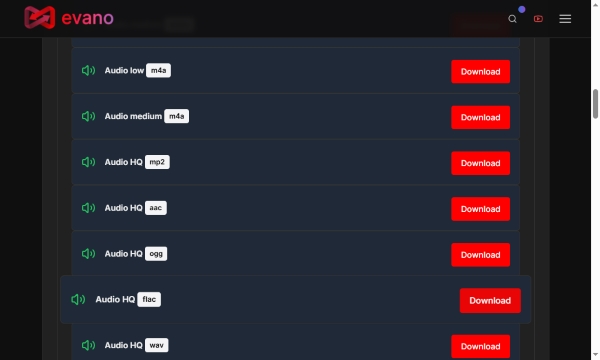
Pros and Cons of Evano
Clean and simple interface;
No account or login required;
Supports multiple media formats (video and audio);
No ads
Playlist download not supported;
Requires a stable internet connection;
Download speed can be slow
5. 4KDownload
4KDownload also offers an online YouTube to FLAC conversion service and is known for its reliability. It supports multiple audio formats and is suitable for users who value basic but reliable conversions.
Website: https://4kdownload.to/en01/youtube-to-flac
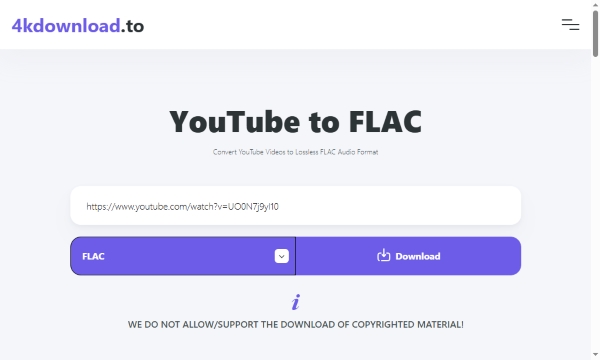
Steps to Download YouTube to FLAC Online for Free with 4KDownload
Step 1. Copy the YouTube video URL.
Step 2. Go to the 4KDownload YouTube to FLAC page.
Step 3. Paste the link on the 4KDownload page and select FLAC as the output format.
Step 4. Click Download to save the FLAC file to your device.
Pros and Cons of 4KDownload
Supports multiple audio formats;
Free to use;
Stable conversion process
No advanced audio customization;
Multiple redirects before download;
Playlist download not available
Part 4. Comparison of Best YouTube to FLAC Downloaders (Desktop & Online)
After reviewing the seven top YouTube-to-FLAC converters in the previous sections, you should now have a clear understanding of how those tools work. If you're still unsure which downloader is the best fit for your needs, the comparison table below will help you make a smarter choice.
| Tool | Type | Input Source | Output Format | Max Audio Quality | Cost | Download Speed | Batch Conversion? | Metadata Retention | Ads & Risks | Rating |
|---|---|---|---|---|---|---|---|---|---|---|
| AudFree Streaming Music Converter | Desktop | YouTube Music (DRM) | FLAC, WAV, AIFF, MP3, M4A, M4B | High (Lossless, up to 24-bit) | Paid | Very Fast (up to 30×) | ✅ | ✅ | ❌ None | ⭐⭐⭐⭐ |
| AudFree Audio Capture | Desktop | YouTube/YouTube Music (all audio) | FLAC, WAV, MP3, AAC, and more | High (Lossless capture) | Paid | Slow (Real-time) | ❌ | ✅ | ❌ None | ⭐⭐⭐⭐ |
| Loader.to | Online | YouTube/YouTube Music | FLAC, AAC, WAV, MP3, and more | Medium-High | Free | Medium | ✅ | ❌ | High | ⭐⭐⭐ |
| AceThinker | Online | YouTube/YouTube Music | FLAC, MP3, WAV, OGG, AAC | Medium | Free (Limited) | Slow-Medium | ❌ | ❌ | Moderate | ⭐⭐⭐ |
| Cutyt | Online | YouTube | FLAC | Medium | Free | Fast | ❌ | ❌ | Moderate | ⭐⭐⭐ |
| Evano | Online | YouTube | FLAC, MP3, WAV, OGG, AAC, MP4 | Medium | Free | Slow-Medium | ❌ | ❌ | Moderate | ⭐⭐⭐ |
| 4KDownload | Online | YouTube | FLAC, MP3, AAC, MP4, and more | Medium | Free | Slow-Medium | ❌ | ❌ | High | ⭐⭐⭐ |
In Conclusion
If you seek peak audio fidelity and a secure music archive, converting YouTube to FLAC is your best path forward. While online tools offer quick fixes, desktop-grade software remains the gold standard for preserving every detail of your favorite tracks. By choosing a dedicated converter, you bypass the limitations of browser-based tools and ensure your collection is preserved in the highest possible quality.

Staff Editor


