


Audible is one of the world's largest audiobook platforms, offering millions of titles across different genres. Meanwhile, Kobo eReaders have become popular among book lovers who prefer a dedicated reading device with audiobook support. This naturally raises a common question: Can you play Audible books on Kobo? Or, can you use Audible on Kobo eReader?
Unfortunately, Audible and Kobo belong to two different audiobook ecosystems. While Kobo supports audiobooks purchased from the Kobo Audiobooks store, it does not provide native support for Audible books or the Audible app. This means you cannot simply download an Audible title and open it directly on a Kobo eReader.
However, that does not mean you have to give up your Audible library. In this guide, we will explain whether Kobo works with Audible, how to prepare Audible books for Kobo offline listening, and the key differences between Kobo and Audible audiobook services.


Part 1. Can Kobo Play Audible Audiobooks? Compatibility Explained
The short answer is no, Kobo eReaders cannot directly play Audible audiobooks.
Although some Kobo devices support audiobook playback, this feature is designed for audiobooks purchased through Kobo's own audiobook platform. Kobo does not offer an official Audible app, and Audible titles cannot be transferred directly to a Kobo device like regular ebook files.
There are two main reasons behind this limitation.
Kobo Does Not Support the Audible App
Unlike smartphones and tablets, Kobo eReaders use a closed Linux-based operating system designed mainly for reading and Kobo's own services. You cannot install third-party apps on a Kobo eReader, such as Audible, Spotify, Apple Books, etc.
Therefore, users cannot simply install the Audible app, log into their account, and stream or download their purchased audiobooks.
Audible Books Use DRM Protection
Another important reason is that Audible audiobooks are protected by Digital Rights Management (DRM). When you download a title from Audible, it is typically saved in the proprietary AA or AAX format, which includes encryption to prevent unauthorized copying or playback.
Because Kobo eReaders don't support Audible's authorization system, they can't recognize or decrypt these protected audiobook files. As a result, Audible books can't be transferred to or played on Kobo devices directly.
Here's a quick comparison between the two ecosystems:
| Feature | Audible | Kobo eReader |
|---|---|---|
| Audiobook Provider | Audible | Kobo Books |
| File Protection | ✅ | ✅ |
| Native Audible App Support | ✅ | ❌ |
| Kobo eReader support | ❌ | ✅ |
| Common Audio Formats | AA, AAX | Kobo-protected audiobook format |
| Offline listening | Audible app on supported devices | Kobo eReader and Kobo Books app |
If you've built up an Audible library and want to listen on a compatible Kobo eReader, you'll first need to remove the Audible restrictions by converting your AA or AAX files into a Kobo-compatible audio format, such as MP3. Once converted, you can transfer the files to supported Kobo devices for offline listening without relying on the Audible app.
See also: How to Download AAX to MP3
Audio playback is only available on Kobo models that support audiobooks and Bluetooth audio, such as the Kobo Sage, Kobo Libra Colour, Kobo Clara Colour, Kobo Clara BW, and Kobo Elipsa 2E. Older devices like the Kobo Clara HD, Kobo Aura, and most earlier Kobo eReaders don't include audio hardware, so they cannot play audiobooks regardless of the file format.
Part 2. How to Download Audible Books for Kobo with the Best Solution
To listen to Audible audiobooks on a Kobo eReader offline, you must first bypass two major roadblocks: the digital rights management (AA or AAX) encryption and incompatible file formatting.
A dedicated Audible converter can remove the DRM protection while preserving the original audio quality, chapter markers, and metadata, allowing you to enjoy your audiobooks on supported Kobo devices without the Audible app.
One reliable option is AudFree Audible Audiobook Converter. It converts Audible books to common formats such as MP3, M4A, M4B, FLAC, and WAV, making them compatible with Kobo as well as many other eReaders, music players, smartphones, and portable audio devices. Free up your purchased Audible library entirely!
AudFree Audible Audiobook Converter

- Convert Audible AA/AAX files to MP3, M4A, M4B, etc.
- Preserve original audio quality, chapter information, and ID3 tags
- Customize the output bitrate, sample rate, codec, and other audio settings
- Split large audiobooks into smaller chapters or segments
- Batch-convert multiple Audible titles at 100x for offline playback on Kobo and other devices
Steps to Convert Audible Books for Your Kobo
Since Kobo eReaders do not natively support Audible files, converting your books to standard MP3 is the most reliable way to get them offline. Follow these steps to prepare your audiobooks files:
- Step 1. Load Audible Audiobooks to AudFree Conversion List

- Launch AudFree Audible Audiobook Converter on your Windows or Mac computer. Sign in to your Audible account in the built-in Audible web player, browse your library, and click the floating '+' button to import the audiobooks you want to convert.
- Step 2. Set Output Parameters for Kobo eReader Audible Playback

- Click 'Menu > Preferences > Conversion' on Windows ('AudFree Audible Converter > Preferences > Conversion' on Mac), then select MP3 as the output format for the best Kobo compatibility. You can also adjust the bitrate, sample rate, codec, and channel settings if desired before saving your changes.
MP3 offers the widest compatibility across Kobo devices. If you're converting audiobooks for other players, you can also choose M4A, M4B, FLAC, or WAV.
See also:
• How to Convert AAX to M4B
• How to Convert Audible AAX to FLAC
- Step 3. Convert Audible Audiobooks for Kobo eReader

- Return to the main interface, go to Converting section, and click 'Convert'. AudFree will remove the Audible DRM and convert your selected titles at up to 100× faster speed while preserving the original chapters and metadata. Once finished, click Converted to locate the converted MP3 files on your computer.
Want to play your favorite music from Spotify, Tidal, or Apple Music offline on your Kobo as well? Look no further than the AudFree Streaming Audio Recorder. This lightweight yet powerful desktop application supports over 10 major streaming platforms, serving as a seamless bridge to record, convert, and transfer your music playlists directly to your Kobo device.
Part 3. How to Transfer Converted Audible Books to Kobo for Offline Listening
Now that you have DRM-free MP3 files, you might think the logical next step is to simply drag the MP3 folder onto your Kobo via a USB cable. While this works, the standard Kobo media player handles loose MP3 files poorly. It treats them like a scattered music playlist rather than a cohesive audiobook, meaning you lose standard features like cover art display and proper reading progress tracking.
To achieve a flawless, native-feeling audiobook experience on Kobo, it is recommended to use the .mp3z formatting trick.
Kobo actually has a hidden, dedicated audiobook player designed for side-loaded content, but it only activates if the files are packaged correctly. Here's whole steps to get it.
If you want a quick setup and don't mind a basic playback interface, you can skip the formatting trick entirely. Simply connect your Kobo eReader to your computer with a USB cable, transfer the Audible MP3 files directly into your local storage, and you are ready to listen offline.
Step 1. Place all the converted MP3 chapters of your Audible audiobook inside a single, dedicated folder on your computer. Make sure the files are named in strict numerical order (e.g., 01_Chapter.mp3, 02_Chapter.mp3) so the player knows exactly which order to follow.
Step 2. Right-click the folder containing your organized MP3s and compress it into a standard .zip file.
Step 3. Locate your newly created .zip file, right-click it, and select Rename. Change the file extension at the very end from .zip to .mp3z (e.g., rename Book.zip to Book.mp3z). Confirm any system prompt warning you about changing a file extension.
If you cannot see the extension, you must enable "File name extensions" in your Windows File Explorer View menu, or uncheck "Hide extension" in your Mac's Finder preferences.
Step 4. Connect your Kobo eReader to your computer via USB and tap 'Connect' on your eReader's screen. Open the mounted KoboeReader drive on your computer and drag-and-drop the .mp3z file directly into the main root directory.
Step 5. Safely eject the Kobo drive from your computer and unplug the cable after transfer. Once your library automatically refreshes, you will see your audiobook. When opened, it will bypass the basic music player and launch in Kobo's advanced Audiobook Player interface - complete with chapter skipping, a visual progress bar, and playback controls.
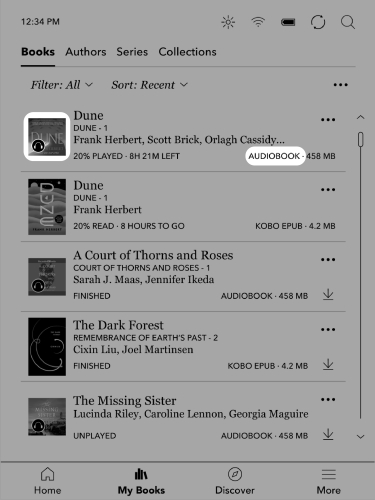
Part 4. Bonus Tip: Kobo vs Audible: Which Audiobook Service Is Better?
Both Kobo and Audible provide high-quality audiobook experiences, but they are designed for different types of listeners. If you're deciding between Audible and Kobo Audiobooks, the better choice depends on how you prefer to listen. Audible offers one of the world's largest audiobook libraries, while Kobo Audiobooks provides a more integrated experience for Kobo eReader owners.
Audible: Best for the Largest Audiobook Selection
Audible remains one of the most popular audiobook platforms worldwide in terms of catalog depth. It features millions of titles, high-budget Audible Originals, and a robust credit system. If you want instant access to the latest bestsellers on release day, Audible is the stronger choice.
Key advantages include:
- Millions of audiobook titles
- Exclusive Audible Originals
- Early access to many new releases
- Strong mobile listening experience
- Large global user community
Kobo Audiobooks: Best for Integrated Reading Experience
Kobo Audiobooks is the ideal alternative for those who prefer an integrated reading experience without leaving their E-ink ecosystem. It provides smooth library management and combines ebooks and audiobooks in one place, making it convenient for readers who prefer using Kobo devices.
Key advantages include:
- Seamless integration with Kobo accounts
- Easy management of ebooks and audiobooks together
- Kobo device compatibility
- Simple reading and listening experience
Kobo vs Audible: Quick Comparison
| Feature | Audible | Kobo Audiobooks |
|---|---|---|
| Audiobook Library | Millions of titles | Large and growing catalog (Less than Audible) |
| Exclusive Content | Large and growing catalog | Limited exclusives |
| Subscription Model | Limited exclusives | Purchase-based + Kobo Plus in supported regions |
| Device Experience | Best with Audible app | Best with Kobo ecosystem |
| Ebook Integration | Limited | Strong ebook + audiobook integration |
| Best For | Users seeking maximum audiobook choices | Kobo readers who want everything in one ecosystem |
See also: Kindle Unlimited vs Audible
The Verdict: If you are heavily invested in the Kobo hardware ecosystem, starting with Kobo Audiobooks offers a clean, seamless experience. However, if you prefer Audible's unmatched selection, utilizing AudFree Audible Converter lets you easily enjoy the best of both worlds - allowing you to back up your Audible purchases and listen to them flawlessly on your Kobo eReader.
Conclusion
So, can you use Audible on Kobo? The answer is no - not directly. Kobo eReaders do not support the Audible app, and Audible's DRM-protected AA/AAX files are not compatible with Kobo's audiobook system.
However, you can still enjoy your Audible library offline by converting Audible books into common audio formats with a reliable Audible converter. This gives you more flexibility to manage your audiobook collection and listen on compatible devices without being restricted by platform limitations.

Staff Editor


