


With more people looking for ways to download music from streaming and video platforms, online MP3 converters remain popular in 2026. Among them, BigMP3 has attracted attention for its simple interface, free access, and promise of fast MP3 downloads without installing software.
But is BigMP3 actually safe? Does it work reliably? And are there better alternatives available today?
In this comprehensive BigMP3 review, we'll examine its features, test its real-world performance, evaluate its safety and legitimacy, and compare it with a dedicated music downloader solution. By the end, you'll know whether BigMP3 is worth using in 2026.

Part 1. What Is BigMP3? Features, Supported Platforms, and How It Works
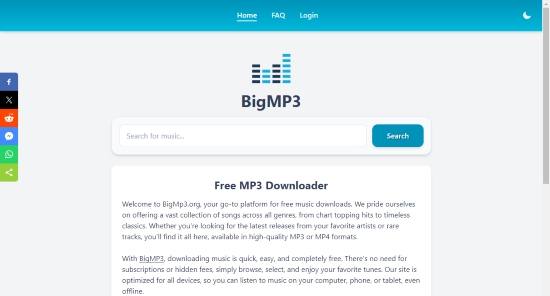
BigMP3 is a web-based audio conversion tool that claims to let users download music across various genres entirely for free. The process is straightforward: you simply enter a song name or artist into the search bar, select an output format, and the tool downloads the audio directly as an MP3 without requiring you to create an account.
Unlike traditional desktop downloaders, BigMP3 requires no software installation. Because everything happens directly in your browser, it is highly accessible from almost any internet-connected device.
BigMP3 at a Glance
| Category | Details |
|---|---|
| Official Website | https://bigmp3.org/ |
| Key Features | Free online conversion, browser-based operation, no installation required, simple UI |
| Output Format | MP3 audio |
| Supported Platforms | Windows PCs, Mac computers, Android phones, iPhones and iPads, Linux systems, Chromebooks |
How BigMP3 Works
One of the tool's biggest selling points is its frictionless workflow. Here is the step-by-step process:
Step 1. Navigate to the official BigMP3 website on your device.
Step 2. Search by entering the song name, artist, or relevant keywords to locate your desired track.
Step 3. Select the preferred file from the search results, along with your desired output format and quality.
Step 4. Download the converted MP3 file directly to your local storage.
Although BigMP3 previously offered a range of specific bitrate options (64 kbps to 320 kbps), our recent testing reveals that these selections are no longer available in the user interface. It remains unclear whether this is a temporary issue or a permanent removal.
Part 2. BigMP3 Review: Real-World Testing Results
When trying out free online tools, the actual day-to-day user experience is what matters most. To give you a fair and honest evaluation, we ran hands-on tests with BigMP3 across multiple devices, networks, and audio tracks. Here is how it truly performs.
1. User Interface
One of BigMP3's biggest strengths is its visual simplicity. The homepage presents a single search field and minimal clutter. There are no confusing menus or steep learning curves - even a first-time user will understand exactly where to type a song name within seconds.
Rating: 8/10
2. Conversion Speed
In our testing, performance varied wildly depending on the length of the audio file and server traffic. For short tracks, conversions usually finish within one to three minutes. However, during peak hours, the processing time slowed down noticeably. On several occasions, the conversion queue completely stalled out before finishing the job.
Rating: 6/10
3. Audio Quality
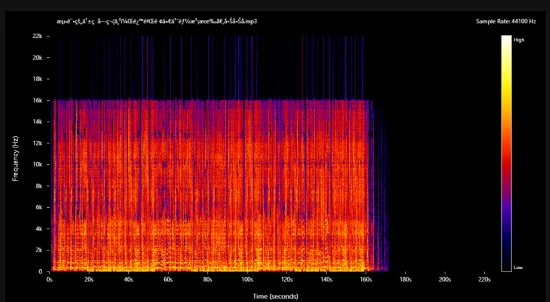
As mentioned earlier, BigMP3 has removed its specific bitrate selection tool (like 320kbps). Because of this, you are largely at the mercy of the default conversion. For casual listening in the car or on standard earbuds, the audio is acceptable. However, audiophiles will quickly notice a muddy sound. It lacks the crispness of true high-resolution files, making it a poor choice for anyone looking to build a high-quality local music library.
Rating: 5/10
4. Download Success Rate
A downloader is only as good as its ability to actually deliver the file, and unfortunately, this is where BigMP3 struggles heavily. Our tests revealed a surprisingly high failure rate. Many attempts resulted in errors or got permanently stuck in the conversion stage.
We observed occasional issues, including:
- Downloads freezing indefinitely at 0%
- "Server timeout" error messages
- The actual download link failing to appear after conversion
- Unexpected redirects to third-party spam websites instead of triggering the download
Rating: 4/10
5. Mobile Compatibility
Since BigMP3 is entirely browser-based, you don't need a dedicated app. It loads fine on both Windows and macOS browsers (like Chrome and Safari). However, the mobile experience is frustrating. Navigating pop-up ads on a small smartphone screen is difficult, and iOS users may find it slightly annoying to manually move the downloaded MP3s from the "Files" app into their Apple Music library.
Rating: 6/10
6. Ads and Pop-ups
This is the most concerning aspect of the tool. Like many free online converters, BigMP3 relies heavily on aggressive advertising to keep its servers running. During our tests, clicking anywhere on the page frequently triggered invisible "pop-unders" or redirected our browser to unrelated, sometimes sketchy websites. There are also deceptive ads designed to look like the real "Download Now" button. We highly recommend using a strict ad-blocker (like uBlock Origin) if you decide to use this site.
Rating: 3/10
7. Metadata Support and Ease of Use
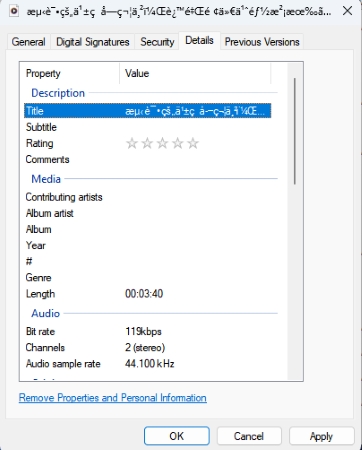
Although downloading music is relatively straightforward, BigMP3 does not consistently preserve original ID3 tags. Missing album artwork, artist information, or track details were common in our tests.
Users who maintain organized music libraries may need to manually edit metadata after downloading, which adds extra time to the workflow.
Rating: 3/10
Overall Testing Score
| Category | Score |
|---|---|
| User Interface | 8/10 |
| Conversion Speed | 6/10 |
| Audio Quality | 5/10 |
| Download Reliability | 4/10 |
| Mobile Compatibility | 6/10 |
| Ads and Pop-ups | 3/10 |
| Metadata Support | 3/10 |
| Overall | 5/10 |
Based on our testing, BigMP3 can handle occasional music downloads with a relatively simple workflow. However, inconsistent reliability, intrusive advertising, and limited metadata support make it less suitable for users who frequently download playlists or manage large offline music libraries.
At the end of the day, BigMP3 is fine if you just need to grab a quick track now and then. However, if you are looking for stable batch downloads, proper metadata tagging, and a clean, ad-free experience, a dedicated desktop solution is a far better choice. Feel free to skip straight to Part 5 to find the alternative that best fits your music setup.
Part 3. Is BigMP3 Safe and Legit?
For anyone trying out a free online converter, safety is usually the biggest concern. Before you start downloading files to your personal computer or phone, it is important to understand exactly what you are clicking on.
Is BigMP3 Safe?
The short answer: Yes, but you need to be careful.
During our testing, we found that the BigMP3 website itself does not automatically install malicious software or force background malware downloads. The core tool works as intended. However, like most free online downloaders, it monetizes its traffic through aggressive advertising networks.
If you are not paying close attention, you will likely encounter these common traps:
- Deceptive Download Buttons: Fake buttons designed to look like the real download link, which actually lead to third-party offers.
- Pop-unders and Redirects: Clicking anywhere on the page might suddenly open a new tab filled with spam or irrelevant websites.
- Misleading Alerts: Fake "update your browser" or "your computer is infected" warnings generated by the ad network.
How to stay safe while using BigMP3:
- Run an Ad-Blocker: We highly recommend using a reliable extension like uBlock Origin to strip away fake buttons and block redirect scripts.
- Watch Where You Click: Only click the final text link that appears after your file is converted.
- Keep Antivirus Active: Ensure Windows Defender or your preferred antivirus software is running in the background just in case a redirect slips through.
- Check the File Extension: Always make sure the file you downloaded ends in .mp3. If it ends in .exe or .zip, delete it immediately.
Is BigMP3 Legit?
BigMP3 is a functional web tool, meaning it is not a "scam" site - it actually delivers the audio files it promises.
However, when it comes to legality, the waters are a bit murky. The legitimacy of using a tool like this depends entirely on what you are downloading. Downloading copyrighted music without paying for it or having proper authorization is illegal in most regions.
We always advise users to respect copyright regulations. Tools like BigMP3 are best used for downloading royalty-free music, public domain audio, or backing up content you personally own or have explicit permission to save.
Part 4. BigMP3 Pros and Cons: Is It Right for You?
Before deciding to use BigMP3, it helps to weigh its immediate benefits against its long-term limitations. Like most free online tools, it offers short-term convenience at the cost of stability and features.
100% Free to Use: No subscription fees, paywalls, or hidden costs;
Zero Installation Required: Runs entirely in your web browser, preserving your device's local storage and memory;
Universal Compatibility: Works across all modern operating systems (Windows, macOS, iOS, Android, Linux, and ChromeOS);
Fast Setup Process: No account registration or sign-ins are required - just open the site, enter the keywords, and start.
Invasive Advertising: Heavy reliance on aggressive ad networks that trigger frequent pop-unders, redirects, and deceptive download buttons;
Unreliable Server Performance: Occasional conversion freezes, download link dropouts, and frustrating server timeouts;
Missing Quality Controls: While the site markets multiple bitrate selections (up to 320kbps), the current user interface offers no actual quality settings;
Security Red Flags: The sketchy behavior of the underlying ad networks can cause some sensitive antivirus programs to flag your downloads;
No Library Management: Lacks essential features like bulk/playlist processing and strips away critical ID3 tags (album artwork, artist metadata), leaving you with disorganized files.
Who Should Use BigMP3 and Who Should Avoid It?
To make your decision easier, we have broken down exactly who can get away with using this tool and who should steer completely clear.
Use BigMP3 if you are a:
- Casual Listener: You just want a quick, one-off track for background music or a basic ringtone.
- Minimalist User: You are on a temporary or shared device and cannot (or do not want to) install desktop software.
- Rare Downloader: You only harvest music once in a blue moon and do not mind dealing with a few ad pop-ups to get a free file.
Avoid BigMP3 if you are a:
- Audiophile: You care about high-fidelity sound, true bitrates, and uncompressed audio dynamics.
- Music Collector or Curator: You take pride in maintaining a pristine local media library (using tools like Plex, Roon, or foobar2000) and need files with intact ID3 tags and album art.
- Power User / DJ: You need to batch-download entire albums or playlists with guaranteed reliability and zero download failures.
Part 5. Need More Than BigMP3? A Reliable Alternative for Music Downloads
While web-based tools like BigMP3 are convenient for an occasional quick fix, most music lovers eventually outgrow their limitations. If you are tired of failed links, aggressive ad redirects, and muddy audio, a dedicated desktop solution will completely change how you build your music collection.
A highly reliable choice is AudFree Streaming Audio Recorder (also known as AudFree Streaming Music Converter). Unlike unstable browser downloaders, AudFree is a specialized desktop utility designed for users who require pristine sound quality, flawless library organization, and consistent performance.
Why AudFree Outperforms Web-Based Converters BigMP3
| Feature | BigMP3 | AudFree Streaming Audio Recorder |
|---|---|---|
| Audio Quality | Default compressed MP3 (Often fake or upscaled) | True Lossless Quality (Up to 24-bit studio sound) |
| Export Formats | MP3 only | MP3, FLAC, WAV, AIFF, M4B, M4A |
| Metadata & ID3 Tags | Stripped or broken (Shows as "Unknown Artist") | 100% Preserved (Art, artist, album, track numbers, etc.) |
| Batch Processing | No (One manual track at a time) | Yes (Save multiple tracks simultaneously) |
| Safety & Ads | High risk of sketchy pop-ups and redirects | 100% Safe, clean, and ad-free desktop environment |
| Platform Compatibility | Browser dependent | Windows and macOS |
| Service Support | Unknown source and numbers | Over 10 music services (Spotify, Apple Music, Tidal, etc.) |
| Conversion Speed | Slow to moderate (Varies by server load) | Fast and consistent |
For users who care about maintaining a well-organized music library, features such as metadata preservation and batch processing can save considerable time compared to online converters.
How to Download High-Quality Audio with Full ID3 Tags via AudFree
- Step 1. Set Output Format As Needed

- Install and launch AudFree Streaming Audio Recorder on your Windows or Mac computer. Once you have activated the software with your license key, navigate to 'Menu > Preferences > Conversion'. From here, select your desired output format (such as MP3 or FLAC) and adjust the bitrate, sample rate, and audio channels to your liking. Finally, switch over to the 'Output' tab to choose your saving folder and ensure the option to retain ID3 tags is enabled.
- Step 2. Add Tracks to Conversion List

- Select the supported streaming service you want to use and sign in through the built-in web player, TIDAL for example. Browse your favorite songs, albums, or playlists, then click the '+' button to import them into the conversion queue. This makes it easy to prepare multiple tracks for downloading at once rather than processing them individually.
See also: How to Listen to Tidal Offline
- Step 3. Start Conversion Process

- Navigate to the Converting section and click 'Convert'. AudFree will process the selected tracks and save them to your chosen output folder. Once completed, you'll have local audio files that can be transferred to smartphones, USB drives, media players, car audio systems, or other offline listening devices.
Who Should Choose AudFree Streaming Audio Recorder?
AudFree may be a better fit if you:
- Frequently download playlists or large music collections;
- Want more control over output quality and file formats;
- Prefer complete metadata and album artwork;
- Need a more stable workflow without ads or broken download links.
Part 6. FAQs About BigMP3
Why Does BigMP3 Get Stuck at 0%?
BigMP3 can get stuck at 0% due to temporary server overloads, an unstable internet connection, or sudden code changes on the source streaming platform that temporarily break the site's scraping script. In most cases, refreshing the page, clearing your browser cache, or switching to an Incognito window can resolve the issue.
But if you are constantly running into download freezes and want a much smoother, faster experience, a dedicated desktop downloader like AudFree Streaming Audio Recorder is a far more dependable option.
Why Are BigMP3 Downloads Marked as Suspicious?
Some antivirus programs flag files downloaded from online converters because these sites often use redirects, pop-up ads, or dynamically generated download links. A warning doesn't necessarily mean the file is harmful, but it's always a good idea to scan downloads with security software before opening them.
Does BigMP3 Work on Mobile Devices Without a Computer?
Yes. Because BigMP3 is entirely browser-based, it functions natively on most Android phones, iPhones, and tablets. You can simply search for a song or artist keyword, convert the track, and save it directly through your mobile browser without ever needing a PC.
What Are the Best Ad-Free Online Alternatives to BigMP3?
If you're looking for alternatives to BigMP3, popular options include MP3 Juice, Squid WTF, YTMP3, YT1s, and other web-based audio converters. However, most free online converters display some level of advertising. For a cleaner, more reliable experience, many users prefer dedicated desktop downloaders (like AudFree) that offer faster conversions, higher audio quality, and fewer interruptions.
Part 7. Final Verdict: Is BigMP3 Worth Using?
For occasional single-track downloads, BigMP3 can still be a convenient option. It requires no installation and works directly in a web browser, making it suitable for quick, one-time conversions.
However, if you regularly save music for offline playback or want a more dependable long-term solution, a dedicated desktop tool like AudFree Streaming Audio Recorder generally provides a smoother experience, better audio quality, and greater flexibility.

Staff Editor


