


Podcasts are great for learning, entertainment, and keeping up with your favorite creators. However, streaming isn't always convenient when you're traveling, commuting, or using a device without a reliable internet connection. That's why many listeners want to download podcasts as MP3 files for offline playback, easier file management, and compatibility with portable music players.
In this guide, we'll walk you through three practical ways to download podcasts to MP3, explain how each method works, and help you choose the right option for your listening needs.

Part 1. Can You Download Podcasts as MP3 Files?
Yes, you can download many podcasts as MP3 files, but the process depends on where the episodes are hosted and which audio formats are available.
Some podcast creators provide direct download links on their websites, while others distribute episodes through RSS feeds that contain links to audio files. These are often the easiest sources to access because you can save the original episode without relying on a dedicated listening app.
An RSS feed is a web link containing essential podcast metadata, including episode titles, publication dates, show notes, and direct audio file URLs. Podcast directories use these feeds to syndicate content across various listening apps. When a podcast's audio URL is publicly accessible, you can often right-click and download the MP3 file directly through your web browser (for example, https://example.com/podcast-feed.xml or https://example.com/podcast-feed.xml).
Besides, streaming services introduce another limitation when providing podcasts. For example, Spotify and Apple Podcasts offer in-app download features for offline listening, but those downloads generally remain within their respective apps rather than becoming standalone MP3 files that you can freely move to other devices.
If you want to transfer an episode to a USB drive, an older MP3 player, or another audio device, you'll need an accessible audio file in a compatible format. Here are three ways to get started:
- Official websites and RSS feeds: Best when the podcast publisher provides downloadable audio files.
- AudFree Streaming Audio Recorder: A desktop option for saving a wide range of podcasts from across the web as local audio files, without signing in to a podcast account for its dedicated podcast feature.
- PodcastToMP3: A free online option for searching for supported podcasts and downloading individual episodes without installing software.
Part 2. How to Convert Podcast to MP3 from Official Websites or RSS Feeds
If you prefer a clean and software-free approach, the most direct route is to get the MP3 file straight from the creator's own distribution channels.
Simply put, if a podcast publisher provides a public RSS feed or direct audio downloads, you may be able to save episodes as MP3 without using any additional downloader. This method is particularly useful for independent podcasts and shows that make their episodes available on their official websites.
Option A. Save Podcast MP3 Files Directly from the Official Website
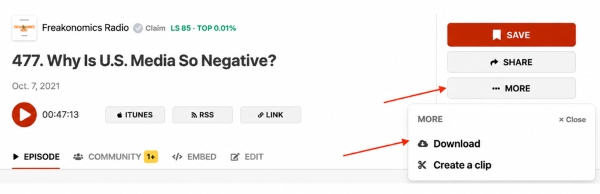
Step 1. Head over to the podcast's official site and navigate to your chosen episode's page.
Step 2. Look for an explicit "Download", "Download Episode", or a 3-dot menu (...) on the embedded audio player (for instance, on NPR's Planet Money episode pages, you'll often find a small download button right below the audio player).
Step 3. Right-click the button or link to download it and choose a folder on your device.
Option B. Download Podcasts as MP3 from RSS Feeds (If No Download Button Exists)
When a website only streams audio without a visible download button, the episode is almost always hosted on an accessible public RSS feed.
Step 1. Look for an RSS link or icon on the show's official website (usually located in the site footer or listed alongside Apple/Spotify subscription badges as an RSS icon).
You can check this RSS Directory to find RSS feeds for popular shows and see if your favorites are available.
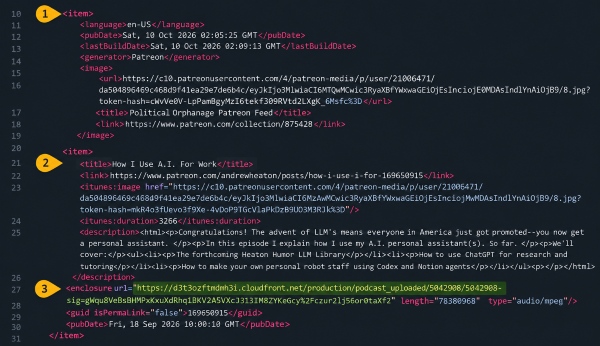
Step 2. Open the RSS URL in your browser, and you will see a page of structured code/text.
Step 3. Press "Ctrl + F" (or "Cmd + F" on Mac) and search for .mp3 or the keyword enclosure.
Step 4. Copy the direct media URL, paste it into a new browser tab, and press "Ctrl + S" or use the available download option to save the MP3 directly to your computer. If the link downloads the file automatically, check your Downloads folder.
Not all podcasts are distributed as MP3 files. Some publishers stream in formats like M4A or AAC. If your target playback device or media player only supports MP3, you may need to convert these files before playing them.
This is a good starting point if you only need a few episodes from a podcast with publicly accessible audio. If you regularly download shows from multiple sources, however, a dedicated desktop tool may offer a more convenient workflow.
Audio comes straight from the publisher's verified CDN;
Works natively within any web browser without installing third-party software;
Delivers the original audio file prepared by the show's producers
Not every podcast provides a public RSS feed or direct download link;
May need a separate converter if the original file isn't MP3;
Manually downloading individual episodes can be frustrating, especially when you want to save an entire show season at once
Part 3. How to Download Podcast as MP3 with AudFree Streaming Audio Recorder
If you want to download podcasts from different websites and streaming sources rather than search for individual RSS feeds, AudFree Streaming Audio Recorder offers a more centralized solution. Its newly introduced podcast downloading feature is designed to help you save a wide range of podcasts from across the web as local audio files (e.g., MP3, M4A, FLAC, WAV, etc.), making offline listening and device transfers more convenient.
Unlike methods that rely on finding a public RSS feed, AudFree offers a dedicated workflow for podcast downloads. You also don't need to log in to a podcast account to use this feature.
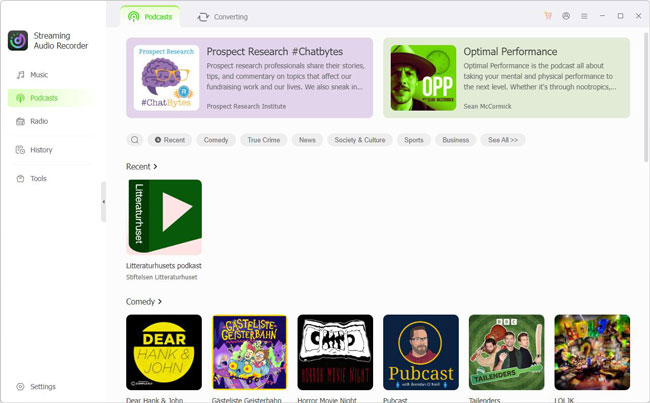
Simply launch the application to search for your show and select your preferred download format. This streamlines your workflow when gathering episodes across multiple platforms, saving you from constantly switching between websites or logging into separate services.
The tool also works seamlessly across other major platforms, making it easy to download songs and podcasts from Spotify, TIDAL, SoundCloud, YouTube Music, and beyond.
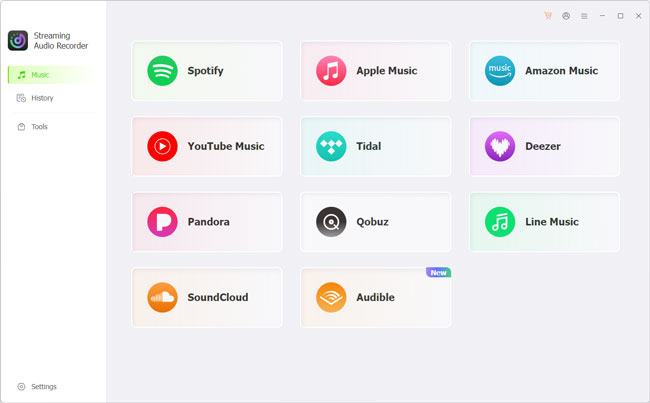
Its activated version unlocks all available features, including its separate streaming-service tools, so you can use the same application for different audio needs.
Step 1. Download AudFree Streaming Audio Recorder from its official website and install it on your computer. Launch the program and navigate to its dedicated podcast section.
Step 2. Search for a specific title or browse through the intuitive interface to locate your preferred show. Once found, select the podcast content you want to download (e.g., Good Hang with Amy Poehler).
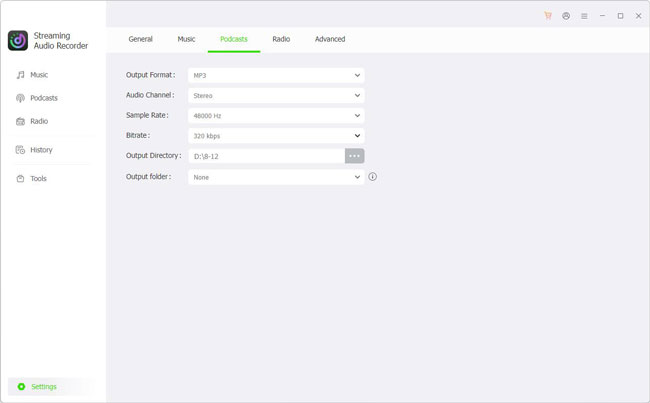
Step 3. Navigate to "Settings > Podcast" to adjust your export settings. MP3 is the default format, though you can also modify the audio bitrate and sample rate for higher quality.
See also: How to Download Spotify Podcast to MP3
Step 4. Next, load the selected episode and start the download. Once processing is complete, locate the saved audio file in the output folder.
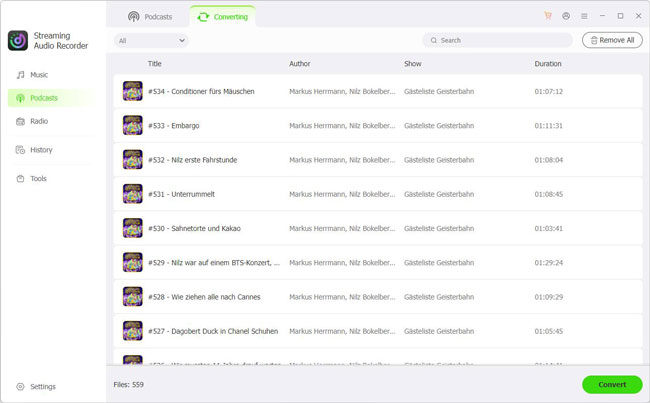
Now, you can play the podcast MP3 downloads using a compatible local media player or transfer them to another device. For example, you could copy episodes to a USB drive for your car, organize them in a local audio library, or move them to a portable music player for offline listening.
Supports multiple major music streaming services;
Accesses a wide range of podcasts from across the web;
No podcast account login is required for the dedicated podcast feature;
Saves compatible audio files locally for offline listening;
Offers a wide variety of popular audio formats for different device
Requires installing desktop software;
Some exclusive or restricted podcasts may not be available for direct download;
Full conversion requires license activation
Part 4. How to Download Podcast to MP3 Free Online with PodcastToMP3
If you prefer not to install software, PodcastToMP3 is a free online tool that lets you search for podcasts and download supported episodes directly from their original sources. It offers a straightforward way to download podcast MP3 files through your browser, without creating an account. It is particularly convenient when you only need a few episodes as MP3.
Site: https://podcasttomp3.com/
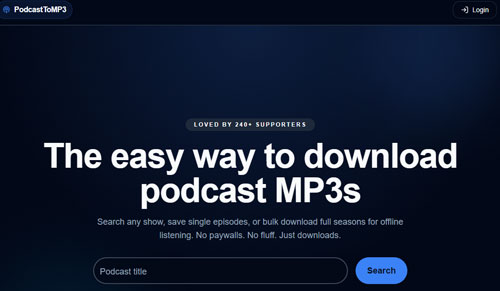
Step 1. Visit the PodcastToMP3 web interface. You will find a prominent search bar on the homepage - no software installation or account registration is required to start searching.
Step 2. Enter the show's title or keyword into the search bar and select the correct match from the search results.
PodcastToMP3 operates by indexing publicly available RSS feeds and retrieving media directly from original publisher servers rather than hosting files locally. As a result, download availability depends on active server links, and successful retrieval cannot be guaranteed for every show.
Step 3. Select the episode you want to download and click "Download". Once the download is complete, check the file extension to confirm that the audio is in MP3 format before transferring it to your preferred device.
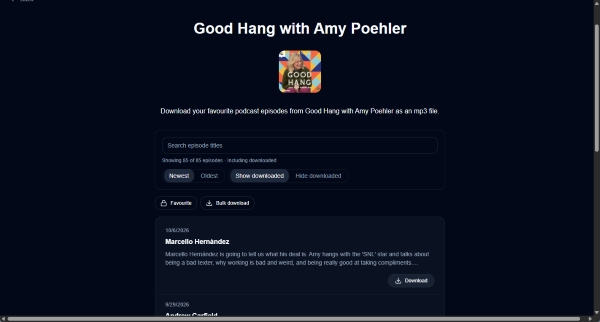
If the audio opens in a new browser tab instead of downloading automatically, open the audio player's three-dot menu and select Download, if available. This provides an alternative way to save the file.
Free to use without a subscription;
No account or software installation required;
Simple search-and-download workflow;
Supports bulk downloading (up to 100)
Availability depends on the podcasts indexed by the service and their source links;
Less suitable when you need content that isn't listed or accessible;
The tool may occasionally fail to get MP3 podcast downloads
Part 5. Which Podcast to MP3 Method Should You Choose?
The best way to download podcasts as MP3 files depends on where your favorite shows are published, how often you download episodes, and whether you want to install software. Here's a quick comparison of the three methods.
| Feature | Official Website / RSS | AudFree Streaming Audio Recorder | PodcastToMP3 |
|---|---|---|---|
| Cost | Free | Activation required for full access | Free |
| Installation | ❌ | ✅ | ❌ |
| Bulk download | ❌ | ✅ | ✅ |
| Account login | ❌ | ❌ | ❌ |
| Podcast coverage | Publicly accessible feeds and episodes | Wide range of streaming platforms & web shows | Shows available via indexed source links |
| Download speed | Fast (Direct server connection) | High-speed batch processing | Fast (Direct web stream extraction) |
| MP3 output | Only if the source provides MP3 | ✅ | ✅ |
| Output format | Original feed format (MP3, M4A, AAC) | MP3, FLAC, WAV, AIFF, M4A, M4B | MP3 |
| Success rate | High | Very High | Moderate to High |
| Best for | Quick single-episode grabs from public feeds | High-quality batch archiving & flexible audio conversion | Quick, browser-based downloads |
• Choose the official website or RSS feed if the episode is publicly available and you want to download it without installing software. It's the simplest option when the original audio is already in MP3 format.
• Choose AudFree Streaming Audio Recorder if you want a more centralized way to find and download supported podcasts as local audio files. Its dedicated Podcast feature doesn't require a podcast platform login and supports MP3, FLAC, WAV, and more output. It can be useful for building a local audio library, especially when you want to listen offline or transfer files to other devices.
• Choose PodcastToMP3 if you prefer a free, browser-based option for supported shows. It advertises bulk downloads, but results depend on the podcasts and source links available through the service.
Part 6. FAQs About Downloading Podcasts as MP3 Files
Can I download podcast as MP3 for free?
Yes. You can download podcasts for free whenever publishers offer publicly accessible MP3 files or RSS feeds. Free web tools like PodcastToMP3 also allow you to download supported episodes without a paid subscription. Alternatively, free open-source software like Audacity can record podcast audio directly to MP3, though real-time recording is significantly slower than direct downloading.
See also: How to Record Audio from Podcast
Is it legal to download podcasts as MP3 files?
It depends on the source, the podcast's licensing terms, and how you use the downloaded audio. Before recording, converting, or redistributing content, check the publisher's terms and applicable copyright laws. Avoid sharing or commercially using copyrighted recordings without permission.
Can I convert The Joe Rogan Experience podcast as MP3?
While The Joe Rogan Experience is available on Spotify for offline playback within the app, Spotify does not provide direct MP3 file downloads. To obtain standard MP3 audio files for external devices, tools like PodcastToMP3 or desktop audio recorders can retrieve and convert episode streams into playable MP3 files.
What about Spotify and Apple Podcasts to MP3?
First, check whether the podcast publisher provides a direct downloadable audio file or a public RSS feed. Alternatively, you can search for the show on PodcastToMP3, or use the streaming download feature in AudFree Streaming Audio Recorder. For Spotify podcasts, simply select the Spotify module within the software, log into your free account, and begin downloading your episodes as local MP3s.
See also: How to Listen to Apple Music Podcast
In Summary
Downloading podcasts as MP3 files gives you more flexibility to listen offline, organize your favorite episodes, and enjoy audio on devices that don't support your usual streaming apps. If a podcast offers direct downloads or a public RSS feed, you can often save its episodes without additional software. For quick online downloads, PodcastToMP3 provides another convenient option.
If you want to download podcasts from a wider range of sources, AudFree Streaming Audio Recorder offers a dedicated podcast feature that doesn't require a podcast account login. While some exclusive shows may not be directly supported, it provides another way to build a local podcast collection for offline listening. Choose the method that best fits your favorite shows, device compatibility, and downloading needs, and remember to respect content creators' rights.

Staff Editor


