


Apple Music remains a titan in the streaming world, boasting a library of over 100 million songs, live broadcasts like Beats 1, Apple Music exclusives, and expertly curated playlists. While it serves over 100 million subscribers globally, many users - both new and existing - are constantly on the hunt for ways to bypass the monthly fee or get a free apple music code.
In this guide, we'll explore proven methods to get Apple Music free trials and promo codes ranging from 1 to 6 months. While these trials are typically time-limited, we'll also reveal a "bonus" strategy to keep your Apple Music library accessible forever. Let's dive in.


Part 1. Is Apple Music Free?
No, Apple Music does not offer a free tier. Unlike services like Spotify or YouTube Music, which provide ad-supported free versions, Apple Music is a premium, ad-free platform. To access its library of over 100 million songs, playlists, and exclusive content, you must have a paid subscription.
Currently, Apple Music offers the following subscription plans:
| Plan Type | Monthly Price | Key Features |
|---|---|---|
| Student | $5.99 | Full access for verified students; special individual plan for students |
| Individual | $10.99 | Standard listening experience for one user, including the whole catalog, lossless quality, etc. |
| Family | $16.99 | Access for up to six people with individual accounts |
However, there's good news for new users. Apple Music provides free trial offers, allowing you to enjoy full access to its entire music library and features for up to 6 months, depending on the promotion. In the following sections, we'll explain how to get an Apple Music free trial step by step.
Once the free trial ends, Apple Music will automatically charge you unless you cancel the subscription in advance. If you cancel, any downloaded Apple Music tracks will become unavailable after 90 days, since they are protected streaming files.
So, is there a way to keep Apple Music songs forever, even after your trial or subscription ends? The answer is yes. In Part 8, we'll introduce a one-time solution, AudFree Apple Music Downloader, which allows you to download Apple Music tracks as local files and keep them permanently, even after canceling your Apple Music subscription.
Part 2. How to Get Apple Music 6 Months Free Trial
Several official and third-party promotions offer a 6-month free trial for Apple Music. While some of these offers may have expired, we've compiled both current and past options in case they're renewed, ranging from official offers to those from Apple partners, 6 in total.
1. Buy New Apple Devices to Get Apple Music Free for 6/3 Months [For New Users]
As of 2026, Apple officially offers free Apple Music trials bundled with new Apple device purchases. Depending on the device category, you can receive either 6 months or 3 months of Apple Music at no extra cost.
1.1 The 6-Month Apple Music Free Trial (Audio Devices)
Apple provides a longer 6-month free Apple Music trial when you purchase selected audio products. This promotion is designed to showcase Apple Music features like Spatial Audio and Lossless Audio on supported hardware.
✅ Eligible Devices: AirPods Pro, AirPods (2nd & 3rd gen), AirPods Max, HomePod, HomePod mini, and most Beats products (Beats Fit Pro, Studio Buds, Solo Pro, etc.).
✅ Condition: You must pair the device with an iPhone or iPad running the latest iOS. The offer usually appears in the Apple Music app within 90 days of the first pairing.
✅ User Type: New Apple Music subscribers only.
1.2 The Apple Music 3 Months Free Trial (Main Apple Devices)
When you purchase a new primary Apple device, Apple typically offers a 3-month Apple Music free trial. While shorter than the audio-device offer, this promotion is available on a much wider range of products.
✅ Eligible Devices: Any new iPhone, iPad, Mac, Apple TV, or Apple Watch capable of running the latest OS.
✅ Condition: Activate your new device and open the Apple Music app. You have 90 days from activation to claim it.
✅ User Type: New subscribers (though occasionally "qualified returning subscribers" may see a 1-2 month version of this offer).
• These device-based trials cannot be stacked with other Apple Music free trials.
• Only one device-based offer can be redeemed per Apple ID.
• After the trial ends, Apple Music automatically switches to a paid subscription unless canceled.
2. How to Get Free Apple Music for 6 Months via Back-to-school Season [For New Users]
Apple has announced a limited-time promotion for students who have not yet subscribed to Apple Music. The students, in the US, UK, Canada, and Japan, can get a 6-month free Apple Music hack. The promotion is aimed at students enrolled in a bachelor's degree, graduate degree, or equivalent higher education program at a university or college (US only). Eligibility in Canada includes post-secondary students, and in Japan, students in junior colleges, technical colleges, and special programs are also eligible.
Typically, a 6-month Apple Music student discount will be offered at the start of the back-to-school season. You can bookmark the UNiDAYS Apple Music promotion page and check the activity when the Apple Back-to-school promotion starts.
To claim your Apple Music 6-month free trial, you'll need to verify your student status through UNiDAYS. The offer is available for new users only.
How to Use Apple Music Student 6 Months Free
Step 1. Open the Apple Music app or iTunes and tap "Listen Now" or "For You".
Step 2. Go to "Free Trial" and select "College Student", then tap "Verify Eligibility".

Step 3. Follow the instructions to verify your registration on the UNiDAYS website. Once verification is complete, log in to your Apple account.
Step 4. Confirm your billing information and add a valid payment method.
Step 5. Tap "Join" to receive a free 6-month student subscription to Apple Music.
3. How to Get Free Apple Music For 6 Months via Verizon [For New/Returning Users]
Verizon has included Apple Music in its Play More or Get More (Do More) Unlimited smartphone lines. Subscribers to Verizon Wireless' top-tier 5G Get More (Start) Unlimited plan ($55/month per line) will receive a free 6-month subscription to Apple Music. Meanwhile, Verizon's cheaper 5G Play More Unlimited and Do More Unlimited plan ($45/month per line) will also give you Apple Music free trial for 6 months. This includes new and returning users.

How to Redeem 6 Months Apple Music Free Trial via Verizon
Step 1. Visit the campaign website of Verizon and Apple Music.
Step 2. Select a line from 'Get More Unlimited plan' and 'Play More plan'.
Step 3. You will receive a text message with a link to download or open Apple Music.
Step 4. After the steps, you will get Apple Music for free for 6 months.
4. How to Get Apple Music 6 Months Free Trial via EE [For New/Existing Users]
EE serves as a British mobile network operator and internet service provider. It is offering an Apple Music 6-month free trial for all new and existing customers in UK. This offer is available to consumers and small business customers who have been on an EE monthly payment or SIM card phone plan for at least 12 months. They will pay for your data for 6 months, so you can stream and download music without using your data allowance.
If you're already an Apple Music subscriber, cancel your current subscription before claiming this free Apple Music for 6 months from EE.

How to Claim 6 Months Free Apple Music via EE
Step 1. Download the My EE app on your device.
Step 2. Open My EE and navigate to "Plan & Add-ons".
Step 3. Select the "Add-ons" option and then "Get more add-ons".
Step 4. Follow the instructions to sign up.
Step 5. You will receive a text once your Apple Music free subscription begins.
5. How to Get Apple Music Free for 6 Months via Rogers [For New/Existing Users]
Rogers is offering customers 6 months of Apple Music for free. The offer is available to new and existing customers on 20GB and 50GB unlimited plans. It should be noted that customers who is currently on other promotional plans do not qualify. Besides, if you're an existing Apple Music user, you need to cancel your current subscription first. You can check if you are eligible for the offer on the Rogers website.

How to Use 6 Months Free Apple Music
Step 1. Go to Roger's website and subscribe to an eligible plan.
Step 2. After subscribing, you will receive a text message on how to subscribe to Apple Music.
Step 3. Follow the link in the text message to the subscription page and get Apple Music free 6 months.
If you have any problems about this 6-month Apple Music free trial promotion from Rogers, check out their official FAQ webpage here. Or you can start a live chat and ask their customer support directly!
6. [Expired] How to Subscribe to Orange Mobile for Apple Music 6 Months Free Trial [For New/Existing Users]
Orange Spain is a famous telecommuication company offering mobile network service for users. It offers 6 months free Apple Music as a gift to its customers in Spain, whether you're new or existing Apple Music subscribers. You can cancel at any time during the 6-month period but will still enjoy the full 6-month free Apple Music trial.
So, if you're customer of Orange Spain, check their official promotion page, and click "Quiero disfrutar de Apple Music" to redeem the 6-month Apple Music free trial. If you're not an Orange customer, you can also get the offer by clicking the "Quiero comprar un dispositivo Apple con Orange" to purchase Apple devices with Orange.

How to Claim Apple Music 6 Months Free via Orange Mobile
Step 1. Visit the official Orange Spain promotion page.
Step 2. Click "Quiero disfrutar de Apple Music" to redeem your free trial.
Step 3. If you're not an Orange customer, click "Quiero comprar un dispositivo Apple con Orange" to buy an Apple device and claim the offer.
This offer expired on December 31st, 2024.
Comparison Table of Ways to Get Apple Music 6 Months Free Trial
| Methods/Features | Offer Still Valid | Free Trial Duration | Supported Region | Eligibility |
|---|---|---|---|---|
| Via Apple Audio Devices | ✅ | 6 Months | Global | New Apple Music subscribers who purchase eligible audio devices (AirPods, HomePod, Beats, etc.) |
| Via Main Apple Devices | ✅ | 3 Months | Global | New Apple Music subscribers who purchase a new iPhone, iPad, Mac, Apple TV, or Apple Watch |
| Via Back-to-school Season | ✅ (Seasonal Promotion) | 6 Months | US, UK, Canada, Japan | Students enrolled in college or equivalent programs |
| Via Verizon | ✅ | 6 Months | US (Nationwide) | Verizon 5G Get More Unlimited, 5G Play More Unlimited plans |
| Via EE Mobile | ✅ | 6 Months | UK (England, Wales, Scotland, Northern Ireland) | EE customers on a monthly or SIM-only plan for 12+ months |
| Via Rogers Infinite | ✅ | 6 Months | Canada (Nationwide) | Rogers customers on 20GB and 50GB unlimited plans |
| Via Orange Mobile | ❌ Expired (Dec 31, 2024) | 6 Months | Spain | Orange customers (new or existing) |
Part 3. How to Get Apple Music 3 Months Free Trial
Apart from Apple Music 6 months free trial above, another offer length offered most often for user is 3-month. Here are 5 ways to get free Apple Music 3 months.
1. How to Get 3/4 Months Apple Music Free Trial via Best Buy [For New/Returning Users]
Best Buy offers one of the most generous Apple Music promotions through its My Best Buy Plus™ and My Best Buy Total™ memberships.
- New Apple Music users can get up to 4 months free
- Returning users can usually get 3 months free
In addition to Apple Music, this promotion often bundles free trials for Apple TV+ and Apple News+. Included Best Buy free Apple Music Trials:
- Apple TV+: 4 months (new users) / 3 months (returning users)
- Apple News+: 4 months (new users) / 3 months (returning users)
How to Get Free Apple Music in Best Buy
Step 1. Navigate to Best Buy's official website and sign in or create a Best Buy account.
Step 2. Search for 'Apple Music' in the search bar or visit the Best Buy Apple Music free trial product page directly.
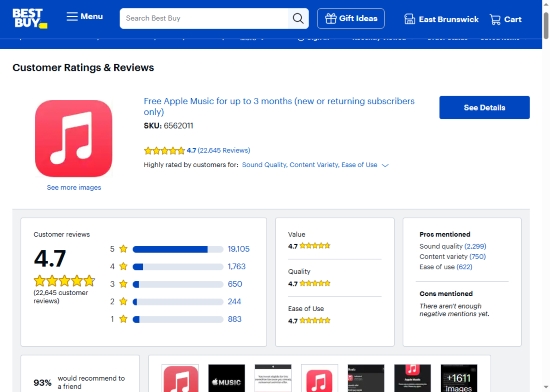
Step 3. Add 'Free Apple Music for up to 4 months' or 'Free Apple Music for up to 3 months' to your cart and complete checkout.
Step 4. A redemption code will be sent to the email address linked to your Best Buy account.
Step 5. Tap on the free Apple Music code and hit 'Redeem Now' to activate your Apple Music free trial. The trial length will be 3 or 4 months, depending on your eligibility.
Please note that the 3-month and 4-month Apple Music free codes are currently sold out at Best Buy. If they become available again, keep in mind that you may need to wait several months between redemptions if you've used a code recently. Additionally, this offer is exclusive to the United States and is limited to new or qualified returning subscribers.
🌟 Bonus: You can bookmark the Best Buy Apple Music 3-month offer page or the Best Buy Apple Music 4-month offer page. This promotion returns frequently and may allow you to redeem up to 3 or 4 months of Apple Music for free again in the future.
2. How to Get Apple Music 3 Months Free via Apple Music Family Plan [For New Users]
Apple is currently offering a 3-month free trial of the Apple Music Family plan as part of a limited-time Super Bowl promotion, running from January 26th to February 24th, 2026.
This offer is available to new Apple Music subscribers only and allows up to six family members to enjoy Apple Music at no cost, as long as none of them have subscribed before. The promotion works on both Apple and Android devices and is available globally.
For more details, you can visit the official page: Get 3 Months Free - Limited-Time Offer.
How to Get Free Apple Music for 3 months via the Family Plan (Super Bowl Promotion)
Step 1. Use an iPhone, iPad, Mac, or Android device running the latest version of the operating system.
Step 2. Open the Apple Music app and sign in with your Apple Account. If the offer doesn't appear immediately, go to the Home tab and look for the promotion banner.
Step 3. Tap "Accept Free Trial" to activate the 3-month Apple Music Family Plan trial.
If the promotion does not appear, make sure your Apple Music app is updated to the latest version. This offer expires on February 24th, 2026, and must be redeemed before that date.
3. How to Get Free Apple Music 3/2 Months via PS5 Promotion [For New/Returning Users]
If you're a PS5 owner and either a new or qualified returning Apple Music subscriber, you can claim a free Apple Music trial through an official PlayStation promotion. All you need is a PlayStation Network account and an Apple ID.
This offer lets eligible users enjoy up to 3 months of Apple Music for free. You can find full details on the official PlayStation page: https://www.playstation.com/en-us/deals/apple-music-playstation-offers/.

How to Redeem the Apple Music Free Trial on PS5
Step 1. Search for the Apple Music app on your PS5 console's search bar. Or, you can go to the 'All Apps' section to get it.
Step 2. Download, install, and launch the Apple Music app on your PlayStation 5.
Step 3. Sign in with your Apple Account, or sign up for an Apple Music account if you don't already have one.
Step 4. After that, you will get a free trial up to 3 months of Apple Music at no extra cost.
• New subscribers can receive up to 3 months free. Qualified returning subscribers are eligible for 2 months free.
• This promotion expires on March 18th, 2026.
View also: How to Play Apple Music on PS5
4. How to Get Apple Music 3 Months Free Trial via ISTYLE [For New/Returning Users]
Besides, there is a free Apple Music for returning users and new users by subscribing to ISTYLE newsletter. Then new users will get 3 months Apple Music free trial, while returning users can also get 2 months trial. It is noted that this offer is only valid for Apple IDs registered in UAE and you don't need to purchase any device.
Step 1. Go to ISTYLE Apple promotion page via the web browser on your device.
Step 2. Scroll down and click on the 'Apple Music Get now >' section.

Step 3. Scroll down in the pop-up window, then enter your name and your email address. Next, tap 'I'm signing up' to proceed to get Apple Music 3 months free trial.

5. [Expired] Get Apple Music 3 Months Free via Apple Card [For New/Returning Users]
As a gift for Apple Card users, Apple Card launches an up to 3 months free Apple Music, Apple TV+, and other Apple Entertainment services. New subscribers can get 3 months free trial, while returning subscribers can get 2 months free trials on Apple Entertainment services. If you're an existing Apple Music subscriber, you can bookmark Apple Card promotion page and redeem the free trial after your subscription ends.
This promotion expired on January 31, 2025, U.S. only. However, Apple Card offers may return in the future, so it's worth bookmarking the official promotion page.
Comparison Table of Ways to Get Free Apple Music 3 months Trial
| Methods/Features | Offer Still Valid | Free Trial Duration | Supported Region | Eligibility |
|---|---|---|---|---|
| Via Best Buy | ⚠️ Temporarily Unavailable | 3-4 Months | US | New users (up to 4 months) / qualified returning users (up to 3 months) |
| Via Apple Music Family Plan | ✅ | 3 Months | Global | New Apple Music subscribers only (Family Plan, up to 6 members) |
| Via PS5 Promotion | ✅ (Ends Mar 18, 2026) | 6 Months | US & select regions | PS5 owners with PSN account and Apple ID |
| Via ISTYLE Newsletter | ✅ | 3 Months (New) / 2 Months (Returning) | UAE | Apple IDs registered in UAE; newsletter subscription required |
| Via Apple Card | ❌ Expired (Jan 31, 2025) | 3 Months (New) / 2 Months (Returning) | US | Apple Card holders |
Part 4. How to Get Apple Music Free Trial 4 Months
In addition to Best Buy's 4-month Apple Music free trial for new users, there are a few other ways to unlock up to 4 months of Apple Music at no cost. Below are the currently known methods and how they work.
1. Get 4 Months Apple Music Free Trial via Walmart [For New/Returning Users]
Cooperated with Apple, Walmart launched an up to 4 months Apple Music free trial and other Apple services for customers buying selected items in Walmart physical stores in the US. However, it doesn't tell which product are qualified. The Walmart says there will be an activation code on your receipt if you buy the selected product.

So, regard this method as a surprise and keep an eye on your Walmart receipt after shopping on the physical store. If you have met such an activation code, you can click here to redeem the free Apple Music code.
This offer will expire on 7/1/2026. Only new Apple Music subscribers or users whose subscription has expired can enroll in this offer.
🌟 Bonus: Previously, Walmart also offered 5 months of Apple Music free to new and existing Walmart+ members. Although that promotion expired on July 2, 2024, similar offers may return in the future. You can keep an eye on updates by checking the Wlmart+ membership page.

2. [Expired] How to Get Apple Music 4 Months Free Trial via Family Sharing Setup [For New Users]
If you're new to Apple Music, you can get a 1-month free trial on its website. Besides, you can get an additional 3-month free trial by using Family Sharing. In this way, you can get a total of 4 months Apple Music for free.
You can start by getting a 1-month free Apple Music, and set up a Family Sharing to invite your family members to join. Then ask one of your family members to get a 3-month Apple Music free trial. Once they do this, everyone in the family group can get the free trial too, even if you previously got it as an individual.
View also: How to Add Family Member to Apple Music
How to Set Up Family Sharing
On iPhone or iPad:
Step 1. Go to the Settings app on your iPhone or iPad.
Step 2. Tap on your name.

Step 3. Find and tap "Set up Family Sharing" and "Get Started".
Step 4. It will guide you to send an iMessage to your family members.
On Mac:
Step 1. Navigate to your "Apple Menu".
Step 2. Select "System Preferences".

Step 3. Click on "Family Sharing".
Step 4. Enter your Apple ID and follow the instructions to start using Family Sharing.
This stacking method is no longer available. Apple has since closed this loophole, and free trials can no longer be combined in this way.
Comparison Table of Ways to Get 4 months Free Apple Music Trial
| Methods/Features | Offer Still Valid | Free Trial Duration | Supported Region | Eligibility |
|---|---|---|---|---|
| Via Walmart In-Store Purchase | ✅ (Ends Jul 1st, 2026) | Up to 4 Months | US | New or expired Apple Music subscribers; eligible Walmart in-store purchases |
| Via Family Sharing Setup | ❌ Expired | Up to 4 Months (stacked) | Global | New Apple Music users using Family Sharing workaround (no longer works) |
Part 5. How to Get Apple Music 2 Months Free Trial
Compared with 3-month or 4-month offers, 2-month Apple Music free trials are usually launched through third-party partners or limited-time promotions. Some of these deals are still active, while others have expired but may return in the future.
Below are the most common ways to get 2 months of Apple Music free, along with their current status.
1. Get 2 Months Free Apple Music via Shazam [For New Users]
For new Shazam registers, Shazam is currently running a generous offer - up to 2 months of free Apple Music. Users can start a free trial of Apple Music for 2-month by scanning the QR code provided on the Shazam website. Although it's a trial, you don't have to pay anything now and you won't be charged until after four months. Alternatively, if you don't want to pay, you can cancel your subscription at any time. Here is how to do that via Shazam.
View also: How to Connect Shazam to Apple Music

Step 1. Go to the official Shazam Apple Music promotion page. On computer, you'll see the QR code; while on phone, it will display available offer currently.
Step 2. Use your Android or iPhone's camera or QR scanner to scan the QR code on the screen.
Step 3. Follow the on-screen instructions to complete redemption and activate 2 months of free Apple Music.
The Shazam updates the Apple Music free trial promotion frequently; you can bookmark this webpage and redeem more free trials in the future. Besides, the actual offers might vary from different countries and areas. Scan the code to see the exact offer to you.
2. [Expired] Activate Apple Music 2 Months Free Trial via Target Circle [For New Users]
Apple also cooperates with Target Circle to offer 2 months free trial of Apple Music to new U.S. users who haven't tried Apple Music before. Here let's see how to get it.

Step 1. Go to Target Circle official website or Target Circle app on your device. Then sign up for a new Target Circle account.
Step 2. Head to Target partners webpage via a web browser and sign in with your Target Circle account.
Step 3. Once logged in, scroll down the page to find and click on the 'Apple Music free for 2 months' section. Then follow the guide to get the offer.
This offer expired on January 1st, 2025.
3. [Expired] Get Free Apple Music 2 Months Trial By Installing djay Pro on Computer/Phone [For New Users]
You can also get free Apple Music 2 months trial via djay Pro on iPhone, iPad, Mac, Windows, Android and Apple Vision Pro. This offer is available in 167 selected countries. Please note that only new subscribers to Apple Music can get this offer. Just go to install and open the djay app on your device to get it.
This offer expired on February 3rd, 2025.

View also: How to Use Apple Music on djay Pro
4. [Expired] Get Free Apple Music 2 Months Trial via American Airlines Entertainment [For New/Returning Users]
To offer a better entertainment service for passengers, American Airlines offers 2 months free Apple Music and TV+ new and returning members. Besides, after you redeem this offer, you can listen to Apple Music online without paying additional cost for the Viasat WiFi, which is also available for existing Apple Music users.
Simply visit the AA entertainment promotion page, click the Redeem 2 Free Months Now button, and follow the instructions on the screen to redeem Apple Music free trial for 2 months!
This offer expired on January 31st, 2025.
5. [Expired] Get Apple Music 2 Months Free Trial by Touch 'n Go [For New Users]
Touch 'n Go used to offer a free trial of Apple Music for 2 months for new users. After getting this offer, you can enjoy timeless classics and the latest songs on Apple Music. You can visit the offer via Touch 'n Go Apple Music webpage and proceed to get it in the future.

This offer expired on July 4th, 2024. While no longer available, it's worth keeping an eye on Touch 'n Go's official promotions for future returns.
Comparison Table of Ways to Get 2 months Free Apple Music Trial
| Methods/Features | Offer Still Valid | Free Trial Duration | Supported Region | Eligibility |
|---|---|---|---|---|
| Via Shazam | ✅ (Varies by region) | Up to 2 Months | Global (Region-dependent) | New Shazam users |
| Via Target Circle | ❌ Expired (Jan 1st, 2025) | 2 Months | US | New Apple Music subscribers |
| Via djay Pro App | ❌ Expired (Feb 3rd, 2025 | 2 Months | 167 Countries | New Apple Music subscribers |
| Via American Airlines | ❌ Expired (Jan 31st, 2025) | 2 Months | US / In-flight | New & returning Apple Music users |
| Via Touch 'n Go | ❌ Expired (Jul 4th, 2024) | 2 Months | Selected regions | New Apple Music subscribers |
Part 6. How to Get 1 Month Free Apple Music Trial
Compared with longer promotions (2-6 months), the 1-month free trial is Apple Music's standard entry-level offer, mainly available to brand-new subscribers. It's the easiest and most stable way to try Apple Music if you've never used it before.
1. How to Get Apple Music Free Trial for 1 Month [For New Users]
If you've never subscribed to Apple Music before, you can get a one-month free trial of Apple Music paid service. By the way, if you don't want to pay for Apple Music at the end of the trial period, you must cancel your Apple Music subscription 24 hours before it automatically renews. Now, we'll show you how to get Apple Music free trial for 1 month.
Step 1. Go to the Apple Music webpage via your web browser. Then click on the "Try 1 month free" button in the top-right corner or middle of the screen.

Step 2. Follow the instructions to create a new Apple Music account. Afterward, select the target type of trial offer like Individual, Family, or Student and add a valid payment method.
Step 3. After that, you can start enjoying music and playlists from Apple Music for free for a month.
In some regions and during certain promotional periods, Apple also offers a 3-month Apple Music free trial, such as through Family Plan promotions. Availability and trial length may vary depending on region and time.
2. How to Get 1 Month Free Apple Music via Apple One [For New Users]
Apple One is a subscription bundle offered by Apple. It includes several services, such as Apple Music, Apple TV+, Apple Arcade, and iCloud storage. Apple One also comes with a 1-month free trial, which automatically includes Apple Music. With it, you can also share the subscription with up to 5 family members across all their devices. Now, we will take you through how to make it:
On iPhone/iPad, head to 'Settings' > 'General' > 'Software Update' to update your iOS device to the latest version. Then go to Settings > Account > Manage Subscriptions to sign up for Apple One free trial.

On Mac, please choose 'System Preferences' > 'Software Update' to update it to the newest version. Then head to App Store to manage your subscription and get Apple Music free trial for one month.
On Windows, just navigate to the Apple One website. Then tap on 'Try Apple One free'.

Comparison Table of Ways to Get a 1-month Apple Music Free Trial
| Methods/Features | Offer Still Valid | Free Trial Duration | Supported Region | Eligibility |
|---|---|---|---|---|
| Via Apple Music Website | ✅ | 1 Month or 3 Months | Global | New Apple Music subscribers |
| Via Apple One | ✅ | 1 Month | Global | New Apple One subscribers |
Part 7. [Expired] How to Get Apple Music 5 Months Free via Barclaycard [For New Users]
Apple previously partnered with Barclaycard to offer one of the longest Apple Music free trials ever - up to 5 months. This promotion was available to Barclaycard cardholders in the United Kingdom and Ireland. If you just tried Apple Music free trial before, you can get a 4-month offer. If you have subscribed to Apple Music before, you are not eligible.

Step 1. Go to Barclaycard Apple special offer webpage.
Step 2. Touch the 'Try it free' button on the screen. Then you will be asked to fulfill your Apple ID.
Step 3. Type your Barclaycard name, zip code, etc. to confirm you are a Barclaycard holder.
After that, you can proceed to get Apple Music free trial for 5 months.
This promotion has expired. However, Apple and Barclaycard may launch similar offers again, so it's worth keeping an eye on future campaigns.
Table of Getting 5 months Apple Music Free Trial
| Features/Methods | Via Barclaycard |
|---|---|
| Offer Still Valid | ❌ Expired |
| Free Trial Duration | Up to 5 Months |
| Supported Region | UK & Ireland |
| Eligibility | New Apple Music users / Limited returning users |
Part 8. How to Get Apple Music Free Forever [For All Users]
If none of the free trials or promo codes above are available to you - or if you're simply looking for an easier, more reliable way to keep Apple Music free forever - this solution is worth checking out.
AudFree Apple Music Converter is a professional tool designed to download, convert, and save Apple Music tracks as local files with original quality preserved. You can also take full advantage of your Apple Music free trial to back up playlists and albums via this tool, then keep permanent access to them even after the free trial or subscription ends.
Once Apple Music songs are downloaded locally, they're stored in your computer's folder, allowing you to keep and enjoy them anytime, anywhere - online or offline. That means you can still listen to Apple Music after your free Apple Music trial expires without paying for an ongoing subscription.
Why Use AudFree Apple Music Converter?
AudFree Apple Music Converter lets you convert Apple Music tracks into multiple popular audio formats - such as MP3, FLAC, WAV, AIFF, and more - making them playable on virtually any device. It preserves 100% original audio quality and keeps all ID3 metadata, including title, artist, album, and artwork.
AudFree Apple Music Converter

- Download Apple Music to your local drive at up to 17X speed
- Keep Apple Music songs forever after the free trial or subscription ends
- Convert Apple Music to MP3, FLAC, WAV, and other common formats
- Customize output quality, bitrate, sample rate, and more
How to Get Apple Music for Free Forever Hack via AudFree Apple Music Converter
First, download and install AudFree Apple Music Downloader on your computer. Then follow the steps below to convert and save Apple Music songs permanently during your free trial or subscription period.
You don't need to download Apple Music tracks from your account in advance. AudFree Apple Music Converter has a built-in Apple Music web player, allowing you to download songs, albums, and playlists directly in real time.
- Step 1. Import Apple Music into AudFree Apple Music Converter

- Open the AudFree Apple Music Converter on your computer. Browse and select the songs, albums, or playlists you want to download. Then click on the song you want and tap the '+ ♫' icon. Next, add them to AudFree program for converting by tapping the 'Add to list' button.
- Step 2. Define Output Format for Apple Music

- Click on the Menu > Preferences icon to open the output setting window. Under the Conversion tab, choose your desired output format for your Apple Music. MP3 is recommended for maximum compatibility. Additionally, you can also customize the channel, bit rate, and sample rate to meet your quality preferences.
- Step 3. Convert and Download Apple Music Locally

- After saving your settings, go to the Converting tab and click the Convert button. AudFree Apple Music Converter will start converting Apple Music tracks in bulk and save them to your local folder. Once converted, you can keep these files forever and listen offline anytime you want.
View also: How to Listen to Apple Music Offline
Video Tutorial: How to Get Apple Music Free Forever Efficiently & Legally via AudFree Apple Music Converter
If you need support for multiple streaming services beyond Apple Music, you can try the all-in-one desktop solution AudFree Streaming Audio Recorder. It allows you to download Apple Music tracks in lossless quality while preserving complete ID3 tags, and it offers a simple, efficient batch download workflow for managing large music libraries.
How to Get Apple Music for Free Forever Hack on iPhone/Android/iPad/Anywhere
Now, you get local Apple Music files on your computer via AudFree Apple Music Downloader. If you want to get free Apple Music on your iOS or Android device, the easiest way is by syncing. Simply sync your local Apple Music songs from your computer to your mobile device. This way, you can listen to Apple Music offline for free forever on your smartphone and tablet. Besides, you can transfer converted Apple Music songs to any other device or player for offline playback.
Step 1. Connect your mobile device to your computer using a USB cable or Bluetooth.
Step 2. Locate the unprotected Apple Music files in your computer's local folder.
Step 3. Drag and drop the Apple Music songs into your Android phone's folder directly. For iPhone/iPad users, you need to open the iTunes app or Apple Music app on your computer and add local Apple Music files to it. Then you can sync music files to your iPhone/iPad via iTunes app or Apple Music app.

Step 4. Now you can play Apple Music offline on Android/iPhone/iPad anytime, anywhere, without a premium subscription.
Part 9. FAQs about Apple Music Free Trial
Can I Stack Apple Music Free Trial?
No, you can't. You might wonder if you can combine a 3-month Apple Music Best Buy code with a 6-month new device offer to get 9 months of free music. In reality, Apple enforces a 'one trial per account' policy. If you attempt to redeem a second offer, you will likely see a message stating that your 'code limit has been reached', or that you are 'ineligible' for the promotion. However, you can register another new Apple account as a workaround to enroll in new trials.
What Will Happen When an Apple Music Free Trial Ends?
When your Apple Music free trial ends, you will lose access to the entire streaming catalog. Any songs you've downloaded for offline listening will become unplayable, and if you don't resubscribe, your library and playlists may be permanently deleted after 90 days. To avoid being charged, remember to cancel the trial before it expires - but be aware that for some trials, access stops the moment you hit 'Cancel'.
View also: How to Fix Apple Music Playlist Gone Issue
How to Cancel Apple Music Free Trial?
Open iTunes or the Apple Music app, head to Account > View My Account, then select Manage Subscriptions and tap Cancel Free Trial. Make sure to cancel before the trial ends to avoid being charged.
Which Way Is Cheaper to Get Apple Music for Free?
The most cost-effective way to enjoy Apple Music is to take advantage of the longest free trial available (6 months) using the methods above. During the trial period, you can use AudFree Apple Music Converter to convert and save Apple Music songs as local files. This allows you to keep listening offline on any device even after canceling your subscription, without paying monthly Apple Music fees.
How Do I Keep Apple Music Songs Forever for Free?
With traditional methods, Apple Music tracks are protected and cannot be kept after your subscription ends. However, by using the bonus tool mentioned in Part 8 - AudFree Apple Music Converter, you can convert Apple Music songs to local MP3 files and keep them permanently, even after canceling your Apple Music subscription.
How to Get Free Apple Music for Existing or Returning Users?
Existing or returning Apple Music users can still get free access through partner promotions and limited-time offers. Carriers like Verizon (US), EE (UK), and Rogers (Canada) often provide 6-month free trials for eligible plans, even for former subscribers. Best Buy sometimes offers 3 months Apple Music free to returning users. In certain regions, Family Plan or platform promotions (such as PS5) may grant 1-2 months for qualified returners.
Availability depends on region, timing, and account history, and you usually need to cancel your current subscription first before redeeming.
How to Fix Apple Music 6 Months Free Code Not Working?
Some users complain that they failed to redeem with Apple Music 6 months free trial or else. If you encounter the same problem, please give the following methods a shot:
1) Check Whether You're Eligible
Some promotions or deals to get an Apple Music 6-month free trial are valid for a restricted time. Please check if the promo is available still or if you have the eligible device.
2) Update Your Device's Software
Please update your Apple devices to the latest macOS, iOS, tvOS, iPadOS, or watchOS.
3) Check Whether the Offer Is Redeemed
If your family member had redeemed this Apple Music free 6-month offer, it cannot be redeemed again.
4) Contact Apple Customer Service
You can draw help from Apple Staff provided the above methods are of no avail.
In Conclusion
Who doesn't love free Apple Music? By following the methods in this guide, you can get Apple Music free for 1, 2, 3, 4, 5, or even 6 months, depending on your region and eligibility. However, once a Apple Music free trial ends, access to your Apple Music library is revoked and all downloaded songs disappear.
To avoid losing your favorite tracks, use AudFree Apple Music Converter to save Apple Music songs permanently on your device during the trial. Start now and enjoy Apple Music free forever, with no subscription required.

Staff Editor


