


Almost everyone has found themselves wanting to save a video for a long flight, or grab an audio track of a hard-to-find live performance from YouTube Music or SoundCloud Music to listen to offline. In the crowded market of free online media downloaders, Loader.to has consistently ranked among the most popular web-based tools.
At first glance, Loader.to appears simple: paste a URL, choose an output format, and download the content. It supports multiple websites, requires no registration, and works directly in a browser. But is it actually safe? Does it still work reliably in 2026? And are there better alternatives available?
To answer these questions, we took a closer look at Loader.to's features, usability, risks, and overall performance. In this review, you'll learn what Loader.to does well, where it falls short, and whether it's worth using for your offline listening needs.

Part 1. Loader.to Tested: What It Does Well (and Where It Falls Short)
Loader.to is a web-based media downloader that supports content from several popular platforms, including YouTube, SoundCloud, Facebook, Vimeo, TikTok, and more.
To understand if Loader.to is right for you, you have to separate its advertised features from its real-world performance. The tool is entirely web-based, meaning you do not need to install any software on your Windows, Mac, iOS, or Android device to use it. Simply paste a URL and choose your preferred output format.
Here, we broke our hands-on testing down into five core areas: download performance, platform compatibility, audio fidelity, ad intrusion, and overall user experience.

1. Download Performance: Fast, Until You Push the Limits
When it comes to grabbing a single, standard-length video or audio track, Loader.to is remarkably snappy. In general, you paste the link, and its backend server usually parses the data and prepares your file in under 15 seconds, like a YouTube video or music link, as well as a SoundCloud link.
However, performance drastically shifts depending on what you ask it to do in reality:
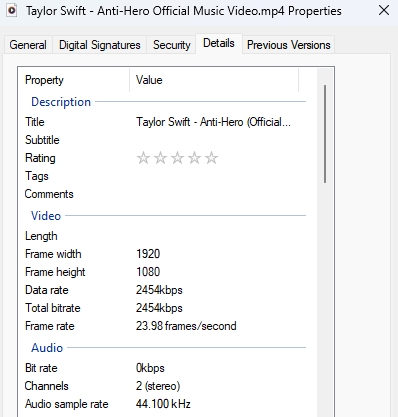
- The 1080p Limitation: While the drop-down menu proudly flaunts a "4K" MP4 option, our hands-on tests revealed a different reality. When handling large files, the site frequently times out or quietly downgrades the output to standard 1080p to conserve its own server bandwidth. In fact, a closer look at the file properties exposes the deception: the final download suffers a fourfold drop in total pixel resolution and a staggering twentyfold restriction in bitrate compared to true 4K.
- The Playlist Throttle: Loader.to originally gained fame for processing whole YouTube playlists (up to 20 videos at once). Today, trying to batch-download files often triggers "Parsing Errors", or the site will stall indefinitely and redirect you to a page pushing a paid, third-party desktop downloader.
2. Supported Platforms: A Versatile Media Multi-Tool
One of Loader.to's biggest strengths is that it isn't a one-trick pony. While most people use it as a YouTube-to-MP3 converter, its scraping engine is highly adaptable.
During our testing, the tool successfully recognized and processed links from an impressive variety of platforms, including SoundCloud, TikTok, Twitter (X), Twitch, Pinterest, and Facebook. This makes it an incredibly convenient single bookmark for casual users who pull media from all corners of the internet, saving them from having to find a separate downloader for every app.

3. Audio Quality: Surprising Options for Music Lovers
Most basic web downloaders squeeze your audio into highly compressed, low-bitrate MP3 files (often capped at 128kbps), which can leave your music sounding muddy or hollow. Loader.to stands out by offering a much wider array of audio formats.
Beyond the standard 320kbps MP3 (the highest quality standard MP3 supports), it offers container formats like M4A, as well as uncompressed, lossless options like WAV and FLAC.

While selecting FLAC or WAV will technically produce an uncompressed file format, keep in mind that the tool can only download the highest quality available from the original streaming platform. YouTube audio streams max out around 126kbps-165kbps AAC, depending on the upload (YouTube Music is capped at 256kbps AAC, and SoundCloud is 320kbps MP3), so converting it to a FLAC file won't magically make it sound like a studio master - but it does avoid further quality loss during the conversion process.
4. Ads and Pop-ups: The Immediate UX Tax
You cannot talk about Loader.to's performance without talking about its advertisements. Because the tool is entirely free to use and faces massive server bills, it partners with aggressive, low-tier advertising networks.
The moment you click the site's main interface, you are paying a "user experience tax". Even with a clean layout, hidden "click-jacking" scripts overlay the page. Clicking "Download" or changing a format drop-down will almost always forcefully trigger an aggressive redirect or open a new browser tab pushing deceptive security software or fake system updates. It functions well, but it forces the user into a constant game of digital dodgeball.
5. Ease of Use: Zero Installation, High Accessibility
If you can look past the ad environment, the tool is incredibly intuitive. Because it is completely browser-based, there are no clunky installer packages to download, no accounts to create, and no registration forms to fill out.
It works identically whether you are on a high-end Windows desktop, a MacBook, an Android device, or an iPhone. The interface is reduced to just two main elements: a text box for your link and a drop-down menu for your format. This minimalist approach means that even the least tech-savvy user can figure out how to use it within five seconds of landing on the page.
Loader.to Performance Contrast: The Good vs The Reality
To give your readers a quick, scannable breakdown of the real-world performance, you can use a comprehensive comparison table below. It summarizes the five core categories from our testing, contrasting the marketing promises against the actual reality of using the tool.
| Category | What Loader.to Does Well (The Good) | Where Loader.to Falls Short (The Reality) |
|---|---|---|
| Download Performance | Incredibly fast for single tracks; typically processes a basic video or audio link in under 15 seconds | Heavily markets 4K downloads but often quietly downgrades them to 1080p; large playlist downloads frequently freeze or fail |
| Supported Platforms | Highly versatile multi-tool; successfully parses links from YouTube, SoundCloud, TikTok, Twitter (X), Twitch, and Facebook | Entirely dependent on the public scraping environment; it completely fails on private, unlisted, or age-restricted links |
| Audio Quality | Offers high-bitrate 320kbps MP3 format along with container support for lossless files like WAV and FLAC | Downloaded tracks often completely lack ID3 metadata tags (album, artist, artwork); output can feel inconsistent due to upscaling |
| Ads & Pop-ups | The tool itself is 100% free to use, and the final media files you successfully save to your drive are clean and virus-free | Relies on aggressive, low-tier ad networks; clicking anywhere on the page can trigger deceptive redirects like fake virus warnings |
| Ease of Use | No software installation, no account registration, and works flawlessly across mobile and desktop browsers | The constant game of digital dodgeball with pop-up tabs ruins the user experience for anyone without a robust ad-blocker |
The Quick Takeaway for Your Review:
Think of Loader.to as a "quick and dirty" solution. It is highly convenient when you need to grab a single audio track on the fly and have your guard up. However, if your goal is archiving pristine 4K video files, managing massive music playlists with accurate metadata, or browsing an ad-free interface, the reality of the tool simply falls short of its promises.
👉 Looking for a better way to archive music? If you need to batch-save tracks from various platforms with complete flexibility, superior audio quality, and fully intact ID3 metadata, skip to the premium alternatives featured in Part 5.
Part 2. How to Use Loader.to for YouTube and SoundCloud Downloads
If you just want to grab a quick audio file or a standard video, you can do it safely and efficiently. However, because of the site's aggressive advertising, you must follow a strict order of operations to use it properly.
Here is the step-by-step guide to using Loader.to without compromising your digital security:
Step 1. Mandatory Prerequisite: Install an Ad Blocker
Before you even type Loader.to into your address bar, ensure you have a highly-rated, free ad blocker installed on your browser (such as uBlock Origin). This single step will block 90% of the malicious pop-ups and fake download buttons before the website even finishes loading.

Step 2. Copy Your Source Link
Navigate to YouTube, YouTube Music, SoundCloud, or your platform of choice. Find the specific video or track you want to save. Copy the full URL from the address bar (or use the "Share" button on mobile to copy the link).
Step 3. Paste and Configure
Open Loader.to, and you will see a clean, central search bar. Paste your copied link into this bar. Below the bar, use the drop-down menu to select your desired format. Keep it simple: for everyday music listening on your phone, select "MP3". For watching a video on a laptop or tablet, select "1080p MP4".
Step 4. Click Download (and Dodge the Pop-ups)
Click the blue "Download" button. The site will begin parsing the link. Once it reaches 100%, a second "Download" button will appear for the actual file.
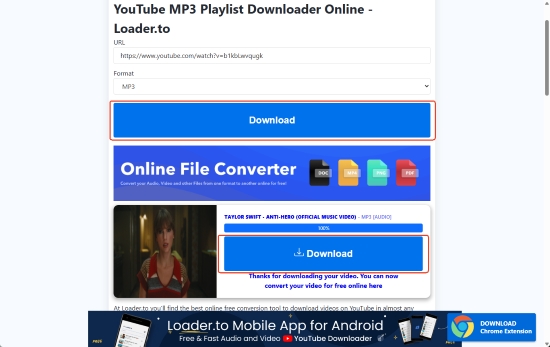
When you click this final button, the site may automatically open a new browser tab. Close this new tab immediately without reading it or clicking anything on it. Your media file will download safely in the background of the original Loader.to tab.
Part 3. Is Loader.to Safe? The Real Risks You Should Know
When users ask, "Is Loader.to safe?" they are actually asking two distinct questions: Are the downloaded files clean? and Is browsing the website itself secure? As it turns out, the answers couldn't be more different. Having outlined the high-level conclusions in our Part 1 summary table, this section break down the underlying mechanics and security risks in detail.
1. The Downloaded Files Are Safe
Let's start with the reassuring news: the actual MP3, WAV, or MP4 files generated by Loader.to are almost always perfectly clean and safe.
When you paste a link from YouTube or SoundCloud, Loader.to acts purely as a middleman. Its backend server requests the stream directly from the platform's official servers, demuxes or converts the raw container, and pipes that exact stream straight into a downloadable file format for you.
Because static media formats (like an .mp3 or .mp4) do not natively execute code, they cannot easily carry hidden malware, trojans, or tracking software. If you successfully get the file onto your hard drive, you can open it without worry.
2. The True Danger: The Advertising Network
If the downloaded files are clean, why do antivirus programs and security extensions flag Loader.to so aggressively? The threat isn't the file; it's the monetization engine.
Maintaining a server infrastructure that can transcode thousands of high-bandwidth video streams every minute is incredibly expensive. Because Loader.to is entirely free and cannot use premium ad networks (like Google AdSense) due to legal and copyright restrictions, it has to rely on aggressive, low-tier advertising aggregators. These networks routinely employ a gray-hat technique known as 'malicious redirects'.
When you click the legitimate "Download" button, an invisible script running beneath the page interface intercepts your click and forcefully opens a new tab, a completely different, unvouched domain. These new tabs are designed to look terrifying or urgent. Common examples include:
- Fake Security Warnings: A bright red screen claiming your computer has been infected by a virus, urging you to call a toll-free number or download an antivirus program.
- Software Update Scams: A page that perfectly mimics a system notification, telling you that your media player, browser, or Flash player is out of date and requires an immediate download.
- Fake Download Buttons: Banner ads placed directly below the real download bar that say "Start Download Now" or "Play Video", designed to trick you into clicking an ad instead of your file.
None of these redirect screens can actually scan your hardware. They have absolutely no idea what state your computer is in. Their entire goal is to trigger panic so you will willingly download malicious installers or input sensitive login credentials.
In short, your computer is perfectly fine. These alerts are completely fabricated. The golden rule of using Loader.to - or any free online converter - is to never trust a new tab that opens on its own.
Part 4. Loader.to Not Working? Common Fixes and Solutions
Web-based downloaders are inherently unstable. Because platforms like YouTube constantly update their backend code to prevent downloading, sites like Loader.to frequently break. If you paste a link and get a "Parsing Error", infinite loading screens, or an "Invalid URL" message, try these common fixes:
- Wait Out the Server Overload: The most common issue is simply that Loader.to's servers are overloaded with traffic. If the progress bar gets stuck at 0% or 20%, close the tab, wait 10 to 15 minutes, and try again.
- Clear Your Browser Cache and Cookies: Sometimes, old or corrupted browser data prevents the site's scripts from running properly. Clearing your recent cache or attempting the download in an "Incognito" or "Private Browsing" window will often resolve persistent parsing errors.
- Check the Privacy Status of the Link: Loader.to can only access public data. If you are trying to download a YouTube video that is set to "Private", "Unlisted", or is age-restricted (requiring a login to view), the tool will fail every time. It cannot bypass platform security requirements.
- The "Move On" Fix: If you have already refreshed the page and double-checked your link, yet it still isn't working, the site's backend scraper is likely broken. Don't waste an hour trying to force it to work. Move on to a reliable alternative immediately.
In the next part, we've rounded up the best backup options to keep your downloads running smoothly when Loader.to gives up.
Part 5. Best Loader.to Alternatives for Offline Playback
If Loader.to is suffering from prolonged server downtime, crashing on your favorite playlists, or simply exhausting your patience with its relentless pop-up redirects, you do not have to give up on offline media. The web scraping ecosystem has evolved, and there are far more reliable, specialized options available.
Depending on whether you prioritize pristine audio fidelity, stable video archiving, or a completely ad-free web experience, here are the absolute best Loader.to alternatives.
1. Best for Music Downloads: AudFree Streaming Audio Recorder
If your primary goal is building a permanent, high-quality music library, relying on browser-based URL downloaders like Loader.to is a losing battle. They strip away track metadata, upscale compressed audio, and break whenever a streaming platform updates its encryption.
AudFree Streaming Audio Recorder (also known as AudFree Streaming Music Converter) completely rewrites this process by operating as a high-precision internal recording engine on your desktop.
✅ The Lossless Edge: Instead of relying on an unstable web-based scraper, AudFree directly captures the raw digital audio stream from your system's audio output or desktop apps (like YouTube Music, Spotify, Tidal, SoundCloud, etc.). Running entirely on your local machine, its advanced recording engine strips out background interference to export true, bit-perfect copies in lossless FLAC/WAV, or pristine 320kbps MP3s.
✅ Intelligent Metadata Tagging: Unlike Loader.to, which leaves you with confusingly named files like videoplayback.mp3, AudFree features a built-in ID3 tag editor. It automatically detects and embeds the track title, artist name, album, release year, and high-resolution album artwork directly into the file.
✅ Simultaneous Multi-Track Downloading: It seamlessly handles bulk downloads, letting you queue up entire albums or massive playlists and save them locally at blazing-fast speeds.
For listeners who demand flawless audio fidelity and meticulously organized music folders, this software completely eclipses the "quick-and-dirty" web downloader model. And here is a short workflow to use it.
Step 1. After launching the program, click the 'Menu' icon in the top-right corner and navigate to 'Preferences' > 'Conversion'. Choose your target format (like FLAC, WAV, or 320kbps MP3) and adjust the audio channel, sample rate, and bitrate to match your listening preferences. Under the 'Output' tab, select your target storage folder and verify that ID3 tag export is turned on.

Step 2. Return to the main interface dashboard. Choose your preferred streaming music platform icon (such as YouTube Music, Spotify, or SoundCloud) to launch the built-in web player. Sign into your streaming account within it and browse to the specific tracks, custom playlists, or full albums you want to archive, then click the green '+' button to load them into your automated conversion queue.
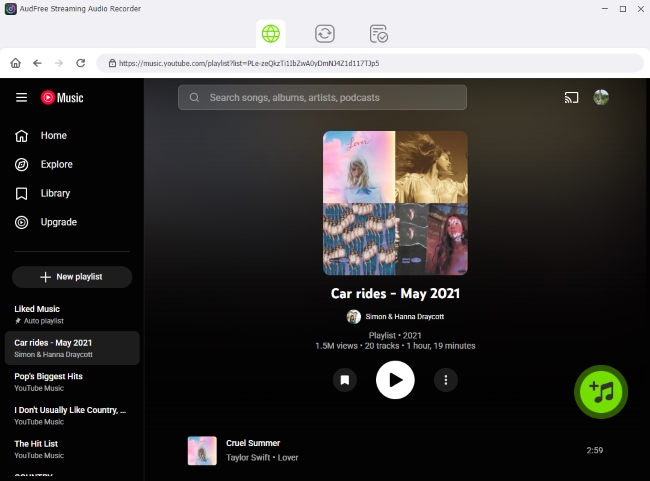
Step 3. Head over to the Converting section and click the main 'Convert' button to start downloading. The software will process your tracks cleanly. Once the status bars hit 100%, swap over to the Converted tab to instantly access your freshly indexed, local audio files.

2. Best for Video Downloads: VD6S YouTube Video Downloader & YT1s
If your goal is simply downloading individual videos or music tracks without installing a dedicated media management tool, both VD6S and YT1s are solid alternatives to Loader.to. They follow a very similar workflow while offering a cleaner and more consistent download experience for casual users.
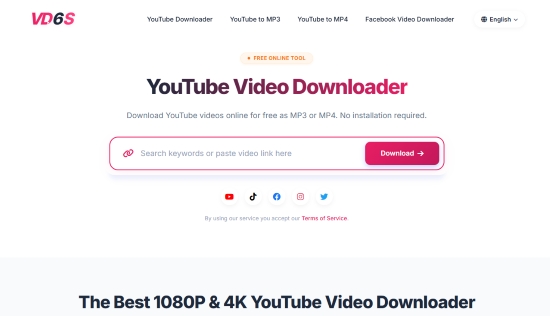
Unlike Loader.to, which can occasionally become stuck during conversion or fail to process certain links, both tools focus on fast URL-based downloads and support popular output formats without requiring account registration.
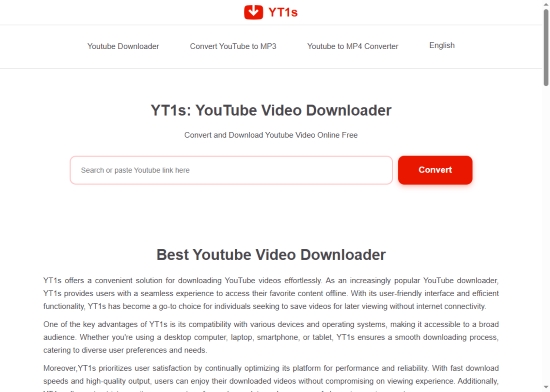
✅ Support for High-Quality Audio Downloads:Both platforms allow users to convert videos into MP3 files with bitrates of up to 320kbps. This makes them suitable for saving music tracks, podcasts, interviews, and other audio content for offline listening.
✅ Download Videos in Up to 1080P Resolution: For video downloads, both VD6S and YT1s support MP4 output in resolutions up to 1080P. Whether you're downloading tutorials, documentaries, lectures, or entertainment videos, the original visual quality is largely preserved.
✅ No Software Installation Required & Works Across Multiple Device: Everything happens directly inside your browser, so both of them are compatible with Windows PCs, Mac computers, Android phones, iPhones, iPads, and Tablets.
Neither VD6S nor YT1s supports bulk operations, meaning you can forget about saving entire albums or playlists in one click like Loader.to or AudFree. Besides, the downloaded files completely lack ID3 metadata, and the web interfaces themselves also include some ads.
Since the workflow is almost identical for both VD6S and YT1s, you can follow the same simple steps below to use either platform:
Step 1. Open YouTube and locate the video you want to save. Copy the complete URL from the browser address bar or share menu.
Step 2. Visit either VD6S or YT1s and paste the copied URL into the search box located on the homepage. The platform will automatically analyze the content and display available download options.
Step 3. After the analysis, choose your preferred format and bitrate (e.g., MP3 320kbps for audio or MP4 1080p for video) as your needs, click 'Download', and the service (whether VD6S or YT1s) will process the video and ave the file to your device.
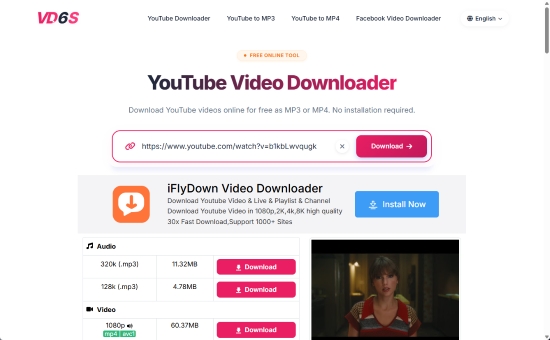
Actual conversion and downloading times will vary depending on the video's length, current server loads, and your local internet speed.
3. Best Free Web Alternatives: CNVMP3 & SoundCloudDL
If you refuse to install desktop software but want a completely free website to escape the malicious pop-ups, two community-driven web tools, CNVMP3 and SoundCloudDL, offer an incredibly refreshing alternative to Loader.to.
Unlike many online downloaders that rely heavily on pop-ups, redirect pages, and misleading download buttons, both tools focus on a simple conversion experience. They require no software installation, no account registration, and can be accessed directly from any modern browser.
Both platforms support a fast link analysis and offer multiple file formats, making them suitable for quick offline listening and viewing. More importantly, their lightweight interfaces are noticeably cleaner than Loader.to, which can make the entire download process much less frustrating.
The key difference is that each tool is optimized for a different platform.
CNVMP3: Best for YouTube Music and YouTube Videos
CNVMP3 is designed primarily for YouTube-based content. Whether you're saving music videos, podcasts, tutorials, or regular YouTube uploads, it provides a straightforward conversion workflow without overwhelming users with advertisements.
✅ Clean and ad-light interface
✅ Supports MP3 (320kbps) and MP4 (1080p) downloads
✅ Works on desktop and mobile browsers
✅ No account registration required
✅ No intrusive ads
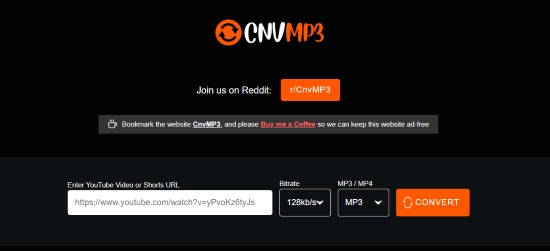
Step 1. Copy a YouTube or YouTube Music link.
Step 2. Go to the CNVMP3 official website, and paste it into the CNVMP3 search box.
Step 3. Select MP3 320kbpx or MP4 1080p as the output format.
Step 4. Click 'Convert' to start the conversion process and the files will be downloaded to your device.
Keep in mind that the tool comes with a strict monthly cap - averaging just 20 downloads per month.
SoundCloudDL: Best for SoundCloud Music and Playlists
If most of your listening comes from SoundCloud, SoundCloudDL is the more specialized option. Unlike general-purpose downloaders, it focuses specifically on SoundCloud content and often handles tracks and playlists more efficiently than universal tools such as Loader.to.

✅ Exclusively optimized for SoundCloud links
✅ Supports both individual tracks and playlists downloads
✅ Offers MP3 and M4A output options
✅ No login or installation required
✅ Ad-light interface for better usability
How It Works: The workflow is identical to CNVMP3: simply copy your desired SoundCloud URL, paste it into the search bar on the SoundCloudDL homepage, and grab your download link.
SoundCloudDL can only download tracks that are publicly streamable (it cannot bypass Go+ or region-locked tracks). Additionally, for massive playlists, the tool's backend engine will typically truncate the batch and only parse the first 50 to 100 tracks.
Comparison Table of Loader.to vs Alternatives
The following table highlights how these alternative tools stack up against the standard Loader.to framework across audio/video fidelity, safety, and core features:
| Feature | Loader.to | AudFree Streaming Audio Recorder | VD6S | YT1s | CNVMP3 | SoundCloudDL |
|---|---|---|---|---|---|---|
| Official Website | https://en.loader.to/ | https://www.audfree.com/streaming-audio-recorder/ | https://vd6s.net/ | https://yt1s.com.co/ | https://cnvmp3.com/ | https://soundclouddl.cc/ |
| Installation Required | ❌ | ✅ | ❌ | ❌ | ❌ | ❌ |
| Core Strength | Quick web downloads | Bit-perfect audio archiving | FHD video download | Fast mobile video saves | Ad-free multi-platform clips | Batch downloads for SoundCloud |
| Playlist Downloads | ✅ (Limited) | ✅ | ❌ | ❌ | ❌ | ✅ (Limited) |
| Lossless Audio Output | ❌ | ✅ | ❌ | ❌ | ❌ | Depends on Source |
| Metadata Preservation | ❌ | ✅ | ❌ | ❌ | ❌ | ❌ |
| Ad-Free Experience | ❌ | ✅ | ❌ | ❌ | ✅ (Mostly) | ✅ (Mostly) |
| Download Stability | Medium | High | Medium | Medium | Medium | Medium |
| Mobile Friendly | ✅ | ❌ | ✅ | ✅ | ✅ | ✅ |
| Malware Risk | High | Zero | Medium | Medium | Low | Low |
| Output Format | MP3, AAC, WAV, FLAC, MP4, etc | MP3, M4A, WAV, FLAC, M4B, AIFF, LOSSLESS | MP3, MP4 | MP3, MP4 | MP3, MP4 | MP3, M4A |
Conclusion
So, is Loader.to worth using in 2026? The answer depends entirely on your browsing habits and what you expect from the tool.
If you are a casual user looking to grab a single MP3 for a road trip, and you have the technical savvy to use a reliable ad-blocker and ignore deceptive pop-up tabs, Loader.to remains a fast, functional, and highly capable tool. It gets the job done quickly and supports an impressive array of audio formats.
However, if you are looking for true high-resolution 4K video downloads, need to archive massive playlists, or are easily stressed by aggressive, scammy advertising networks, Loader.to is no longer the powerhouse it once was. For those users, transitioning to a dedicated desktop application like AudFree or an open-source web alternative like VD6S or YT1s will provide a much safer and far less frustrating experience.

Staff Editor


