


As we continue to stream and download content from various online platforms, YouTube remains one of the most popular sources for music, podcasts, and videos. Many users rely on converters like EzMP3 to convert these videos to MP3 or other formats for offline listening.
However, with evolving technology and concerns around safety and legality, it's essential to ask: Is EzMP3 still safe and reliable in 2026? This comprehensive review will delve into the safety, features, and user experiences of EzMP3, compare it with alternatives, and provide answers to common questions about its performance and reliability.

Part 1. Is EzMP3 Safe and Legal to Use?
What's EzMP3? EzMP3 is a popular online utility designed to convert YouTube videos into high-quality MP3 and MP4 files. It has become a favorite for users looking to save audio and video content locally without the hassle of installing complex software. Recently, the service has transitioned to the name EzConv to reflect its evolving platform.
Official Site: https://ezconv.cc/ or https://ezmp3.co/
Is EzMP3 Safe?
If you're wondering about the safety of EzMP3, you aren't alone - it's one of the most common questions we receive. We understand the importance of security, and we're happy to confirm that EzMP3 is a safe and reliable option.
But given that it's an online tool that allows users to download and convert content from video platforms like YouTube, there's an inherent risk of encountering malicious software or malware.
EzMP3 itself is known to be fairly safe, but users must exercise caution when navigating such websites (clone sites, e.g., https://ezmp3.net/), as they might contain pop-ups, misleading ads, or external links that could compromise security.
Is EzMP3 Legit?
As for legality, EzMP3 operates in a legal gray area. While converting publicly available YouTube videos to MP3 for personal use may not be explicitly illegal, YouTube's Terms of Service prohibit downloading or converting videos without permission.
EzMP3 doesn't host or provide copyrighted content, but using it to download content that is copyrighted may still be considered a breach of the platform's rules and illegal, especially when done for commercial purposes.
But if you're only downloading content for personal use, there's usually less risk, but you should be mindful of your local laws and YouTube's terms and conditions.
Pros and Cons of EzMP3 MP3 Converter
As with any tool, there are both advantages and disadvantages to using EzMP3. Let's take a look at both.
Free & Accessible: A cost-free, browser-based tool requiring no software installation or registration;
Multiple Audio Quality: Supports multiple bitrate options for customized download quality;
Audio Trim Support: Includes a built-in tool for basic audio clipping;
User-Friendly: Simple, minimalist interface designed for quick conversions
Legal Issues: As mentioned, downloading copyrighted content might violate YouTube's terms of service;
Clone Site Risks: Excessive ads and pop-ups are common on clone sites, hard to distinguish official sites from malicious clones for everyone;
Lack Batch Processing: Does not support simultaneous downloads or full playlist conversions;
No Support for High-Quality Audio: The quality of the MP3s isn't always the best (compressed), and users looking for lossless audio may find this a limitation;
Regional Restrictions: Access may be blocked in certain geographic locations;
Performance Lags: High traffic can lead to slow loading times and failed conversions for long videos
If you are looking for a comprehensive solution that supports batch conversion while bypassing the risks of clone sites and the limitations mentioned above, AudFree YouTube Music Downloader is the premier alternative featured in Part 5.
Part 2. How to Use EzMP3 Converter for Both Audio & Video
EzMP3 is known for its simplicity, offering a quick and easy way to convert YouTube videos or music into MP3. Whether you want to convert audio or video, the process is nearly identical. Here's a step-by-step guide to using EzMP3:
While EzMP3 (now EzConv) previously supported both MP3 and MP4 formats, the service has now split into two specialized tools. To download YouTube content in MP4 format, please follow the steps outlined above using the dedicated EzMP4 platform (ezmp4.cc).
How to Convert Audio via EzMP3 from YouTube or YouTube Music
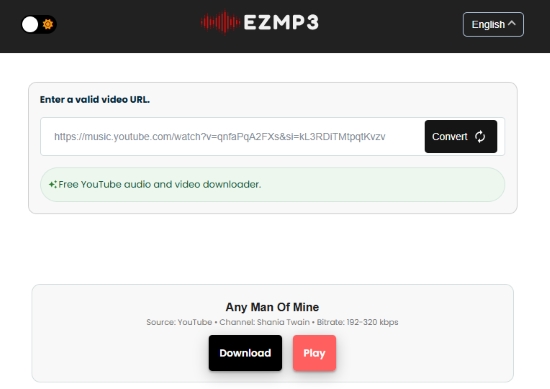
Step 1. Open your web browser and go to the official website of EzMP3 (EzConv).
Step 2. Copy the URL of the YouTube video or songs from YouTube Music you want to convert.
Step 3. Paste the URL into the provided field and select MP3 as the output format.
Step 4. Click the 'Convert' button, and the tool will process the video.
Step 5. Once the conversion is complete, a download link ('Download MP3' button) will appear, allowing you to save the MP3 file to your device.
Between steps 3 and 4, you have the option to adjust the bitrate or trim the audio as needed.
Part 3. The Real User Experience of EzMP3 from Reddit & Trustpilot
To evaluate EZMP3's true effectiveness, we looked at real user reviews on platforms like Reddit and Trustpilot. User experiences tend to be a mixture of positive and negative, with some praising the ease of use and speed, while others express concerns regarding ads, quality, and reliability.
What Do Trustpilot Users Think About EzMP3?
Trustpilot Feedback: 4.7/5 Stars
With recent domain updates, EzMP3 has received a refreshed set of ratings on Trustpilot. As of 2026, it holds an average score of 4.7 out of 5 based on nearly 40 recent reviews, suggesting that it remains a reliable option for many users.
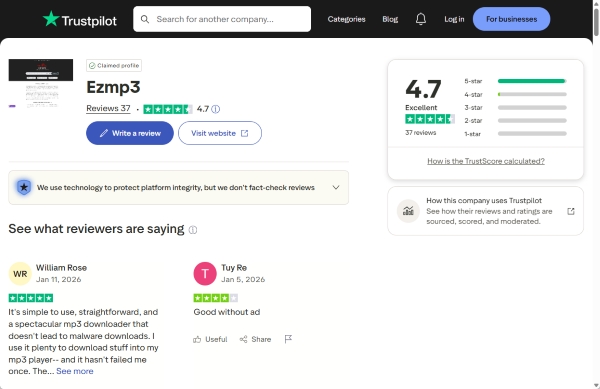
Most users express satisfaction with its simple workflow and clean, ad-free interface. Additionally, the fact that the service is completely free continues to be one of its biggest advantages and a key reason behind its positive feedback.
What is the Real User Experience of EzMP3 on Reddit?
Below is a curated look at real-world feedback on EzMP3 from the Reddit community, highlighting both the advantages and the common pitfalls reported by users.
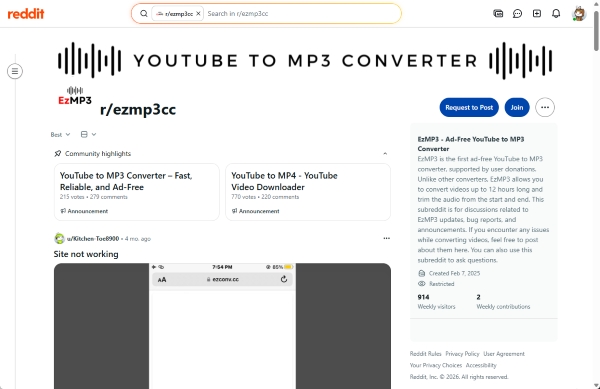
✅ Positive User Experiences:
- High-Speed Conversions: Users appreciate the fast processing times for individual tracks.
- Fast and Easy to Use: The conversion process is quick and requires minimal steps, making it beginner-friendly.
- Completely Free: Users can convert and download media without any subscription or hidden fees.
- Clean and Simple Interface: The layout is straightforward and easy to navigate, with fewer distractions compared to similar tools.
❌ Negative User Experiences:
- Occasional Downtime: The website may become unavailable or fail to load at times.
- Limited Format Options: Only basic formats (such as MP3 and MP4) are supported.
- Domain Frequently Blocked or Changed: Access can be unstable due to regional restrictions or domain issues.
- Slow Download Speed: Some users report longer processing or download times.
- Inconsistent Audio Quality: Output quality may be lower than expected, especially for music files.
- Fails with Long Videos: Videos longer than 90 minutes often cannot be converted successfully.
- No Metadata Preservation: Important details like artist, album, and cover art are not retained.
- High Conversion Failure Rate: Conversions may fail unexpectedly, requiring multiple attempts.
- Unstable Download Behavior: In some cases, downloads overlap or interfere with each other.
Part 4. How to Fix EzMP3 Not Working
As some EzMP3 users complained on Reddit, it has its own shortcomings when using. If you encounter some issues failed conversions or slow speeds, here are some troubleshooting steps you can try:
✅ Clear Browser Cache: Sometimes, clearing your browser's cache or cookies can help fix loading issues with EzMP3.
✅ Try a Different Browser: Switching to a different browser may resolve any compatibility issues.
✅ Check for Pop-Up Blockers: If the site isn't loading properly, ensure that your pop-up blocker is not preventing important elements from loading.
✅ Disable VPN or Proxy: Sometimes, using a VPN or proxy can interfere with the website's performance. Try disabling these services temporarily.
✅ Check Internet Connection: Ensure you have a stable and fast internet connection to avoid timeouts during the conversion process.
While some shortcomings can be managed, certain inherent drawbacks of online tools simply cannot be avoided, for example, occasional downtime and inconsistent audio quality. In these cases, a professional solution like AudFree Streaming Audio Converter delivers a level of performance and reliability that far exceeds expectations.
Part 5. Best Alternative to YouTube to MP3 Converter EzMP3
Looking for lossless audio quality and high-speed downloads? Or perhaps you need a robust tool that supports multiple formats and full playlist batching?
If so, AudFree YouTube Music Downloader is a top choice. Based on testing, it stands out as one of the best alternatives to EzMP3. It offers up to 30× faster download speeds, high-quality output (up to 320kbps MP3), and a wide range of format options - delivering a smooth and premium user experience.
Beyond YouTube Music, it also supports major streaming platforms like Spotify, Apple Music, and TIDAL, giving you greater flexibility across your entire music library.
AudFree YouTube Music Downloader

- Convert YouTube music to MP3, WAV, FLAC, and more formats
- Batch download entire albums or long playlists at up to 30× speed
- Preserve ad-free output with lossless audio quality
- High conversion success rate
- No pop-ups or malicious redirects
- Automatically retain full ID3 tags
- Stable performance with 24/7 support
- 100% safe and reliable, with no risk of privacy data leaks
Step-by-Step Guide to EzMP3 Alternative: AudFree YouTube Music Converter
With the powerful tool, you don't need to download YouTube Music to computer in advance. For more details, please see below.

Step 1. Click the button above to download and install AudFree YouTube Music Converter on your Windows or Mac computer. After installation, launch the program and activate it by entering your purchased license to unlock all features.
Step 2. Go to Menu > Preferences > Conversion to choose your desired output format, such as MP3 or M4A. You can also customize audio settings like bitrate, sample rate, and channels. Additionally, set an output folder and enable ID3 tag retention to keep your YouTube Music library well organized.
Step 3. On the main interface, click the YouTube Music icon to open the built-in web player. Sign in to your account and browse for the songs or albums you want. Then click the green '+' button to add them to the conversion list. The tool supports batch conversion, allowing you to add multiple tracks at once.
Step 4. Navigate to the 'Converting' tab and click 'Convert' to start the process. Once completed, your downloaded YouTube Music files will appear in the Converted section or in the output folder you selected.
Part 6. EzMP3 vs Its Best Alternative: Feature Comparison
Here's a detailed comparison between EzMP3 and its alternatives:
| Feature | EzMP3 | AudFree YouTube Music Downloader |
|---|---|---|
| Platform | Online | Windows / Mac |
| Safety Level | Medium | High |
| Cost | Free | Paid (Trial available) |
| Ads | ✅ (Clone sites pose risks) | ❌ |
| Format | MP3 | LOSSLESS, MP3, WAV, FLAC, AIFF, M4A, M4B |
| Supported Quality | 64kHz - 320kHz | 192 kHz 24-bit or 320kHz |
| Lossless Formats Supported | ❌ | ✅ |
| Batch / Playlist Download | ❌ | ✅ |
| Conversion Speed | Fast | Lightning-fast Speed (Up to 30x) |
| Stability | Low | Very High |
| Easy to Use | ⭐⭐⭐⭐⭐ | ⭐⭐⭐⭐⭐ |
| Rating | ★★★★☆ (4.6/5) | ★★★★★ (4.9/5) |
Part 7. FAQs About EzMP3 and Its Alternative
Is There a Download Limit for EzMP3 Per Day?
EzMP3 doesn't impose a specific download limit per day. However, heavy usage may result in temporary restrictions on your IP address, especially if there is a high volume of conversions.
Can I Use EzMP3 on Mobile (iPhone or Android)?
Yes, EzMP3 works on both iPhone and Android, even for all browsers on devices. You can use it directly through your mobile browser by copying and pasting the YouTube video or music link. Just ensure you are using a mobile browser that supports these web-based tools.
See also:
How to Download YouTube Music to iPhone
How to Download YouTube Music to Android
Can EzMP3 Actually Support 320kbps?
Yes, EzMP3 claims to support MP3 downloads at up to 320kbps, which suggests high-quality audio with minimal compression. However, it's important to note that the platform's actual maximum output is typically 256kbps AAC, not true 320kbps MP3.
In fact, 256kbps AAC can deliver better sound quality than standard 320kbps MP3 due to its more efficient encoding. That said, some users report that the so-called '320kbps' files are often upscaled from lower bitrates (such as 128kbps) rather than being true high-bitrate sources. As a result, the audio quality may be inconsistent and not always as high as advertised.
Why Does EzMP3 Not Available in Your Country?
If EzMP3 is unavailable in your country, it could be due to regional restrictions (ISP Filtering), government censorship, or platform issues. Using a VPN can help bypass these restrictions and access the site from a different region.
Conclusion
In 2026, EzMP3 (or EzConv now) remains a convenient, accessible tool for quickly converting YouTube videos or music to MP3 files without installing software. Its biggest strengths lie in its simplicity, free access, and fast single-track conversions, making it a practical choice for casual users.
However, it also comes with notable limitations. Inconsistent audio quality, lack of batch processing, potential safety risks from clone sites, and regional restrictions can impact the overall experience. In addition, its operation within a legal gray area means users should proceed with caution and respect copyright rules.
For users who only need occasional, quick downloads, EzMP3 remains a viable option. But for those seeking higher audio quality, stable performance, full playlist downloads, and a safer, ad-free environment, a professional alternative like AudFree YouTube Music Downloader offers a more reliable and feature-rich solution.
Ultimately, the right choice depends on your needs: convenience vs. quality and stability.

Staff Editor


