


CNVMP3 is a well-known online YouTube to MP3 converter that promises fast, free audio downloads without software installation. For users who simply want to extract audio from YouTube videos, CNVMP3 may seem like a convenient solution at first glance. However, many users search for questions like "Is CNVMP3 safe?", "Why is CNVMP3 not working?", or "Are there better alternatives to CNVMP3?"
These concerns are not accidental. Online YouTube converters often come with security risks, unstable performance, aggressive ads, and legal gray areas. In recent years, CNVMP3 has also experienced frequent server errors, domain changes, and accessibility issues on mobile networks.
In this in-depth review, we'll objectively analyze CNVMP3's safety, pros and cons, and how it works, explain common problems users encounter, and introduce safer, more stable alternatives, including both desktop software and online tools. If you're unsure whether CNVMP3 YouTube Downloader is still worth using in 2026, this guide will help you make an informed decision.

Part 1. Is CNVMP3 Safe to Use? (Strengths & Drawbacks)
When evaluating whether CNVMP3 is safe, it's crucial to look beyond its surface-level convenience and evaluate aspects like security, privacy, reliability, and overall user experience.
Strengths of CNVMP3 YouTube Downloader
Despite its issues, CNVMP3 does have a few notable advantages. These advantages explain why CNVMP3 remains popular among casual users who want a quick, one-time conversion.
✅ Completely Free to Use: No subscription or payment required
✅ No Account Needed: Users can download videos and songs anonymously from YouTube or YouTube Music
✅ User-Friendly Interface: Paste a YouTube URL to download in a clean interface (Ad-Free)
✅ Multiple Output Options: Supports various MP3 qualities (64k, 128k, 192k, 256k, 320k) and MP4 resolutions (144p, 360p, 480p, 720p, 1080p)
✅ One-Click Download: Fast and easy conversion with a single click
✅ Browser-based: No software installation required
Drawbacks and Potential Risks of CNVMP3 YouTube Downloader
However, CNVMP3 also comes with significant drawbacks that affect both safety and usability:
❌ Video Length Restrictions: Conversions are capped at a 3-hour limit
❌ Unstable Servers: Common issues like "Server Error" messages, failed conversions, and broken download links
❌ Limited Audio Formats: CNVMP3 typically only supports MP3 and MP4 files, lacking advanced audio settings or lossless format options
❌ No Batch or Playlist Support: Users must convert videos or songs individually
❌ Potential Security Risks: Because the official site is often targeted by regulators, many malicious copycat sites exist that use the CNVMP3 name to spread adware
Does CNVMP3 contain a virus? Not exactly. While the official platform is malware-free, the danger lies in fake clone websites and aggressive third-party redirects. For a more secure and streamlined experience, we recommend using the verified alternatives listed in Part 3.
Does CNVMP3 Collect IP Addresses or Personal Information?
CNVMP3 does not require users to create accounts or submit personal details. However, like most online services, it may log your:
• IP addresses
• Browser and device data
• Conversion requests
• Download files
This is typical for free online tools, but it still raises privacy concerns, especially when combined with third-party advertising scripts.
Bottom line: CNVMP3 is not outright malicious, but it is not the safest option, especially for users who care about stability, privacy, and high-quality audio. If you're looking for a more secure, stable, efficient, and higher-quality alternative, consider exploring other options in Part 3 of this guide.
Part 2. How Does CNVMP3 YouTube Downloader Work? (With Troubleshooting Insights)
Many users on platforms like Reddit often encounter errors like "CNVMP3 not working" or "CNVMP3 failed to download". These issues usually stem from how the service interacts with YouTube's ecosystem. Understanding the underlying process can help explain why these "failed" messages are so common.
How CNVMP3 Converts YouTube Videos or YouTube Music
In simple terms, CNVMP3 operates through a three-step process:
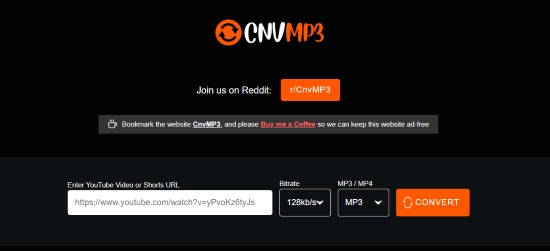
Step 1. Link Submission
The user pastes a YouTube video or YouTube Music link into the converter's input field.
Step 2. Server-Side Fetching
CNVMP3's server "scrapes" or fetches the raw data from YouTube's servers to identify the direct media streams.
Step 3. Extraction & Conversion
Once the link is analyzed, the audio is extracted and converted into MP3 or MP4 format, using a preset bitrate or resolution. All processing happens server-side, not on your device.
Ensure you are using the official site at cnvmp3.com. Avoid cnvmp3.org and other fake clones, as these copycat sites may pose security risks to your device.
Why CNVMP3 Often Stops Working
Because CNVMP3 relies entirely on remote servers, it is vulnerable to several issues:
• YouTube Backend Changes: YouTube frequently changes its 'rolling cipher' (a type of code security). If CNVMP3's scripts aren't updated immediately, the server can't find the video data.
• High Traffic Loads (especially during Peak Hours): These sites often run on limited hardware. If too many users try to convert large files at once, the server may time out or drop the connection.
• Domain Blocking by ISPs or Mobile Carriers: YouTube sometimes restricts content based on location or network provider. If the CNVMP3 server is in a region where the video is blocked, the link 'fetch' (Step 2) will fail.
• Ad-Blocker Conflicts or Browser Security Restrictions: Some ad-blockers or strict browser security settings may interfere with CNVMP3's ability to fetch video data, causing conversion failures.
• Copyright Protection: Some high-profile music videos have additional copyright protections that prevent automated extraction, resulting in a "Failed to Analyze" error.
These factors above explain why CNVMP3 may work one day and fail the next.
Common CNVMP3 Troubleshooting Scenarios
While CNVMP3 is simple to use, it frequently runs into technical hurdles. Below are the most common scenarios users face and the likely causes:
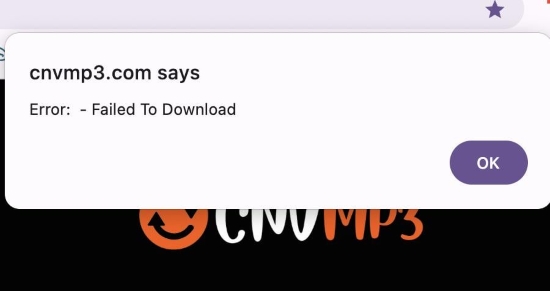
• "Server Error" Message: This usually indicates that the site's servers are overloaded with traffic or that YouTube has updated its API, rendering CNVMP3's current scripts temporarily broken.
• Stuck at 0% Conversion: Often caused by attempting to convert exceptionally long videos (over 3 hours) or a momentary drop in your network's stability.
• Page Not Loading/404 Errors: This typically means the domain has been blocked by your ISP or the site is temporarily down
Bottom Line: Because most of these issues are server-side, there is very little a user can do to fix them manually. This lack of reliability remains CNVMP3's greatest weakness. If you're tired of "Failed" messages, we recommend switching to a more stable, professional tool for your YouTube videos and music playlists in the next section.
Part 3. CNVMP3 Not Working? Best Alternative Here for You!
If CNVMP3 keeps failing, the most reliable solution is to switch to a dedicated desktop tool that doesn't rely on unstable online servers.
Why Desktop Alternatives Are Safer and More Stable
Compared to online converters, desktop software offers:
- Local processing instead of remote servers
- No pop-up ads or redirects
- Better audio quality control
- Support for playlists and batch processing
- Higher success rate for long videos
Recommended CNVMP3 Alternative: AudFree Streaming Audio Recorder
For pure audio quality and efficient conversion from YouTube Music, AudFree Streaming Music Converter is a perfect solution. As one of the best alternatives to CNVMP3, it offers a superior downloading experience, setting it apart from online YouTube converters like CNVMP3.
AudFree Streaming Audio Recorder is a powerful desktop tool designed for users who want high-quality, stable audio extraction (up to 320kbps MP3) from streaming platforms. Additionally, it supports a wide range of music services, including Spotify, Apple Music, TIDAL, and more.
AudFree Streaming Music Converter

- Convert YouTube music to MP3, WAV, FLAC, and more formats
- Handles YouTube entire albums or long playlists in bulk at 30X speed
- Preserve ad-free output with lossless audio quality
- No pop-up ads or malicious redirects
- Automatically recognize and retain ID3 tags
- Provides consistent performance and 24/7 support, serving as a dependable fallback whenever tools like CNVMP3 fail
Unlike CNVMP3, AudFree Streaming Audio Recorder runs locally on your computer, which eliminates server errors and significantly reduces security risks.
Step-by-Step Guide to CNVMP3 Alternative: AudFree Streaming Audio Recorder

Step 1. Download and install AudFree Streaming Audio Recorder on your Windows or Mac computer. Activate the software using your license to unlock all features.
Step 2. Navigate to 'Menu' > 'Preferences' > 'Conversion' to select your desired output format. You can adjust settings such as bitrate, sample rate, and audio channels to suit your preferences. Don't forget to choose a destination folder and enable ID3 tag retention to keep your music library organized.
Step 3. Click the YouTube Music icon on the main interface to launch the built-in web player. Sign in to your YouTube Music account and browse for songs, playlists, or albums. Click the green '+' button to add them to the conversion list. You can enjoy unlimited batch processing, adding as many tracks as you like.
Step 4. Go to the 'Converting' tab and click 'Convert'. Once the conversion is complete, your YouTube Music audio files will be available in the 'Converted' section or the folder you selected.
For more flexible recording options, AudFree Audio Capture lets you record audio from browsers, streaming services, media players, and system sound with precise control. This tool is perfect when online converters like CNVMP3 are blocked, or if you need to trim audio from YouTube or YouTube Music for a customized MP3 experience.
Pros and Cons of AudFree Tools
Works seamlessly with YouTube Music, Spotify, Tidal, and more;
Supports 'True 320kbps' and Lossless FLAC output;
Automatically saves ID3 tags (Artist, Album, Cover Art);
Batch downloads at accelerated speeds (30x);
Ideal for playlists and long sessions
Requires a license for full length;
No mobile app (conversion must be done on PC/Mac)
Part 4. Online Alternatives to the CNVMP3 Site (6 Tools)
If you still prefer browser-based YouTube to MP3 converters, there are several online alternatives to CNVMP3. These tools don't require software installation and work directly in your browser, but they vary in stability, output quality, ads, and supported formats. Below is an all-around overview of some commonly used options.
1. YTMP3
YTMP3 (https://ytmp3.ai/) is a minimalist YouTube-to-MP3 converter designed for fast, one-off conversions. It focuses on simplicity rather than advanced features.

Workflow: Paste YouTube or YouTube Music URL → Select MP4/MP3 → Convert → Download
Pros and Cons of YTMP3
Clean and simple interface;
No registration required;
Both YouTube videos and YouTube Music URL supported;
MP4 & MP3 output offered
Limited format and quality options;
No playlist or batch downloads;
May fail with long or protected videos
2. Y2Mate
Y2Mate (https://v1.y2mate.nu/) is a well-known YouTube downloader that supports both audio and video formats, making it popular among users who want flexible output options.

Workflow: Paste YouTube / YouTube Music link → Choose format (MP3/MP4) → Convert → Download
Pros and Cons of Y2Mate
Both YouTube and YouTube Music supported;
YouTube downloads are available in MP3 format (up to 4 hours at 192kbps) and MP4 format (up to 30 minutes at 360p)
Occasional ads and pop-ups;
Conversion failures during peak traffic;
Inconsistent download speeds
3. EZMP3 / EZConv
EZMP3 (https://ezconv.cc/) is a streamlined online converter designed for effortless MP3 extraction. By eliminating complex settings and third-party software, it offers a purely lightweight experience. Users can easily trim audio segments and customize output quality with bitrates ranging from 64k to 320k.
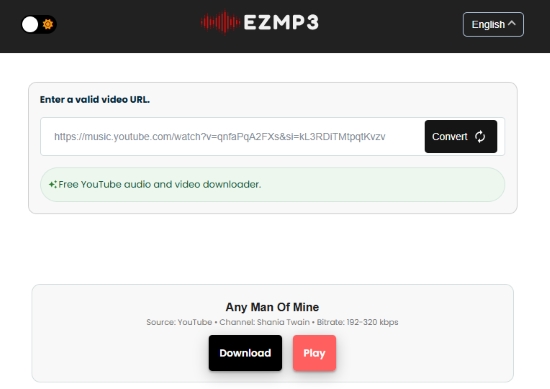
Workflow: Paste link from YouTube or YouTube Music → Convert → Download MP3
Pros and Cons of EZMP3
Fast, seamless conversions from YouTube and YouTube Music;
Integrated audio trimming and bitrate selection;
Fully compatible with desktop and mobile browsers
MP3-only output;
Occasional server downtime and ads;
No playlist supported
4. HireQuotient YouTube to MP3 Converter
HireQuotient YouTube to MP3 Converter (https://www.hirequotient.com/youtube-to-mp3) is a basic online tool embedded within a larger website, suitable for occasional YouTube-to-MP3 conversions.
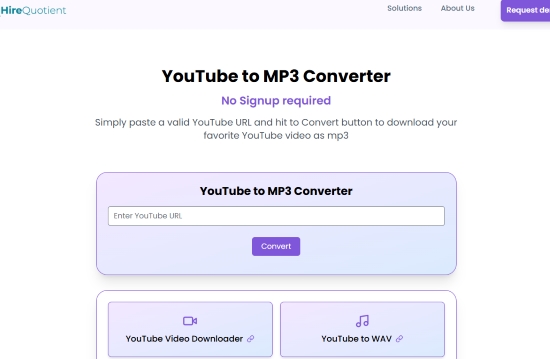
Workflow: Insert YouTube URL → Convert → Download MP3
Pros and Cons of HireQuotient Converter
Clean layout with fewer pop-ups;
Easy to use for beginners;
No software installation
Limited advanced audio settings;
Slower processing speeds;
Not optimized for long videos or playlists;
Only YouTube video supported
5. MP3Juice
MP3Juice (https://mp3juice.as/) is a popular search-based YouTube MP3 downloader that allows users to convert videos or search for music directly.

Workflow: Paste YouTube / YouTube Music link or search song → Convert → Download MP3
Pros and Cons of MP3Juice
Supports direct song search;
Fast MP3 downloads;
No login required
Aggressive ads and redirects;
Variable audio quality;
Risk of fake mirror sites
6. FLVTO
FLVTO (https://flvto.click/) is a long-running YouTube converter that supports both audio and video downloads, with broad browser compatibility.
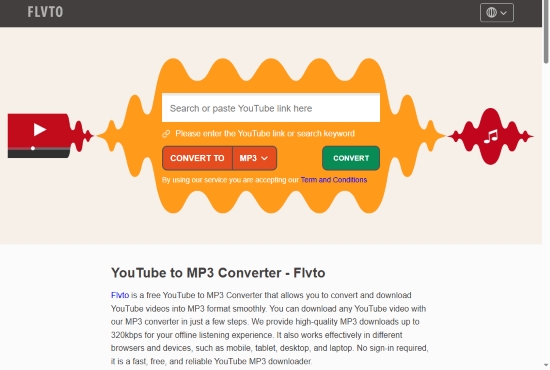
Workflow: Paste YouTube link → Choose format → Convert → Download
Pros and Cons of FLVTO
Supports MP3 and MP4 formats;
Works across multiple browsers
Ad-heavy workflow and frequent redirects (every click with a redirect);
Inconsistent availability due to domain changes;
Limited reliability for copyrighted content
While online tools are convenient, they often suffer from server instability, ads, format limitations, and frequent failures due to YouTube's backend changes. For users who need stable performance, batch downloads, or high-quality audio, a desktop solution in Part 3 is usually more reliable.
Part 5. Comparison Table of CNVMP3 and Its Alternatives
The following table compares CNVMP3 with several popular online and desktop alternatives across key factors such as safety, audio quality, supported formats, and ease of use, helping you quickly identify the most reliable option for your needs.
| Tool | Platform | Safety Level | Cost | Ads | Max Audio Quality | Lossless Formats Supported | Batch / Playlist Download | Stability | Easy to Use | Rating |
|---|---|---|---|---|---|---|---|---|---|---|
| CNVMP3 | Web | Medium | Free | ❌ | MP3 (≈128-320 kbps) | ❌ | ❌ | Low | ⭐⭐⭐⭐⭐ | ★★★☆☆ (3.8/5) |
| AudFree Streaming Audio Recorder | Windows / Mac | High | Paid (Trial available) | ❌ | FLAC 192 kbps 24-bit | ✅ | ✅ | Very High | ⭐⭐⭐⭐ | ★★★★★ (4.8/5) |
| AudFree Audio Capture | Windows / Mac | High | Paid (Trial available) | ❌ | FLAC 192 kbps 24-bit | ✅ | ✅ | Very High | ⭐⭐⭐ | ★★★★★ (4.7/5) |
| YTMP3 | Web | Medium | Free | Moderate | MP3 128 kbps | ❌ | ❌ | Low to medium | ⭐⭐⭐⭐ | ★★★☆☆ (3.5/5) |
| Y2Mate | Web | Medium | Free | Moderate | MP3 192 kbps | ❌ | ❌ | Medium | ⭐⭐⭐⭐ | ★★★☆☆ (3.7/5) |
| EZMP3 | Web | Low | Free | Moderate | MP3 192 kbps | ❌ | ❌ | Low to medium | ⭐⭐⭐⭐ | ★★★☆☆ (3.5/5) |
| HireQuotient Converter | Web | Medium | Free | Moderate | MP3 128 kbps | ❌ | ❌ | Medium | ⭐⭐⭐⭐ | ★★★☆☆ (3.2/5) |
| MP3Juice | Web | Medium-Low | Free | Heavy | MP3 128 kbps (quality inconsistent) | ❌ | ❌ | Low to medium | ⭐⭐⭐⭐ | ★★★☆☆ (3.3/5) |
| FLVTO | Web | Low | Free | Heavy | MP3 128 kbps | ❌ | ❌ | Low to medium | ⭐⭐⭐ | ★★☆☆☆ (2.9/5) |
Part 6. FAQs About CNVMP3 Site and CNVMP3 Alternatives
Which CNVMP3 alternative supports FLAC or WAV?
Most online tools do not support lossless formats. Desktop solutions like AudFree Streaming Audio Recorder and AudFree Audio Capture support FLAC and WAV, making them suitable for audiophiles and professional use.
See also:
How to Download YouTube Music to WAV
How to Convert YouTube to FLAC For Free
Is CNVMP3 YouTube Downloader blocked on mobile networks?
Yes. In many regions, CNVMP3 domains are restricted by mobile carriers or ISPs, especially on school or public networks. This explains why CNVMP3 may work on Wi-Fi but fail on mobile data.
Is there a daily conversion limit on CNVMP3 site?
CNVMP3 does not publicly state a daily limit, but users often experience implicit restrictions, such as slowed speed or failed conversions after multiple uses in a short period.
Conclusion
So, is CNVMP3 safe to use? The honest answer is: it's usable, but not ideal as users assume. For users who care about consistent performance and better listening quality, CNVMP3 is no longer the best option, at least.
And if CNVMP3 is no longer working - or if you value security, reliability, and high-quality audio - switching to a desktop-based alternative is the smarter long-term choice. Tools like AudFree Streaming Audio Recorder provide a safer, more stable, and more professional solution in 2026 and beyond.

Staff Editor


