


For audiophiles and digital archivers, local ownership of high-fidelity music is the ultimate goal. While modern streaming platforms offer unparalleled convenience, they restrict your library using digital rights management (DRM) encryptions. The moment your monthly subscription lapses, your curated world of sound disappears.
This dilemma gave rise to Deemix, an open-source utility that became legendary within the music preservation community. It is widely considered the ultimate tool for downloading 16-bit/44.1kHz FLAC and high-bitrate MP3 files straight from Deezer.
However, streaming networks constantly update their infrastructure and security protocols. Is this community-driven tool still reliable? In this comprehensive Deemix review, we will evaluate the current state of the software, guide you through its intricate setup, troubleshoot its most common errors, and explore a more stable alternative if it no longer meets your needs.
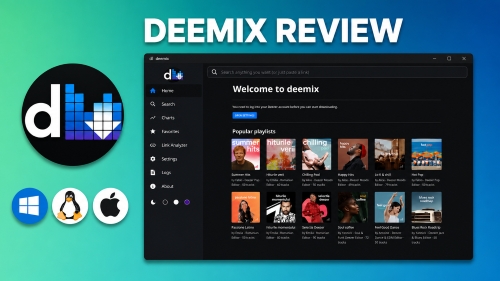

Part 1. What Is Deemix? Is It Still Working This Year?
Deemix is a standalone software application born from the ashes of Deezloader Remix, a classic tool that suffered numerous takedown orders from streaming providers. Available as both a streamlined Graphical User Interface (GUI) desktop application and a command-line utility (CLI) for advanced users and Docker deployments, Deemix serves a singular purpose: it allows users to download music directly from Deezer's database.
Unlike standard streaming recorders that capture audio playing through your computer's system sounds, Deemix works through direct extraction. By connecting to Deezer's API via an active user session, it directly pulls the raw encrypted audio tracks from Deezer's servers and decrypts them locally.
Although Deemix is built on the Deezer API, the GUI includes native Spotify integration ('Spotify Features'). By supplying a Spotify track or playlist link, the software maps the metadata and mirrors the downloads seamlessly using Deezer's catalog. Keep in mind that if a rare track exists on Spotify but is absent from Deezer's catalog, deemix will skip it and log a 'track not found' error.
This architectural approach results in several key advantages:
- Open-Source Background: Deemix operates as an open-source project. Because the original developers abandoned the main repository due to legal pressures, it is entirely maintained by independent community forks (such as those hosted by developers like bambanah on GitHub).
- Interface Varieties: It is available both as a command-line interface (CLI) for Docker/NAS setups and a standard graphical user interface (GUI) desktop app.
- Supported Platforms: Windows 11, macOS, and Linux.
- Flawless Bitrate matching: If your account permits, Deemix downloads the exact, pristine source files - whether MP3 (128kbps or 320kbps) or CD-quality FLAC (1411kbps 16-bit quality).
- Pricing & Legality: Deemix is completely free. However, downloading decrypted audio from a streaming service bypasses DRM boundaries and directly violates Deezer's Terms of Service (ToS).
- Rich Metadata & Tagging: Deemix automatically embeds high-resolution album artwork, accurate track titles, artist profiles, track numbers, and even synchronized lyrics directly into the audio containers.
- Batch Downloading Efficiency: Users can paste an entire artist discography, a massive curation playlist, or an album URL into Deemix, and the program will queue and extract hundreds of tracks simultaneously at high speeds.
Deemix GUI offers unlimited downloads, but a free Deezer account caps quality at 128kbps MP3. Additionally, aggressive bulk downloading carries a high risk of a server ban. To keep your primary account safe, space out your downloads or use a secondary 'burner' account.
Does Deemix GUI Still Work?
Yes, Deemix still works, but inconsistently. It is no longer a plug-and-play app. Because Deezer frequently updates its backend encryption, Deemix exists in a constant cycle of breaking down and waiting for community developers to push code updates.
Pros & Cons of Deemix GUI App
Completely free and ad-free;
True, native FLAC (1411kbps) downloads offered;
Seamless bulk playlist downloading;
Flawless ID3v2 metadata tagging;
Downloads high-res original album artwork
Requires a complex "ARL cookie" string to log in;
Highly fragile, may break whenever Deezer alters its API;
No official customer support or instant help;
Downloading large batches can trigger account bans
Tired of constant breaks and ban risks on Deemix? If you are fed up with these technical hurdles, skip straight to Part 5 for a seamless fix. A professional tool offers 100% safe, stable, and untraceable lossless downloads. You get the same pristine FLAC files and rich metadata, backed by reliable customer support and low risk to your account.
Part 2. How to Download and Use Deemix GUI (Step-by-Step)
Is deemix safe to use with your personal library? As we noted earlier, aggressive bulk downloading via third-party tools carries a high risk of account suspension, making it unsafe for your primary Deezer profile. To protect your main account and music collection, we strongly recommend using a secondary "burner" account. If you have your spare account ready, follow the step-by-step guide below to start downloading music from Deezer.
Deploying the Deemix WebUI via Docker requires advanced technical knowledge and can be overwhelming for beginners, so we won't be covering it in this guide. However, if you're an advanced user who is looking for a containerized setup, you can visit the official Deemix repository on GitHub to download the necessary packages and documentation for deployment.
Step 1: Download Deemix GUI
To protect your device, avoid unverified download portals or outdated mirrors. Before downloading, make sure to visit an actively maintained open-source fork repository on GitHub or check the community-vetted links on the r/deemix subreddit. Alternatively, you can click here to download the latest release build package tailored for your operating system and unpack the folder
Step 2: Extract Your Deezer ARL Token
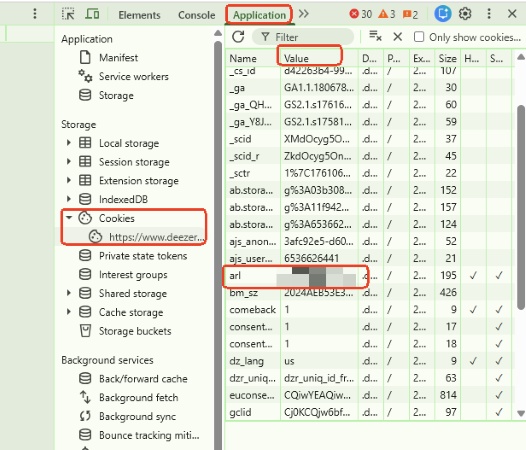
1. Open your desktop web browser (such as Google Chrome, Firefox, or Brave) and go to deezer.com.
2. Log into your personal account.
3. Once logged in, press 'F12' on your keyboard (or right-click anywhere on the page and select 'Inspect') to open the Developer Tools console.
4. Navigate to the 'Application' tab (on Chrome/Brave) or the 'Storage' tab (on Firefox).
5. On the left-side menu, expand the 'Cookies' dropdown and select 'https://www.deezer.com'.
6. Look down the central list under the 'Name' column until you find the tag labeled 'arl'.
7. Double-click the corresponding value string next to it (a long text string of random letters and numbers) and copy it to your clipboard.
Step 3: Log Into Deemix
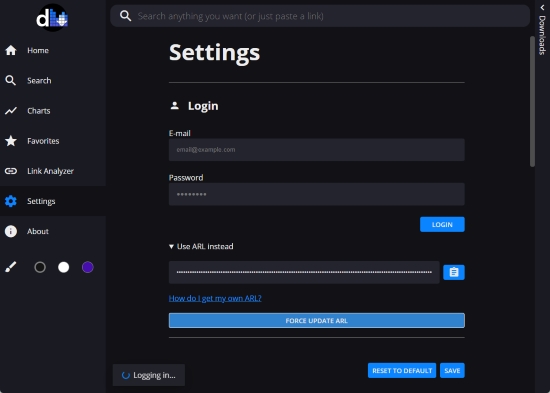
Launch your Deemix GUI desktop application. Click on 'Settings' in the left panel, find the entry field marked ARL / Token, paste your copied string, and click 'FORCE UPDATE ARL'. The app will use this cookie to spoof a valid browser session.
With current Deemix GUI version on github, you cannot simply sign in with a standard email and password, the ARL (Access Request License) is the only version to get access.
Step 4: Search and Download Deezer Songs
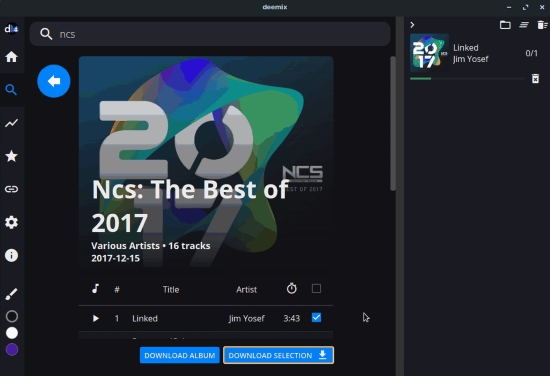
Paste a Deezer track, album, or playlist URL directly into the top search bar of Deemix. Click the download icon, and the software will queue the tracks and download them directly to your hard drive.
If you are a Deezer Premium subscriber, you can easily customize your default download bitrate to FLAC in the settings. Additionally, all users can enable automated embedded tags, synced lyrics, and high-resolution cover art. You can also create a custom naming rule (such as Artist/Album/TrackNumber - Title) to organize your local music directory automatically.
Part 3. Common Deemix Problems & How to Fix Them
Because Deemix operates in an unapproved gray area, users run into errors constantly. Here are the most prevalent technical hurdles and their standard workarounds.
1. "The app can't reach Deezer"
This network error means the Deemix desktop client is being blocked from communicating with the cloud servers.
The Fix: Check your antivirus and Windows Defender settings to ensure Deemix has network clearance. If you use a system-wide VPN or custom DNS routing, try disabling it; Deezer frequently flags data center IP ranges. Furthermore, because Deemix runs inside an Electron shell wrapper, it may struggle with network proxy configurations that work seamlessly in standard browsers.
2. Stuck on "Logging in"
If the wheel spins indefinitely when pasting your ARL token, the authentication process has failed.
The Fix: Standard email and password login pathways are broken within the client. This error almost always means your copied ARL string has expired. ARL cookies become invalid if you log out of Deezer on your web browser, clear your browser history, or change your account security settings. You must open an incognito browser window, log back in, and grab a fresh ARL string.
3. Download Queue Doesn't Start
Your tracks sit in the Deemix download view queue, but the progress bar remains frozen at 0%.
The Fix: Verify that your ARL token matches your intended download quality. If your token belongs to a free account tier, forcing Deemix to request a FLAC stream will cause the download engine to stall. Adjust your settings down to MP3 320kbps or upgrade your account subscription level.
4. FLAC Option is Grayed Out
Even though you have an active paid subscription, the high-fidelity FLAC audio option remains grayed out or locked in the configuration menu.
The Fix: Deezer continuously updates its servers to block non-premium accounts from accessing FLAC streams. If the option is locked for you, it means deemix is either reading a cached free-tier session or your current ARL token has expired and defaulted back to basic guest permissions. You need to force a clean session update. Open an incognito browser window, log into your active paid Deezer account, and extract a fresh ARL string. Paste this new token into your deemix settings and restart the application to unlock lossless downloads.
5. Slow Download Speeds / Intermittent Stalls
Downloads begin quickly but drop down to single-digit kilobytes per second in Deemix GUI.
The Fix: You are being rate-limited. When the app extracts too many megabytes of data over a short period, Deezer's firewall flags your traffic as an automated script. Avoid queuing up thousands of songs at once; download smaller batches and include brief cooling-off intervals between albums.
6. Why does my Deemix app say "Track not found on server"?
This is one of the most common errors, and it occurs for two distinct reasons:
• Regional Licensing Restrictions: A song might appear in your playlist but be restricted in your geographical territory due to music distribution laws. If the track is blacked out or unavailable for playback in your region on the official web player, Deemix will not be able to find the file on the server.
• Backend API Updates: Deezer regularly patches its server pathways to break downloading clients. When they shuffle their API structure, Deemix loses track of where the raw media files are hidden on the cloud backend, throwing a generic "Track not found" error across your entire queue. When this occurs, your only option is to stop downloading and wait for a developer to post a patched version of Deemix on GitHub.
Part 4. Deemix Review: Real User Experience & The Hidden Costs
When Deemix is working properly, it feels like magic. It is fast, automated, embeds perfect metadata, and doesn't cost a penny. For Linux users running automated multimedia servers via Docker or Lidarr setups, it provides an incredible hands-off method for building local digital music vaults.
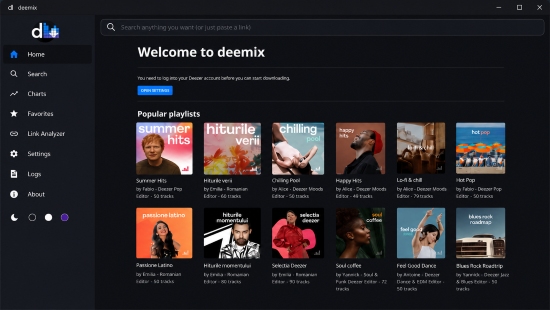
However, relying entirely on open-source scraping tools introduces a significant hidden cost: your time and patience.
Many music lovers find that maintaining Deemix begins to feel like a 'secondary job'. You must frequently check community message boards for updated installation scripts, handle unexpected error logs, and dig through browser console menus to refresh volatile cookie strings. Furthermore, using Deemix on your primary paid account carries a persistent risk of an official account ban, which could wipe out your entire legal library.
If you love open-source technology and don't mind routine troubleshooting, Deemix remains an exceptional tool. But if you simply want a clean, hands-off solution that works reliably day after day without maintenance drills, moving to a professional tool is a smart and worthwhile choice.
Part 5. Best Deemix Alternative for Stable Music Downloads
If you find yourself spending more time tracking down valid open-source forks, troubleshooting developer error logs, and digging through browser developer code than actually enjoying your music, it is time to consider a reliable alternative.
For users who want to build a pristine music library without the systemic headaches, risk of account bans, or reliance on volatile API tokens, a professional desktop solution like AudFree Streaming Audio Recorder is a superior choice.
Unlike Deemix, which relies on fragile API exploits to scrape files from the cloud, AudFree uses a robust virtual recording engine. It captures the pristine audio data directly from your computer's system sound card during playback. Because it records the stream at the hardware level instead of tampering with platform servers, it cannot be blocked by platform security updates or API shifts.
AudFree Streaming Audio Recorder

- 100% stable connection that never breaks via APIs
- Safe and secure downloads with low account ban risks
- Universal multi-platform support across 10 major streaming services
- Pristine lossless audio quality with automated metadata tagging
- High-quality output formats such as FLAC, WAV, MP3, and more
- Batch downloading of multiple tracks, playlists, or entire albums
- Official 24/7 customer support for reliable and instant assistance
Follow the steps below to configure AudFree as your ultimate Deezer music assistant:
- Step 1. Launch and Activate AudFree Streaming Audio Recorder
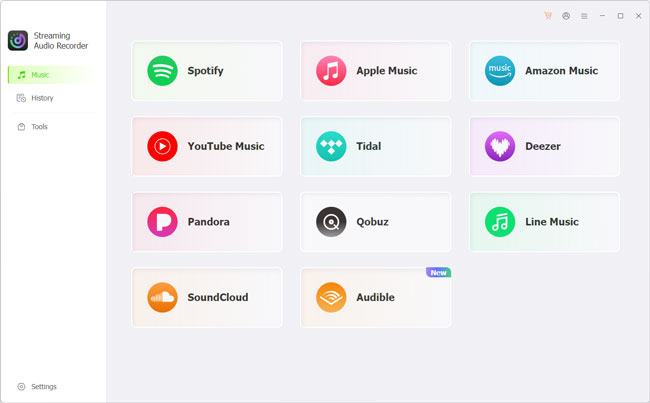
- After downloading the software via the link above, install and open AudFree Streaming Audio Recorder on your computer. On the primary interface, you will see a clean dashboard featuring native support for over 10 major streaming ecosystems. If you have purchased a premium license, register it now to remove all limitations.
- Step 2. Set Output Format and Metadata Preferences
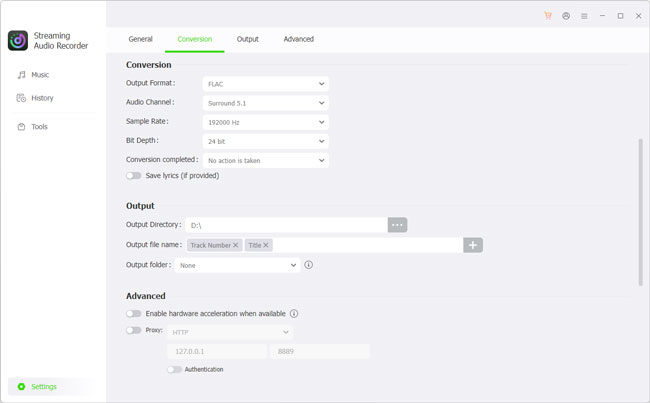
- Navigate to the 'Settings' at the bottom-left corner. Here, you can define your default output profile, such as CD-quality FLAC or universal MP3, and adjust the bitrate, sample rate, and audio channels configuration. Under the 'Output' tab, specify your local saving directory and ensure automated ID3 tag retention is enabled.
- Step 3. Select Your Deezer and Target Tracks
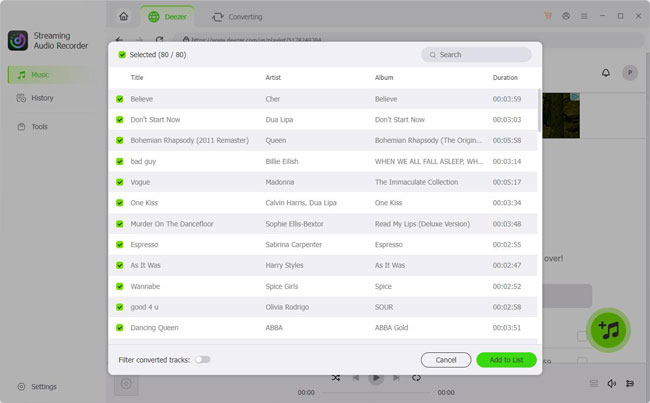
- Click on 'Deezer' icon to initiate its integrated playback player. Log into your account securely, navigate to the specific track, curated playlist, or complete artist discography you wish to archive, and click the green "+" icon to populate your conversion queue.
- Step 4. Start Conversion Process
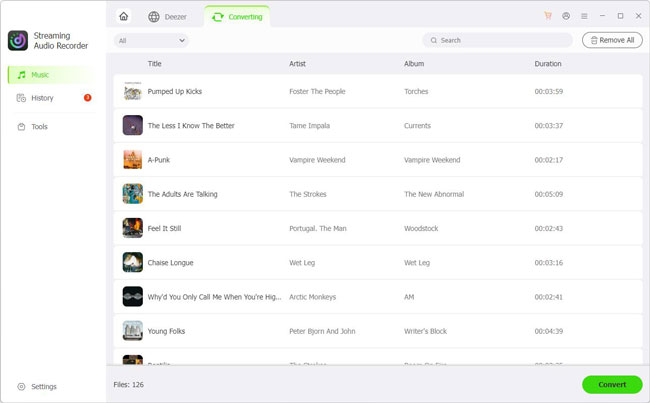
- Switch over to the Converting tab located at the top header and click the 'Convert' button to begin the hardware-level recording. Once the automated extraction concludes, head over to the History section or open your destination folder to enjoy your permanently archived, DRM-free high-fidelity audio files.
If Deezer is your sole streaming service, you can opt for a more cost-effective alternative: the AudFree Deezer Music Converter. Functioning exactly like the flagship Streaming Audio Recorder, this dedicated tool is specifically engineered for high-speed, lossless Deezer downloads at a lower price point.
Part 6. Deemix vs AudFree: Which One Should You Choose?
To better understand what you sacrifice or gain with each approach, let's look at how a community tool like Deemix stacks up against a professional media converter in daily usage.
| Features | Deemix GUI | AudFree Streaming Audio Recorder |
|---|---|---|
| Price | Completely Free | Paid Premium (Free Trial Available) |
| Ease of Setup | Intermediate (Requires browser cookie mining) | Beginner (Simple plug-and-play installation) |
| Long-Term Stability | Inconsistent (Breaks when server API updates) | Highly stable |
| Account Safety | Risky (Can trigger automated platform bans) | Up to 100% Secure (Undetectable by music servers) |
| Supported Platforms | Deezer Only | 10 major music services (Deezer, Spotify, etc.) |
| Download Speeds | Fast direct server ripping | Up to 46X conversion speed |
| Max Audio Quality | High (44.1kHz FLAC) | High (true 24-bit/192kHz) |
| Batch Support | ✅ | ✅ |
| Ads & Pop-ups | ❌ | ❌ |
| 24/7 Customer Service | ❌ | ✅ |
| Best For | Occasional quick use | Long-term, reliable backup |
Part 7. FAQs About Deemix GUI
Is Deemix safe to use?
Yes, the official open-source code for Deemix is transparent and safe. However, because it has been targeted by copyright groups, many copycat websites host fake versions embedded with malware. Only download the program from trusted, community-vetted GitHub links.
Is using Deemix legal?
Using Deemix falls into a clear legal gray area. While making a personal backup of media you own is often protected, downloading decrypted source files directly from a streaming provider's cloud servers circumvents DRM protection systems and directly violates copyright regulations and platform user agreements.
Why does Deemix ask for an ARL instead of a password?
Deezer uses modern two-factor security frameworks that block third-party programs from accessing account databases with standard passwords. An ARL cookie acts as a pre-authenticated passport token, tricking the platform into thinking Deemix is an active web browser.
Can I download FLAC files with a free account?
No. Deezer blocks free accounts from accessing high-fidelity audio streams at the server level. If your ARL string belongs to a free account tier, Deemix will drop back to standard MP3 quality or throw an error.
Final Verdict
Deemix remains a monumental achievement for the open-source music preservation community. If you enjoy managing software setups, don't mind handling occasional troubleshooting, and want to extract bulk playlists from Deezer for free, it is an incredibly powerful option.
However, its constant vulnerability to server security updates means it is not always a reliable companion. If you value your time, want a straightforward experience, or collect music from multiple streaming networks like Spotify or Apple Music, a premium solution like AudFree Streaming Audio Recorder is a worthwhile upgrade. It removes the technical friction so you can focus entirely on your music library.

Staff Editor


