


Downloading videos or music from YouTube has always been a popular need for most people, whether for offline listening, content backup, or personal use. Among the many tools available online, YT1s has gained attention as a free and fast YouTube downloader. But with increasing concerns about privacy, malware, and legality in 2026, many users are asking: Is YT1s actually safe to use?
In this guide, we'll take a transparent look at YT1s, including its features, risks, real user feedback, and safer alternatives you can rely on. If you're considering using YT1s - or already have - this article will help you make a more informed decision.

Part 1. What's YT1s Downloader? (Pros & Cons Explained)
In short, YT1s is a web-based tool that allows users to download and convert YouTube videos into MP3 (audio) or MP4 (video) formats. It requires no installation, making it convenient for quick downloads.
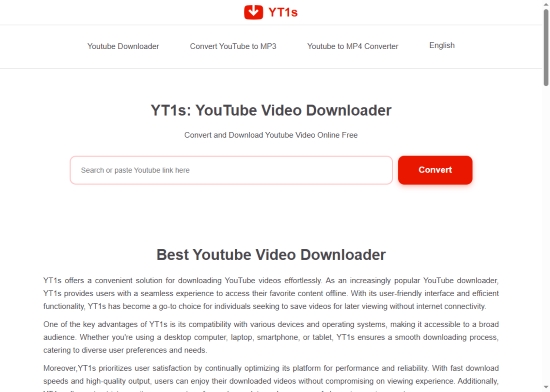
Where is the Official YT1s Site?
The official YT1s domain frequently changes due to copyright regulations. While many users are familiar with the original .com address, the current functional site is https://yt1s.com.co/en200/. Always ensure you are on the correct version to avoid landing on malicious clones.
We recommend using a robust ad-blocker or a VPN when accessing YT1s mirrors to protect against aggressive pop-up redirects.
Pros and Cons of YT1s Downloader
No tool is perfect, and YT1s is no exception. To help you decide if it's the right choice for you, here is a breakdown of the strengths and drawbacks of this online downloader.
User-Friendly: Simple, intuitive interface designed for beginners;
Reliable Speeds: Offers competitive conversion speeds (subject to server load);
No Setup: No account registration or software installation required;
Completely Free: All features are accessible without a subscription;
Versatile Formats: Supports a wide range of audio and video qualities (MP3 up to 320kbps; MP4 up to 1440p);
Universal Compatibility: Works seamlessly across Windows, Mac, iOS, and Android;
Unlimited Access: No daily caps on the number of downloads
Intrusive Ads: Heavy presence of pop-ups and banner advertisements;
Security Risks: Frequent redirects to potentially malicious third-party websites;
Inconsistent Quality: Limited manual control over specific output parameters;
No Batch Processing: Lacks support for downloading entire playlists or multiple files simultaneously;
Privacy Concerns: Data logging and tracking risks typical of free "ripping" sites;
Technical Limits: Prone to server timeouts on files exceeding 1GB or 2 hours in length
Part 2. How to Use YT1s to Download MP3/MP4 from YouTube
YT1s is widely popular due to its simplicity and convenience. It allows users to seamlessly convert YouTube URLs into high-quality MP3 or MP4 formats. To get started, follow our detailed step-by-step guide below.
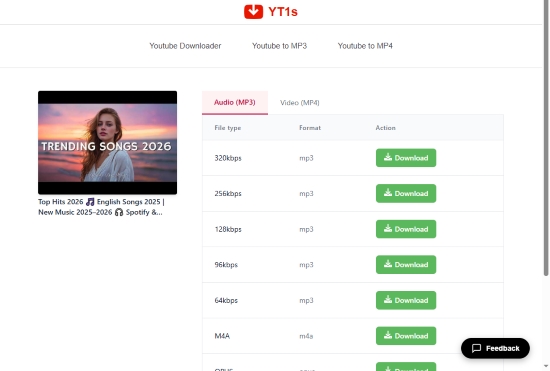
Step 1. Navigate to the official YT1s website using your preferred web browser.
Step 2. Go to YouTube and copy the URL of the video or song you wish to download.
Step 3. Paste the link into the search box on the YT1s homepage and click the 'Convert' button.
Step 4. Wait a moment while the tool processes the URL and generates download options.
Step 5. Select your preferred format and quality from the dropdown menu (e.g., 320kbps MP3 for audio or 1440p MP4 for video).
Step 6. Click the 'Download' button. Your file will be saved directly to your device's local storage.
Part 3. Is YT1s Safe? Reddit and Trustpilot Reviews
While the steps above are simple, using YT1s in a real-world setting reveals several security risks that users must navigate carefully. Common risks include:
- Deceptive Ads: Pop-ups designed to mimic legitimate download buttons.
- Aggressive Redirects: Automatic forwarding to unrelated or suspicious third-party domains.
- Fake Prompts: Misleading 'Download Now' or 'Update Required' alerts.
So if you are wondering if YT1s is truly safe, the answer is no. Using the site significantly increases the risk of malware infections and potential data privacy breaches.
Trustpilot Reviews
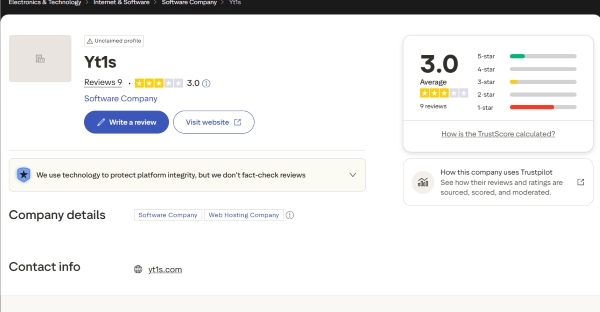
Trustpilot Feedback: 3/5 Stars
As of 2026, user sentiment for YT1s remains divided. With an average score of 3.0 out of 5 stars, the platform is frequently criticized for its lack of reliability. While users appreciate that it remains a completely free service, many express frustration with high download failure rates and the intrusive nature of the advertising.
Reddit Feedback
On Reddit, the general consensus is that while YT1s "gets the job done", it is not recommended for frequent use. Long-term users highlight several recurring red flags:
- Ad Overload: A high volume of "cloaked" buttons that lead to unwanted software.
- Security Anxiety: Frequent redirects to unverified domains make even tech-savvy users nervous.
- Reliability Issues: Users often report the site working one day and being shut down or blocked the next.
Overall, YT1s is not necessarily a virus itself, but its environment can expose users to risks, especially if they click the wrong areas or elements.
Part 4. Top Safest YT1s Alternative for MP3 Downloads (Ad-Free & Secure)
If ad-free and safety is your priority, it's better to choose a professional desktop solution rather than a web-based downloader.
Recommended YT1s Alternative: AudFree YouTube Music Downloader
AudFree YouTube Music Downloader is one of the top, powerful, and secure choices designed for downloading and converting music from various streaming platforms, including YouTube Music.
With an intuitive and ad-free interface, it downloads YouTube Music to high-quality MP3s or FLACs in batches. It offers up to 30× faster download speeds for downloading playlists.
AudFree YouTube Music Downloader

- 100% secure with no data tracking or leaks
- Ad-free lossless audio quality without the interruptions
- A safe, clean environment for downloads with zero malicious pop-ups
- 24/7 support whenever you need it for stable performance
- Convert YouTube to MP3, FLAC, WAV, and more
- Batch-save playlists and albums in seconds (up to 30x faster speed)
- High conversion rates for all YouTube content
- Full ID3 tags like Artist, title, and album info are saved automatically
Steps to Use YT1s Alternative: AudFree YouTube Music Converter
Unlike YT1s, the AudFree tool provides a controlled and secure environment, making it a better long-term solution for music downloading. With it, you can download YouTube Music to computer more easily and safely than ever.
Step 1. Download and install AudFree YouTube Music Converter on your Windows or Mac computer. Once installed, launch the application and enter your license credentials via the registration window to unlock the full version.

Step 2. Go to Menu > Preferences > Conversion to select your preferred output format, such as MP3 or FLAC. For audiophiles, you can manually adjust the bitrate, sample rate, and channel settings. Don't forget to designate a destination folder and ensure the 'ID3 Tag' option is selected to keep your library perfectly organized.

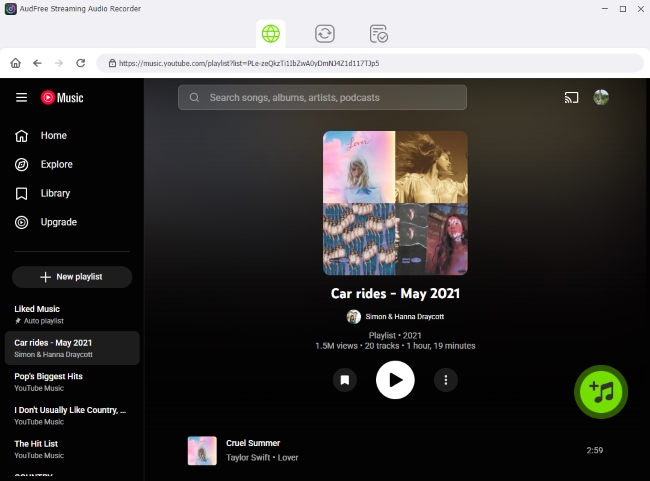
Step 3. On the home interface, click the YouTube Music icon to access the built-in web player. Sign in to your account, browse for your favorite tracks or albums, and click the green '+' button to load them into the conversion queue. AudFree supports batch processing, so feel free to add entire playlists at once.
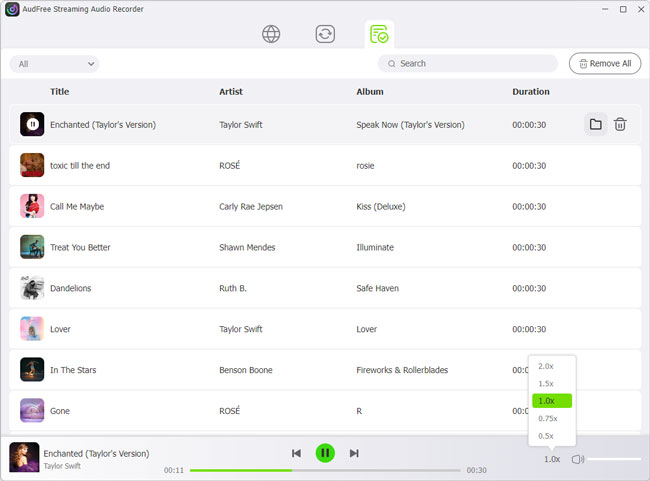
Step 4. Switch to the 'Converting' tab and click the 'Convert' button to begin the process. Once the status reaches 100%, you can find your high-quality files in the 'Converted' history section or your local output folder.
Part 5. YT1s vs Alternatives: Full Comparison Table
To help you visualize the differences between these tools, we have compiled a detailed comparison table for your decision.
| Feature | YT1s Downloader | AudFree YouTube Music Downloader |
|---|---|---|
| Platform Type | Web-based | Desktop software |
| Ads & Pop-ups | ✅ (heavy) | ❌ |
| Security | Low (Risk of Redirects) | High (100% Safe) |
| Price | Free | $69.95/year (Free Trial Available) |
| Format | MP3 | LOSSLESS, MP3, WAV, FLAC, AIFF, M4A, M4B |
| Audio Quality | Limited (64kHz - 320kHz) | Lossless (24-bit/192 kHz) |
| Batch Downloads | ❌ | ✅ |
| Playlist Downloads | ❌ | ✅ |
| Success Rate | Inconsistent | 100% Guaranteed |
| Conversion Speed | Moderate | Fast & Stable (Up to 30x) |
| Stability | Low | Very High |
| Easy to Use | ⭐⭐⭐⭐⭐ | ⭐⭐⭐⭐⭐ |
| Rating | ★★★☆☆ (3.2/5) | ★★★★★ (4.9/5) |
YT1s offers quick, free access, but for consistent, safe, and high-quality use, professional tools like AudFree YouTube Music Downloader clearly outperform it.
Part 6. FAQs About YT1s Downloader
Is YT1s legal?
YT1s itself is not an illegal tool. However, downloading copyrighted content without permission may violate both YouTube's terms of service and local copyright laws. To stay safe, only download content that is copyright-free or that you have permission to use.
Why is YT1s not working?
Most issues with YT1s stem from server instability or browser conflicts. If it isn't working properly, try the following fixes.
• Check your Ad-blocker: It may be blocking essential scripts. Temporarily disable it and reload the page.
• Clear Browser Data: Clear your cache and cookies, then refresh the page.
• Try Other Browser: Try a different browser (e.g., Chrome, Edge, or Firefox) to rule out compatibility issues.
• Try a VPN: Your ISP may be restricting access to YT1s servers, and a VPN can help bypass this.
• Use an Alternative: If the site is down, it likely means the domain is under maintenance or has moved. Using a reliable alternative (like AudFree) is often the quickest solution.
Where are files stored after using yt1s.com?
Files downloaded via YT1s are typically saved to your browser's default 'Downloads' folder. If you've customized your browser settings, the files may be stored in a different location you selected.
Can YT1s download YouTube playlists?
No, YT1s mainly supports single video downloads only. It does not offer a built-in feature for downloading entire playlists. For playlist downloads, you can turn to AudFree YouTube Music Downloader.
See also: Best YouTube Playlist Downloaders
Can I use YT1s on mobile devices?
Yes, YT1s works on mobile browsers like Chrome or Safari. However, the experience can be less smooth compared to desktop, as mobile users often encounter more pop-ups, redirects, and accidental clicks. Alternatively, you can download YouTube Music content via AudFree on your computer and transfer it to your phone.
See also: How to Download YouTube Music on Android
Conclusion
YT1s remains a popular choice for quick YouTube downloads in 2026 due to its simplicity and free access. However, its heavy reliance on ads, potential security risks, and limited functionality make it less reliable for regular use.
If you only need occasional downloads and proceed carefully, YT1s might suffice. But if you value security, stability, and high-quality output, switching to a professional tool like AudFree YouTube Music Downloader is a smarter choice.
Ultimately, the best approach depends on your priorities, whether you value a zero-cost solution like YT1s or prefer your privacy and data security like AudFree.

Staff Editor


