


Lately, a new player named VD6S (operating under vd6s.net) has been making waves across tech subreddits and forums. Promising high-definition video merging (1080p, 4K, and even 8K with audio tracks intact) and high-speed MP3 conversion without forcing users to sign up, it sounds almost too good to be true.
However, before using any free downloader, many users have the same concerns: Is VD6S safe? Does VD6S contain malware? Does it really work as advertised? And is the download quality good enough for serious music listeners?
In this VD6S review, I will take an in-depth look at what VD6S is, how it works, its real-world performance, user feedback, and whether it is a safe choice in 2026. I will also introduce a more reliable alternative for users who want better audio quality, faster downloads, and a more stable offline music experience.

Part 1. Part 1. What Is VD6S? Key Features & Supported Platforms
At its core, VD6S is a web-based multimedia downloader and converter. Unlike traditional desktop software that requires installation and local system resources, VD6S functions entirely within your web browser. It utilizes server-side scripts to fetch video files directly from streaming platforms, decode them, and repackage them into easily downloadable formats (MP3 or MP4).
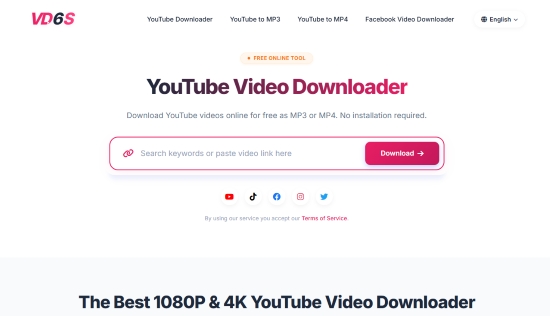
Official Site: https://vd6s.net/
Key Features Promised by the VD6S YouTube Downloader:
✅ True High-Definition Video Support: Unlike many competing web tools that cap free video downloads at a blurry 720p or strip the audio track on anything higher, VD6S claims to fully support 1080p Full HD, 4K, and 8K resolutions with perfectly synced audio.
✅ Audio Extraction Capability: Users can instantly convert music videos, podcasts, or concerts into MP3 128 kbps or 320 kbps.
✅ No Registration or Software Installation: The service requires zero personal data - no emails, no passwords, and no sketchy browser extensions.
✅ Cross-Platform Accessibility: Because it runs via a web UI, it works seamlessly across Windows, macOS, Android, iOS, and Linux.
While heavily marketed as a YouTube Video downloader as well as YouTube Music downloader, the platform also extends its compatibility to other major social media ecosystems, allowing users to scrape media files from TikTok, Instagram, Twitter (X), and Facebook.
As YouTube music and video downloading continues to trend, VD6S has emerged as one of the most popular tools in the space. That said, its popularity has also attracted scammers. There are several risky imitation sites circulating right now - most notably vd6s.com, which is a fake counterfeit website. Always verify the link before proceeding.
Part 2. How to Use VD6S to Download YouTube Music/Video
Operating VD6S is designed to be as straightforward as possible, making it appealing to users who want a quick, hassle-free conversion process. Similar to popular online downloaders such as Y2Mate and EzMP3, VD6S focuses on a simple workflow that allows users to convert YouTube videos, music tracks, and content from other supported platforms into MP3 or MP4 files with only a few clicks.
See also: EzMP3 Review and Its Best Alternatives
The entire process can be completed directly through a web browser without installing additional software. Here is how VD6S works in practice:
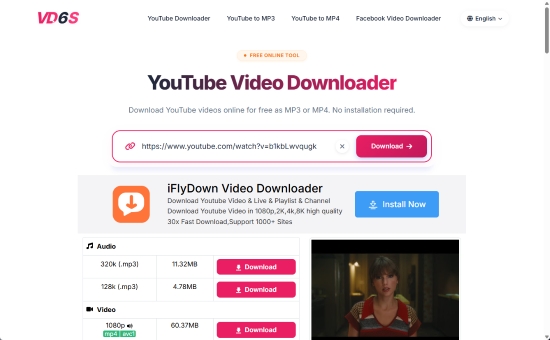
Step 1. Go to YouTube or your preferred streaming platform, find the video or audio clip you wish to save, and copy its URL from the browser address bar or the "Share" menu.
Step 2. Open a browser tab to the official VD6S website. Paste the copied link into the prominent input box at the center of the homepage, and then click the "Download" button. The server will take a few seconds to parse the URL and extract the available quality tiers.
Step 3. A drop-down menu will appear displaying the available formats. Choose your preferred video resolution (e.g., MP4 1080p) or audio quality (e.g., MP3 320kbps) and click the "Download" next to it. VD6S will process the file and your browser will begin saving it to your local storage.
In addition to link analysis, the tool features a built-in keyword search function. You can easily find your favorite songs or videos by entering the artist's name, song title, or other video keywords.
Part 3. Real-World Performance: My One-Week Test
To separate VD6S's marketing claims from actual performance, I tested the service over one week on both a dedicated Windows PC and an M-series MacBook. During testing, I focused on several practical factors, including download speed, file quality, reliability, and overall user experience.
The Conversion Experience
For short and standard-definition content, VD6S performed surprisingly well. When downloading clips under five minutes at 720p quality, the URL analysis usually completed within seconds, and the download process started almost immediately.
The tool also handled higher-quality video sources reasonably well. When processing 1080p and 4K YouTube videos, VD6S was able to combine YouTube's separate video and audio streams and generate a complete MP4 file with synchronized sound.
However, performance became less consistent when handling longer content.
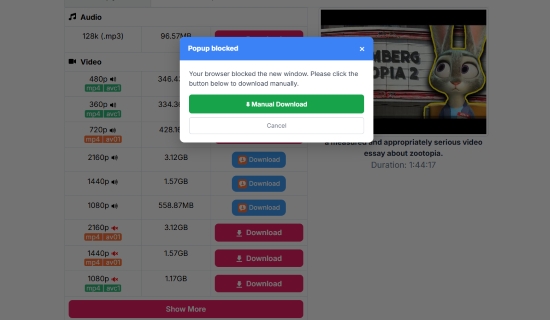
During testing with two-hour video essays and extended live concert recordings, VD6S frequently struggled with server-side conversion. Virtually all large files (exceeding 1 GB or 2 hours in length) required manual intervention to download. Furthermore, several downloads interrupted midway, displaying vague error messages like 'Server Connection Error' and forcing a complete restart of the process.
This suggests that while VD6S works well for quick downloads, its web-based conversion system may not be reliable enough for large files or long-form content.
VD6S: The Pros and Cons at a Glance
After seven days of continuous operation, the ultimate strengths (What I Liked) and flaws (What Could Be Improved) of VD6S became highly apparent:
100% Free & No Signup: Users can download basic files without creating an account or paying for premium access;
True HD Stream Merging: Successfully outputs 1080p and 4K MP4 files with integrated sound;
Relatively Clean UI: Currently lacks the aggressive adult or gambling pop-ups common to older download sites
Audio Compression Quality: Despite claiming high-bitrate outputs, the audio is trans-coded from highly compressed web streams, lacking true Hi-Fi depth;
No Batch Downloading: You cannot paste an entire playlist or album link. You must manually copy-paste every single link, one by one;
Server Stability Issues: Large files and long videos are more likely to experience timeouts, failed conversions, or interrupted downloads due to server limitations;
Server & Metadata Flaws: Lacks basic ID3 tags and metadata handling
Overall, VD6S delivers a convenient experience for occasional downloads, especially when dealing with short videos or individual music tracks. However, users who want to build a large offline media library may quickly encounter its limitations, particularly regarding batch processing, audio quality, and long-term stability.
If extracting top-tier audio quality from YouTube Music is your priority, you might want to skip directly to Part 6. I've highlighted a dedicated YouTube Music downloader there that fills the gaps left by VD6S - offering robust batch processing, reliable stability, full metadata intact, and superior sound quality conversion.
Part 4. Real User Feedback: Trustpilot & Reddit Reviews
Beyond my own testing, it's also worth looking at what other users have experienced. Reviews from platforms like Trustpilot and discussions on Reddit can provide a broader picture of VD6S's performance in everyday use.
Trustpilot Reviews: Convenient but Not Without Limitations
Trustpilot Feedback: 4.8/5 Stars
Many users give the platform high marks for its seamless, free access to full-length videos and audio tracks. They really appreciate VD6S because it's free, requires no software installation, and makes it easy to download short videos or extract MP3 audio for personal use quickly. Its simple, clean interface and quick processing are also frequently mentioned as positives, especially for occasional downloads.
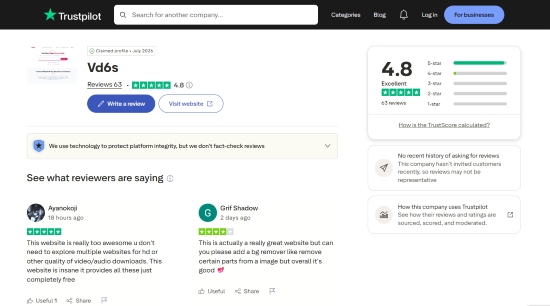
On the other hand, negative reviews often point to inconsistent performance. Some users report that download links stop working unexpectedly, while others encounter redirect pages or temporary service interruptions. Another common complaint is the lack of support for downloading entire playlists or albums, making the tool less practical for users with larger music libraries.
Since VD6S is a free online service, it's also worth noting that technical issues may not always be resolved quickly, and users generally have limited access to customer support.
Reddit Discussions: Limited Mentions but Familiar Concerns
Unlike many well-known YouTube downloaders, VD6S has received relatively little attention on Reddit. There are no major discussion threads dedicated to the service, and the few mentions that do exist mainly revolve around questions about its safety and long-term reliability.
That said, broader Reddit discussions about browser-based YouTube downloaders reveal a consistent trend. While many users appreciate the convenience of free online tools, they also express concerns about service stability, privacy, changing download success rates, and the risk of websites becoming unavailable over time.
Compared with some older download websites, VD6S offers a cleaner interface without excessive pop-up advertising or heavy script loading. However, as with most online download tools, users should still exercise caution, especially when visiting mirror sites or downloading files from unfamiliar sources.
Overall, community feedback suggests that VD6S works well for quick, occasional downloads, particularly if you only need to save a few videos or audio files. However, users looking for greater reliability, higher-quality output, batch downloading, or long-term music library management may eventually find its limitations difficult to overlook.
Part 5. Is VD6S Safe, Legit, and Free of Malware?
Safety is one of the biggest concerns when using any free online downloader. Since services like VD6S operate outside official app stores and rely entirely on a web browser, many users naturally wonder whether they're exposing their devices to malware, phishing, or privacy risks.
The short answer is that VD6S appears to be relatively safe when accessed through its official website, but it should still be used with caution.
Is VD6S Safe to Use?
During my testing, VD6S functioned as expected without triggering suspicious downloads or attempting to install additional software. A scan of the official domain with VirusTotal did not detect any known malicious scripts or malware.
However, security reputation services don't always reach the same conclusion. For example, some website reputation checkers (e.g., WebSafely) assign the domain a relatively high risk score due to factors such as limited ownership transparency, its relatively recent online history, or the nature of free download services. While these warnings don't necessarily indicate malicious behavior, they do suggest that users should verify they're visiting the official site and remain cautious.
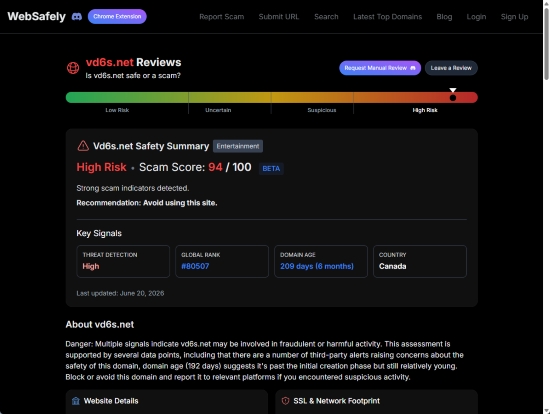
Based on both my hands-on testing and publicly available user feedback, there's no strong evidence that VD6S is an unsafe tool. Still, it doesn't offer the same level of transparency, technical support, or long-term maintenance as more established commercial software.
Does VD6S Contain Malware?
At the time of writing, there is no clear evidence that the official version of VD6S contains malware. The greater risk comes from unofficial websites that imitate the original service or distribute modified versions.
These unofficial sources may include:
- Bundled adware
- Unwanted browser extensions
- Potentially unwanted programs (PUPs)
- Modified or tampered executable files
To reduce potential risks, it's recommended to access VD6S only through its official website. Many security incidents associated with free download tools originate from unofficial copies rather than the original service itself.
Is VD6S Legal?
VD6S itself is simply a download tool, and its legality depends largely on how it's used. Saving your own videos, public-domain content, or media with the creator's permission is generally acceptable.
However, downloading copyrighted videos or music without authorization may violate the terms of service of platforms such as YouTube and could infringe applicable copyright laws in certain jurisdictions. Users are responsible for ensuring their use complies with local laws and platform policies.
Does VD6S Collect Personal Information?
One advantage of browser-based tools like VD6S is that they typically don't require users to create an account or provide personal information before use. Even so, it's still good practice to review the site's privacy policy, avoid granting unnecessary browser permissions, and be mindful of any unexpected redirects or pop-ups.
Overall Safety Verdict
Overall, VD6S appears to be a relatively low-risk option for occasional downloads, provided it's accessed through the official website and used with reasonable caution. My testing didn't uncover any obvious malware or malicious behavior.
However, safety is only one part of the equation. If you regularly build offline music libraries, value consistent output quality, or need long-term reliability and dedicated support, a professional desktop solution may offer a more dependable experience than a free web-based downloader.
Part 6. Best VD6S Alternative for Higher Quality and Better Stability
While VD6S works well for quick, browser-based downloads, it isn't designed for users who regularly build or manage an offline music library. Its biggest limitations aren't necessarily speed, but consistency, audio quality, batch processing, and long-term reliability.
If those factors matter to you, a dedicated desktop application may be a better fit.
One option worth considering is AudFree YouTube Music Converter. Rather than functioning as a traditional online downloader, it focuses on helping users save music from YouTube Music for offline playback while preserving audio quality, album artwork, and ID3 metadata. During testing, it also proved more reliable when processing large playlists and albums than browser-based download tools.
Compared with browser-based downloaders, AudFree offers several advantages for users who frequently listen to music offline.
AudFree YouTube Music Downloader

- Supports multiple output formats, including MP3, FLAC, WAV, AIFF, and M4A
- Batch processes playlists and albums instead of one link at a time
- Preserves album artwork and ID3 tags for better library organization
- Works with multiple streaming services, including YouTube Music, Spotify, Apple Music, TIDAL, Deezer, and Amazon Music
- Provides adjustable audio parameters such as bitrate and sample rate
- Offers stable performance backed by 24/7 dedicated customer service
For casual users, these features may not make much difference. However, for anyone building a larger offline music collection, they can save considerable time and make library management much easier.
How to Use AudFree YouTube Music Converter
With it, you don't need to download YouTube Music to your computer in advance. The whole workflow is simple and easy.
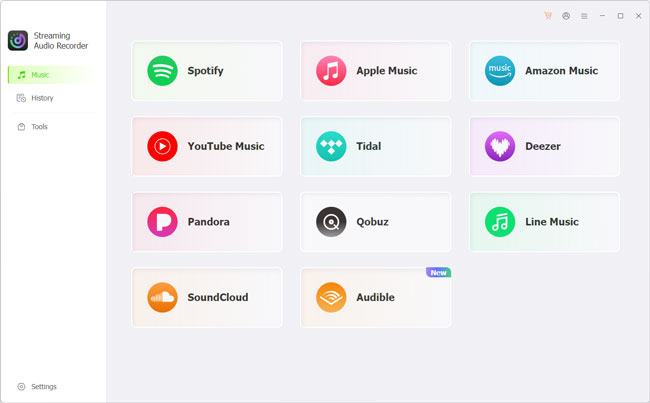
Step 1. Install AudFree on your Windows or Mac computer and complete the initial setup.
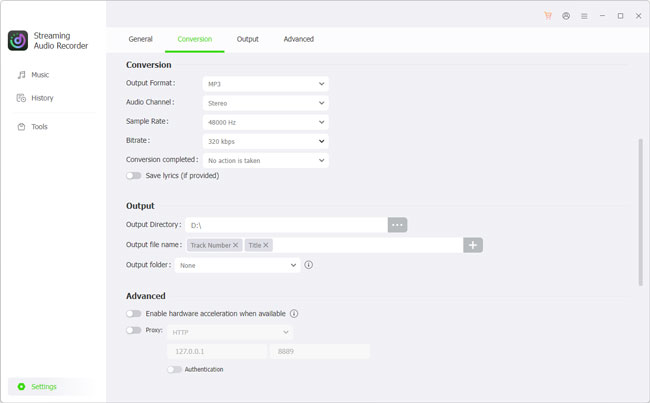
Step 2. Go to Settings at the bottom-left corner, and choose your preferred output format (e.g., MP3 or FLAC) and adjust audio settings such as bitrate, sample rate, and output location. Here, you can also enable ID3 tag retention to keep your YouTube Music library well organized.
Step 3. Open the built-in YouTube Music web player, sign in to your account, and add the songs, albums, or playlists you'd like to save.
Step 4. Start the conversion process. Once finished, your music will be available locally with its original metadata preserved.
Part 7. VD6S vs AudFree: Which One Is Better?
VD6S and AudFree serve different types of users. VD6S is designed for quick and simple downloads, while AudFree focuses on users who want a complete offline audio solution.
Here is a direct comparison:
| Feature | VD6S | AudFree YouTube Music Converter |
|---|---|---|
| Main Purpose | Download online videos/audio | Create high-quality offline music library |
| Supported Sources | Mainly YouTube and social media platforms like Tiktok, INS, etc. | Multiple streaming music platforms, like YouTube Music, Spotify, etc. |
| Platform | Web Browser UI (No installation) | Local Desktop App (Windows / macOS) |
| Safety Level | Medium | High |
| Cost | Free | Paid (Trial available) |
| Ads | ✅ (Clone sites pose risks) | ❌ |
| Format | MP3, MP4 | MP3, WAV, FLAC, AIFF, M4A, M4B |
| Audio Quality Output | Lossy/Compressed (MP3 128-320kbps) | Bit-Perfect Lossless (FLAC, WAV, M4A, etc.) |
| Lossless Formats Supported | ❌ | ✅ |
| Batch Capabilities | None (Single URL or item processing only) | Full automation (Playlists, Albums, etc.) |
| Conversion Speed | Fast | Up to 30× processing speed |
| Stability | Highly volatile; breaks when YouTube updates APIs | Extremely stable; frequently updated desktop core |
| System Footprint | Low initial usage; heavy browser script loads | Light, highly optimized local CPU utilization |
| Metadata & Tags | Basic or completely stripped out | Automated ID3 tag and high-res art embedding |
| Easy to Use | ⭐⭐⭐⭐⭐ | ⭐⭐⭐⭐⭐ |
| Rating | ★★★★☆ (4.8/5) | ★★★★★ (4.9/5) |
Conclusion
Choosing between VD6S and AudFree ultimately depends on how you plan to use them.
If you only need to save the occasional video or short audio clip, VD6S is a convenient browser-based option that requires no installation. As with any free online tool, it's worth using the official website and exercising reasonable caution.
On the other hand, users who regularly save music for offline listening may benefit from a dedicated desktop solution, like AudFree YouTube Music Converter. Features such as batch processing, broader format support, metadata preservation, and more consistent performance can make managing a large music library much easier over time.
Neither solution is universally better - they simply serve different purposes. Understanding your own listening habits and priorities will help you decide which approach is the better fit.

Staff Editor


